
New W7 user experiencing resolution problems

Yup tried switching connections too. I'm still waiting for the driver download to finish so will try that and report back :)
 

My Computer

OS
Microsoft Windows 7 Professional 64-bit 7601 Multiprocessor Free Service Pack 1
CPU
AMD Athlon(tm) 64 X2 Dual Core Processor 5200+
Motherboard
Foxconn C51XEM2AA
Memory
4.00 GB
Graphics Card(s)
NVIDIA GeForce 8600 GT
Sound Card
High Definition Audio Device
Monitor(s) Displays
AOC N20W Widescreen
Screen Resolution
1680 x 1050 x 32 bits (4294967296 colors) @ 59 Hz
Hard Drives
(1) ST350063 0AS SCSI Disk Device (2) HUAWEI SD Storage USB Device
Just as a sidenote my browsing speeds have plummeted since the W7 install - even page refresh is slow to act.
 

My Computer

OS
Microsoft Windows 7 Professional 64-bit 7601 Multiprocessor Free Service Pack 1
CPU
AMD Athlon(tm) 64 X2 Dual Core Processor 5200+
Motherboard
Foxconn C51XEM2AA
Memory
4.00 GB
Graphics Card(s)
NVIDIA GeForce 8600 GT
Sound Card
High Definition Audio Device
Monitor(s) Displays
AOC N20W Widescreen
Screen Resolution
1680 x 1050 x 32 bits (4294967296 colors) @ 59 Hz
Hard Drives
(1) ST350063 0AS SCSI Disk Device (2) HUAWEI SD Storage USB Device
Just as a sidenote my browsing speeds have plummeted since the W7 install - even page refresh is slow to act.


What was your speed before and what is it now? Is it wired or wireless?
 

My Computer

OS
Windows 7 Professional 64 bit
Howdy Layback Bear! Yes I'd already tinkered around in that department with no result. Even in the scaling tab I'd opt for 'fullscreen' (the default is 'aspect ratio') and it didn't change anything. Pretty confusing... :/
Next to the scaling their is SIZE does it give you any options you haven't tried. You have tried so many things this may be redundant. I'm just looking for things that might of been missed. Like hitting apply,save, ok after changes were made. It's been missed before by others because of the frustration things like this can cause.
 

My Computer

Computer type
PC/Desktop
Computer Manufacturer/Model Number
Home made Desktop
OS
Windows 10 Pro. 64/ version 1709 Windows 7 Pro/64
CPU
Intel i7-6800K @ 4.3
Motherboard
ASUS X-99 Deluxe II
Memory
Corsair Platinum 16 gig @2400
Graphics Card(s)
EVGA GTX 1070 OC
Monitor(s) Displays
Asus 27" LED LCD/VE278Q
Screen Resolution
1920-1080 or 1280-720 HDMI
Hard Drives
INTEL SSD 730-240 Gb Sata 3.0/
PSU
EVGA Platium 1200W
Case
Phanteks Luxe Tempered Glass 8 fans/ one radiator
Cooling
XSPC/ Water Cooled CPU
Keyboard
Das 4 Professional
Mouse
Logitech M705/MX Anywhere 2-S
Internet Speed
100 mbits
Antivirus
Microsoft Security Essentials/ Malwarebytes Premium 3.0/ SAS
Browser
I.E. 11 default/Firefox/ ISP Time Warner Cable/Spectrum
Other Info
LG BluRay Burner/
Sound system-KLipsch-THX/
Icy Dock ssd Hot Swap bays.
I have both wired and wireless capabilities via my MiFi device. Not sure what my speeds were before as I never checked them, but as a clue the driver you suggested has been downloading for over an hour and isn't even half way through. The file is only 200mb. Grim huh? It's the same with other sites. It'll take 5 or 6 seconds to go to a next page - whereas on XP it was all pretty much instantaneous. And everytime i refresh a page it takes upto 10 seconds to refresh. It'd be a huge step backwards reverting to XP now I love the look of 7 - I just get the feeling my system doesn't like 7... :(
 

My Computer

OS
Microsoft Windows 7 Professional 64-bit 7601 Multiprocessor Free Service Pack 1
CPU
AMD Athlon(tm) 64 X2 Dual Core Processor 5200+
Motherboard
Foxconn C51XEM2AA
Memory
4.00 GB
Graphics Card(s)
NVIDIA GeForce 8600 GT
Sound Card
High Definition Audio Device
Monitor(s) Displays
AOC N20W Widescreen
Screen Resolution
1680 x 1050 x 32 bits (4294967296 colors) @ 59 Hz
Hard Drives
(1) ST350063 0AS SCSI Disk Device (2) HUAWEI SD Storage USB Device
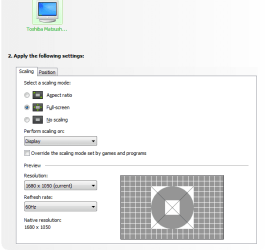
Howdy Layback Bear! Yes I'd already tinkered around in that department with no result. Even in the scaling tab I'd opt for 'fullscreen' (the default is 'aspect ratio') and it didn't change anything. Pretty confusing... :/
Next to the scaling their is SIZE does it give you any options you haven't tried. You have tried so many things this may be redundant. I'm just looking for things that might of been missed. Like hitting apply,save, ok after changes were made. It's been done before.

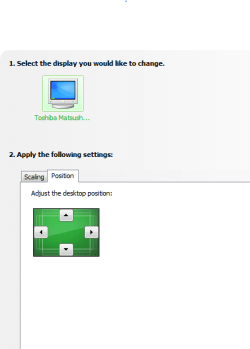
I wish I knew how to screenshot. As i said before, in my nvidia CC next to 'scaling' is 'position' not 'size' and this just moves your desktop up, down and sidewards. I don't have the 'size' tab as seen in Pauls' screenshot.
 

My Computer

OS
Microsoft Windows 7 Professional 64-bit 7601 Multiprocessor Free Service Pack 1
CPU
AMD Athlon(tm) 64 X2 Dual Core Processor 5200+
Motherboard
Foxconn C51XEM2AA
Memory
4.00 GB
Graphics Card(s)
NVIDIA GeForce 8600 GT
Sound Card
High Definition Audio Device
Monitor(s) Displays
AOC N20W Widescreen
Screen Resolution
1680 x 1050 x 32 bits (4294967296 colors) @ 59 Hz
Hard Drives
(1) ST350063 0AS SCSI Disk Device (2) HUAWEI SD Storage USB Device
I have both wired and wireless capabilities via my MiFi device. Not sure what my speeds were before as I never checked them, but as a clue the driver you suggested has been downloading for over an hour and isn't even half way through. The file is only 200mb. Grim huh? It's the same with other sites. It'll take 5 or 6 seconds to go to a next page - whereas on XP it was all pretty much instantaneous. And everytime i refresh a page it takes upto 10 seconds to refresh. It'd be a huge step backwards reverting to XP now I love the look of 7 - I just get the feeling my system doesn't like 7... :(

Yeah, I get the feeling it doesn't like it too, but I would say most of it is down to the fact that you cannot put any of the proper motherboard drivers on as it's fairly old and is only supported by XP drivers.

You might be able to get an updated Ethernet driver from Microsoft, have you done all your windows updates? There would have been quite a few to put on with a clean install.
 

My Computer

OS
Windows 7 Professional 64 bit
Howdy Layback Bear! Yes I'd already tinkered around in that department with no result. Even in the scaling tab I'd opt for 'fullscreen' (the default is 'aspect ratio') and it didn't change anything. Pretty confusing... :/
Next to the scaling their is SIZE does it give you any options you haven't tried. You have tried so many things this may be redundant. I'm just looking for things that might of been missed. Like hitting apply,save, ok after changes were made. It's been done before.

I wish I knew how to screenshot. As i said before, in my nvidia CC next to 'scaling' is 'position' not 'size' and this just moves your desktop up, down and sidewards. I don't have the 'size' tab as seen in Pauls' screenshot.


Screen shots are easy to do with windows 7 , just use the snipping tool built into windows under "accessories" highlight the area you wish to capture, save it to desktop or your pictures and then upload it to here as an attachment.
 

My Computer

OS
Windows 7 Professional 64 bit
Like this?
 

Attachments

  • 123.PNG
    123.PNG
    11.6 KB · Views: 8
  • 1234.PNG
    1234.PNG
    10.2 KB · Views: 3

My Computer

OS
Microsoft Windows 7 Professional 64-bit 7601 Multiprocessor Free Service Pack 1
CPU
AMD Athlon(tm) 64 X2 Dual Core Processor 5200+
Motherboard
Foxconn C51XEM2AA
Memory
4.00 GB
Graphics Card(s)
NVIDIA GeForce 8600 GT
Sound Card
High Definition Audio Device
Monitor(s) Displays
AOC N20W Widescreen
Screen Resolution
1680 x 1050 x 32 bits (4294967296 colors) @ 59 Hz
Hard Drives
(1) ST350063 0AS SCSI Disk Device (2) HUAWEI SD Storage USB Device
Also, just installed the driver. No change. I'm currently doing some windows updates. Is there a way I can target an ethernet update specifically? I'm not totally sure what I'm doing but it's fun along the way. Remember Texas Instruments from the 80s? Yeah, that's kinda my level of technological advancement or lack of hahahaha :)
 

My Computer

OS
Microsoft Windows 7 Professional 64-bit 7601 Multiprocessor Free Service Pack 1
CPU
AMD Athlon(tm) 64 X2 Dual Core Processor 5200+
Motherboard
Foxconn C51XEM2AA
Memory
4.00 GB
Graphics Card(s)
NVIDIA GeForce 8600 GT
Sound Card
High Definition Audio Device
Monitor(s) Displays
AOC N20W Widescreen
Screen Resolution
1680 x 1050 x 32 bits (4294967296 colors) @ 59 Hz
Hard Drives
(1) ST350063 0AS SCSI Disk Device (2) HUAWEI SD Storage USB Device
All windows updates now installed. No change. Still searching everywhere in regards to a true 16:9 ratio with no joy. I can live with the current resolution - albeit small text and some pages centralised - it's just that online gaming may well be a no-no as one quarter of my screen is redundant (leaving what remains squished inwards) whilst trying to play my favourite (and only) online game. There are other online games I'm really interested in playing so may have to revert back to XP. Shame. Thankyou anyway for your time and wisdom. Peace y'all :)
 

My Computer

OS
Microsoft Windows 7 Professional 64-bit 7601 Multiprocessor Free Service Pack 1
CPU
AMD Athlon(tm) 64 X2 Dual Core Processor 5200+
Motherboard
Foxconn C51XEM2AA
Memory
4.00 GB
Graphics Card(s)
NVIDIA GeForce 8600 GT
Sound Card
High Definition Audio Device
Monitor(s) Displays
AOC N20W Widescreen
Screen Resolution
1680 x 1050 x 32 bits (4294967296 colors) @ 59 Hz
Hard Drives
(1) ST350063 0AS SCSI Disk Device (2) HUAWEI SD Storage USB Device

My Computer

Computer type
PC/Desktop
Computer Manufacturer/Model Number
Home made Desktop
OS
Windows 10 Pro. 64/ version 1709 Windows 7 Pro/64
CPU
Intel i7-6800K @ 4.3
Motherboard
ASUS X-99 Deluxe II
Memory
Corsair Platinum 16 gig @2400
Graphics Card(s)
EVGA GTX 1070 OC
Monitor(s) Displays
Asus 27" LED LCD/VE278Q
Screen Resolution
1920-1080 or 1280-720 HDMI
Hard Drives
INTEL SSD 730-240 Gb Sata 3.0/
PSU
EVGA Platium 1200W
Case
Phanteks Luxe Tempered Glass 8 fans/ one radiator
Cooling
XSPC/ Water Cooled CPU
Keyboard
Das 4 Professional
Mouse
Logitech M705/MX Anywhere 2-S
Internet Speed
100 mbits
Antivirus
Microsoft Security Essentials/ Malwarebytes Premium 3.0/ SAS
Browser
I.E. 11 default/Firefox/ ISP Time Warner Cable/Spectrum
Other Info
LG BluRay Burner/
Sound system-KLipsch-THX/
Icy Dock ssd Hot Swap bays.
Thanks I'll give it a go :) And if I dont keep W7 on my desktop I'll definitely get it installed on my netbook :)
 

My Computer

OS
Microsoft Windows 7 Professional 64-bit 7601 Multiprocessor Free Service Pack 1
CPU
AMD Athlon(tm) 64 X2 Dual Core Processor 5200+
Motherboard
Foxconn C51XEM2AA
Memory
4.00 GB
Graphics Card(s)
NVIDIA GeForce 8600 GT
Sound Card
High Definition Audio Device
Monitor(s) Displays
AOC N20W Widescreen
Screen Resolution
1680 x 1050 x 32 bits (4294967296 colors) @ 59 Hz
Hard Drives
(1) ST350063 0AS SCSI Disk Device (2) HUAWEI SD Storage USB Device

My Computer

Computer type
PC/Desktop
Computer Manufacturer/Model Number
CoreI7-6700K MrFingerIII Special Builds
OS
Windows 10 Home Premium 64bit sp1
CPU
Intel I7-6700K @ 4.6 Ghz 1.344 volts everyday OC
Motherboard
Asrock Fatality K6 Z170 Socket 1151
Memory
32GB G-Skill TridentZ 3200mhz 16-18-18-38 DDR4
Graphics Card(s)
Sli Gigabyte Windforce GTX 980 G1
Sound Card
AC97 Creative Rage Tactic 3D Headphones Bluetooth
Monitor(s) Displays
27" Asus ROG Swift PG278Q G-Sync 48" Vizio Smart HD TV
Screen Resolution
2560x1440p 27"- 48" Currently Gaming at 2560x1440p Res 2K
Hard Drives
250GB Samsung Evo840SSD Seagate baracuda 500 GB WD Mybook 500Gb 1TB Seagate Barracuda
PSU
HX1050w Corsair Silver 80plus certified crosfire/sli
Case
Enthod Pro Full Tower
Cooling
Corsair H110i GT 280 mm High Performance WaterBlock
Keyboard
Logitech wireless keyboard
Mouse
Logitech wireless mouse
Internet Speed
Cox Cable 100+ mb
Antivirus
WebRoot Spysweeper with Antivirus
Browser
IE-10, Chrome, Opera
Other Info
My Other Rig is a AMD FX8320E @4.6Ghz 16GB Ballistic Sport Ram
Mobo Asrock Fatality 990FX 120GB OCZ SSD 1TB Seagate Barracuda Corsair H75 Cooling PSU Corsair CX750
GPU GTX Gigabyte 970G1

My Computer

OS
Microsoft Windows 7 Professional 64-bit 7601 Multiprocessor Free Service Pack 1
CPU
AMD Athlon(tm) 64 X2 Dual Core Processor 5200+
Motherboard
Foxconn C51XEM2AA
Memory
4.00 GB
Graphics Card(s)
NVIDIA GeForce 8600 GT
Sound Card
High Definition Audio Device
Monitor(s) Displays
AOC N20W Widescreen
Screen Resolution
1680 x 1050 x 32 bits (4294967296 colors) @ 59 Hz
Hard Drives
(1) ST350063 0AS SCSI Disk Device (2) HUAWEI SD Storage USB Device
As for the gesture of filling in my system specs - I don't know all the names/numbers/models of all my various system parts. Like I say - I'm kinda green with tech. I've a 500GB HDD and I was planning to swap my 4 x 1GB ramsticks with 4 x 2GB ramsticks and start studying computers more and maybe take a web design course so I needed a bigger whack of memory. A screenshot of my system info follows - I apologise for my lack of tech knowledge and precision...
 

Attachments

My Computer

OS
Microsoft Windows 7 Professional 64-bit 7601 Multiprocessor Free Service Pack 1
CPU
AMD Athlon(tm) 64 X2 Dual Core Processor 5200+
Motherboard
Foxconn C51XEM2AA
Memory
4.00 GB
Graphics Card(s)
NVIDIA GeForce 8600 GT
Sound Card
High Definition Audio Device
Monitor(s) Displays
AOC N20W Widescreen
Screen Resolution
1680 x 1050 x 32 bits (4294967296 colors) @ 59 Hz
Hard Drives
(1) ST350063 0AS SCSI Disk Device (2) HUAWEI SD Storage USB Device

My Computer

Computer type
PC/Desktop
Computer Manufacturer/Model Number
Golden Mk. I.4
OS
Windows 10 Pro x64 ; Xubuntu x64
CPU
Intel i7 860 @ 2.80 GHz O/C'ed to 4.0GHz
Motherboard
Gigabyte P55A-UD3R Rev.1. Award BIOS F13
Memory
16GB Corsair Vengance DDR3 @ 661 MHz Dual Channel (9-9-9-24)
Graphics Card(s)
EVGA NVidia GTX 560 1024MB
Sound Card
Realtek Integrated
Monitor(s) Displays
Dual Samsung SyncMaster 2494HS
Screen Resolution
1920*1080 and 1920*1080
Hard Drives
1*Samsung 840 EVO 120GB SSD;
1*OCZ Vertex 2 60GB SSD;
2*Samsung F3 SpinPoint 1TB in RAID0;
1*Samsung F1 SpinPoint 1TB;
2*Western Digital 1TB External USB 3.0
1*Western Digital 500GB External USB 3.0
1*Seagate 500GB External USB 2.0
PSU
Thermaltake ToughPower QFan 750W
Case
Thermaltake Element S VK60001W2Z
Cooling
Corsair H60 Water Cooling, 2*230mm and 2*80mm case fans
Keyboard
Logitech G110
Mouse
Logitech MX518

My Computer

OS
Microsoft Windows 7 Professional 64-bit 7601 Multiprocessor Free Service Pack 1
CPU
AMD Athlon(tm) 64 X2 Dual Core Processor 5200+
Motherboard
Foxconn C51XEM2AA
Memory
4.00 GB
Graphics Card(s)
NVIDIA GeForce 8600 GT
Sound Card
High Definition Audio Device
Monitor(s) Displays
AOC N20W Widescreen
Screen Resolution
1680 x 1050 x 32 bits (4294967296 colors) @ 59 Hz
Hard Drives
(1) ST350063 0AS SCSI Disk Device (2) HUAWEI SD Storage USB Device
There we go - that looks better. Nice system there.
 

My Computer

Computer type
PC/Desktop
Computer Manufacturer/Model Number
Golden Mk. I.4
OS
Windows 10 Pro x64 ; Xubuntu x64
CPU
Intel i7 860 @ 2.80 GHz O/C'ed to 4.0GHz
Motherboard
Gigabyte P55A-UD3R Rev.1. Award BIOS F13
Memory
16GB Corsair Vengance DDR3 @ 661 MHz Dual Channel (9-9-9-24)
Graphics Card(s)
EVGA NVidia GTX 560 1024MB
Sound Card
Realtek Integrated
Monitor(s) Displays
Dual Samsung SyncMaster 2494HS
Screen Resolution
1920*1080 and 1920*1080
Hard Drives
1*Samsung 840 EVO 120GB SSD;
1*OCZ Vertex 2 60GB SSD;
2*Samsung F3 SpinPoint 1TB in RAID0;
1*Samsung F1 SpinPoint 1TB;
2*Western Digital 1TB External USB 3.0
1*Western Digital 500GB External USB 3.0
1*Seagate 500GB External USB 2.0
PSU
Thermaltake ToughPower QFan 750W
Case
Thermaltake Element S VK60001W2Z
Cooling
Corsair H60 Water Cooling, 2*230mm and 2*80mm case fans
Keyboard
Logitech G110
Mouse
Logitech MX518
Ummm... the install of the system update readiness tool completed but it's vanished and can't find it again. Doh!

Update - i found it :) Will properly test it out tomorrow as I'm heading off to bed. G'nite y'all :)
 

My Computer

OS
Microsoft Windows 7 Professional 64-bit 7601 Multiprocessor Free Service Pack 1
CPU
AMD Athlon(tm) 64 X2 Dual Core Processor 5200+
Motherboard
Foxconn C51XEM2AA
Memory
4.00 GB
Graphics Card(s)
NVIDIA GeForce 8600 GT
Sound Card
High Definition Audio Device
Monitor(s) Displays
AOC N20W Widescreen
Screen Resolution
1680 x 1050 x 32 bits (4294967296 colors) @ 59 Hz
Hard Drives
(1) ST350063 0AS SCSI Disk Device (2) HUAWEI SD Storage USB Device
Back
Top