Solved New Win7 user having problems with security & permissions

ggh78

New member
Member
Local time
8:49 PM
Messages
30
Hello everyone,

I started using Windows 7 a few months ago and I'm probably still not aware of all of its basic features you find yourself messing with everyday. The main issue I have with it, is the permissions limitations and / or the user account types, two things I don't recall messing with, when I was using Win XP.

I think the root of the problem is that my user is not "fully recognized" as an administrator. I.E., when going to a folder's properties, I see quite many terms that simply try to divide users (I'm a solo users of my PC, which I think is pretty obvious), into security-related groups:

Administrators
Users (user-PC\Users)
Authenticated Users

and there's also an 'Owner'. Also, for some reason when administrators have full control, I don't. Which is pretty weird, since my user account is of administrator-type.

I really don't want to get into what everything means; what I simply need is to get direct access to my files without messing with notifications, errors, permissions and the like. These are pretty useless to me as I'm no organization or company, and running a simple and basic PC for my daily studies and leisure. No Pentagon secrets or whatever... :)

Well, having said all that, could someone guide me through the process of turning these features off, or at least configuring them in a way I won't be needing to mess around again ?

Thanks
 

My Computer

Computer type
PC/Desktop
Computer Manufacturer/Model Number
Asus
OS
Windows 7 (Pro) 64bit
Hard Drives
SSD 128GB
Antivirus
NOD32
Hi ggh78, I recommend leaving UAC (User Account Control) @ default. If not done, use a password, and as your the only user you can, configure W7 to log you on automatically:

-click Start and type netplwiz in the Search field and then press Enter.

-click Continue when the User Account Control window appears.

From the User Accounts window that appears, verify that the account you want to log on with is selected. Clear the Users must enter a username and password to use this computer option and click OK.
Provide the password for the user account when prompted and restart your computer. W7 will automatically log on with that user account.
 

My Computer

Computer Manufacturer/Model Number
Look in my Signature.
OS
Win7 H.Prem. 32bit+SP1
Roderunner - thanks for your clarification. It doesn't answer my question though, yet helpful and useful information.

My main issue was the permissions I'm supposed to be having in order to gain full access to my files. I've figured I need to take ownership of everything, though I'd still like to get rid of that method of control, and have an absolute access to anything, as I used to have on Windows XP and 98 in the past. No permissions or security 'hierarchy' like I have now.
 

My Computer

Computer type
PC/Desktop
Computer Manufacturer/Model Number
Asus
OS
Windows 7 (Pro) 64bit
Hard Drives
SSD 128GB
Antivirus
NOD32
In my five or so years using a pc, from xp, vista & win7, I've never had any ownership issues. If your unable to access files NOT on C: drive, copy them to C: delete originals then put them back from the copies you made.
 

My Computer

Computer Manufacturer/Model Number
Look in my Signature.
OS
Win7 H.Prem. 32bit+SP1
In my five or so years using a pc, from xp, vista & win7, I've never had any ownership issues. If your unable to access files NOT on C: drive, copy them to C: delete originals then put them back from the copies you made.

Do you know a way to disable the permission system entirely ? I find it completely useless at this point, and pretty much annoying too.

On the other side, I might not be able to see the whole picture - simply out of ignorance. Does it have any advantages to someone like me who is the only person to use his PC ?

Thanks
 

My Computer

Computer type
PC/Desktop
Computer Manufacturer/Model Number
Asus
OS
Windows 7 (Pro) 64bit
Hard Drives
SSD 128GB
Antivirus
NOD32
Do you know a way to disable the permission system entirely ? I find it completely useless at this point, and pretty much annoying too.

On the other side, I might not be able to see the whole picture - simply out of ignorance. Does it have any advantages to someone like me who is the only person to use his PC ?

Thanks
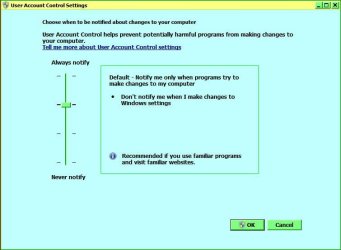
Yes, type uac in start menu search box.

RR.JPG

From here you can set it as you desire, BUT remember its not recommended.
-
Can you post an image of the difficulties your having when opening a file/folder, to give me a clearer idea.
P.S. I am the sole user on my pc's also.
 

My Computer

Computer Manufacturer/Model Number
Look in my Signature.
OS
Win7 H.Prem. 32bit+SP1

My Computer

Computer type
PC/Desktop
Computer Manufacturer/Model Number
Asus
OS
Windows 7 (Pro) 64bit
Hard Drives
SSD 128GB
Antivirus
NOD32
I thought it was your pc your were having file/folder trouble. This is the first time I have encountered 'Sendspace.com' therefore know sfa about it. If its installed on your pc, look in start menu>all progs to see if it has its own uninstaller, if not d/l Revouninstaller Portable If you intend re installing it, first right click the .exe file & unblock it, apply - ok. Right click again & choose 'Run as Administrator.
 

My Computer

Computer Manufacturer/Model Number
Look in my Signature.
OS
Win7 H.Prem. 32bit+SP1
Sorry - I might have puzzled you here. The problem is shown in the pictures themselves. Here they are:

The permission warning:

i1tkhtjmymz0.jpg


the inability to create files (previously occured on C: root until I messed with the ownership function, which took quite a lot of time considering its importance)

bzawjtm3nyrt.jpg


and the 'hierarchy' of security permission groups. (note the various types of categories - I've no idea which one I belong to. Nor do I think I should even care about it.)

mwaz2wzymkzo.jpg


This is what I would like to disable.
 

My Computer

Computer type
PC/Desktop
Computer Manufacturer/Model Number
Asus
OS
Windows 7 (Pro) 64bit
Hard Drives
SSD 128GB
Antivirus
NOD32
Try as I stated in my last post. If it fails we'll try stage 2.
 

My Computer

Computer Manufacturer/Model Number
Look in my Signature.
OS
Win7 H.Prem. 32bit+SP1
I'm sorry, I just can't figure out what application or program you were referring to here.

I thought it was your pc your were having file/folder trouble. This is the first time I have encountered 'Sendspace.com' therefore know sfa about it. If its installed on your pc, look in start menu>all progs to see if it has its own uninstaller, if not d/l Revouninstaller Portable If you intend re installing it, first right click the .exe file & unblock it, apply - ok. Right click again & choose 'Run as Administrator.
 

My Computer

Computer type
PC/Desktop
Computer Manufacturer/Model Number
Asus
OS
Windows 7 (Pro) 64bit
Hard Drives
SSD 128GB
Antivirus
NOD32
FWIW. Some of the folders that are listed in windows explorer are really not folders but in-place references for programs that expect certain files in specific folders. Sometime you can see two identical named folders in a directory listing, one is just a pointer..

Rich
 

My Computer

Computer type
Laptop
Computer Manufacturer/Model Number
Toshiba Laptop Qosimo X870
OS
Windows 7 Pro x64 SP1
CPU
Intel Core I7
Motherboard
Toshiba Qosmio
Memory
16 Gigs
Graphics Card(s)
NVIDIA GeForce GTX 670M
Monitor(s) Displays
17.7" laptop
Screen Resolution
1600 x 900
Hard Drives
256 Gig SanDisk SSD for C
256 Gig Intel SSD for D
Internet Speed
50/25 FIOS
Antivirus
Vipre (all you can eat for 10 machines)
Browser
IE and FF
Other Info
I have dos 6.22, wfwg 3.11, win98, 2000 and xp VHD's available for testing. MS's Virtual PC works great.
I'm sorry, I just can't figure out what application or program you were referring to here.
I thought it was 'Sendspace.com' as in your post.
 

My Computer

Computer Manufacturer/Model Number
Look in my Signature.
OS
Win7 H.Prem. 32bit+SP1
I'm sorry, I just can't figure out what application or program you were referring to here.
I thought it was 'Sendspace.com' as in your post.

Yeah, sorry I've totally misled you there. The problems are shown in the images.

So now that we're referring to the same issue, do you know a way to avoid seeing these notifications and security categories ? Simply to make Windows 'trust' me in a way it shouldn't take over my data.

Thanks
 

My Computer

Computer type
PC/Desktop
Computer Manufacturer/Model Number
Asus
OS
Windows 7 (Pro) 64bit
Hard Drives
SSD 128GB
Antivirus
NOD32
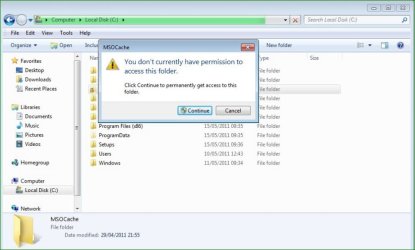
I see from this image,

RR1.JPG

You were trying to opem 'Msocache' WHY!
 

My Computer

Computer Manufacturer/Model Number
Look in my Signature.
OS
Win7 H.Prem. 32bit+SP1
I see from this image,

View attachment 154675

You were trying to opem 'Msocache' WHY!

Why not ? I don't see why I shouldn't be able to open any folder on my hard disc. The point I'm trying to make is, I've never seen such notifications before on my WinXP (and pre-XP), and I would really, really like to get rid of them. The same locker appears on my user folder too (spent my time on messing with it as well that time). I'd simply like to put an end to that; I don't want Windows 7 to control my security or anything, I only need it to manage the my system's resources, not my data. This is my view at least...

By the way I highly appreciate you for replying continuously and trying to help. Thanks for that.
 

My Computer

Computer type
PC/Desktop
Computer Manufacturer/Model Number
Asus
OS
Windows 7 (Pro) 64bit
Hard Drives
SSD 128GB
Antivirus
NOD32
The reason Microsofties don't want users opening operating system files is to prevent damaging it, saving us from the need for a clean install to fix things.
 

My Computer

Computer Manufacturer/Model Number
Look in my Signature.
OS
Win7 H.Prem. 32bit+SP1
You can not treat Win7 like XP, They are not the same. Forget most everything you know about Windows and start again.

Security has been tightened for a reason.
There are many locations that you can access but should not, hence the warning and the continue button.

Documents and Settings are no longer used and are Junction Points to direct old software to the Users folders.

You should not be running as full admin. That was the reason most people complained about XP's security faults.
 

My Computer

Computer Manufacturer/Model Number
Self Built
OS
Win 7 Ultimate 32bit
CPU
C2D E6600 2.4Ghz
Motherboard
Intel D965WH
Memory
4G Kingston KHX5400D2
Graphics Card(s)
EVGA GTX 570 HD SC (012-P3-1573-KR)
Sound Card
On-Board
Monitor(s) Displays
Samsung 226BW
Screen Resolution
1680 x 1050
Hard Drives
2 x 250 Seagate Barracuda
2 x 500 Seagate Barracuda (Raid1)
PSU
Corsair TX750W
Case
In-Win C589
Cooling
Stock Intel Cooling
Thank you both, you couldn't have explained it in better words. All clear.
 

My Computer

Computer type
PC/Desktop
Computer Manufacturer/Model Number
Asus
OS
Windows 7 (Pro) 64bit
Hard Drives
SSD 128GB
Antivirus
NOD32
Just to drive the point home to anyone who may read this thread......
I may miss a couple of areas, but this is just some quick info...

The user safe areas are for the most part....

Desktop
Libraries
Documents
Music
Pictures
Videos
Downloads
External HDD's
Internal Additional Drive used for data only.

All other areas are locked down to prevent,,,,

Users from changing/deleting system files
Viruses/Malware from accessing/changing files

With UAC enabled, all additional data (for the most part) that would go into Program files for some app is redirected to

C:\Users\profilename\AppData\Local\VirtualStore
C:\Users\profilename\AppData\Roaming

Those are (for the most part) user accessible areas also.

Temporary Internet files are located at

C:\Users\Profilename\AppData\Local\Microsoft\Windows\Temporary Internet Files
C:\Users\Profilename\AppData\Local\Microsoft\Windows\Temporary Internet Files\Content.IE5

Temp files are located at

C:\Users\Profilename\AppData\Local\Temp


C:\Windows still has a Temp folder and may be accessible, but not much is saved there

C:\Temp does still exist (usually but not always) but not much should be in there.

C:\ should not be used for anything by the User

Stay away from TakeOwn ,,, it can be used improperly and in the long run, maybe not right away, you more than likely will have to re-image your system at some point.

Again, Win 7 is not WinXP and should not be treated the same.
Everyone should be running with UAC enabled and use the Run As Admin option where needed.
Any app that requires UAC be disabled should be replaced or upgraded.

Only you can prevent your system from getting infected and at this time in Win7, there should be dang near almost no excuse for it. Again, almost.

In other words, Don't Blame Windows, Blame the keyboard/mouse operator, and Third Party Developers.
 

My Computer

Computer Manufacturer/Model Number
Self Built
OS
Win 7 Ultimate 32bit
CPU
C2D E6600 2.4Ghz
Motherboard
Intel D965WH
Memory
4G Kingston KHX5400D2
Graphics Card(s)
EVGA GTX 570 HD SC (012-P3-1573-KR)
Sound Card
On-Board
Monitor(s) Displays
Samsung 226BW
Screen Resolution
1680 x 1050
Hard Drives
2 x 250 Seagate Barracuda
2 x 500 Seagate Barracuda (Raid1)
PSU
Corsair TX750W
Case
In-Win C589
Cooling
Stock Intel Cooling
Back
Top