
security permissions needed to access files

netpotechani

New member
Local time
10:27 AM
Messages
3
Good morning all, please i have this problem wid my laptop, i deleted one of my account that i used microsoft to sign in and i have not seen where it kept the user files of that account and i also set security permissions on most of my files through that account so now that the account is no more, it is requesting me to obtain permission from that account, each time i want to copy, move or delete a file. Please what do i do ?
 

Attachments
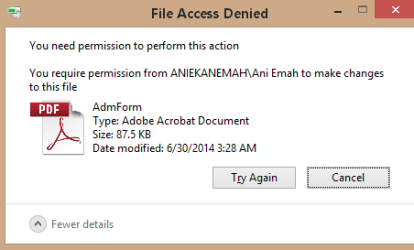
  • Capture.PNG
    Capture.PNG
    11.8 KB · Views: 15

My Computer

Computer type
Laptop
Computer Manufacturer/Model Number
Samsung
OS
windows 8.1 32bit
CPU
intel core i3
Memory
6gb
Hard Drives
500gb
Antivirus
windows defender
Browser
google chrome
Hi netpotechani, Welcome to SevenForums

First, i would like to know if you can right click cmd, then run as administrator on your current account.
 

My Computer

Computer type
PC/Desktop
Computer Manufacturer/Model Number
HP
OS
Windows 7 Pro 32bit
CPU
Dual Core
Antivirus
Trend Micro
Yes i can do it,
 

My Computer

Computer type
Laptop
Computer Manufacturer/Model Number
Samsung
OS
windows 8.1 32bit
CPU
intel core i3
Memory
6gb
Hard Drives
500gb
Antivirus
windows defender
Browser
google chrome
okay, i would like you to this:

type this command on the cmd, run as administrator.

net user administrator /active:yes

restart your computer after
 

My Computer

Computer type
PC/Desktop
Computer Manufacturer/Model Number
HP
OS
Windows 7 Pro 32bit
CPU
Dual Core
Antivirus
Trend Micro
If that works, you can see an administrator account after you reboot,
Log-in to administrator account then give permission or make your current account administrator.
 

My Computer

Computer type
PC/Desktop
Computer Manufacturer/Model Number
HP
OS
Windows 7 Pro 32bit
CPU
Dual Core
Antivirus
Trend Micro
reply

it is not working, i have done that before and it didn't work
Sir, let me explain this thing well for you, i set security permissions on my harddisk so that someone might not be able to access my informations, on that fateful day i had a flat battery and a friend came looking for a file from my computer so i removed my internal hard disk and then put it in another it booted fine but i was unable to access my files cos of the permissions set on the hdd, when i put it back on my computer it booted fine also but this time around the start screen did not show, it was black and empty while the built-in administrator showed the start screen well but most of my files didn't show at all, i had to delete d microsoft account i was using before and now use the build-in administrator account to create another microsoft account.
So now if i want to access any file or copy, move or delete any file affected with the permissions it will request permission from that account that i deleted, n i cant format my computer cos i will lose alot of informations that i cant get anymore.
Please help me out, i have tried all wat i knw wid thing machine and it is not working
 

My Computer

Computer type
Laptop
Computer Manufacturer/Model Number
Samsung
OS
windows 8.1 32bit
CPU
intel core i3
Memory
6gb
Hard Drives
500gb
Antivirus
windows defender
Browser
google chrome
Hi, have you tried Windows 8 Forums , can you recreated the "Ani Emah" Microsoft account on this computer?
 

My Computer

Computer type
PC/Desktop
Computer Manufacturer/Model Number
custom build
OS
w7 ultimate 64-bit sp1
CPU
i5 2500K @4.5
Motherboard
MSI P67A-GD65 rev2
Memory
2x4GB G.Skill Ripjaws-X 2,133 CL9
Graphics Card(s)
GTX 560Ti
Sound Card
on board
Monitor(s) Displays
BenQ G2410HD
Screen Resolution
1920x1080
Hard Drives
Samsung 2.5-Inch 250 GB 850 EVO
PSU
BeQuiet 600W
Keyboard
K65
Mouse
Razer Deathadder Ergonomic Gaming Mouse
Internet Speed
35Mbps
Hey Netpotechani,

Attached is a batch script that will set those pesky permissions straight... and help re-claim what was once yours :p!

Preview:
Code:
@echo off
net session >NUL 2>&1|| powershell Start-Process '%0' -Verb RunAs&& exit /b|| exit /b
pushd "%~dp0"
:select
for /f "delims=" %%I in ('
powershell "((new-object -com 'Shell.Application').BrowseForFolder(0,'Select a folder to gain access to',1,17)).Self.Path"
') do set selected_dir="%%I"
if "%SELECTED_DIR:"=%"=="" exit /b 1
if "%SELECTED_DIR:"=%"=="::{20D04FE0-3AEA-1069-A2D8-08002B30309D}" goto :select
echo.& echo Are you sure you want to reset and recover access to
echo  %SELECTED_DIR:"=%
echo by taking ownership and assigning full control of this directory and all its 
echo sub-directories and files to the current user?
echo.
choice
if errorlevel 2 exit /b 0& cls
takeown /f %SELECTED_DIR% /r
icacls %SELECTED_DIR% /reset /t /c
icacls %SELECTED_DIR% /grant:r "%USERNAME%":f
echo.& echo Success.
popd& timeout 2 >NUL
 

Attachments

Last edited:

My Computer

Computer type
PC/Desktop
OS
Windows 10, Windows 8.1 Pro, Windows 7 Professional, OS X El Capitan
Back
Top