no background

mojta

New member
Local time
8:34 PM
Messages
2
i know this problem has been discussed before but i cant seem to fix my problem with any of the suggestions ive found... as im sure uve guessed im not able to change my background image i am running windows 7 ultimate 32bit on a hp dv6000 laptop... the background stays black no matter what i do i have tried emptying the slideshow.ini file and also deleting the transcodedwallpaper.jpg file neither have done me any good... havent tried any regedit solutions because i cant ever seem to find the exact location ppl are telling you to look at... any help would be apreciated obviously its not gonna hurt me not to get this fixed but it is very annoying

EDIT:havent had background since i reformatted my laptop and put windows 7 on it
 

My Computer

OS
windows 7 ultimate 32bit
Welcome to Seven Forums mojta. It is hard for us to tell what all you have tried, so bear with us if we suggest things you have.

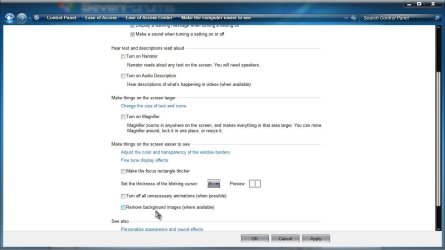
Make sure Remove background images (where available) isn't checked

Ease.jpg

If it is not, suggest run the System File Checker

Let us know, and we can go further if necessary.

A Guy
 

My Computer

Computer type
PC/Desktop
OS
Windows 10 Home x64
CPU
INTEL Core i5-750 Quad-Core 3.37GHz
Motherboard
ASUS P7P55D
Memory
HyperX Fury Black Series 8GB (2 x 4GB) 1866Mhz
Graphics Card(s)
EVGA GeForce GTX 750 Superclocked 1GB 128-Bit GDDR5
Monitor(s) Displays
LG 32MA68HY 32" IPS
Screen Resolution
1920 x 1080
Hard Drives
Samsung 840 Evo 120GB, SEAGATE 500GB Barracuda® 7200.12, SATA 3 Gb/s, 7200 RPM, 16MB cache
PSU
ANTEC TruePower New TP-550, 80 PLUS, 550W
Case
ANTEC Three Hundred Illusion
Cooling
COOLER MASTER Hyper 212 Plus, 4 x 120mm 1 x 140mm Noctua's
Internet Speed
85 + Mbps
Antivirus
Avast
Browser
Vivaldi
yah tried that one... ummm tried a lil tinkering with the regeditor but didnt feel too comfotorble messing with it due to the fact that i havent found a detailed explanation of the different things to try with it
 

My Computer

OS
windows 7 ultimate 32bit
Back
Top