- Local time
- 11:11 AM
- Messages
- 60
Hi all,
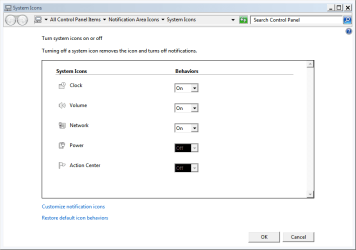
I am having a problem in safe mode when my battery icon disappeares. I have a seperate program called BatteryCare, but it says there is no battery installed, and there is one installed and fully charged. When I type in battery in start menu, and click on show or hide battery icon in taskbar, in the window, the power option is greyed out. How do you fix this?
I am having a problem in safe mode when my battery icon disappeares. I have a seperate program called BatteryCare, but it says there is no battery installed, and there is one installed and fully charged. When I type in battery in start menu, and click on show or hide battery icon in taskbar, in the window, the power option is greyed out. How do you fix this?
My Computer
- Computer Manufacturer/Model Number
- Custom built
- OS
- Windows 7 Ultimate x64/Windows 8 Enterprise
- CPU
- Intel Core i7-2600k
- Motherboard
- Asus Sabertooth P67
- Memory
- 8 GB
- Graphics Card(s)
- AMD Radeon HD 6990
- Sound Card
- Realtek HD Audio
- Monitor(s) Displays
- 2x Samsung S22B300
- Screen Resolution
- 1920x1080
- Hard Drives
- Corsair Force Series 3
WD Caviar Green
- PSU
- Corsair GS700
- Case
- Antec p193
- Cooling
- Cooler Master Hyper 212 +
- Mouse
- Logitech Peformance MX
- Internet Speed
- 15M down/1M up
- Antivirus
- Kaspersky Pure