Solved No boot after BIOS upgrade - please help!

Vortechs

New member
Member
Local time
1:24 PM
Messages
64
I updated my Asus P8Z68-V LX motherboard from the first BIOS edition to the most recent, the update went OK with no apparent problems, now when I reboot the machine it gets to the windows 7 screen (where the 4 coloured dots swirl around) and then it restarts, I've tried all the restart options - safe mode, last known good config, etc. I have 2 mirrored Samsung SSD's with the windows 7 OS, both behave the same. The drives are set to ACHI in the BIOS (but they behave the same if set to IDE or raid). I've tried all repaitr options available on the windows 7 disk and done repeated repairs until eventually it says it "cannot repair the computer manually" no explanation of the problem is given. I've tried removing all harware except the essentials but nothing makes any diffference. Please can anyone see what I'm missing?
Thanks.
 

My Computer My Computer

Computer Manufacturer/Model Number
Me
OS
Windows 7 pro x64
CPU
Intel 3.3Ghz
Motherboard
Asus P8Z68-V LX
Memory
8 GB
Graphics Card(s)
On board
Sound Card
On board
Hard Drives
2 Samsung 256gb SSD
2 Seagate 3TB HDD
PSU
BeQuiet 350w
Case
Lian Li
Cooling
Err.. cant remember
I updated my Asus P8Z68-V LX motherboard from the first BIOS edition to the most recent, the update went OK with no apparent problems, now when I reboot the machine it gets to the windows 7 screen (where the 4 coloured dots swirl around) and then it restarts, I've tried all the restart options - safe mode, last known good config, etc. I have 2 mirrored Samsung SSD's with the windows 7 OS, both behave the same. The drives are set to ACHI in the BIOS (but they behave the same if set to IDE or raid). I've tried all repaitr options available on the windows 7 disk and done repeated repairs until eventually it says it "cannot repair the computer manually" no explanation of the problem is given. I've tried removing all harware except the essentials but nothing makes any diffference. Please can anyone see what I'm missing?
Thanks.


Is the boot order correct , the last bios update , I had to re-order the boot order for the main drive .
 

My Computer My Computer

Computer type
PC/Desktop
Computer Manufacturer/Model Number
Custom Build
OS
Windows 10 Pro - 64 bit
CPU
Intel i7 2600K
Motherboard
Asus P8P67
Memory
8 Gig ddr3 1600 mhz - viper extreme (Patriot)
Graphics Card(s)
EVGA 980 TI
Monitor(s) Displays
2 - Lg 21" LED , sony 48 " bravia LED
Hard Drives
one - samsung 840 series 465.76 GB SSD
two - wd 2 tB black
one - wd 1.5 tb black
one - wb 1 tb black
PSU
1000 Watt Coolmaster : Silent Pro Gold
Case
antec 1200
Cooling
watercooled
Mouse
logitech wireless
Antivirus
Norton Security 2015
Other Info
powerware 3.1 KVA FERRUPS with 4 - 1000 Amp Deep cycle batteries ...
If windows starts loading its not an incorrect boot order.

That is odd. Did you do the bios update from windows or in the bios itself?

Are you overclocked?

Have you set the bios to factory defaults?
 

My Computer My Computer

Computer type
PC/Desktop
Computer Manufacturer/Model Number
Custom Built
OS
Windows 10 Pro
CPU
AMD Ryzen 5 2400G Processor with Radeon RX Vega 11 Graphics
Motherboard
ASRock X470 Master SLI/AC AM4 AMD Promontory X470 SATA 6Gb/s
Memory
G.SKILL Ripjaws V Series 16GB (2 x 8GB) 288-Pin DDR4 SDRAM D
Graphics Card(s)
2047MB NVIDIA GeForce GTX 1060 6GB (EVGA)
Sound Card
Motherboard Built in
Monitor(s) Displays
Acer R240HY bidx 23.8-Inch IPS HDMI DVI VGA (1920 x 1080) Wi
Screen Resolution
1920 x 1080
Hard Drives
1TB Sandisk SSD PLUS (Main drive)
500 GB Seagate 7200 RPM (Games)
500 GB Western Digital 7200 RPM (Virtual Machines)
PSU
CORSAIR TX Series TX650M 650W 80+ Gold Modular Power Supply
Case
CORSAIR CARBIDE SPEC-02 Mid-Tower Gaming Case, Red LED Fan
Cooling
220mm, two 120mm, and four 60mm fans
Keyboard
Wired Dell keyboard
Mouse
Wireless Logitech mouse
Internet Speed
250mb down, 30mb up
Antivirus
Panda Cloud Antivirus
Browser
Chrome-ish x64
Other Info
Your awesome for reading this.
I've tried the factory defaults, and I'm not overclocking. The bios update was done from a bootable USB key following instructions on the Asus site. I suspected the new bios was in some way incompatible with the Samsung SSD's so I bought a new bios chip with the original bios version that I had - the drives still wont boot...

I've tried all the possible boot orders. The only thing I've found that makes any difference is if I set the sata setting to RAID, then it boots until the windows logo coloured dots come together and throb a few times, then it restarts.

If I attempt to boot into safe mode it always stops at CLASSPNP.SYS, I tried renaming the classpnp.sys file to see if that was what was causing the problem, but then it just stops at the next one DISK.SYS.

:sick:
 

My Computer My Computer

Computer Manufacturer/Model Number
Me
OS
Windows 7 pro x64
CPU
Intel 3.3Ghz
Motherboard
Asus P8Z68-V LX
Memory
8 GB
Graphics Card(s)
On board
Sound Card
On board
Hard Drives
2 Samsung 256gb SSD
2 Seagate 3TB HDD
PSU
BeQuiet 350w
Case
Lian Li
Cooling
Err.. cant remember

My Computer My Computer

Computer type
PC/Desktop
Computer Manufacturer/Model Number
Custom Built
OS
Windows 10 Pro
CPU
AMD Ryzen 5 2400G Processor with Radeon RX Vega 11 Graphics
Motherboard
ASRock X470 Master SLI/AC AM4 AMD Promontory X470 SATA 6Gb/s
Memory
G.SKILL Ripjaws V Series 16GB (2 x 8GB) 288-Pin DDR4 SDRAM D
Graphics Card(s)
2047MB NVIDIA GeForce GTX 1060 6GB (EVGA)
Sound Card
Motherboard Built in
Monitor(s) Displays
Acer R240HY bidx 23.8-Inch IPS HDMI DVI VGA (1920 x 1080) Wi
Screen Resolution
1920 x 1080
Hard Drives
1TB Sandisk SSD PLUS (Main drive)
500 GB Seagate 7200 RPM (Games)
500 GB Western Digital 7200 RPM (Virtual Machines)
PSU
CORSAIR TX Series TX650M 650W 80+ Gold Modular Power Supply
Case
CORSAIR CARBIDE SPEC-02 Mid-Tower Gaming Case, Red LED Fan
Cooling
220mm, two 120mm, and four 60mm fans
Keyboard
Wired Dell keyboard
Mouse
Wireless Logitech mouse
Internet Speed
250mb down, 30mb up
Antivirus
Panda Cloud Antivirus
Browser
Chrome-ish x64
Other Info
Your awesome for reading this.
you had it in ahci before correct and in raid 1? is it software raid or hardware? also even though you went to defaults you might want to try clearing the cmos as well(iv had to do this before with mine and always do it now.)if they are raid one try unplugging one of them and see if your system boots. you might have to recreate the software raid.
rvcjew
 

My Computer My Computer

Computer type
PC/Desktop
Computer Manufacturer/Model Number
Custom
OS
10 Pro x64
CPU
Ryzen 9 3900X
Motherboard
Asrock x370 Tachi
Memory
64GB(4x16GB) DDR4
Graphics Card(s)
EVGA 1080ti FTW3
Sound Card
ASUS Xonar Essence STX (V4 Bursons), ODAC rev B, NFB-11, O2
Monitor(s) Displays
3xASUS PB278Q/R, Optoma HD142X
Screen Resolution
3x1440p, 1080p
Hard Drives
512GB 850 EVO(OS, Programs)
4TB (Movies)
3TB (Downloads)
3TB (Programs)
1TB HDD (Games)
2x6TB R1 (videos)
PSU
AX760
Case
Fractal Define R5
Cooling
NH-D15S
Keyboard
Massdrop Ctrl with Box Navy's
Mouse
G903, Alioth XXL Mat
Internet Speed
280/40
Antivirus
MBAM, ESET
Browser
Canary 64 Bit
Other Info
I also own a Thinkpad P50 Xeon 4K, X220T, X1C5
Yes, it was in ACHI using windows 7 software raid 1 (mirrored). I tried factory defaults and cleared the CMOS by removing the on board battery on both the bios chips, I just tried it again and tried with both drives attatched, nothing makes any difference. I unfortunately dont have another 64 bit machine to try them on but I dont think the problem is the software, I managed to do a system restore and also restored the os from a backup image, neither made any difference. I can boot to a linux live CD or USB no problem and from within that I can access all the data on the drives.
 

My Computer My Computer

Computer Manufacturer/Model Number
Me
OS
Windows 7 pro x64
CPU
Intel 3.3Ghz
Motherboard
Asus P8Z68-V LX
Memory
8 GB
Graphics Card(s)
On board
Sound Card
On board
Hard Drives
2 Samsung 256gb SSD
2 Seagate 3TB HDD
PSU
BeQuiet 350w
Case
Lian Li
Cooling
Err.. cant remember
I've tried the factory defaults, and I'm not overclocking. The bios update was done from a bootable USB key following instructions on the Asus site. I suspected the new bios was in some way incompatible with the Samsung SSD's so I bought a new bios chip with the original bios version that I had - the drives still wont boot...

I've tried all the possible boot orders. The only thing I've found that makes any difference is if I set the sata setting to RAID, then it boots until the windows logo coloured dots come together and throb a few times, then it restarts.

If I attempt to boot into safe mode it always stops at CLASSPNP.SYS, I tried renaming the classpnp.sys file to see if that was what was causing the problem, but then it just stops at the next one DISK.SYS.

:sick:

This is a shot in the dark, I have experienced this behavior when W7 is installed as ACHI, and then sees the BIOS reverted to IDE. The normal fix is change the BIOS back to ACHI, BUT, there is a registry hack so W7 well boot with the BIOS set as IDE. You will need to google this to find the hack, it may even be here at sevenforums.

RE: ASUS mobo support. I've found that if you call asus support during weekday normal business hours you get support from knowledgeable people, nights and weekends not so much.
 

My Computer My Computer

Computer type
PC/Desktop
Computer Manufacturer/Model Number
Custom, Dell and Lenono LT's
OS
Win8/8.1,Win7-U64, Vista U64, uncounted Linux distor's
CPU
AMD and Intell, 9590, 8350, i5 3570k
Motherboard
CFVFZ, GA990FXA, Z77e-itx
Memory
Corsair G Skill
Graphics Card(s)
Crossfired Sapphire HD 7950 Vapor-X, ASUS R9 280X TOP
Sound Card
Realtek ALC889
Monitor(s) Displays
ViewSonic VX2770SMH 27" / ViewSonic VX2433 LCD 24"
Screen Resolution
1080i HD
Hard Drives
Samsung SSD 840 Pro
OCZ Agility 3's
OCZ Vector's
WD's Blue, red, green, Velociraptors
Seagate USB3 & Hybrid's
ASUS Blu-Ray
ASUS DVD
PSU
Corsair AX1200i, Seasonice 850 Gold
Case
Cooler Master HAF 922 & HAF 932, Lian Li Train case.
Cooling
Air, Glacer 240L expanded, custom EK loop with duel D5's
Keyboard
Microsoft SideWinder X4 USB Keyboard / Logitech 250 PS2
Mouse
Logitech G500 / MS wireless 5000
Internet Speed
Best of 5ms / 75+ dn / 12+ up More or less.
Antivirus
MS esentials-MalwareBytes
Browser
Firefox Chromebook
I just spoke to Asus technical support, he thought it was raid related and said it must be a raid problem in the OS or BIOS. I then explained I've tried a new bios chip and replaced the os with a backup image and neither made any difference, he couldn't help me any further.

I'd like to try that reg hack but not sure what to google to find it, any idea what it's called?
 

My Computer My Computer

Computer Manufacturer/Model Number
Me
OS
Windows 7 pro x64
CPU
Intel 3.3Ghz
Motherboard
Asus P8Z68-V LX
Memory
8 GB
Graphics Card(s)
On board
Sound Card
On board
Hard Drives
2 Samsung 256gb SSD
2 Seagate 3TB HDD
PSU
BeQuiet 350w
Case
Lian Li
Cooling
Err.. cant remember
This happened to me on my Asus p8p67 motherboard

1. look in your bios settings to see what version it is
2. go to Google and look at the peoples reviews to see that if there was any problems for them if there is then go to step 3
3. re-format the hhd or ssd that you have in your computer
4. if that doesn't work then open your computer case and remove the motherboard battery and leave it out for a good minute then place it back in.
5. if that doesn't work then re-roll your motherboard settings to the past version that you had before
6. if that doesn't work then seek help from your local computer store
 

My Computer My Computer

Computer type
PC/Desktop
Computer Manufacturer/Model Number
Custom build
OS
Windows 7 pro 64-bit
CPU
i7 2600k
Motherboard
Asus p8p67 deluxe
Memory
G skill sniper series
Graphics Card(s)
(2) gtx 580
Sound Card
N/A
Monitor(s) Displays
(2) Samsung monitors
Screen Resolution
1920x1080
Hard Drives
Seagate (HDD)
Intel (SSD)
PSU
Corsair ax1200
Case
Cooler Master storm trooper
Cooling
Corsair H100
Keyboard
Razer blackwidow ultimate
Mouse
Razer Naga
Internet Speed
Broadband 50
Antivirus
Kaspersky
Browser
Internet explorer
Thanks, I've already tried all of that except formatting and I want to save the OS on the drive. I used to work in the local computer store, lol.
 

My Computer My Computer

Computer Manufacturer/Model Number
Me
OS
Windows 7 pro x64
CPU
Intel 3.3Ghz
Motherboard
Asus P8Z68-V LX
Memory
8 GB
Graphics Card(s)
On board
Sound Card
On board
Hard Drives
2 Samsung 256gb SSD
2 Seagate 3TB HDD
PSU
BeQuiet 350w
Case
Lian Li
Cooling
Err.. cant remember
OK, I've formatted and reinstalled Win7 on one of my SSD's it boots fine no problem. I've reattached my mirrored 3TB data drives and am trying to restore the system image that is stored on the drive. Windows says it cant restore the image because the layout of the computer has changed! WTF. What's it's problem now? Is this the sata cable ports in a slightly different order or what?
Thanks.
 

My Computer My Computer

Computer Manufacturer/Model Number
Me
OS
Windows 7 pro x64
CPU
Intel 3.3Ghz
Motherboard
Asus P8Z68-V LX
Memory
8 GB
Graphics Card(s)
On board
Sound Card
On board
Hard Drives
2 Samsung 256gb SSD
2 Seagate 3TB HDD
PSU
BeQuiet 350w
Case
Lian Li
Cooling
Err.. cant remember
Win7 backup imaging is very limited. You may only be able to extract files by mounting the image in Disk Mgmt as a Virtual Hard Disk - Create and Attach VHD.

If it will mount then you can also try imaging it again using a more flexible app like Macrium - Image your system to see if it will recover that image to your new disk config.

We see nothing but problems here with RAID for all 5 years since Beta, to the point it can't be viewed as a Best Practice at all. I do recall one case in the past year where the RAID's image was able to be applied to single SSD, and as best I can remember it was using a much more flexible app than Windows Backup.

We have some imaging experts like SIW2 who can be consulted to try to force it.
 
I've been reading around and come to the same conclusion. I just tried to restore my backup image using Acronis true image, everything went OK but it still wont boot. There are 3 partition images in the backup, the main win7OS, a system reserved partition and a MBR prartition, do I restore all 3 ? If I format the disk and instal a new win7 can I then just restore the main win7OS partition?
Thanks.
 

My Computer My Computer

Computer Manufacturer/Model Number
Me
OS
Windows 7 pro x64
CPU
Intel 3.3Ghz
Motherboard
Asus P8Z68-V LX
Memory
8 GB
Graphics Card(s)
On board
Sound Card
On board
Hard Drives
2 Samsung 256gb SSD
2 Seagate 3TB HDD
PSU
BeQuiet 350w
Case
Lian Li
Cooling
Err.. cant remember
Unplug all other HD's and peripherals,

Make sure the System Reserved (preferred if you have it) or C is Partition Marked Active,

Then run Startup Repair - Run up to 3 Separate Times to repair or rewrite the System boot files.

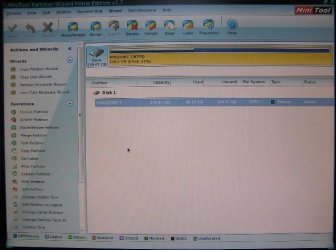
If this fails post back a camera snap of Partition Wizard bootable CD maximized Drive Map so we can see if anything is obvious. Confirm the Active partition, then try Partition Wizard Rebuild MBR - Video Help. If this fails to start it then run the 3 separate repairs again. If that fails move the Active flag from SysReserved to C and try all steps again.

Otherwise with all other HD's unplugged boot the Win7 installer, delete all partitions during Clean Install Windows 7.

Tips to get and keep a perfect install are the same as for Clean Reinstall - Factory OEM Windows 7
 
is your true image backup with disk signature or without? and did you backup it initially as disk mode or partition mode? since its messed up at this point anyway i would take all drives out cept for the ssd's and then put them in your gray sata ports(6GB's) then put your bios into raid mode and make them raid 1, then boot off acronis bootable media for your version (if you cant get your media to boot then boot it in legacy mode and after the restore then but your bios back to uefi) then see if your system boots without the 3TB mirrors in it. if this works you have hardware raid vs software and its better anyway just make backups because its harder to come back from if it dies.

EDIT: noticed that you got a successful restore you might need to rebuild your bcd to get windows to boot.
 

My Computer My Computer

Computer type
PC/Desktop
Computer Manufacturer/Model Number
Custom
OS
10 Pro x64
CPU
Ryzen 9 3900X
Motherboard
Asrock x370 Tachi
Memory
64GB(4x16GB) DDR4
Graphics Card(s)
EVGA 1080ti FTW3
Sound Card
ASUS Xonar Essence STX (V4 Bursons), ODAC rev B, NFB-11, O2
Monitor(s) Displays
3xASUS PB278Q/R, Optoma HD142X
Screen Resolution
3x1440p, 1080p
Hard Drives
512GB 850 EVO(OS, Programs)
4TB (Movies)
3TB (Downloads)
3TB (Programs)
1TB HDD (Games)
2x6TB R1 (videos)
PSU
AX760
Case
Fractal Define R5
Cooling
NH-D15S
Keyboard
Massdrop Ctrl with Box Navy's
Mouse
G903, Alioth XXL Mat
Internet Speed
280/40
Antivirus
MBAM, ESET
Browser
Canary 64 Bit
Other Info
I also own a Thinkpad P50 Xeon 4K, X220T, X1C5
No luck with rebuilding the BCD unfortunately.

Is there any way at all to force windows 7 to do a Repair Installation when booted from the original install DVD? So I dont get Gotcha'd by this:

The computer started using the windows installation disk. Remove the installation disk and restart your computer so that windows starts normally. then,insert the installation disk and restart the upgrade. (Do not select "Custom (advanced)" to perform an upgrade. "Custom (advanced)" installs a new copy of windows and deletes your programs and settings.)

I've tried absolutely every other repair option I can find without luck, I know it might not work but at this stage I'll try anything. :confused:
 

My Computer My Computer

Computer Manufacturer/Model Number
Me
OS
Windows 7 pro x64
CPU
Intel 3.3Ghz
Motherboard
Asus P8Z68-V LX
Memory
8 GB
Graphics Card(s)
On board
Sound Card
On board
Hard Drives
2 Samsung 256gb SSD
2 Seagate 3TB HDD
PSU
BeQuiet 350w
Case
Lian Li
Cooling
Err.. cant remember
I didn't read the entire thread so forgive me if this has been suggested already.

I think the SATA MODE setting in the BIOS was changed to either IDE or AHCI depending on what it was
when the OS was installed which is typical to the four orbs starting to load then a restart, which is a fast BSOD
with a value of 0x7B (it's very fast because it doesn't flush a dump file because it can't access the storage solution).
Try and switch the SATA MODE in the BIOS to either IDE or AHCI, again dependent on what it is at the moment.
 

My Computer My Computer

Computer type
PC/Desktop
OS
Windows 10
CPU
Intel Core i5 3570K
Motherboard
Asus P8Z77V-PRO
Memory
16GB 1600Mhz G.Skill
Graphics Card(s)
Gigabyte GTX 970 G1-Gaming
PSU
Seasonic 1000W Platinum
Case
Fractal Design Define R4
Cooling
Noctua NH-D14
I've tried absolutely every other repair option I can find without luck, I know it might not work but at this stage I'll try anything. :confused:

Then where is the PW boot disk camera snap I requested, as well as response to any of the steps I gave you?
 
Greg, sorry, I did try out all your suggestions, I forgot to take a snap of the PW drive shot at the time - I just ran through all of it again, here's the pic. I wont be doing a fresh install of windows 7 - this is it, it either it starts or I'm off to Linux. I've been using windows since 3.1 and it took me several years to get that win 7 os into something I was happy using, I'm not doing it all again.
This SSD drive has now been secure erased and a backup image from a month before the crash has been restored to it, all the repair sequences have been rerun again and it still wont boot.

yoyo155 - already tried that multiple times.

No one answered my question, is there any way to run a repair install on a system that wont boot from the os?
Thanks.
 

Attachments

  • PW1.JPG
    PW1.JPG
    35.2 KB · Views: 15

My Computer My Computer

Computer Manufacturer/Model Number
Me
OS
Windows 7 pro x64
CPU
Intel 3.3Ghz
Motherboard
Asus P8Z68-V LX
Memory
8 GB
Graphics Card(s)
On board
Sound Card
On board
Hard Drives
2 Samsung 256gb SSD
2 Seagate 3TB HDD
PSU
BeQuiet 350w
Case
Lian Li
Cooling
Err.. cant remember
Back
Top