No boot sector on internal hard drive while AHCI enabled installation

zakhail

New member
Local time
4:32 AM
Messages
12
hi everybody!
I have a dell studio 1536 my hard disk got corrupted a month ago and tried different software could not make it to work so, decided to buy another HD .
my new hard drive is (used) bought in ebay and SMART shows 100% health also tested on dell diagnosetic utility and all tests passed .
So, here comes my problem , the very first time when i poped (new/used) HD into the laptop and started, it showed me the above error ''no bootsector on internal hard drive'' and gave me 3 options F1 retry , F2 setup , F5 dell diganose utility. I ignored it as you all know a HD without system files, partion , or windows would do exactly the same , and i went ahead and somehow sorted windows vista to install . When setup expanded files, it restarted and when dell logo and flash screen passed where it was supposed to boot from C: it gave me this error again , but the vista disk was still there i thought let the cd take care of it as the HD may not have been used after couple formating and wiping. So thought it,s normal, all installation went normal finally restarted again with same error above .
Now if i put windows cd or whatever bootable madia i can get to my windows if i dont hit any key but first it will show the above error and then it will boot other media , even i can access to windows by pressing F1 ''retry'' after message appears and it will boot successfully fast and flawlessly but, windows cant find boot section by its own .
Installed vista and windows 7 four times but same symptoms
NOTE>>>> It will only occure when I enable AHCI mode , installed on ATA mode doesnt require me to do anything and will successfully go to boot from bios .
my bios setup is in correct order and also reseted couple of times . reseated hard drive one time
also i installed sata drive driver downloaded from dell site and loaded with usb everytime when i installed . So what could be the problem?
Am i missing something prior or after installation ?
I have completely lost my mind with this problem , tried 7hours of searching in forums nobody else has got same problem as mine , the error is same but symptoms are different
[PLEASE HELP}
 

My Computer My Computer

At a glance

Windows 7 Home Premium 64bitAMD Turion X2NANIAATI HD3200
Computer Manufacturer/Model Number
DELL Studio 1536
OS
Windows 7 Home Premium 64bit
CPU
AMD Turion X2
Memory
NANIA
Graphics Card(s)
ATI HD3200
Sound Card
IDT
Hard Drives
Toshiba 120GB
When AHCI mode is enabled, is the first boot device changed? it's as if it's trying to read from say a USB stick or memory card slot first, then moving on to the next boot device of Hard disk or Optical when that has failed.
 

My Computer My Computer

At a glance

Windows 7 Ultimate x64Intel Core2 Quad Q8300 2.5GhzKingston HyperX 4x1GB DDR2 1066MhzAsus/Nvidia 9500GT 1GB
Computer type
PC/Desktop
Computer Manufacturer/Model Number
Self Build
OS
Windows 7 Ultimate x64
CPU
Intel Core2 Quad Q8300 2.5Ghz
Motherboard
Asus P5QD Turbo
Memory
Kingston HyperX 4x1GB DDR2 1066Mhz
Graphics Card(s)
Asus/Nvidia 9500GT 1GB
Sound Card
On-Board HD
Monitor(s) Displays
22" Widescreen TFT
Screen Resolution
1920x1080
Hard Drives
2x 320Gb Seagate SATAII RAID 0
2x 80Gb Seagate SATAII RAID 0
1x 1tb hybrid (8gb ssd)
PSU
650w
Case
ATX
Cooling
140mm front, 120mm Rear, 80mm Chipset + stock CPU and GPU
Keyboard
Plastic one
Mouse
Plastic one
Internet Speed
4Mbps
Other Info
Laptop: HP Elitebook 2560p
i5 @2.7Ghz 4GB DDR3
hi , yes i have set internal hard disk as a first boot device and you maybe correct there is something silly going on with the boot process that is why it prevents it from boot the windows properly any trick and tips or suggestion mostly appreciated as i am stuck and clueless
 

My Computer My Computer

At a glance

Windows 7 Home Premium 64bitAMD Turion X2NANIAATI HD3200
Computer Manufacturer/Model Number
DELL Studio 1536
OS
Windows 7 Home Premium 64bit
CPU
AMD Turion X2
Memory
NANIA
Graphics Card(s)
ATI HD3200
Sound Card
IDT
Hard Drives
Toshiba 120GB
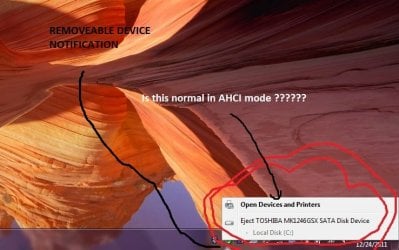
one thing more i would like to add is that my hard drive is bieng shown as a removeable device in notification area , do you thing is that normal ? or there is a driver missing ?
 

My Computer My Computer

At a glance

Windows 7 Home Premium 64bitAMD Turion X2NANIAATI HD3200
Computer Manufacturer/Model Number
DELL Studio 1536
OS
Windows 7 Home Premium 64bit
CPU
AMD Turion X2
Memory
NANIA
Graphics Card(s)
ATI HD3200
Sound Card
IDT
Hard Drives
Toshiba 120GB
Are you sure the notifications are about your internal hard disk and not the 8in1 card reader?
I would suggest installing the the AHCI driver from the dell website via USB stick, then REMOVE THE USB STICK before continuing with setup. In-fact making sure no drives except the internal drive are available for windows to install to.
 

My Computer My Computer

At a glance

Windows 7 Ultimate x64Intel Core2 Quad Q8300 2.5GhzKingston HyperX 4x1GB DDR2 1066MhzAsus/Nvidia 9500GT 1GB
Computer type
PC/Desktop
Computer Manufacturer/Model Number
Self Build
OS
Windows 7 Ultimate x64
CPU
Intel Core2 Quad Q8300 2.5Ghz
Motherboard
Asus P5QD Turbo
Memory
Kingston HyperX 4x1GB DDR2 1066Mhz
Graphics Card(s)
Asus/Nvidia 9500GT 1GB
Sound Card
On-Board HD
Monitor(s) Displays
22" Widescreen TFT
Screen Resolution
1920x1080
Hard Drives
2x 320Gb Seagate SATAII RAID 0
2x 80Gb Seagate SATAII RAID 0
1x 1tb hybrid (8gb ssd)
PSU
650w
Case
ATX
Cooling
140mm front, 120mm Rear, 80mm Chipset + stock CPU and GPU
Keyboard
Plastic one
Mouse
Plastic one
Internet Speed
4Mbps
Other Info
Laptop: HP Elitebook 2560p
i5 @2.7Ghz 4GB DDR3
yes that is right! it shows me my internal hard drive , but i have seen in many forums and most of them says that it is normal as AHCI is hot-swapable you have acces to indernal or external disk conveniently , but in my other laptop Acer 5935g there is no such option in notification. Infact that is also AHCI enabled but the controller and chipsets are different Acer has intel and Dell has AMD .
anyways have a look at my dell support centre result , if possible you may find something in there , the file is 125kb so you have to download i couldnt find any other way in attach it as it is html so, sorry about that and help would be appreciated
here it is https://skydrive.live.com/?cid=682069A938E6236C&id=682069A938E6236C!109
 

My Computer My Computer

At a glance

Windows 7 Home Premium 64bitAMD Turion X2NANIAATI HD3200
Computer Manufacturer/Model Number
DELL Studio 1536
OS
Windows 7 Home Premium 64bit
CPU
AMD Turion X2
Memory
NANIA
Graphics Card(s)
ATI HD3200
Sound Card
IDT
Hard Drives
Toshiba 120GB
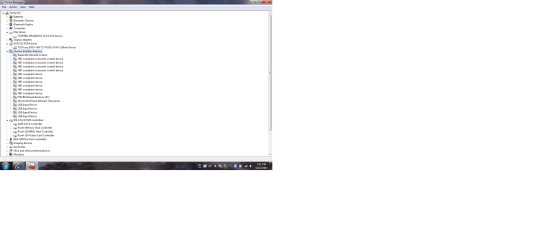
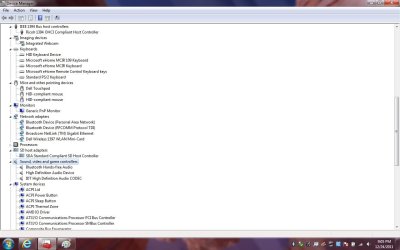
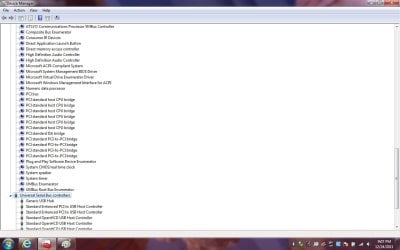
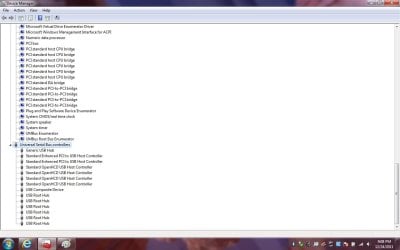
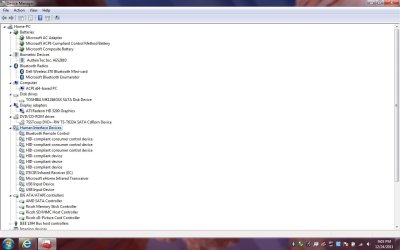
here is the snapshot i have taken from device manager
 

Attachments

  • 12.png
    12.png
    56.6 KB · Views: 79

My Computer My Computer

At a glance

Windows 7 Home Premium 64bitAMD Turion X2NANIAATI HD3200
Computer Manufacturer/Model Number
DELL Studio 1536
OS
Windows 7 Home Premium 64bit
CPU
AMD Turion X2
Memory
NANIA
Graphics Card(s)
ATI HD3200
Sound Card
IDT
Hard Drives
Toshiba 120GB
Boot into free Partition Wizard bootable CD (which will autostart) to partition the new HD, give it a label then Modify>Set to Active, see how Win7 DVD responds to it.
 
Boot into free Partition Wizard bootable CD (which will autostart) to partition the new HD, give it a label then Modify>Set to Active, see how Win7 DVD responds to it.
hi thanks for helpfull link but i decide to installed windows in ata mode and will change some registry siiting that will redirect me to ahci any help in switching to ahci from ata would be appreciated as this time i am trying to switch after installing
will let you know guys if it gone will
 

My Computer My Computer

At a glance

Windows 7 Home Premium 64bitAMD Turion X2NANIAATI HD3200
Computer Manufacturer/Model Number
DELL Studio 1536
OS
Windows 7 Home Premium 64bit
CPU
AMD Turion X2
Memory
NANIA
Graphics Card(s)
ATI HD3200
Sound Card
IDT
Hard Drives
Toshiba 120GB
my bad<< :(>> it doesnt work even i changed controller from ATA to AHCI . it was so simple just a tiny number in registry has to be change in order to activate AHCI controller as i followed this link: Gadgets and Hacks: Enabling AHCI in Windows 7
It seems that bios cant read from windows boatloader or there is a single conflict or something very very tiny bad thing preventing the entire Huge machine from boating into windows , i can live with it to hit F1 key every time to redetect HD and load but this misteriouse tiny problem driving me krazy . I know that this is not something related to file or software it could be bios or something conflict . I have read somewhere about this issue that dvd rom preventing HD to boot but i cant remember now where it was , if you guys have any idea, suggestion , tips or tricks i will try all .
Since HD is proved to be 100% clear of errors and faults tried different software which never ignors or skip errors but it passed all . i have recently updated bios to A6 in this model . something makes me suspecious now is DVD rom but taking apart that from laptop is not easy , hundreds of screws to be taken out before i take out that silly thing
 

My Computer My Computer

At a glance

Windows 7 Home Premium 64bitAMD Turion X2NANIAATI HD3200
Computer Manufacturer/Model Number
DELL Studio 1536
OS
Windows 7 Home Premium 64bit
CPU
AMD Turion X2
Memory
NANIA
Graphics Card(s)
ATI HD3200
Sound Card
IDT
Hard Drives
Toshiba 120GB
It's nearly impossible to understand your problem from reading your original post, so you're not able to benefit from our advice until there is some clarity.

Are you able to install Win7 or Vista, but need the disk in drive to enable it to boot? The solution for this is to mark Win7 Active then boot into DVD System Recovery Options to run Startup Repair - Run 3 Separate Times to repair the boot. Partition - Mark as Active (Method Two)

If you're unable to install try IDE mode if you have it. What other SATA controller modes are available? What other OS has been installed successfully on this machine and in what mode?

If you have Vista but cannot install Win7, try running Win7 installer from Vista desktop to install to it's disk.

Once you clarify the problem exactly we will have other troubleshooting steps as this is where these problems are solved once we understand exactly what it is.
 
It's nearly impossible to understand your problem from reading your original post, so you're not able to benefit from our advice until there is some clarity.

Are you able to install Win7 or Vista, but need the disk in drive to enable it to boot? The solution for this is to mark Win7 Active then boot into DVD System Recovery Options to run Startup Repair - Run 3 Separate Times to repair the boot. Partition - Mark as Active (Method Two)

If you're unable to install try IDE mode if you have it. What other SATA controller modes are available? What other OS has been installed successfully on this machine and in what mode?

If you have Vista but cannot install Win7, try running Win7 installer from Vista desktop to install to it's disk.

Once you clarify the problem exactly we will have other troubleshooting steps as this is where these problems are solved once we understand exactly what it is.

HI, yes i can install both windows vista and windows 7 without any problem. I am using paragon partition and as well as windows disk management both shows that my (C) drive where windows, system files, boot files are existing " is active .
although i have made only one partition in order to boot properly.

I am able to install vista and windows7 on both 'Modes' ATA and AHCI. There are 3 options for controller ATA, AHCI and the other is OFF which obviousely means set the controller off so i didnt test that.

When i boot to windows repair or recovery option to fix or repaire boot automatically it says that there is no problem found in your system.

If i istall windows (vista or 7) in IDE/ATA mode system boots from bios fine without giving me any problem ,' However if i intall windows (vista or win7) it giving me "no boot sector on internal hdd" problem

I have erased my HD using MHDD a software developed by hdguru.com which is more suffucient and powerfull as other manufacturer made tools. however i coudnt find manufecturer tool for Toshiba hard drive and they dont make it .

Now the problem is that system wont boot up properly when it is in AHCI mode and giving the above error.

If i install windows in IDE/ATA mode it will install and boot properly without any problem but the reason i dont want IDE/ATA is because i want to utitliz various benefits of AHCI with eSATA port enable and hotswap and also i can notice a signeficent boost in boot time and performance and so on.
 

My Computer My Computer

At a glance

Windows 7 Home Premium 64bitAMD Turion X2NANIAATI HD3200
Computer Manufacturer/Model Number
DELL Studio 1536
OS
Windows 7 Home Premium 64bit
CPU
AMD Turion X2
Memory
NANIA
Graphics Card(s)
ATI HD3200
Sound Card
IDT
Hard Drives
Toshiba 120GB
Installing windows on AHCI enabled is going same as in ATA mode but the problem is it cant boot from system the first time , It first giving me no boot sector error and then 3 option F1 , F2 , F5 after a couple of second blinking *_* this sign on top left with black screen . if i hit the F1 option then it will boot otherwise it wont boot until it gives me this error
 

My Computer My Computer

At a glance

Windows 7 Home Premium 64bitAMD Turion X2NANIAATI HD3200
Computer Manufacturer/Model Number
DELL Studio 1536
OS
Windows 7 Home Premium 64bit
CPU
AMD Turion X2
Memory
NANIA
Graphics Card(s)
ATI HD3200
Sound Card
IDT
Hard Drives
Toshiba 120GB
Install in AHCI so you get the full functions you want, to separate HD's with one unplugged while installing to the other. Then boot choice of HD's by setting preferred first to boot in BIOS setup, boot other HD using one-time BIOS Boot Menu key which on Dell is F12.

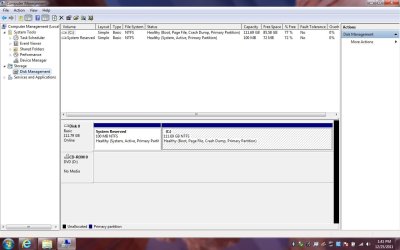
Then post back a screenshot of your maximized Disk Management drive map with listings showing all columns, using the Snipping Tool in Start Menu.
 
Here are the snapshots taken from device management and by the way i have only one internal hard drive to install windows .
 

Attachments

  • Untitled1.jpg
    Untitled1.jpg
    74.7 KB · Views: 14
  • Untitled2.jpg
    Untitled2.jpg
    75.8 KB · Views: 8
  • Untitled3.jpg
    Untitled3.jpg
    82 KB · Views: 6
  • Untitled4.jpg
    Untitled4.jpg
    75.6 KB · Views: 7
  • Untitled6.jpg
    Untitled6.jpg
    52.1 KB · Views: 11

My Computer My Computer

At a glance

Windows 7 Home Premium 64bitAMD Turion X2NANIAATI HD3200
Computer Manufacturer/Model Number
DELL Studio 1536
OS
Windows 7 Home Premium 64bit
CPU
AMD Turion X2
Memory
NANIA
Graphics Card(s)
ATI HD3200
Sound Card
IDT
Hard Drives
Toshiba 120GB
We need the Disk Mgmt screen, not Device Manager.

It's normal to have Safely Remove show HD for hotswapping when running AHCI mode.
 
hi sorry , i mistakenly take it as you said device manager
here is the device management
 

Attachments

  • Untitled1.jpg
    Untitled1.jpg
    87.2 KB · Views: 16

My Computer My Computer

At a glance

Windows 7 Home Premium 64bitAMD Turion X2NANIAATI HD3200
Computer Manufacturer/Model Number
DELL Studio 1536
OS
Windows 7 Home Premium 64bit
CPU
AMD Turion X2
Memory
NANIA
Graphics Card(s)
ATI HD3200
Sound Card
IDT
Hard Drives
Toshiba 120GB
Check the mobo temps by installing and monitoring CoreTemp.

Run a full Disk Check on C.

Use Hitachi Drive Fitness Test to test Toshiba HD, choosing extended CD scan then zeroing the HD if you have not done that yet: HD Diagnostic

Wiping the HD should clear the boot sector of any possibly conflicting or corrupt code which might be causing the error, if HD tests out OK.
 
Last edited:
Back
Top