No Color Scheme in Control Panel

Xeal Clianad

Newbie
Local time
2:30 PM
Messages
13
Location
Philippines
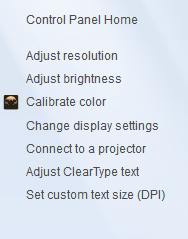
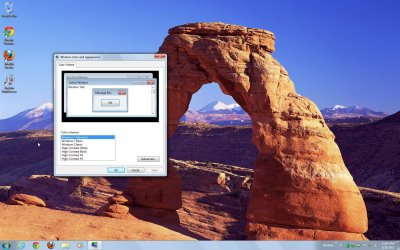
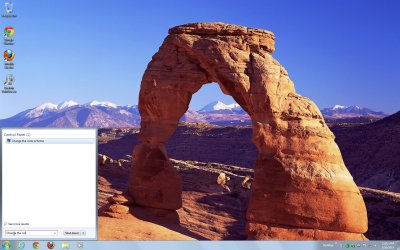
I can't find the Color Scheme button in the Control Panel.

I also tried to go search it but I can't also find it.

Here is what I mean...
There's supposed to be a Color Scheme button, but it's not there.
 

Attachments

  • Untitled3.png
    Untitled3.png
    8.5 KB · Views: 75

My Computer My Computer

Computer type
Laptop
Computer Manufacturer/Model Number
Asus
OS
Windows 7 Home Basic x64 SP1
Memory
RAM: 2 GB (1.6 GB usable)
Graphics Card(s)
AMD E-450 APU with Radeon(tm) HD Graphics 1.65 GHz
Sound Card
Realtek
Screen Resolution
1366 x 768
Hard Drives
C:\
D:\
Mouse
Genius
Internet Speed
7.2 Mbps
Antivirus
AVG
Browser
Chrome
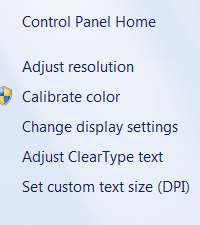
This is all I get:

Color.PNG
 

My Computer My Computer

Computer type
PC/Desktop
OS
Microsoft Windows 7 Home Premium 64-bit 7601 Multiprocessor Free Service Pack 1
CPU
Intel(R) Core(TM) i7-3770 CPU @ 3.40GHz
Motherboard
ASUSTeK COMPUTER INC. P8H77-M
Memory
8.00 GB
Graphics Card(s)
Intel(R) HD Graphics 4000
Sound Card
On Board
Monitor(s) Displays
Dell 24"
Screen Resolution
1920 x 1080
Hard Drives
(1) INTEL SSDSC2CT180A3 ATA Device (2) ST500DM002-1BD142 ATA Device (3) WDC WD3200AAKS-75L9A0 ATA Device (4) Generic- Compact Flash USB Device (5) Generic- MS/MS-Pro USB Device (6) Generic- SD/MMC USB Device (7) Generic- SM/xD-Picture USB
PSU
500w Corsair
Case
Cooler Master
Cooling
3 Fans
Keyboard
Logitech MK300
Mouse
Logitech WOM
Internet Speed
75Mb
Antivirus
Norton 360
Browser
Firefox, Opera, IE
Right click on the Desktop and click Personalize.
See if that opens the window you are looking for.
 

My Computer My Computer

Computer type
PC/Desktop
Computer Manufacturer/Model Number
home built
OS
Multi-Boot W7_Pro_x64 W8.1_Pro_x64 W10_Pro_x64 +Linux_VMs +Chromium_VM
CPU
AMD Athlon II x4 620
Motherboard
Gigabyte GA-MA785G-UD3H
Memory
6GB GSkill DDR2 800
Graphics Card(s)
AMD 4670 GPU + AMD 4200 IGP
Sound Card
on board Realtek ALC889A
Monitor(s) Displays
RCA 40" LCD TV, Insignia 32" LCD TV, HP 15" LCD monitor
Screen Resolution
1680 x 1050
Hard Drives
OCZ Vertex 3 120GB,
Samsung F3 1TB (3),
Several others - WD, Seagate, Hitachi, ...
PSU
Corsair 500 W
Case
Rosewill mid tower
Cooling
CM 90mm rifle
Keyboard
Gyration wireless, Logitech wireless, Dell USB wired
Mouse
Gyration wireless, Logitech wireless, V7 USB wired
Internet Speed
Spectrum - 100Mbps D / 10Mbps U
Antivirus
Avast, MBAM3, EMET, WinPatrol
Browser
Pale Moon, Firefox, IE
Other Info
2 multi-boot PC's
Mainly HTPC/Office/Gen purpose (no gaming).
Trendnet USB KVM.
LG DVD burner/Blue Ray Player.
Tray system for removable SATA backup drives.

Not currently OCd, under-volted.
I use Hybrid sleep, rarely re-boot or shutdown.

Hauppauge HD-PVR, Avermedia PCIe TV Tuner, Hauppauge PCI TV Tuner.
Are you using any third party themes?
 

My Computer My Computer

Computer type
PC/Desktop
Computer Manufacturer/Model Number
Custom Build
OS
Win 10 Pro 64
CPU
Intel Core i7 960 @3.20 GHz
Motherboard
MSI MS7522
Memory
24.0 GB DDR3
Graphics Card(s)
EVGA GTX 750Ti
Monitor(s) Displays
LG E2341 23 Inch
Screen Resolution
1920x1080
Hard Drives
1TB Western Dgital 1002FAEX-00Y9A0
1TB Hitachi HDS721010CLA322
PSU
700 Watt
Case
Haf 912
Cooling
Fans
Keyboard
Logitech MK710
Mouse
Logitech M705
Internet Speed
Cable
Antivirus
AIS 2015 .10.0.2225
Browser
Firefox 49
Other Info
MalwareBytes Anti-Rootkit utility
Hi Xeal Clianad and welcome to Seven Forums
I think you will find Home Basic does not allow you to change the colour schemes of the Windows. That is one of the limitations of Home Basic.
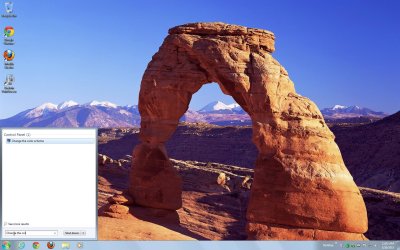
You can change the wallpaper. Change your desktop background You can pick different built in options by searching in the start menu for Change the color scheme but you cannot change them to different colours or themes.
 

Attachments

  • ScreenShot001.jpg
    ScreenShot001.jpg
    252.8 KB · Views: 13
  • ScreenShot000.jpg
    ScreenShot000.jpg
    226.6 KB · Views: 8

My Computer My Computer

Computer type
PC/Desktop
Computer Manufacturer/Model Number
Bluethunder II
OS
Windows 7 x64 Ultimate and numerous virtual machines
CPU
AMD FX-8350 Vishera 32nm Technology @ 4.2 GHz default
Motherboard
ASUSTeK COMPUTER INC. SABERTOOTH 990FX R2.0 (Socket 942)
Memory
G Skill 32.0GB Dual-Channel DDR3 @ 1204MHz (11-13-13-31)
Graphics Card(s)
EVGA GeForce GTX 960 4GB Super SC ACX 2.0+ with Back Plate
Sound Card
Creative X-Fi Titanium HD Audiophile PCIe
Monitor(s) Displays
LG L227WTG x 3
Screen Resolution
1680 x 1050 16:10
Hard Drives
238GB Samsung850 PRO SATA Disk Device (SSD)
1863GB Seagate ST2000DM 001-1CH164 (SATA)
1397GB Seagate ST1500DL 003-9VT16L(SATA)
466GB Western Digital WDC WD50 03AZEX-00K1GA0 (SATA) x 2
932GB Seagate ST310005 28AS SATA Disk Device (SATA)
PSU
Enermax Revolution87+ 1000 Watts Gold Certified Power Supply
Case
Rocketfish Full Tower
Cooling
Cooler Master Hyper 212 EVO Push Pull 120mm Fans
Keyboard
Logitech K740
Mouse
Logitech G100S Laser LED + Logitech Gamepad F310
Internet Speed
500 mbs down and 30mbs up
Antivirus
Malwarebytes Pro & Avast and MSE on certain Virtual Machines
Browser
Firefox (Main) Chrome, Internet Explorer (Back Up)
Other Info
Logitech X 230 2.1 Stereo System and 5.1 Yamaha RX V2090
B&W DM6 Monitor Speakers + Center and Surround Speakers
Using Mouse Without Borders (Google it)
You can try to type in dccw.exe in your search box and see if that takes you anywhere?
 

My Computer My Computer

Computer type
PC/Desktop
Computer Manufacturer/Model Number
Custom Build
OS
Win 10 Pro 64
CPU
Intel Core i7 960 @3.20 GHz
Motherboard
MSI MS7522
Memory
24.0 GB DDR3
Graphics Card(s)
EVGA GTX 750Ti
Monitor(s) Displays
LG E2341 23 Inch
Screen Resolution
1920x1080
Hard Drives
1TB Western Dgital 1002FAEX-00Y9A0
1TB Hitachi HDS721010CLA322
PSU
700 Watt
Case
Haf 912
Cooling
Fans
Keyboard
Logitech MK710
Mouse
Logitech M705
Internet Speed
Cable
Antivirus
AIS 2015 .10.0.2225
Browser
Firefox 49
Other Info
MalwareBytes Anti-Rootkit utility
You can try to type in dccw.exe in your search box and see if that takes you anywhere?
Hey Gary, that brings up the calibration in home basic. He is using Home Basic not generally available in the Western Markets. There is no theme support and the Personalization does not exist. I have a Home Basic Virtual machine. It is crippled compared to Premium.:cool:
Tony
 

My Computer My Computer

Computer type
PC/Desktop
Computer Manufacturer/Model Number
Bluethunder II
OS
Windows 7 x64 Ultimate and numerous virtual machines
CPU
AMD FX-8350 Vishera 32nm Technology @ 4.2 GHz default
Motherboard
ASUSTeK COMPUTER INC. SABERTOOTH 990FX R2.0 (Socket 942)
Memory
G Skill 32.0GB Dual-Channel DDR3 @ 1204MHz (11-13-13-31)
Graphics Card(s)
EVGA GeForce GTX 960 4GB Super SC ACX 2.0+ with Back Plate
Sound Card
Creative X-Fi Titanium HD Audiophile PCIe
Monitor(s) Displays
LG L227WTG x 3
Screen Resolution
1680 x 1050 16:10
Hard Drives
238GB Samsung850 PRO SATA Disk Device (SSD)
1863GB Seagate ST2000DM 001-1CH164 (SATA)
1397GB Seagate ST1500DL 003-9VT16L(SATA)
466GB Western Digital WDC WD50 03AZEX-00K1GA0 (SATA) x 2
932GB Seagate ST310005 28AS SATA Disk Device (SATA)
PSU
Enermax Revolution87+ 1000 Watts Gold Certified Power Supply
Case
Rocketfish Full Tower
Cooling
Cooler Master Hyper 212 EVO Push Pull 120mm Fans
Keyboard
Logitech K740
Mouse
Logitech G100S Laser LED + Logitech Gamepad F310
Internet Speed
500 mbs down and 30mbs up
Antivirus
Malwarebytes Pro & Avast and MSE on certain Virtual Machines
Browser
Firefox (Main) Chrome, Internet Explorer (Back Up)
Other Info
Logitech X 230 2.1 Stereo System and 5.1 Yamaha RX V2090
B&W DM6 Monitor Speakers + Center and Surround Speakers
Using Mouse Without Borders (Google it)
Right click on the Desktop and click Personalize.
See if that opens the window you are looking for.

I got Home Basic. In other words, I don't have that personalize button.
 

My Computer My Computer

Computer type
Laptop
Computer Manufacturer/Model Number
Asus
OS
Windows 7 Home Basic x64 SP1
Memory
RAM: 2 GB (1.6 GB usable)
Graphics Card(s)
AMD E-450 APU with Radeon(tm) HD Graphics 1.65 GHz
Sound Card
Realtek
Screen Resolution
1366 x 768
Hard Drives
C:\
D:\
Mouse
Genius
Internet Speed
7.2 Mbps
Antivirus
AVG
Browser
Chrome

My Computer My Computer

Computer type
Laptop
Computer Manufacturer/Model Number
Asus
OS
Windows 7 Home Basic x64 SP1
Memory
RAM: 2 GB (1.6 GB usable)
Graphics Card(s)
AMD E-450 APU with Radeon(tm) HD Graphics 1.65 GHz
Sound Card
Realtek
Screen Resolution
1366 x 768
Hard Drives
C:\
D:\
Mouse
Genius
Internet Speed
7.2 Mbps
Antivirus
AVG
Browser
Chrome
Hi Xeal Clianad and welcome to Seven Forums
I think you will find Home Basic does not allow you to change the colour schemes of the Windows. That is one of the limitations of Home Basic.
You can change the wallpaper. Change your desktop background You can pick different built in options by searching in the start menu for Change the color scheme but you cannot change them to different colours or themes.

I looked at your first image attachment. That is what I meant, and when I tried to find it, it wasn't there.
 

My Computer My Computer

Computer type
Laptop
Computer Manufacturer/Model Number
Asus
OS
Windows 7 Home Basic x64 SP1
Memory
RAM: 2 GB (1.6 GB usable)
Graphics Card(s)
AMD E-450 APU with Radeon(tm) HD Graphics 1.65 GHz
Sound Card
Realtek
Screen Resolution
1366 x 768
Hard Drives
C:\
D:\
Mouse
Genius
Internet Speed
7.2 Mbps
Antivirus
AVG
Browser
Chrome
Hi Xeal Clianad and welcome to Seven Forums
I think you will find Home Basic does not allow you to change the colour schemes of the Windows. That is one of the limitations of Home Basic.
You can change the wallpaper. Change your desktop background You can pick different built in options by searching in the start menu for Change the color scheme but you cannot change them to different colours or themes.

I looked at your first image attachment. That is what I meant, and when I tried to find it, it wasn't there.

Type exactly what I typed in the first attachment and it will come up. It is hidden and that is the only way to get it to come up in home basic.
 

Attachments

  • ScreenShot000.jpg
    ScreenShot000.jpg
    226.6 KB · Views: 9

My Computer My Computer

Computer type
PC/Desktop
Computer Manufacturer/Model Number
Bluethunder II
OS
Windows 7 x64 Ultimate and numerous virtual machines
CPU
AMD FX-8350 Vishera 32nm Technology @ 4.2 GHz default
Motherboard
ASUSTeK COMPUTER INC. SABERTOOTH 990FX R2.0 (Socket 942)
Memory
G Skill 32.0GB Dual-Channel DDR3 @ 1204MHz (11-13-13-31)
Graphics Card(s)
EVGA GeForce GTX 960 4GB Super SC ACX 2.0+ with Back Plate
Sound Card
Creative X-Fi Titanium HD Audiophile PCIe
Monitor(s) Displays
LG L227WTG x 3
Screen Resolution
1680 x 1050 16:10
Hard Drives
238GB Samsung850 PRO SATA Disk Device (SSD)
1863GB Seagate ST2000DM 001-1CH164 (SATA)
1397GB Seagate ST1500DL 003-9VT16L(SATA)
466GB Western Digital WDC WD50 03AZEX-00K1GA0 (SATA) x 2
932GB Seagate ST310005 28AS SATA Disk Device (SATA)
PSU
Enermax Revolution87+ 1000 Watts Gold Certified Power Supply
Case
Rocketfish Full Tower
Cooling
Cooler Master Hyper 212 EVO Push Pull 120mm Fans
Keyboard
Logitech K740
Mouse
Logitech G100S Laser LED + Logitech Gamepad F310
Internet Speed
500 mbs down and 30mbs up
Antivirus
Malwarebytes Pro & Avast and MSE on certain Virtual Machines
Browser
Firefox (Main) Chrome, Internet Explorer (Back Up)
Other Info
Logitech X 230 2.1 Stereo System and 5.1 Yamaha RX V2090
B&W DM6 Monitor Speakers + Center and Surround Speakers
Using Mouse Without Borders (Google it)
Good news, and bad news:

Good news: I did what you did and I saw it on the Start Menu.

Bad news: Nothing's happening.
 

My Computer My Computer

Computer type
Laptop
Computer Manufacturer/Model Number
Asus
OS
Windows 7 Home Basic x64 SP1
Memory
RAM: 2 GB (1.6 GB usable)
Graphics Card(s)
AMD E-450 APU with Radeon(tm) HD Graphics 1.65 GHz
Sound Card
Realtek
Screen Resolution
1366 x 768
Hard Drives
C:\
D:\
Mouse
Genius
Internet Speed
7.2 Mbps
Antivirus
AVG
Browser
Chrome
When you see it on the start menu you then have to click on the text to get the window to open.
 

My Computer My Computer

Computer type
PC/Desktop
Computer Manufacturer/Model Number
Bluethunder II
OS
Windows 7 x64 Ultimate and numerous virtual machines
CPU
AMD FX-8350 Vishera 32nm Technology @ 4.2 GHz default
Motherboard
ASUSTeK COMPUTER INC. SABERTOOTH 990FX R2.0 (Socket 942)
Memory
G Skill 32.0GB Dual-Channel DDR3 @ 1204MHz (11-13-13-31)
Graphics Card(s)
EVGA GeForce GTX 960 4GB Super SC ACX 2.0+ with Back Plate
Sound Card
Creative X-Fi Titanium HD Audiophile PCIe
Monitor(s) Displays
LG L227WTG x 3
Screen Resolution
1680 x 1050 16:10
Hard Drives
238GB Samsung850 PRO SATA Disk Device (SSD)
1863GB Seagate ST2000DM 001-1CH164 (SATA)
1397GB Seagate ST1500DL 003-9VT16L(SATA)
466GB Western Digital WDC WD50 03AZEX-00K1GA0 (SATA) x 2
932GB Seagate ST310005 28AS SATA Disk Device (SATA)
PSU
Enermax Revolution87+ 1000 Watts Gold Certified Power Supply
Case
Rocketfish Full Tower
Cooling
Cooler Master Hyper 212 EVO Push Pull 120mm Fans
Keyboard
Logitech K740
Mouse
Logitech G100S Laser LED + Logitech Gamepad F310
Internet Speed
500 mbs down and 30mbs up
Antivirus
Malwarebytes Pro & Avast and MSE on certain Virtual Machines
Browser
Firefox (Main) Chrome, Internet Explorer (Back Up)
Other Info
Logitech X 230 2.1 Stereo System and 5.1 Yamaha RX V2090
B&W DM6 Monitor Speakers + Center and Surround Speakers
Using Mouse Without Borders (Google it)
Yea Home Basic doesn't have that. My moms laptop has Home Basic.
 

My Computer My Computer

Computer type
Laptop
Computer Manufacturer/Model Number
Acer V3-551G
OS
Windows 7 Ultimate 32bit
CPU
AMD Quad-Core A8-4500M with Turbo Core up to 2.80GHz
Memory
8 GB DDR 3
Graphics Card(s)
AMD Radeon HD 7640G + 7670M (2GB dedicated VRAM)
Sound Card
AMD HD Audio device / Realtek HD Audio
Monitor(s) Displays
15.6" HD LED
Screen Resolution
1366 x 768 (32bit)
Hard Drives
1 TB HDD
Antivirus
AVG 2013 free edition
Browser
Google Chrome
Other Info
WEI scores:

Base score= 5.9

-Processor 6.7
-Memory (RAM) 7.2
-Graphics 5.9
-Gaming Graphics 6.2
-Primary hard disk 5.9
When you see it on the start menu you then have to click on the text to get the window to open.

I meant that when I type it, there was a result, but when I click it nothing happened.
 

My Computer My Computer

Computer type
Laptop
Computer Manufacturer/Model Number
Asus
OS
Windows 7 Home Basic x64 SP1
Memory
RAM: 2 GB (1.6 GB usable)
Graphics Card(s)
AMD E-450 APU with Radeon(tm) HD Graphics 1.65 GHz
Sound Card
Realtek
Screen Resolution
1366 x 768
Hard Drives
C:\
D:\
Mouse
Genius
Internet Speed
7.2 Mbps
Antivirus
AVG
Browser
Chrome

My Computer My Computer

Computer type
PC/Desktop
Computer Manufacturer/Model Number
Bluethunder II
OS
Windows 7 x64 Ultimate and numerous virtual machines
CPU
AMD FX-8350 Vishera 32nm Technology @ 4.2 GHz default
Motherboard
ASUSTeK COMPUTER INC. SABERTOOTH 990FX R2.0 (Socket 942)
Memory
G Skill 32.0GB Dual-Channel DDR3 @ 1204MHz (11-13-13-31)
Graphics Card(s)
EVGA GeForce GTX 960 4GB Super SC ACX 2.0+ with Back Plate
Sound Card
Creative X-Fi Titanium HD Audiophile PCIe
Monitor(s) Displays
LG L227WTG x 3
Screen Resolution
1680 x 1050 16:10
Hard Drives
238GB Samsung850 PRO SATA Disk Device (SSD)
1863GB Seagate ST2000DM 001-1CH164 (SATA)
1397GB Seagate ST1500DL 003-9VT16L(SATA)
466GB Western Digital WDC WD50 03AZEX-00K1GA0 (SATA) x 2
932GB Seagate ST310005 28AS SATA Disk Device (SATA)
PSU
Enermax Revolution87+ 1000 Watts Gold Certified Power Supply
Case
Rocketfish Full Tower
Cooling
Cooler Master Hyper 212 EVO Push Pull 120mm Fans
Keyboard
Logitech K740
Mouse
Logitech G100S Laser LED + Logitech Gamepad F310
Internet Speed
500 mbs down and 30mbs up
Antivirus
Malwarebytes Pro & Avast and MSE on certain Virtual Machines
Browser
Firefox (Main) Chrome, Internet Explorer (Back Up)
Other Info
Logitech X 230 2.1 Stereo System and 5.1 Yamaha RX V2090
B&W DM6 Monitor Speakers + Center and Surround Speakers
Using Mouse Without Borders (Google it)
Yeah.

P.S.: My laptop got a nasty malware once. It made my laptop go crazy. I don't know if this is helping but... anyway.
 

My Computer My Computer

Computer type
Laptop
Computer Manufacturer/Model Number
Asus
OS
Windows 7 Home Basic x64 SP1
Memory
RAM: 2 GB (1.6 GB usable)
Graphics Card(s)
AMD E-450 APU with Radeon(tm) HD Graphics 1.65 GHz
Sound Card
Realtek
Screen Resolution
1366 x 768
Hard Drives
C:\
D:\
Mouse
Genius
Internet Speed
7.2 Mbps
Antivirus
AVG
Browser
Chrome
Yeah.

P.S.: My laptop got a nasty malware once. It made my laptop go crazy. I don't know if this is helping but... anyway.
OK well it seems to work in my Home Basic virtual machine. It is fully updated with SP1. Is there anything else that does not work on your laptop? Maybe you need to run a malware scan.
Download Malwarebytes : Malwarebytes Anti-Malware removes malware including viruses, spyware, worms and trojans, plus it protects your computer

Do not sign up for the Pro trial. Post back with the results and we will get a malware guy to take a look if there are problems.
 

My Computer My Computer

Computer type
PC/Desktop
Computer Manufacturer/Model Number
Bluethunder II
OS
Windows 7 x64 Ultimate and numerous virtual machines
CPU
AMD FX-8350 Vishera 32nm Technology @ 4.2 GHz default
Motherboard
ASUSTeK COMPUTER INC. SABERTOOTH 990FX R2.0 (Socket 942)
Memory
G Skill 32.0GB Dual-Channel DDR3 @ 1204MHz (11-13-13-31)
Graphics Card(s)
EVGA GeForce GTX 960 4GB Super SC ACX 2.0+ with Back Plate
Sound Card
Creative X-Fi Titanium HD Audiophile PCIe
Monitor(s) Displays
LG L227WTG x 3
Screen Resolution
1680 x 1050 16:10
Hard Drives
238GB Samsung850 PRO SATA Disk Device (SSD)
1863GB Seagate ST2000DM 001-1CH164 (SATA)
1397GB Seagate ST1500DL 003-9VT16L(SATA)
466GB Western Digital WDC WD50 03AZEX-00K1GA0 (SATA) x 2
932GB Seagate ST310005 28AS SATA Disk Device (SATA)
PSU
Enermax Revolution87+ 1000 Watts Gold Certified Power Supply
Case
Rocketfish Full Tower
Cooling
Cooler Master Hyper 212 EVO Push Pull 120mm Fans
Keyboard
Logitech K740
Mouse
Logitech G100S Laser LED + Logitech Gamepad F310
Internet Speed
500 mbs down and 30mbs up
Antivirus
Malwarebytes Pro & Avast and MSE on certain Virtual Machines
Browser
Firefox (Main) Chrome, Internet Explorer (Back Up)
Other Info
Logitech X 230 2.1 Stereo System and 5.1 Yamaha RX V2090
B&W DM6 Monitor Speakers + Center and Surround Speakers
Using Mouse Without Borders (Google it)
This is what I got Indianatone...

(start)

Malwarebytes Anti-Malware (Trial) 1.70.0.1100
Malwarebytes : Free anti-malware download

Database version: v2012.12.14.11

Windows 7 Service Pack 1 x64 NTFS
Internet Explorer 9.0.8112.16421
cadalin :: XEALCLIANAD [administrator]

Protection: Enabled

3/22/2013 12:37:18 PM
MBAM-log-2013-03-22 (12-52-35).txt

Scan type: Quick scan
Scan options enabled: Memory | Startup | Registry | File System | Heuristics/Extra | Heuristics/Shuriken | PUP | PUM
Scan options disabled: P2P
Objects scanned: 237710
Time elapsed: 11 minute(s), 11 second(s)

Memory Processes Detected: 0
(No malicious items detected)

Memory Modules Detected: 0
(No malicious items detected)

Registry Keys Detected: 3
HKCU\SOFTWARE\Trymedia Systems (Adware.TryMedia) -> No action taken.
HKCU\Software\RavenBleuSA (Adware.Hotbar.RB) -> No action taken.
HKCU\Software\Microsoft\Windows\CurrentVersion\Uninstall\RavenBleuSA (Adware.Hotbar.RB) -> No action taken.

Registry Values Detected: 0
(No malicious items detected)

Registry Data Items Detected: 0
(No malicious items detected)

Folders Detected: 4
C:\Users\cadalin\Local Settings\Application Data\RavenBleuSA (Adware.Hotbar.RB) -> No action taken.
C:\Users\cadalin\Local Settings\Application Data\RavenBleuSA\bin (Adware.Hotbar.RB) -> No action taken.
C:\Users\cadalin\Local Settings\Application Data\RavenBleuSA\bin\1.0.14.0 (Adware.Hotbar.RB) -> No action taken.
C:\Users\cadalin\Local Settings\Application Data\RavenBleuSA\data (Adware.Hotbar.RB) -> No action taken.

Files Detected: 8
C:\Users\cadalin\Local Settings\Application Data\RavenBleuSA\bin\1.0.14.0\copyright.txt (Adware.Hotbar.RB) -> No action taken.
C:\Users\cadalin\Local Settings\Application Data\RavenBleuSA\bin\1.0.14.0\RavenBleuSACB.exe (Adware.Hotbar.RB) -> No action taken.
C:\Users\cadalin\Local Settings\Application Data\RavenBleuSA\bin\1.0.14.0\RavenBleuSAHook.dll (Adware.Hotbar.RB) -> No action taken.
C:\Users\cadalin\Local Settings\Application Data\RavenBleuSA\bin\1.0.14.0\RavenBleuUninstaller.exe (Adware.Hotbar.RB) -> No action taken.
C:\Users\cadalin\Local Settings\Application Data\RavenBleuSA\data\RavenBleuSA.dat (Adware.Hotbar.RB) -> No action taken.
C:\Users\cadalin\Local Settings\Application Data\RavenBleuSA\data\RavenBleuSAau.dat (Adware.Hotbar.RB) -> No action taken.
C:\Users\cadalin\Local Settings\Application Data\RavenBleuSA\data\RavenBleuSA_hpk.dat (Adware.Hotbar.RB) -> No action taken.
C:\Users\cadalin\Local Settings\Application Data\RavenBleuSA\data\RavenBleuSA_kyf.dat (Adware.Hotbar.RB) -> No action taken.

(end)

Haven't done anything yet; waiting instructions...

 

My Computer My Computer

Computer type
Laptop
Computer Manufacturer/Model Number
Asus
OS
Windows 7 Home Basic x64 SP1
Memory
RAM: 2 GB (1.6 GB usable)
Graphics Card(s)
AMD E-450 APU with Radeon(tm) HD Graphics 1.65 GHz
Sound Card
Realtek
Screen Resolution
1366 x 768
Hard Drives
C:\
D:\
Mouse
Genius
Internet Speed
7.2 Mbps
Antivirus
AVG
Browser
Chrome
Hi Xeal, I would allow those detections to be removed. Adware.Hotbar.RB is some type of malware and may be difficult to remove.
 

My Computer My Computer

Computer type
PC/Desktop
Computer Manufacturer/Model Number
Home Built Desktop By DataTech
OS
Windows 7 Ultimate X64 SP1
CPU
Intel i5-2550K, Differing ~4.4-4.8GHz No built in GPU
Motherboard
ASUS P8Z68-V PRO/GEN3
Memory
16GB G.Skill Sniper 1866MHz @ 2133MHz 2x8GB
Graphics Card(s)
ASUS GTX650TIB-DC2OC-2GD5, (650TI Boost)
Sound Card
Onboard Realtek 5-1
Monitor(s) Displays
Samsung P2570HD
Screen Resolution
1920x1080
Hard Drives
Samsung 840 Pro 256GB SSD for OS, 500GB Seagate Constellation (Enterprise drive) for Data
PSU
Corsair HX650W
Case
Inwin Dragon Rider
Cooling
Hyper 212 EVO w/two Noctua fans, push-pull, @1300 RPM
Keyboard
E-Z Eyes, bright yellow keys with large characters
Mouse
steelseries SENSEI Laser Pro Gaming
Internet Speed
48-51Mbs Mbs down, 11 Mbs up Xfinity Cable
Antivirus
Norton Internet Security 2013
Browser
IE 10, Opera, Pale Moon if needed
Other Info
4 case fans, LG BluRay-RE, ASUS DVD-RW, Mr. Fusion power supply, 1.21 gigawatts.
Back
Top