No connection to browser : Adware "generic5,akmv"

ronzboyz4

New member
Local time
7:00 PM
Messages
5
I just went through this mess!

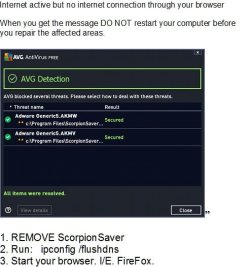
[FONT=&quot]Internet active but no internet connection through your browser
-------------------------------------------------------------------------------------------
[/FONT]
[FONT=&quot]When you get the message DO NOT restart your computer before you repair the affected areas.[/FONT]

[FONT=&quot]1. REMOVE ScorpionSaver[/FONT]
[FONT=&quot]2. Run : ipconfig /flushdns[/FONT]
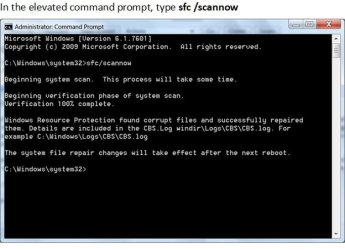
[FONT=&quot]3. Run : sfc /scannow[/FONT]
[FONT=&quot]4. Start your browser. I/E. FireFox. [/FONT]
 

Attachments
  • Adware removal and repair.jpg
    Adware removal and repair.jpg
    34 KB · Views: 30
  • Adware removal and repair 2.jpg
    Adware removal and repair 2.jpg
    34.7 KB · Views: 30
Last edited:

My Computer My Computer

At a glance

Win7 32bit
Computer type
PC/Desktop
Computer Manufacturer/Model Number
Dell 745
OS
Win7 32bit
Antivirus
AVG
Browser
FF

My Computer My Computer

At a glance

Win-7-Pro64bit 7-H-Prem-64biti7-5930K 2nd i9-9940x both water blocked VRM'...Trident-z 3200C14 2nd Trident-z 3600C16EVGA 1080ti ftw3 2nd Titan Xp both water blocked
Computer type
PC/Desktop
Computer Manufacturer/Model Number
Custom assembled by me :}
OS
Win-7-Pro64bit 7-H-Prem-64bit
CPU
i7-5930K 2nd i9-9940x both water blocked VRM's too
Motherboard
ASUS SABERTOOTH X99 2nd ASUS x299 Apex
Memory
Trident-z 3200C14 2nd Trident-z 3600C16
Graphics Card(s)
EVGA 1080ti ftw3 2nd Titan Xp both water blocked
Sound Card
Built-in Realtek
Monitor(s) Displays
1-AOC G2460PG 24"G-Sync 144Hz/ 2nd 1-ASUS VG248QE 24" 144Hz
Screen Resolution
1920 x 1080 144Hz
Hard Drives
2-Samsung M.2 Evo & Evo Plus
2-Samsung 850 EVO 500GB SSD's/ 3-2.5 W.D. Black 1tb-&3-1tb/3-3.5 WD Black 1tb hdd's
PSU
EVGA SuperNOVA 1000-P2 2nd 1200-P2
Case
2-Corsair Obsidian Series 450D Black ATX Mid Tower
Cooling
Custom water loops
Keyboard
Logitech G710+/ 2nd Logitech G910
Mouse
2-RedDragon M901 Perdition 16400 dpi Gaming mouse = wired
Internet Speed
Comcast Ping 19ms 89.31mbps download speed 6.12mbps upload
Antivirus
Malwarebytes Pro/ Superantispyware Pro
Browser
FireFox & Pale moon
Other Info
2nd ASUS X299 Apex/Intel i9-9940x with Custom water loop/7H-Prem-x64/Corsair 450D case/Ram Trident-z 3600C16 4x8gb / Samsung970Evo plus 500gb SSD/Dual ssd EZ swap evo/PSU EVGA SuperNova 1200w-P2 80+Platinum/GPU Titan Xp /8-ML-140 on push-pull on 2-280GTX rads
ScorpionSaver

[FONT=&quot]ScorpionSaver, with something "free", hidden along the install that I missed while installing.[/FONT]
 

My Computer My Computer

At a glance

Win7 32bit
Computer type
PC/Desktop
Computer Manufacturer/Model Number
Dell 745
OS
Win7 32bit
Antivirus
AVG
Browser
FF
Did Thrashzone's method work?
 

My Computer My Computer

At a glance

Windows 7 Home Premium 64BitAMD A6-3420M 1.5GHZ OC - 2.0GHZ4GB DDR3 1600MHZAMD RADEON 6520G+AMD RADEON HD7470M 1GB DDR3
Computer type
Laptop
Computer Manufacturer/Model Number
Packard Bell
OS
Windows 7 Home Premium 64Bit
CPU
AMD A6-3420M 1.5GHZ OC - 2.0GHZ
Memory
4GB DDR3 1600MHZ
Graphics Card(s)
AMD RADEON 6520G+AMD RADEON HD7470M 1GB DDR3
Screen Resolution
1366x768
Hard Drives
500GB SATA
Internet Speed
18Mb Unlimited
Antivirus
AVAST!
Browser
MOZILLA FIREFOX
I did not go to that extent, but it looks good and I will go through the list. I use firefox. Should be similar.
 

My Computer My Computer

At a glance

Win7 32bit
Computer type
PC/Desktop
Computer Manufacturer/Model Number
Dell 745
OS
Win7 32bit
Antivirus
AVG
Browser
FF
ronzboyz4,

Try the following, and post back if you can access the Internet to download the tool...

:info: Press the Windows Key and the R key at the same time.

At the Run prompt, copy/paste the following text inside the box:


HTML:
iexplore.exe http://www.bleepingcomputer.com/download/rkill/dl/132/
Press: OK

If you are able to download, select the Run button to use: RKill

Allow the program to run, and do not reboot the computer after using RKill!!


:info: Now, once again press the Windows Key and the R key at the same time.

At the Run prompt, copy/paste the following text inside the box:


HTML:
iexplore.exe http://www.bleepingcomputer.com/download/malwarebytes-anti-malware/
Press: OK

Select the Run button to use MBAM

When the installation begins, follow the prompts in the setup process.
Do not make any changes to default settings and when the program has finished installing, make sure only the following options are checked:
>Update Malwarebytes’ Anti-Malware
>Launch Malwarebytes’ Anti-Malware
Uncheck:
>Enable free trial of Malwarebytes Anti-Malware PRO
Click on the Finish button.

If an update is found, the program automatically updates itself.
At the program console, on the Scanner tab, and select: Perform Quick Scan

Next, click on the Scan button.

When the Malwarebytes scan is completed, click on: Show Results
When presented with a screen showing the malware detected, make sure everything is Checked, and click on: Remove Selected

When removal is completed, a report opens in Notepad.

:ar: Please copy/paste the entire contents of the MBAM report in your reply.

Note: If MBAM encounters a file that is difficult to remove, you are asked to reboot the computer so MBAM can proceed with the disinfection process. If asked to restart the computer, please do so immediately. Failure to reboot normally (not into safe mode) prevents MBAM from removing all the malware.

:ar: Also let us know if you can access the Internet.
 

My Computer My Computer

At a glance

Windows 7 Home Premium
Computer type
PC/Desktop
Computer Manufacturer/Model Number
An ol' eMachines
OS
Windows 7 Home Premium
Internet Speed
Fine for me...I'm retired!
@ronzboyz4

I tried your method. But when I typed
HTML Code:iexplore.exe Downloading RKill
In my run prompt and error message window and said "there is no program associated to perform the requested action. Please install a program or, if one is already installed, create an association in the default programs control panel.
 

My Computer My Computer

At a glance

Windows 7 Home Premium 64 bitAMD2 GBNvidia
Computer type
PC/Desktop
Computer Manufacturer/Model Number
Emachines
OS
Windows 7 Home Premium 64 bit
CPU
AMD
Memory
2 GB
Graphics Card(s)
Nvidia
Antivirus
AVG
Browser
Firefox
hey guys, i have this similar problem. I tried to uninstall the ScorpionSaver from my computer, but when i try to do this, a windows installer window pops up and says "The feature you are trying to use is on a network resource that is unavailable. Click OK to try again, or enter an alternate path to a folder containing the installation package "ScorpionSaver.msi" in the box below.
It gives me a drop down menu that says c://temp//

When i click on OK, another windows installer window pops up and says "The installation source for this product is not available. Verify that the source exists and that you can access it."
 

My Computer My Computer

At a glance

Windows 7 Home Premium 64 bitAMD2 GBNvidia
Computer type
PC/Desktop
Computer Manufacturer/Model Number
Emachines
OS
Windows 7 Home Premium 64 bit
CPU
AMD
Memory
2 GB
Graphics Card(s)
Nvidia
Antivirus
AVG
Browser
Firefox
Piojoa7x,

Please start your very own topic in this forum:
System Security - Windows 7 Help Forums

It just gets too complicated to solve two problems in one topic. Even though you are experiencing ScorpionSaver problems, normally there are differences in each case.

Thanks!
 

My Computer My Computer

At a glance

Windows 7 Home Premium
Computer type
PC/Desktop
Computer Manufacturer/Model Number
An ol' eMachines
OS
Windows 7 Home Premium
Internet Speed
Fine for me...I'm retired!
Back
Top