Solved No Default Keyboard Layout

valveless

New member
Local time
10:52 PM
Messages
3
Hi all, I'm having a major stress. I don't know why it's happened but my keyboard has gone from UK layout to US (the @ and " positions have swapped as have |#|).

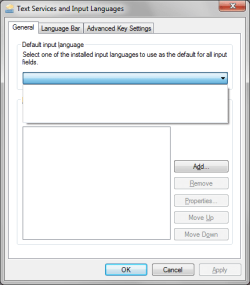
I've spent ages looking for help on this forum and others, googled the h*** out of the sucka, but I can't work out how to get it back. My main problem can be seen from the screenshot below (I hope).
Untitled-2.png

As you can see, for some reason I have no default keyboard layouts. What can I do to get them back, reinstall them or what ever so my layout is restored to UK. I'd rather not have to install a 3rd party app, and I'm comfortable with writing something to the registry if need be.

I've also noticed during this that I can't see the language bar, and can't restore it.

I'm running windows 7 home prem, with sp1 (aparently all the latest updates).

Appreciate your help

valveless
 

My Computer

OS
Windows 7 Home Premium
valveless, welcome to sevenforums.com!

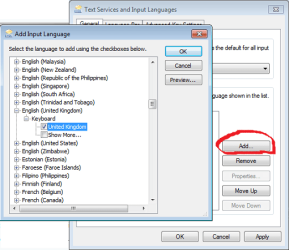
You just need to click on the Add button on that window and select
English (United Kingdom) - Keyboard - United Kingdom

Language bar is not available yet, because you do not have any input languages installed. Use the method I described to add languages, and after that language bar can be available.

More detailed information is available as a Tutorial.
http://www.sevenforums.com/tutorials/86204-keyboard-input-language-add-remove.html
 

Attachments

  • input_lang.png
    input_lang.png
    30.2 KB · Views: 6

My Computer

Computer type
PC/Desktop
OS
Windows 8.1 ; Windows 7 x86 (Dec2008-Jan2013)
Other Info
"The scale icon at the top right of a post or tutorial is how you can give rep to the member."
Hi, thanks for responding so quickly.

Unfortunately, there are no english layouts when I click the add button.Not at the pc to post a screenshot, but it looks like the only options there are the ones that come in sp1. I installed this yesterday as I hadnt realised it had failed due to lack of space.

Is there anywhere I can download the layouts from? They dont appear listed in windows updates.


V
 

My Computer

OS
Windows 7 Home Premium
Ok, at this point of time I am not sure how to restore those layouts (probably http://www.sevenforums.com/tutorials/1538-sfc-scannow-command-system-file-checker.html),
but I have quicker work around for you.

I have opened UK layout in Microsoft Keyboard Layout Creator 1.4 and saved it without any changes in the installation file in attachment. It is calling itself UK-Custom, but it is a full copy of the original UK keyboard layout.

It has versions for i386, amd64, ia64 and wow64, but it will detect the version you need automatically, so just start the setup file.
 

My Computer

Computer type
PC/Desktop
OS
Windows 8.1 ; Windows 7 x86 (Dec2008-Jan2013)
Other Info
"The scale icon at the top right of a post or tutorial is how you can give rep to the member."
I can has @!!!!!

Thank you so much, that worked perfectly.

For anyone who stumbles across this in a year or so (as I so often do), I tried the SFC/SCANNOW method and completed the scan with no luck.

Thanks again Neutron16

valveless
 

My Computer

OS
Windows 7 Home Premium
Back
Top