No drive-letter assign to USB - how to fix?

Burgurne

Danish Viking
Member
VIP
Local time
10:29 PM
Messages
134
Location
Denmark
Greetings.
A while ago one of my USB HDDs did not get a drive-letter when I connected it. I have to go to controlpanel, disk-management to assign a letter manually.
Now it has spread to all of my USB-drives and also to my lonely eSATA HDD.

How do I fix this, so drives again automatic will be assigned to a free drive-letter? (example to h:\)
 

My Computer My Computer

At a glance

Windows 7 Ultimate x64 retailCore i5 3570K @ 4,4Ghz16Gbyte Corsair C9 1866mhzMSI Lightning GTX 770
Computer type
PC/Desktop
Computer Manufacturer/Model Number
homebrewed
OS
Windows 7 Ultimate x64 retail
CPU
Core i5 3570K @ 4,4Ghz
Motherboard
MSI Z77A GD65
Memory
16Gbyte Corsair C9 1866mhz
Graphics Card(s)
MSI Lightning GTX 770
Sound Card
Auzentech
Monitor(s) Displays
BenQ 24"
Screen Resolution
1920x1200
Hard Drives
Samsung 840 EVO SSD, Samsung SSD 830 256Gbyte, Seagate 3Tbyte HDD, WD 4 Tbyte HDD.
PSU
Zahlmann 850HP
Case
Corsair Carbide 500R
Keyboard
G15 logitech
Mouse
Logitech Laser MX1000
Internet Speed
60/60
Antivirus
Bitdefender
Browser
Chrome
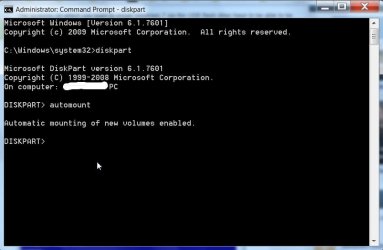
Run diskpart from an elevated command prompt, type automount and enter.

Screenshot:

15-02-2013 23-31-45.jpg
 

My Computer My Computer

At a glance

Windows 7 Home Premium 32 bit
OS
Windows 7 Home Premium 32 bit
No, that was not enough. It wrote Automatic mounting of new devices disabled. Tried again, and same result. Then I tried HELP AUTOMOUNT, and found the solution. I have to write "automount enabled".
This worked. Thank you for pointing me in the right direction :)
 

My Computer My Computer

At a glance

Windows 7 Ultimate x64 retailCore i5 3570K @ 4,4Ghz16Gbyte Corsair C9 1866mhzMSI Lightning GTX 770
Computer type
PC/Desktop
Computer Manufacturer/Model Number
homebrewed
OS
Windows 7 Ultimate x64 retail
CPU
Core i5 3570K @ 4,4Ghz
Motherboard
MSI Z77A GD65
Memory
16Gbyte Corsair C9 1866mhz
Graphics Card(s)
MSI Lightning GTX 770
Sound Card
Auzentech
Monitor(s) Displays
BenQ 24"
Screen Resolution
1920x1200
Hard Drives
Samsung 840 EVO SSD, Samsung SSD 830 256Gbyte, Seagate 3Tbyte HDD, WD 4 Tbyte HDD.
PSU
Zahlmann 850HP
Case
Corsair Carbide 500R
Keyboard
G15 logitech
Mouse
Logitech Laser MX1000
Internet Speed
60/60
Antivirus
Bitdefender
Browser
Chrome
Yep, I missed it by a whisker in a hurry to go to bed. :D

Typing automount will show you the status. In your case it was disabled and the status was shown.

Once the status is known typiing automount enable enables it.

Thanks for your feedback. You did a good job catching on the suggestion.
 

My Computer My Computer

At a glance

Windows 7 Home Premium 32 bit
OS
Windows 7 Home Premium 32 bit
A new problem occured. Now the hidden drive (100MB) as Windows 7 uses for UEFI-boot, is getting a drive-letter :(.

How do I hide this drive from the drive-letters, but keep the automount for attached USB-HDDs and USB-sticks?

As windows was new-installed, I'm pretty sure, that this small "boot"drive did NOT have a drive-letter, I want that to be true again, if possible. But I don't know how :o
 

My Computer My Computer

At a glance

Windows 7 Ultimate x64 retailCore i5 3570K @ 4,4Ghz16Gbyte Corsair C9 1866mhzMSI Lightning GTX 770
Computer type
PC/Desktop
Computer Manufacturer/Model Number
homebrewed
OS
Windows 7 Ultimate x64 retail
CPU
Core i5 3570K @ 4,4Ghz
Motherboard
MSI Z77A GD65
Memory
16Gbyte Corsair C9 1866mhz
Graphics Card(s)
MSI Lightning GTX 770
Sound Card
Auzentech
Monitor(s) Displays
BenQ 24"
Screen Resolution
1920x1200
Hard Drives
Samsung 840 EVO SSD, Samsung SSD 830 256Gbyte, Seagate 3Tbyte HDD, WD 4 Tbyte HDD.
PSU
Zahlmann 850HP
Case
Corsair Carbide 500R
Keyboard
G15 logitech
Mouse
Logitech Laser MX1000
Internet Speed
60/60
Antivirus
Bitdefender
Browser
Chrome
Go into disk management and remove the letter.
 

My Computer My Computer

At a glance

Windows 10 Pro x64Intel Core i7 6700KGSkill TridentZ RGB 16GB 3600 16-16-16-36EVGA GTX 980 Ti SC x2
Computer type
PC/Desktop
Computer Manufacturer/Model Number
Skylake Special #666
OS
Windows 10 Pro x64
CPU
Intel Core i7 6700K
Motherboard
Asus Sabertooth Z170 Mark 1
Memory
GSkill TridentZ RGB 16GB 3600 16-16-16-36
Graphics Card(s)
EVGA GTX 980 Ti SC x2
Sound Card
Realtek High Definition
Monitor(s) Displays
AOC G2460PG
Screen Resolution
1920 x 1080 144Hz
Hard Drives
Samsung 860 Pro 256GB, Seagate Barracuda 4TB x2
PSU
EVGA 1000 P2, EVGA White Custom Braided Cables
Case
Corsair Vengeance C70 Gunmetal Black
Cooling
Corsair H100i v2, Corsair ML120 x2, Thermal Grizzly Kryonaut
Keyboard
Logitech G910 Orion Spectrum
Mouse
Logitech G700s
Internet Speed
Verizon Fios Quantum Gateway 75/75
Antivirus
Windows Defender, Malwarebytes Free 3.8.3
Browser
Chrome
Other Info
Corsair SP120 x4, LG Blu-ray Drive, Durabrand HT-395 100 Watt Dolby Digital Amp, Corsair H2100 Wireless 7.1 Headset
Yes, but after next reboot, it got a letter again. I want drive-letter to stay away from this special drive.
 

My Computer My Computer

At a glance

Windows 7 Ultimate x64 retailCore i5 3570K @ 4,4Ghz16Gbyte Corsair C9 1866mhzMSI Lightning GTX 770
Computer type
PC/Desktop
Computer Manufacturer/Model Number
homebrewed
OS
Windows 7 Ultimate x64 retail
CPU
Core i5 3570K @ 4,4Ghz
Motherboard
MSI Z77A GD65
Memory
16Gbyte Corsair C9 1866mhz
Graphics Card(s)
MSI Lightning GTX 770
Sound Card
Auzentech
Monitor(s) Displays
BenQ 24"
Screen Resolution
1920x1200
Hard Drives
Samsung 840 EVO SSD, Samsung SSD 830 256Gbyte, Seagate 3Tbyte HDD, WD 4 Tbyte HDD.
PSU
Zahlmann 850HP
Case
Corsair Carbide 500R
Keyboard
G15 logitech
Mouse
Logitech Laser MX1000
Internet Speed
60/60
Antivirus
Bitdefender
Browser
Chrome
Back
Top