NO games working on Win7 Ultimate 64-Bit

Armenix

New member
Local time
10:02 PM
Messages
9
Hi there sevenforums!

Ok, so I have an unusual issue. I have 1 computer and 1 laptop with Windows 7 Ultimate 64-bit Edition Build 7600 on both of them, and both have all updated (and proper) drivers. I have tried installing these games in attempts to see what sorts of games will work and what wont: Left 4 Dead, Heroes of Might and Magic V, and Warcraft III.

My laptop:
AMD Sempron Processor
Nvidia GeForce M8200
3GB RAM

Desktop:
Intel E2200 Dual Core
ATI Radeon HD 2600XT
2GB RAM

On my laptop, I am able to successfully install all of the games, but Warcraft III will not play, not even with the latest 1.24a patch (BSOD). Heroes V initially gave me trouble and gave me a BSOD, but once i reinstalled it, it worked just fine. Left 4 Dead gave me no issues.

On my desktop, however, NOTHING will play. All of my programs run just fine, not a single hitch, but all of my games give me a BSOD, or just turn my screen black and restart my computer. Unlike my laptop, I have my Windows 7 on a separate partition (20GB), and i install everything on another partition. I don't know if this is a factor, but as far as i know, it shouldn't matter. I have tried running them all on different compatibility modes, and have run them as a system administrator, and they all yield the same result

Although Warcraft III should work since people can play it on Vista 64-bit, i'm not even that peeved about that, i could live with that. I just want to know why NOTHING works on my desktop computer...any suggestions? I'm about ready to pull out my hair on this one.
 
Last edited:

My Computer My Computer

At a glance

Windows 7 Ultimate 64-bitIntel Dual Core E2200 @ 2.20 Ghz2 GB Corsair RAMATI Radeon HD 2600XT
Computer Manufacturer/Model Number
Custom
OS
Windows 7 Ultimate 64-bit
CPU
Intel Dual Core E2200 @ 2.20 Ghz
Motherboard
Gigabyte S-Series
Memory
2 GB Corsair RAM
Graphics Card(s)
ATI Radeon HD 2600XT
Sound Card
Sound Blaster X-Fi Xtreme Audio
Without knowing what the BSOD errors are, it's hard to pinpoint a culprit.

The usual suspects:

Are all video and sound drivers are up to date?

Chipset drivers installed?

Are there any yellow triangle exclamation marks appearing in device manager?
 

My Computer My Computer

At a glance

8 Pro x64i7 3770K 4.6GHz16GB G.Skill Trident X 2666mhzx2 EVGA 780 Ti Superclocked SLI
Computer type
PC/Desktop
Computer Manufacturer/Model Number
Systems by SmartEyeball
OS
8 Pro x64
CPU
i7 3770K 4.6GHz
Motherboard
ASUS P8Z77 WS
Memory
16GB G.Skill Trident X 2666mhz
Graphics Card(s)
x2 EVGA 780 Ti Superclocked SLI
Sound Card
SB X-FI Surround 5.1 PRO USB / ATH-AD900 Headphones
Monitor(s) Displays
x3 Dell U2410 / 58" Samsung
Screen Resolution
5760*1200/ 1920*1200
Hard Drives
2x Intel 520 240GB (RAID 0) * 2x WD Caviar Blacks 2TB (RAID 0) * 2TB WD Caviar Black * Sony Optirac DVD
PSU
Silverstone Strider Evolution 1200W
Case
Thermaltake Level 10 GT Snow Edition
Cooling
Noctua NH-D14
Keyboard
Topre Realforce // Ducky Shine MX Black // Filco Ninja TKL
Mouse
Thermaltake Theron (Highly Recommended) + Razer Imperator
Antivirus
MSE
Browser
IE, FF, WaterFox
Other Info
GT Extreme V2 Sim Racing Cockpit + 40" LCD and K/B Mouse stand ▼
Fanatec CSR Elite Wheel + Clubsport V1 Pedals + CSR shifter/7G-H ▼Saitek X52 Pro ▼ TrackIR 5 Pro
Buttkicker v2 Seat Rumbler with Dedicated 5.1 and Sub Woofer attached to frame ▼
=
Bloody Big Grin
Thank you for the reply smarteyeball!!

For the most part, i'm primarily getting black screens that seem like it's loading the game, then it reboots my computer automatically after 4-5 seconds. I don't seem to get BSOD's anymore.

I am not seeing any yellow exclamation marks by any of my devices in the "device manager" screen, so I don't think it's that. What I can do is link/tell you what drivers I have installed for the devices on my computer and see if its just not properly recognizing any conflicting drivers, or maybe i'm missing some necessary ones, but all appears right to me.


Intel E2200 Dual Core - None

ATI Radeon HD 2600XT - Drivers & Tools | GAME.AMD.COM (Driver Ver. 8.632.0.0)

GIGABYTE GA-P31-S3G Motherboard - GIGABYTE - Support&Download - Motherboard - Driver - GA-P31-S3G (rev. 1.0) (Chipset Driver Ver 8.3.1.1009)

Sound Blaster X-Fi Xtreme Audio -
Creative Worldwide Support > X-Fi Xtreme Audio (Driver Ver. 1.04.0090)


Thats about it...I'm still unsure of what to do. Im still troubleshooting with no luck, any further advice would be appreciated. THANK YOU

Edit: I seemed to have found an article where someone is facing similar issues, just not the same OS (XP 64-bit), maybe there's something in there that could help lead me to answer?

http://www.tomshardware.com/forum/266108-33-radeon-4850-windows-black-screen-computer-freeze
 
Last edited:

My Computer My Computer

At a glance

Windows 7 Ultimate 64-bitIntel Dual Core E2200 @ 2.20 Ghz2 GB Corsair RAMATI Radeon HD 2600XT
Computer Manufacturer/Model Number
Custom
OS
Windows 7 Ultimate 64-bit
CPU
Intel Dual Core E2200 @ 2.20 Ghz
Motherboard
Gigabyte S-Series
Memory
2 GB Corsair RAM
Graphics Card(s)
ATI Radeon HD 2600XT
Sound Card
Sound Blaster X-Fi Xtreme Audio
It all looks in order driver wise. No exclamation marks in Device indicates nothing untoward there either.

Did you have any trouble with the same components in another OS? ie XP or Vista - or is this a fresh build just for Seven? If it's a new build, it sounds like a power supply problem.

Have you run the WEI system rating? (It shouldn't matter, but if there is a video problem, it may possibly crash when running the Video card assesement)

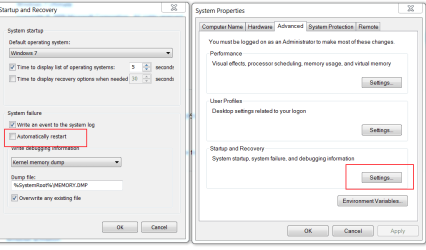
On the off chance it's still technically BSOD'ing - to stop an automatic restart:

Right click on "Computer" in the start menu>properties and then select "advanced system settings"

In the start up and recovery field, select settings and untick 'Automatically restart'
auto.PNG


Since you've already had some BSOD, head to:

C:\Windows\minidump

and zip and upload a few of the most recent .dmp crash dumps (use the paperclip attachment to upload the zipped file)

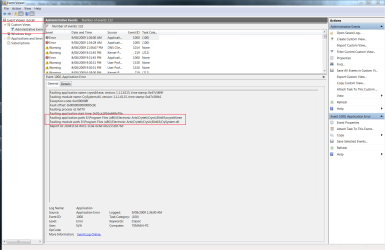
Lastly, check in the Event Viewer logs:

Start Orb>type "event" and got to Custom views>administrative events to see if the app crash has a common faulting module

event viewer.PNG
 

My Computer My Computer

At a glance

8 Pro x64i7 3770K 4.6GHz16GB G.Skill Trident X 2666mhzx2 EVGA 780 Ti Superclocked SLI
Computer type
PC/Desktop
Computer Manufacturer/Model Number
Systems by SmartEyeball
OS
8 Pro x64
CPU
i7 3770K 4.6GHz
Motherboard
ASUS P8Z77 WS
Memory
16GB G.Skill Trident X 2666mhz
Graphics Card(s)
x2 EVGA 780 Ti Superclocked SLI
Sound Card
SB X-FI Surround 5.1 PRO USB / ATH-AD900 Headphones
Monitor(s) Displays
x3 Dell U2410 / 58" Samsung
Screen Resolution
5760*1200/ 1920*1200
Hard Drives
2x Intel 520 240GB (RAID 0) * 2x WD Caviar Blacks 2TB (RAID 0) * 2TB WD Caviar Black * Sony Optirac DVD
PSU
Silverstone Strider Evolution 1200W
Case
Thermaltake Level 10 GT Snow Edition
Cooling
Noctua NH-D14
Keyboard
Topre Realforce // Ducky Shine MX Black // Filco Ninja TKL
Mouse
Thermaltake Theron (Highly Recommended) + Razer Imperator
Antivirus
MSE
Browser
IE, FF, WaterFox
Other Info
GT Extreme V2 Sim Racing Cockpit + 40" LCD and K/B Mouse stand ▼
Fanatec CSR Elite Wheel + Clubsport V1 Pedals + CSR shifter/7G-H ▼Saitek X52 Pro ▼ TrackIR 5 Pro
Buttkicker v2 Seat Rumbler with Dedicated 5.1 and Sub Woofer attached to frame ▼
=
Bloody Big Grin
Thanks again for another reply, smarteyeball!

I've had this computer for about a year now, and i previously ran Win XP Pro SP3 32-bit edition flawlessly. I had never actually gotten a BSOD until windows 7, and I haven't changed anything hardware-wise.

As far as not receiving enough power, my current power supply is an Antec Earthwatts EA430 (430W)...do you think that could be an issue? Found here: Newegg.com - Antec earthwatts EA430 430W Continuous Power ATX12V v2.0 80 PLUS Certified Active PFC Power Supply - Power Supplies

On the WEI, i score a 5.4, which is low-balled by my RAM/CPU. My GPU ranks up to 5.7 for desktop and 6.3 for gaming.

I have attached those errors as requested, and i checked that administrative events thing, and there was only 1 application error logged, and this is what it said:

Faulting application name: rundll32.exe, version: 6.1.7600.16385, time stamp: 0x4a5bc637
Faulting module name: P17RunE.dll, version: 1.0.1.1, time stamp: 0x46199985
Exception code: 0xc0000005
Fault offset: 0x00002393
Faulting process id: 0x808
Faulting application start time: 0x01ca1899f7a8882b
Faulting application path: C:\Windows\SysWOW64\rundll32.exe
Faulting module path: C:\Windows\SysWOW64\P17RunE.dll
Report Id: 4c03fd57-84a7-11de-be50-001d7dadc7be

Do you think it could be something else?

Thanks for your help, smarteyeball!

Edit: I plan on doing a lot more testing/troubleshooting within the next day or so, so maybe that will help pinpoint some errors, I have just been busy with work the past few days, so I'm sorry if there's not a whole lot to work with. I'll be sure to get some more info for you soon!

I was also thinking of just doing a fresh install of win7 and seeing if that fixes the issues, let me know what you think.
 

Attachments

My Computer My Computer

At a glance

Windows 7 Ultimate 64-bitIntel Dual Core E2200 @ 2.20 Ghz2 GB Corsair RAMATI Radeon HD 2600XT
Computer Manufacturer/Model Number
Custom
OS
Windows 7 Ultimate 64-bit
CPU
Intel Dual Core E2200 @ 2.20 Ghz
Motherboard
Gigabyte S-Series
Memory
2 GB Corsair RAM
Graphics Card(s)
ATI Radeon HD 2600XT
Sound Card
Sound Blaster X-Fi Xtreme Audio
First off:

Did you upgrade from XP to W7? When your games are installed to a separate partition (which is what I always do) are you manually installing them (which is what I do) or did you do a custom 7 install that has moved the Program Files tree to another partition using something like vLite?
 

My Computers My Computers

  • At a glance

    Windows 11 21H2 Current buildAMD Ryzen 9 3950X4 * 32 GB - Corsair Vengeance 3600 MHzEVGA GeForce RTX 3080 Ti XC3 ULTRA GAMING (12...
    Computer type
    PC/Desktop
    Computer Manufacturer/Model Number
    The Beast Model A (homebrew)
    OS
    Windows 11 21H2 Current build
    CPU
    AMD Ryzen 9 3950X
    Motherboard
    MSI MEG X570 GODLIKE
    Memory
    4 * 32 GB - Corsair Vengeance 3600 MHz
    Graphics Card(s)
    EVGA GeForce RTX 3080 Ti XC3 ULTRA GAMING (12G-P5-3955-KR)
    Sound Card
    Realtek® ALC1220 Codec
    Monitor(s) Displays
    2x Eve Spectrum ES07D03 4K Gaming Monitor (Matte) | Eve Spec
    Screen Resolution
    3x 3840 x 2160
    Hard Drives
    3x Samsung 980 Pro NVMe PCIe 4 M.2 2 TB SSD (MZ-V8P2T0B/AM) } 3x Sabrent Rocket NVMe 4.0 1 TB SSD
    PSU
    PC Power & Cooling’s Silencer Series 1050 Watt, 80 Plus Plat
    Case
    Fractal Design Define 7 XL Dark ATX Full Tower Case
    Cooling
    SteelSeries Apex Pro Wired Gaming Keyboard
    Keyboard
    SteelSeries Apex Pro
    Mouse
    Logitech MX Master 3S | MX Master 3 for business
    Internet Speed
    AT&T LightSpeed Gigabit Duplex Ftth
    Antivirus
    Windows Defender + MB 3
    Browser
    Nightly (default) + Firefox (stable),Chrome, Edge
  • At a glance

    ChromeOS Flex Dev Channel (current)Intel(R) Core(TM) i5-6300U CPU @ 2.40GHz, 250...16 GBIntel(R) HD Graphics 520
    Computer type
    PC/Desktop
    System Manufacturer/Model Number
    Dell Latitude E5470
    OS
    ChromeOS Flex Dev Channel (current)
    CPU
    Intel(R) Core(TM) i5-6300U CPU @ 2.40GHz, 2501 Mhz, 2 Core(s), 4 Logical Processor(s)
    Motherboard
    Dell
    Memory
    16 GB
    Graphics Card(s)
    Intel(R) HD Graphics 520
    Sound Card
    Intel(R) HD Graphics 520 + RealTek Audio
    Monitor(s) Displays
    Dell laptop display 15"
    Screen Resolution
    1920 * 1080
    Hard Drives
    Toshiba 128GB M.2 22300 drive
    INTEL Cherryville 520 Series SSDSC2CW180A 180 GB SATA III SSD
    PSU
    Dell
    Case
    Dell
    Cooling
    Dell
    Keyboard
    Dell
    Mouse
    Logitech MX Master 3S (shared w. Sys 1) | Dell TouchPad
    Internet Speed
    AT&T LightSpeed Gigabit Duplex Ftth
Unfortunatelty the crash dumps don't pinpoint any driver (MS haven't released the proper Seven Symbols to do a proper check)

However that faulting module "P17RunE.dll" is part of the Creative drivers - so I'd say it's a very strong possibility it's your sound drivers.

As a test, uninstall your sound drivers and then run the games without sound - if they don't crash, there's your culprit.

These drivers could be worth a shot:
RapidShare: 1-CLICK Web hosting - Easy Filehosting

From:
SB P17X Series Support Pack 2.0 (07/31/2009) - AudigySE/Value/LS_Live24bit_X-Fi XtremeAudio_SB5.1VX - Sound Blaster - Creative Labs


(*Note they are unofficial drivers by Daniel_k, but he's done good things with SB drivers in the past ;) )
 

My Computer My Computer

At a glance

8 Pro x64i7 3770K 4.6GHz16GB G.Skill Trident X 2666mhzx2 EVGA 780 Ti Superclocked SLI
Computer type
PC/Desktop
Computer Manufacturer/Model Number
Systems by SmartEyeball
OS
8 Pro x64
CPU
i7 3770K 4.6GHz
Motherboard
ASUS P8Z77 WS
Memory
16GB G.Skill Trident X 2666mhz
Graphics Card(s)
x2 EVGA 780 Ti Superclocked SLI
Sound Card
SB X-FI Surround 5.1 PRO USB / ATH-AD900 Headphones
Monitor(s) Displays
x3 Dell U2410 / 58" Samsung
Screen Resolution
5760*1200/ 1920*1200
Hard Drives
2x Intel 520 240GB (RAID 0) * 2x WD Caviar Blacks 2TB (RAID 0) * 2TB WD Caviar Black * Sony Optirac DVD
PSU
Silverstone Strider Evolution 1200W
Case
Thermaltake Level 10 GT Snow Edition
Cooling
Noctua NH-D14
Keyboard
Topre Realforce // Ducky Shine MX Black // Filco Ninja TKL
Mouse
Thermaltake Theron (Highly Recommended) + Razer Imperator
Antivirus
MSE
Browser
IE, FF, WaterFox
Other Info
GT Extreme V2 Sim Racing Cockpit + 40" LCD and K/B Mouse stand ▼
Fanatec CSR Elite Wheel + Clubsport V1 Pedals + CSR shifter/7G-H ▼Saitek X52 Pro ▼ TrackIR 5 Pro
Buttkicker v2 Seat Rumbler with Dedicated 5.1 and Sub Woofer attached to frame ▼
=
Bloody Big Grin
Johngalt, thanks for some further assistance!

My current installation is a fresh install: I formatted the drive, installed Win7, then partitioned my HD to have a 20g partition, then the rest would be a separate one. Then I reinstalled win7 on that new 20g partition, and formatted the old win7 partition, so its all completely clean, not an upgrade.

As far as how I install programs, what i do is that in the setup process, i usually hit "custom" (if its necc), and i change the install directory to my non win7 partition. So, basically, if Win7 is part "C", then i change the directory to the other partition, "F". I don't physically move any folders after an install to the F partition from the C partition.

I think i'm doing it right, as my regular, non-graphic programs work just fine, just my games have an issue.

Smarteyeball:

No dice with the uninstallation of the sound drivers...i removed all the installed programs associated with SB, and then i went to the device manager and uninstalled the drivers from there. Do you think i should completely remove the card?

I'm now getting those BSOD's again, but i think that can be credited to the unchecking of "restart automatically" thing, because when i check it back, i dont get the BSOD, just a restart. It's hard to say if the removal of the sound drivers had any affect on it...i'm assuming not though.

Am i pretty SOL now? :-/ Thanks for your great help so far!
 

My Computer My Computer

At a glance

Windows 7 Ultimate 64-bitIntel Dual Core E2200 @ 2.20 Ghz2 GB Corsair RAMATI Radeon HD 2600XT
Computer Manufacturer/Model Number
Custom
OS
Windows 7 Ultimate 64-bit
CPU
Intel Dual Core E2200 @ 2.20 Ghz
Motherboard
Gigabyte S-Series
Memory
2 GB Corsair RAM
Graphics Card(s)
ATI Radeon HD 2600XT
Sound Card
Sound Blaster X-Fi Xtreme Audio
OK, just checking. For the future, you do not have to go through the dual installation with W7 - the installer has a built in partition manager. When you go to install and it presents you with a list of your drives, you just delete the existing partition on the drive that you want to install and then create a new one for 20 GB - and install W7 into that (no pre-format required, as the installer handles all of that).

now, on to your issue - get Guru3D - Driver Sweeper and install it and read the instructions starting at Phyxion.net | Driver Sweeper | Products | Products to get an idea how to use it - then use it and see if there are any latent files left over from your driver uninstall.

Also, you should run several virus scans, just in case - see Slow Internet and Vistax32 after a while... - Vista Forums (the link leads to our sister site, Vistax64).
 

My Computers My Computers

  • At a glance

    Windows 11 21H2 Current buildAMD Ryzen 9 3950X4 * 32 GB - Corsair Vengeance 3600 MHzEVGA GeForce RTX 3080 Ti XC3 ULTRA GAMING (12...
    Computer type
    PC/Desktop
    Computer Manufacturer/Model Number
    The Beast Model A (homebrew)
    OS
    Windows 11 21H2 Current build
    CPU
    AMD Ryzen 9 3950X
    Motherboard
    MSI MEG X570 GODLIKE
    Memory
    4 * 32 GB - Corsair Vengeance 3600 MHz
    Graphics Card(s)
    EVGA GeForce RTX 3080 Ti XC3 ULTRA GAMING (12G-P5-3955-KR)
    Sound Card
    Realtek® ALC1220 Codec
    Monitor(s) Displays
    2x Eve Spectrum ES07D03 4K Gaming Monitor (Matte) | Eve Spec
    Screen Resolution
    3x 3840 x 2160
    Hard Drives
    3x Samsung 980 Pro NVMe PCIe 4 M.2 2 TB SSD (MZ-V8P2T0B/AM) } 3x Sabrent Rocket NVMe 4.0 1 TB SSD
    PSU
    PC Power & Cooling’s Silencer Series 1050 Watt, 80 Plus Plat
    Case
    Fractal Design Define 7 XL Dark ATX Full Tower Case
    Cooling
    SteelSeries Apex Pro Wired Gaming Keyboard
    Keyboard
    SteelSeries Apex Pro
    Mouse
    Logitech MX Master 3S | MX Master 3 for business
    Internet Speed
    AT&T LightSpeed Gigabit Duplex Ftth
    Antivirus
    Windows Defender + MB 3
    Browser
    Nightly (default) + Firefox (stable),Chrome, Edge
  • At a glance

    ChromeOS Flex Dev Channel (current)Intel(R) Core(TM) i5-6300U CPU @ 2.40GHz, 250...16 GBIntel(R) HD Graphics 520
    Computer type
    PC/Desktop
    System Manufacturer/Model Number
    Dell Latitude E5470
    OS
    ChromeOS Flex Dev Channel (current)
    CPU
    Intel(R) Core(TM) i5-6300U CPU @ 2.40GHz, 2501 Mhz, 2 Core(s), 4 Logical Processor(s)
    Motherboard
    Dell
    Memory
    16 GB
    Graphics Card(s)
    Intel(R) HD Graphics 520
    Sound Card
    Intel(R) HD Graphics 520 + RealTek Audio
    Monitor(s) Displays
    Dell laptop display 15"
    Screen Resolution
    1920 * 1080
    Hard Drives
    Toshiba 128GB M.2 22300 drive
    INTEL Cherryville 520 Series SSDSC2CW180A 180 GB SATA III SSD
    PSU
    Dell
    Case
    Dell
    Cooling
    Dell
    Keyboard
    Dell
    Mouse
    Logitech MX Master 3S (shared w. Sys 1) | Dell TouchPad
    Internet Speed
    AT&T LightSpeed Gigabit Duplex Ftth
It's hard to say if the removal of the sound drivers had any affect on it...i'm assuming not though.
Unfortunately, after a restart Seven will automatically re-install it's bundled drivers, which could be adding to the issue.

When using device manager to un-install the drivers, make sure to tick the "Delete the driver software for this device" (see attached pic) - this should stop Seven from automatically installing it's own backup drivers from the WinSXS folder and allow you to install your own.

Uninstall software through CP

Uninstall and permanently delete through device manager

Re-boot into safe mode and run Driver Sweeper (Run as admin)

Boot normally and hopefully you won't have any sound device installed, or remaining files. Then try a different driver set.


Do you think i should completely remove the card?

As a last resort, yes.

Do the same uninstall/driver sweeper routine and then remove the card.

The problem with troubleshooting, is that it can be a pita ;)
 

Attachments

  • Permanently delete driver.PNG
    Permanently delete driver.PNG
    7 KB · Views: 12

My Computer My Computer

At a glance

8 Pro x64i7 3770K 4.6GHz16GB G.Skill Trident X 2666mhzx2 EVGA 780 Ti Superclocked SLI
Computer type
PC/Desktop
Computer Manufacturer/Model Number
Systems by SmartEyeball
OS
8 Pro x64
CPU
i7 3770K 4.6GHz
Motherboard
ASUS P8Z77 WS
Memory
16GB G.Skill Trident X 2666mhz
Graphics Card(s)
x2 EVGA 780 Ti Superclocked SLI
Sound Card
SB X-FI Surround 5.1 PRO USB / ATH-AD900 Headphones
Monitor(s) Displays
x3 Dell U2410 / 58" Samsung
Screen Resolution
5760*1200/ 1920*1200
Hard Drives
2x Intel 520 240GB (RAID 0) * 2x WD Caviar Blacks 2TB (RAID 0) * 2TB WD Caviar Black * Sony Optirac DVD
PSU
Silverstone Strider Evolution 1200W
Case
Thermaltake Level 10 GT Snow Edition
Cooling
Noctua NH-D14
Keyboard
Topre Realforce // Ducky Shine MX Black // Filco Ninja TKL
Mouse
Thermaltake Theron (Highly Recommended) + Razer Imperator
Antivirus
MSE
Browser
IE, FF, WaterFox
Other Info
GT Extreme V2 Sim Racing Cockpit + 40" LCD and K/B Mouse stand ▼
Fanatec CSR Elite Wheel + Clubsport V1 Pedals + CSR shifter/7G-H ▼Saitek X52 Pro ▼ TrackIR 5 Pro
Buttkicker v2 Seat Rumbler with Dedicated 5.1 and Sub Woofer attached to frame ▼
=
Bloody Big Grin
Ok, so before i do the driver sweep thing, I just wanted to mention 2 things and see what you think first.

I now notice that in my Device Manager screen, under "other devices", theres a "?". Then, branching off from it is a "Multimedia Audio Controller" with an "!". I'm guessing that this is just my computer recognizing the uninstalled card. I wasn't sure if that could attribute to me still getting errors, probably not though.

As far as deleting the driver software, i'm pretty sure i did that, because on the next restart, it tried to install new hardware, but failed. The Device Manager shows 2 "High Definition Audio Device" (which it always has since win7 fresh install), neither of which i have selected as my sound (i currently have no sound). Should I uninstall or "disable" those as well first? I wasn't sure if that would mess anything up since they were probably Mobo functions. I was thinking they might also re-install themselves anyway. Why would there be 2 HDA devices listed anyway?

Any comments on those before i proceed? Thanks a bunch guys! Sorry if i'm being picky, this helps me learn as well =P, and I really appreciate your guys help!
 

My Computer My Computer

At a glance

Windows 7 Ultimate 64-bitIntel Dual Core E2200 @ 2.20 Ghz2 GB Corsair RAMATI Radeon HD 2600XT
Computer Manufacturer/Model Number
Custom
OS
Windows 7 Ultimate 64-bit
CPU
Intel Dual Core E2200 @ 2.20 Ghz
Motherboard
Gigabyte S-Series
Memory
2 GB Corsair RAM
Graphics Card(s)
ATI Radeon HD 2600XT
Sound Card
Sound Blaster X-Fi Xtreme Audio
Sorry for the delay mate - I do apologise and hope you haven't been holding on :o

If you still have a ? or ! after the drivers have been installed, then yes that could be contributing to the problem. If the ? and ! only appear while the drivers are uninstalled, then as you summized, that is just Windows detecting the "unknown" hardware. ie the X-fi card

At least one of the High Definition Audio devices would be your 2600XT. It's safe to disable it. The other one could be the digital output of the X-Fi.

Another possibility would be your on-board sound device is not disabled in the BIOS, however you would have had issues in XP as well if the on-board wasn't disabled.
 

My Computer My Computer

At a glance

8 Pro x64i7 3770K 4.6GHz16GB G.Skill Trident X 2666mhzx2 EVGA 780 Ti Superclocked SLI
Computer type
PC/Desktop
Computer Manufacturer/Model Number
Systems by SmartEyeball
OS
8 Pro x64
CPU
i7 3770K 4.6GHz
Motherboard
ASUS P8Z77 WS
Memory
16GB G.Skill Trident X 2666mhz
Graphics Card(s)
x2 EVGA 780 Ti Superclocked SLI
Sound Card
SB X-FI Surround 5.1 PRO USB / ATH-AD900 Headphones
Monitor(s) Displays
x3 Dell U2410 / 58" Samsung
Screen Resolution
5760*1200/ 1920*1200
Hard Drives
2x Intel 520 240GB (RAID 0) * 2x WD Caviar Blacks 2TB (RAID 0) * 2TB WD Caviar Black * Sony Optirac DVD
PSU
Silverstone Strider Evolution 1200W
Case
Thermaltake Level 10 GT Snow Edition
Cooling
Noctua NH-D14
Keyboard
Topre Realforce // Ducky Shine MX Black // Filco Ninja TKL
Mouse
Thermaltake Theron (Highly Recommended) + Razer Imperator
Antivirus
MSE
Browser
IE, FF, WaterFox
Other Info
GT Extreme V2 Sim Racing Cockpit + 40" LCD and K/B Mouse stand ▼
Fanatec CSR Elite Wheel + Clubsport V1 Pedals + CSR shifter/7G-H ▼Saitek X52 Pro ▼ TrackIR 5 Pro
Buttkicker v2 Seat Rumbler with Dedicated 5.1 and Sub Woofer attached to frame ▼
=
Bloody Big Grin
Resolved!!!!!!!!

Hey, no problem smarteyeball, everyone's got things to do =)

You will be very pleased though....I FOUND THE SOLUTION!!!

It's a bit bittersweet, however...and i'm pretty annoyed that I went through all this hassle to find that it was my Agnitum Outpost Firewall Pro 6.9 64-bit Edition that was causing all these issues...something I would have never expected, as i never have issues with AOP. I had gotten the newer version of it, and i really should have checked something like that first, but I honestly would have never guessed that a firewall would be causing BSOD! I shut it off, and violla, EVERYTHING WORKS!! =)

It seems like I'm far from the only one with this issue with AOP 6.9 and BSOD's, so i'd advise anyone looking to get 6.9 to stay away for now and stick with 6.7.

This fixed all the game issues on my laptop, and i'm sure it will on my desktop...of course, this still leaves another question that i wont be able to resolve until i can get home on Friday. I still have to see if the SB drivers will still cause some errors, as I cant imagine it would error log something like that for no reason.

I hate making such a newbie mistake though, thanks for sticking through me with this though, I really appreciate it!
 

My Computer My Computer

At a glance

Windows 7 Ultimate 64-bitIntel Dual Core E2200 @ 2.20 Ghz2 GB Corsair RAMATI Radeon HD 2600XT
Computer Manufacturer/Model Number
Custom
OS
Windows 7 Ultimate 64-bit
CPU
Intel Dual Core E2200 @ 2.20 Ghz
Motherboard
Gigabyte S-Series
Memory
2 GB Corsair RAM
Graphics Card(s)
ATI Radeon HD 2600XT
Sound Card
Sound Blaster X-Fi Xtreme Audio
Man those secondary firewalls and add on programs cause so many problems like this I have lost count. Makes it very difficult for the person trying to help as they have no idea if these types of programs are installed or not. Glad you got it sorted out.
 

My Computer My Computer

At a glance

Windows 7 Ult, Windows 8.1 Pro,Q9650-4.275GHz, E8600 4.5GHz, E6750-3.8GHzG.Skill PC2 9600 1200Mhz 5 5 5 15 2TGTX480
Computer type
PC/Desktop
Computer Manufacturer/Model Number
Home built
OS
Windows 7 Ult, Windows 8.1 Pro,
CPU
Q9650-4.275GHz, E8600 4.5GHz, E6750-3.8GHz
Motherboard
Evga 780i FTW
Memory
G.Skill PC2 9600 1200Mhz 5 5 5 15 2T
Graphics Card(s)
GTX480
Sound Card
Asus Xonar D2
Monitor(s) Displays
HannsG
Screen Resolution
1680X1050
Hard Drives
GSkill Phoenix Pro 120GB SSD
PSU
ThermalTake Toughpower 1000Watt modular
Case
ThermalTake XaserV
Cooling
Xigmatek S1283
Keyboard
Logitech G15
Mouse
Logitech G9
Internet Speed
T1
Yea, thanks chev =)

Yea, i should have mentioned it before, I have just never had issues with it before...nor had i ever heard of a firewall causing BSOD's. But none the less, should have mentioned it. Thanks again for all of your efforts!
 

My Computer My Computer

At a glance

Windows 7 Ultimate 64-bitIntel Dual Core E2200 @ 2.20 Ghz2 GB Corsair RAMATI Radeon HD 2600XT
Computer Manufacturer/Model Number
Custom
OS
Windows 7 Ultimate 64-bit
CPU
Intel Dual Core E2200 @ 2.20 Ghz
Motherboard
Gigabyte S-Series
Memory
2 GB Corsair RAM
Graphics Card(s)
ATI Radeon HD 2600XT
Sound Card
Sound Blaster X-Fi Xtreme Audio
Hey, no problem smarteyeball, everyone's got things to do =)

You will be very pleased though....I FOUND THE SOLUTION!!!


This fixed all the game issues on my laptop, and i'm sure it will on my desktop...of course, this still leaves another question that i wont be able to resolve until i can get home on Friday. I still have to see if the SB drivers will still cause some errors, as I cant imagine it would error log something like that for no reason.

I hate making such a newbie mistake though, thanks for sticking through me with this though, I really appreciate it!

One down, one to go :)

As Chev65 pointed out, not knowing all the different apps someone has installed makes remote troubleshooting just that little bit more difficult. Sometimes it's hard enough when you do know what's installed on your own machine :p

As for being a newbie mistake - Don't worry about it :D Sometimes the simplest things are the easiest to overlook. I must confess that AV/Firewall software didn't even cross my mind :o

Fingers crossed it solves the desktop problems as well. Post back with the results when you get back to the machine. Hopefully it's not a separate issue.... ;)

Good luck.
 

My Computer My Computer

At a glance

8 Pro x64i7 3770K 4.6GHz16GB G.Skill Trident X 2666mhzx2 EVGA 780 Ti Superclocked SLI
Computer type
PC/Desktop
Computer Manufacturer/Model Number
Systems by SmartEyeball
OS
8 Pro x64
CPU
i7 3770K 4.6GHz
Motherboard
ASUS P8Z77 WS
Memory
16GB G.Skill Trident X 2666mhz
Graphics Card(s)
x2 EVGA 780 Ti Superclocked SLI
Sound Card
SB X-FI Surround 5.1 PRO USB / ATH-AD900 Headphones
Monitor(s) Displays
x3 Dell U2410 / 58" Samsung
Screen Resolution
5760*1200/ 1920*1200
Hard Drives
2x Intel 520 240GB (RAID 0) * 2x WD Caviar Blacks 2TB (RAID 0) * 2TB WD Caviar Black * Sony Optirac DVD
PSU
Silverstone Strider Evolution 1200W
Case
Thermaltake Level 10 GT Snow Edition
Cooling
Noctua NH-D14
Keyboard
Topre Realforce // Ducky Shine MX Black // Filco Ninja TKL
Mouse
Thermaltake Theron (Highly Recommended) + Razer Imperator
Antivirus
MSE
Browser
IE, FF, WaterFox
Other Info
GT Extreme V2 Sim Racing Cockpit + 40" LCD and K/B Mouse stand ▼
Fanatec CSR Elite Wheel + Clubsport V1 Pedals + CSR shifter/7G-H ▼Saitek X52 Pro ▼ TrackIR 5 Pro
Buttkicker v2 Seat Rumbler with Dedicated 5.1 and Sub Woofer attached to frame ▼
=
Bloody Big Grin
Please can some bodey help me.I wan't to play games on Windows 7 Ultimate x64.My computer doesen't wan't to run them.My skype is gogovg.Please finde me in the skype to solve the problem. smarteyeball Please try to finde me in the skype.
 

My Computer My Computer

At a glance

Windows 7 Ultimate x64
OS
Windows 7 Ultimate x64
Back
Top