No hard disk detected

aadeesh

New member
Local time
6:15 AM
Messages
3
My laptop came with Vista Basic..

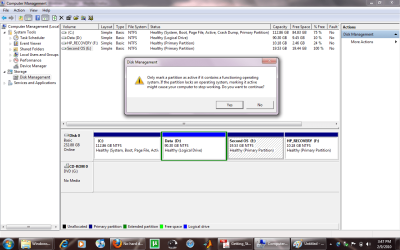
i shrink-ed my c drive from the memory management into three drives (112 gb, 20 gb & 90gb) and installed windows 7 on 112gb drive successfully :D..

now when i am installing Xp on 20gb drive, during the installation process i get an error "No hard disk detected" :shock:

I tried installing XP mode but my processor doesnt support the virtual technology...


Can you guys please suggest me a way out of this problem (with no the RECOVERY disk option) ???
I will be happy if my system has only XP installed !!!


Thank u !!! :D
 

My Computer

OS
Windows 7
Have you also made all your partitions active ?


Steve
 

My Computer

Computer Manufacturer/Model Number
Over Clockers Ultima Viper 2.80Ghz
OS
Windows 7 Ultimate 64 - OEM Service Pack 1
CPU
Intel Core i7 930 2.80Ghz Bloomfield Socket LGA 1366
Motherboard
Gigabyte GA-X58A-UD3R Intel X58 Socket 1366 DDR3
Memory
Patriot Viper 6GB 3x2GB DDR3 PC3-1200C9 1600Mhz Tri Channel
Graphics Card(s)
Asus ATI Radeon HD 5770 CuCore 1024MB GDDR5 PCI Express
Sound Card
Realtek ALC889 @ Intel 82801JB ICH10 - High Definition Audio
Monitor(s) Displays
Samsung SyncMaster 920N 19"
Screen Resolution
1280*1024
Hard Drives
1 x OCZ Vertex2 Series 120GB 2.5" SATA-II SSD
1 x Seagate Barracuda 7200.12 1TB SATA-II 32MB Cache
1 x Western Digital Caviar Green 2TB SATA-II 64 MB Cache
PSU
Corsair TX 650W ATX SLi
Case
Antec 902 Ultimate Gaming Case Black
Cooling
Prolimatech Megahalems Rev B CPU Cooler Socket 775/1156/1366
Keyboard
Microsoft Comfort Curve Keyboard
Mouse
Microsoft Optical USB
Internet Speed
ADSL24 FTTC 34.2 Mbps Down 7.1Mbps Up
Other Info
OcUK 22x DVDSATA ReWriter Black
Akasa AK-FN058 Apache Black Super Silent 120mm Fan
Printer Epson Stylus Photo R300
Scanner Canon Canoscan 8000F
I uploaded a screenshot.. please have a look ... I want to install XP on Second OS Drive...
moz-screenshot.png
 

Attachments

  • Untitled.png
    Untitled.png
    61.6 KB · Views: 173

My Computer

OS
Windows 7
Which version of XP are you using?

Do you know how the drive is set up in the bios, IDE or AHCI?

You setup looks OK, I do not know of any obvious problems, but I do not know why XP will not at least see the hard drive.
 

My Computer

Computer Manufacturer/Model Number
Homebuilt
OS
Windows 7 x64
CPU
i7-2600K
Motherboard
Asus P8Z77-v Pro
Memory
8 G
Graphics Card(s)
GTX 480
Sound Card
Onboard
Monitor(s) Displays
LG W2753V
Screen Resolution
1920x1080
Hard Drives
Crucial M4 128 G SSD
I am using Xp Pro.. I dont know much of the bios.. How do i check for IDE or AHCI?

A friend of mine is also having the same problem...
 

My Computer

OS
Windows 7
Back
Top