
No HDMI Audio in Windows 7

Imajeep

New member
Local time
11:46 PM
Messages
6
I have been through the threads on this forum regarding Windows 7 HDMI audio problems, but they seem to involve HDMI audio devices that can't be selected. I am connected to an HDTV via HDMI, and HDMI is set as the default audio device in my PC's Sound control panel (Sound CP.jpg, attached). But I am still getting no sound on the HDTV.

I have checked the HDTV's audio setup, and HDMI audio is enabled and set to "HDMI". I have tried installing nVidia drivers, but that simply killed the HDMI audio driver that Windows 7 had installed. Computer is a Shuttle SN68PTG6 (6800 G6).

So, at this point, I am stumped. Any suggestions on how to get HDMI audio working? Thanks for your help.

Edit: Found my answer--reinstall display drivers. See message at end of thread below.
 

Attachments
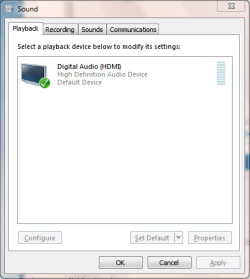
  • Sound CP.PNG
    Sound CP.PNG
    11.3 KB · Views: 63
Last edited:

My Computer My Computer

OS
Windows 7
Fill in your system specs. Sometimes there is an option that needs to be enabled in the BIOS. Knowing what motherboard you have and what BIOS version you have is important in knowing where in the BIOS to look or if it is an option.

Also is this a new build or an upgrade from xp/vista?
Was it ever working or is this first time it has been used for HDTV?
 

My Computer My Computer

Computer type
Laptop
Computer Manufacturer/Model Number
ASUS G60-RBBX05
OS
Win7 Home Premium 64x
CPU
Intel Core 2 Duo P7450 / 2.13 GHz (2.29 with Extreme Turbo)
Memory
4 GB PC-6400 Hyundai (2X2) at 800Mhz
Graphics Card(s)
NVIDIA GeForce GTX 260M 1GB DDR3 VRAM
Monitor(s) Displays
16" LED Backlit
Screen Resolution
1366 x 768 on laptop 1600x1050 max res on 22" external mon
Hard Drives
OCZ Agility 3 60GB SSD / 320 GB - Serial ATA-150 - 7200 rpm
PSU
6-cell Lithium ion { lasts 1.5 hours }
Case
ASUS G60 Laptop
Keyboard
Chicklet type back-lit (white light) keyboard
Mouse
Logitech G9 Laser Mouse 3200dpi and 1000 reports per minute
Internet Speed
Comcast 8.60mb/s up - 3.11mb/s down
Antivirus
MSE
Browser
Firefox
Other Info
General mid-budget gaming Comp. Low batterylife - High FrameRates - currently overheating problems :(

2nd Rig: Case: Rosewill BLACKHAWK Gaming ATX Mid Tower Computer Case

Mobo: GIGABYTE GA-990FXA-UD3
CPU: AMD FX-6200 Zambezi 3.8GHz (4.1GHz Turbo)
Heatsink: COOLER MASTER V8 CPU Cooler
RAM: Patriot Viper 3 8GB (2 x 4GB) 240-Pin DDR3 SDRAM 1866 (PC3 15000)
GPU: SAPPHIRE Radeon HD 6850 1GB 2
If you dont know the motherboard specs, you can use CPU-Z to find out what your system has on it:

CPUID
 

My Computer My Computer

Computer type
Laptop
Computer Manufacturer/Model Number
ASUS G60-RBBX05
OS
Win7 Home Premium 64x
CPU
Intel Core 2 Duo P7450 / 2.13 GHz (2.29 with Extreme Turbo)
Memory
4 GB PC-6400 Hyundai (2X2) at 800Mhz
Graphics Card(s)
NVIDIA GeForce GTX 260M 1GB DDR3 VRAM
Monitor(s) Displays
16" LED Backlit
Screen Resolution
1366 x 768 on laptop 1600x1050 max res on 22" external mon
Hard Drives
OCZ Agility 3 60GB SSD / 320 GB - Serial ATA-150 - 7200 rpm
PSU
6-cell Lithium ion { lasts 1.5 hours }
Case
ASUS G60 Laptop
Keyboard
Chicklet type back-lit (white light) keyboard
Mouse
Logitech G9 Laser Mouse 3200dpi and 1000 reports per minute
Internet Speed
Comcast 8.60mb/s up - 3.11mb/s down
Antivirus
MSE
Browser
Firefox
Other Info
General mid-budget gaming Comp. Low batterylife - High FrameRates - currently overheating problems :(

2nd Rig: Case: Rosewill BLACKHAWK Gaming ATX Mid Tower Computer Case

Mobo: GIGABYTE GA-990FXA-UD3
CPU: AMD FX-6200 Zambezi 3.8GHz (4.1GHz Turbo)
Heatsink: COOLER MASTER V8 CPU Cooler
RAM: Patriot Viper 3 8GB (2 x 4GB) 240-Pin DDR3 SDRAM 1866 (PC3 15000)
GPU: SAPPHIRE Radeon HD 6850 1GB 2
Look up my thread history, the sound subjects. I just went thru this. There are many good suggestions there.
In my case, I did not have the 2 wire cable between mobo sound header, and vid card connected right.
And you might need an nVidia HDMI>DVI dongle. Its will pass sound thru DVI with 2 wire in place.
luck
 

My Computer My Computer

Computer Manufacturer/Model Number
DIY #3, #2
OS
W7 Ulti/64, XP Pro/32
CPU
INTEL i7 920 DO, Core2 Duo 6400
Motherboard
GIGABYTE EX58 UD3R-SLI, EP45-UD3R
Memory
KINGSTON DDR3 1333MHz, CORSAIR DDR2 800MHz
Graphics Card(s)
EVGA GTX 260 x2, 8800 GTX
Sound Card
REALTEK HD onboard, ditto
Monitor(s) Displays
SONY 40" BRAVIA LCD
Screen Resolution
1360 X 768
Hard Drives
OCZ VERTEX/RAID0 -3, Vertex 30GB
PSU
COOLERMASTER 900W, ENERMAX 850W
Case
COOLERMASTER HAF 932 x2
Cooling
stock
Keyboard
MS
Mouse
MS
Internet Speed
ADSL 3MB/768KBs
Other Info
amateur enthusiast
System specs

Here is the CPU-Z report. BTW, I am using mainboard video and audio--no cards. Thanks again for your help!

CPU-Z TXT Report
-------------------------------------------------------------------------
Binaries
-------------------------------------------------------------------------
CPU-Z version 1.54
Processors
-------------------------------------------------------------------------
Number of processors 1
Number of threads 2
APICs
-------------------------------------------------------------------------
Processor 0
-- Core 0
-- Thread 0 0
-- Core 1
-- Thread 0 1
Processors Information
-------------------------------------------------------------------------
Processor 1 ID = 0
Number of cores 2 (max 2)
Number of threads 2 (max 2)
Name AMD Athlon 64 X2 BE-2350
Codename Brisbane
Specification AMD Athlon(tm) X2 Dual Core Processor BE-2350
Package Socket AM2 (940)
CPUID F.B.1
Extended CPUID F.6B
Brand ID 3
Core Stepping BH-G1
Technology 65 nm
Core Speed 2100.3 MHz
Multiplier x FSB 10.5 x 200.0 MHz
HT Link speed 1000.2 MHz
Stock frequency 2100 MHz
Instructions sets MMX (+), 3DNow! (+), SSE, SSE2, SSE3, x86-64, AMD-V
L1 Data cache 2 x 64 KBytes, 2-way set associative, 64-byte line size
L1 Instruction cache 2 x 64 KBytes, 2-way set associative, 64-byte line size
L2 cache 2 x 512 KBytes, 16-way set associative, 64-byte line size
FID/VID Control yes
Max FID 10.5x
Max VID 1.300 V
P-State FID 0x2 - VID 0x12 (5.0x - 1.100 V)
P-State FID 0xA - VID 0x0F (9.0x - 1.175 V)
P-State FID 0xC - VID 0x0D (10.0x - 1.225 V)
P-State FID 0xD - VID 0x0C (10.5x - 1.250 V)
K8 Thermal sensor yes
K8 Revision ID 6.0
Attached device PCI device at bus 0, device 24, function 0
Attached device PCI device at bus 0, device 24, function 1
Attached device PCI device at bus 0, device 24, function 2
Attached device PCI device at bus 0, device 24, function 3
 
Last edited:

My Computer My Computer

OS
Windows 7
lol thats a lot of info....so first off:

The info here suggests you have this machine correct? Shuttle SN68PTG6 Deluxe Barebone - AM2 With Bluetooth/HDMI/Fingerprint Scanner - Ebuyer
Shuttle Europe: SN68PTG6 Deluxe

This is your motherboard and BIOS:
Motherboard model FN68PT revision V10
DMI BIOS vendor Phoenix Technologies, LTD version 6.00 PG

(I am having trouble finding this motherboard and a BIOS update online....)


This is your Graphics Chip:

Name NVIDIA GeForce 7050 PV / NVIDIA nForce 630a (Microsoft Corporation - WDDM)
Revision A1
Memory size 128 MB
Biostar TF7050-M2 PCSTATS Review - nVIDIA GeForce 7050PV Chipset

(Only link I could find for that as well :( )
 

My Computer My Computer

Computer type
Laptop
Computer Manufacturer/Model Number
ASUS G60-RBBX05
OS
Win7 Home Premium 64x
CPU
Intel Core 2 Duo P7450 / 2.13 GHz (2.29 with Extreme Turbo)
Memory
4 GB PC-6400 Hyundai (2X2) at 800Mhz
Graphics Card(s)
NVIDIA GeForce GTX 260M 1GB DDR3 VRAM
Monitor(s) Displays
16" LED Backlit
Screen Resolution
1366 x 768 on laptop 1600x1050 max res on 22" external mon
Hard Drives
OCZ Agility 3 60GB SSD / 320 GB - Serial ATA-150 - 7200 rpm
PSU
6-cell Lithium ion { lasts 1.5 hours }
Case
ASUS G60 Laptop
Keyboard
Chicklet type back-lit (white light) keyboard
Mouse
Logitech G9 Laser Mouse 3200dpi and 1000 reports per minute
Internet Speed
Comcast 8.60mb/s up - 3.11mb/s down
Antivirus
MSE
Browser
Firefox
Other Info
General mid-budget gaming Comp. Low batterylife - High FrameRates - currently overheating problems :(

2nd Rig: Case: Rosewill BLACKHAWK Gaming ATX Mid Tower Computer Case

Mobo: GIGABYTE GA-990FXA-UD3
CPU: AMD FX-6200 Zambezi 3.8GHz (4.1GHz Turbo)
Heatsink: COOLER MASTER V8 CPU Cooler
RAM: Patriot Viper 3 8GB (2 x 4GB) 240-Pin DDR3 SDRAM 1866 (PC3 15000)
GPU: SAPPHIRE Radeon HD 6850 1GB 2
Do you have Win7 32x or 64x?

if you have 32x then this is the newest driver for your nVidia chip:
NVIDIA DRIVERS 15.49 WHQL

If you have 64x then this is the newest driver for your nVidia chip:
NVIDIA DRIVERS 15.49 WHQL

Are these (the latest driver for your chip) The ones you installed? can you see if installing the latest above resolves the issue.

If it doesn't then we might want to look at whether or not there is a BIOS option to enable/disable sound through HDMI.
 

My Computer My Computer

Computer type
Laptop
Computer Manufacturer/Model Number
ASUS G60-RBBX05
OS
Win7 Home Premium 64x
CPU
Intel Core 2 Duo P7450 / 2.13 GHz (2.29 with Extreme Turbo)
Memory
4 GB PC-6400 Hyundai (2X2) at 800Mhz
Graphics Card(s)
NVIDIA GeForce GTX 260M 1GB DDR3 VRAM
Monitor(s) Displays
16" LED Backlit
Screen Resolution
1366 x 768 on laptop 1600x1050 max res on 22" external mon
Hard Drives
OCZ Agility 3 60GB SSD / 320 GB - Serial ATA-150 - 7200 rpm
PSU
6-cell Lithium ion { lasts 1.5 hours }
Case
ASUS G60 Laptop
Keyboard
Chicklet type back-lit (white light) keyboard
Mouse
Logitech G9 Laser Mouse 3200dpi and 1000 reports per minute
Internet Speed
Comcast 8.60mb/s up - 3.11mb/s down
Antivirus
MSE
Browser
Firefox
Other Info
General mid-budget gaming Comp. Low batterylife - High FrameRates - currently overheating problems :(

2nd Rig: Case: Rosewill BLACKHAWK Gaming ATX Mid Tower Computer Case

Mobo: GIGABYTE GA-990FXA-UD3
CPU: AMD FX-6200 Zambezi 3.8GHz (4.1GHz Turbo)
Heatsink: COOLER MASTER V8 CPU Cooler
RAM: Patriot Viper 3 8GB (2 x 4GB) 240-Pin DDR3 SDRAM 1866 (PC3 15000)
GPU: SAPPHIRE Radeon HD 6850 1GB 2
I've had that problem with my GeForce 9400GT. No fix found for me.
 

My Computer My Computer

OS
Windows 7 Enterprise 64-bit
CPU
AMD Phenom II X4 3.0GHz
Motherboard
ASUS M5A97
Memory
8GB G-Skill Ripjaws DDR3 1333
Graphics Card(s)
PNY GeForce 460 GTX 1GB OC - Enthusiast Edition
Sound Card
VIA High Definition Audio
Monitor(s) Displays
Dell 19"
Screen Resolution
1280x1024
Hard Drives
1TB - Primary
160GB - Secondary
250GB - External backup for important files
PSU
OCZ Fata1ty 700W Modular PSU
Case
ASUS
Keyboard
Microsoft Wireless Keyboard 2000
Mouse
Microsoft Wireless Mouse 2000
Internet Speed
3 Mbps/768 kbps
Another thing to consider is that it might be the cable itself. I have heard of HDMI cables that have no sound. Have you used this cable and had sound come through on any other devices?

Also are you having any other sound problems? can you still send sound out to speakers/TV/headphones through the headphone jack?
 

My Computer My Computer

Computer type
Laptop
Computer Manufacturer/Model Number
ASUS G60-RBBX05
OS
Win7 Home Premium 64x
CPU
Intel Core 2 Duo P7450 / 2.13 GHz (2.29 with Extreme Turbo)
Memory
4 GB PC-6400 Hyundai (2X2) at 800Mhz
Graphics Card(s)
NVIDIA GeForce GTX 260M 1GB DDR3 VRAM
Monitor(s) Displays
16" LED Backlit
Screen Resolution
1366 x 768 on laptop 1600x1050 max res on 22" external mon
Hard Drives
OCZ Agility 3 60GB SSD / 320 GB - Serial ATA-150 - 7200 rpm
PSU
6-cell Lithium ion { lasts 1.5 hours }
Case
ASUS G60 Laptop
Keyboard
Chicklet type back-lit (white light) keyboard
Mouse
Logitech G9 Laser Mouse 3200dpi and 1000 reports per minute
Internet Speed
Comcast 8.60mb/s up - 3.11mb/s down
Antivirus
MSE
Browser
Firefox
Other Info
General mid-budget gaming Comp. Low batterylife - High FrameRates - currently overheating problems :(

2nd Rig: Case: Rosewill BLACKHAWK Gaming ATX Mid Tower Computer Case

Mobo: GIGABYTE GA-990FXA-UD3
CPU: AMD FX-6200 Zambezi 3.8GHz (4.1GHz Turbo)
Heatsink: COOLER MASTER V8 CPU Cooler
RAM: Patriot Viper 3 8GB (2 x 4GB) 240-Pin DDR3 SDRAM 1866 (PC3 15000)
GPU: SAPPHIRE Radeon HD 6850 1GB 2
hey there Fred, I remember your issue but vaguely. I think you ended up using an audio cable out. right?
I haven't seen you on here in a while. good to see you back
 

My Computer My Computer

Computer type
Laptop
Computer Manufacturer/Model Number
ASUS G60-RBBX05
OS
Win7 Home Premium 64x
CPU
Intel Core 2 Duo P7450 / 2.13 GHz (2.29 with Extreme Turbo)
Memory
4 GB PC-6400 Hyundai (2X2) at 800Mhz
Graphics Card(s)
NVIDIA GeForce GTX 260M 1GB DDR3 VRAM
Monitor(s) Displays
16" LED Backlit
Screen Resolution
1366 x 768 on laptop 1600x1050 max res on 22" external mon
Hard Drives
OCZ Agility 3 60GB SSD / 320 GB - Serial ATA-150 - 7200 rpm
PSU
6-cell Lithium ion { lasts 1.5 hours }
Case
ASUS G60 Laptop
Keyboard
Chicklet type back-lit (white light) keyboard
Mouse
Logitech G9 Laser Mouse 3200dpi and 1000 reports per minute
Internet Speed
Comcast 8.60mb/s up - 3.11mb/s down
Antivirus
MSE
Browser
Firefox
Other Info
General mid-budget gaming Comp. Low batterylife - High FrameRates - currently overheating problems :(

2nd Rig: Case: Rosewill BLACKHAWK Gaming ATX Mid Tower Computer Case

Mobo: GIGABYTE GA-990FXA-UD3
CPU: AMD FX-6200 Zambezi 3.8GHz (4.1GHz Turbo)
Heatsink: COOLER MASTER V8 CPU Cooler
RAM: Patriot Viper 3 8GB (2 x 4GB) 240-Pin DDR3 SDRAM 1866 (PC3 15000)
GPU: SAPPHIRE Radeon HD 6850 1GB 2
Yes, that's correct. And I stepped out for a bit, been a bit preoccupied with things. It's good to be back.
 

My Computer My Computer

OS
Windows 7 Enterprise 64-bit
CPU
AMD Phenom II X4 3.0GHz
Motherboard
ASUS M5A97
Memory
8GB G-Skill Ripjaws DDR3 1333
Graphics Card(s)
PNY GeForce 460 GTX 1GB OC - Enthusiast Edition
Sound Card
VIA High Definition Audio
Monitor(s) Displays
Dell 19"
Screen Resolution
1280x1024
Hard Drives
1TB - Primary
160GB - Secondary
250GB - External backup for important files
PSU
OCZ Fata1ty 700W Modular PSU
Case
ASUS
Keyboard
Microsoft Wireless Keyboard 2000
Mouse
Microsoft Wireless Mouse 2000
Internet Speed
3 Mbps/768 kbps
Found my answer--thanks to all who helped out. I found the key in another thread--user who said he solved the problem by reinstalling his nVidia video drivers. I did that, and it solved the problem. Makes sense, when you consider that the video drivers control the HDMI port.

Another discovery: I had replaced a Vista 32-bit installation with a Windows 7 install, and I just assumed that 32-bit Win 7 would be installed. Nope--I've got an Athlon 64 in the box, so 64-bit Win 7 was installed. So, I downloaded and installed 64-bit Vista chipset drivers (including the display driver) from Shuttle's website. Fixed the problem immediately upon installation, with no tweaking or settings required.
 

My Computer My Computer

OS
Windows 7
Found my answer--thanks to all who helped out. I found the key in another thread--user who said he solved the problem by reinstalling his nVidia video drivers. I did that, and it solved the problem. Makes sense, when you consider that the video drivers control the HDMI port.

Another discovery: I had replaced a Vista 32-bit installation with a Windows 7 install, and I just assumed that 32-bit Win 7 would be installed. Nope--I've got an Athlon 64 in the box, so 64-bit Win 7 was installed. So, I downloaded and installed 64-bit Vista chipset drivers (including the display driver) from Shuttle's website. Fixed the problem immediately upon installation, with no tweaking or settings required.

You had to have had a 64-bit disc then. You cannot upgrade from any 32-bit OS to a 64-bit OS and each Windows 7 disc comes with either a 32-bit or 64-bit version of what you're installing, not both. Doesn't matter though, the 64-bit version will benefit you more.
 

My Computer My Computer

OS
Windows 7 Enterprise 64-bit
CPU
AMD Phenom II X4 3.0GHz
Motherboard
ASUS M5A97
Memory
8GB G-Skill Ripjaws DDR3 1333
Graphics Card(s)
PNY GeForce 460 GTX 1GB OC - Enthusiast Edition
Sound Card
VIA High Definition Audio
Monitor(s) Displays
Dell 19"
Screen Resolution
1280x1024
Hard Drives
1TB - Primary
160GB - Secondary
250GB - External backup for important files
PSU
OCZ Fata1ty 700W Modular PSU
Case
ASUS
Keyboard
Microsoft Wireless Keyboard 2000
Mouse
Microsoft Wireless Mouse 2000
Internet Speed
3 Mbps/768 kbps
64-bit

Actually, I think the install disk contained both 32 and 64-bit versions--it was a full install disk that Microsoft had given out at a user group event. I had been leery of going 64 bit, but it seems to work without a hitch. Into the future, kicking and screaming the entire way...
 

My Computer My Computer

OS
Windows 7
Back
Top