No internet access after reinstalling wireless drivers.

ladolcevita1

New member
Local time
4:05 PM
Messages
10
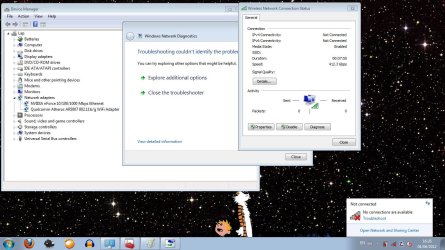
After experiencing some problems with stable connectivity, I went into device manager and selected to uninstall the driver for my Qualcomm Atheros AR5007 802.11b/g WiFi Adapter. After rebooting, I selected the option to automatically update the driver. After all this, I keep getting "Not connected- No connections are available".

1. It's not the router. (The internet is working)
2. Already tried to do system restore. (System restore can't access a certain file and won't let me).
3. Already tried Roll Back Driver.
4. Another weird thing is that when looking at the status of the network connection, it states that the speed is 412.3 Gbps. Despite this speed being ridiculous and it not being connected to anything.
5. Trust me, it's not the router.
wink.png

Hopefully somebody can help me out!
 

My Computer My Computer

OS
Windows 7 Ultimate 32-bit
Graphics Card(s)
Nvidia GTX 460
Please try updating your atheros wireles card drivers from the computer manufacturer's website as device manager is unreliable for finding updated drivers.
 

My Computer My Computer

Computer Manufacturer/Model Number
HP Compaq 6715B
OS
Windows 7 Ultimate x64
CPU
AMD turion 64x2 TL-64 2.2Ghz
Motherboard
HC030
Memory
Sodimm DDR2 4GB
Graphics Card(s)
ATI Radeon 1250 128MB IGP
Hard Drives
Fujitsu Siemens 500GB sata 3.0 Gb/s
I tried doing that much earlier and that rendered the computer unable to boot. I eventually had to use the start-up repair utility to get the computer running again.
 

My Computer My Computer

OS
Windows 7 Ultimate 32-bit
Graphics Card(s)
Nvidia GTX 460
Pleas provide us with an ipconfig /all for us to review.

Also please download xirrus wfi-inspector and post a screenshot when you are connected to the network.

Link below:
Wi-Fi Inspector | Xirrus
 

My Computer My Computer

Computer Manufacturer/Model Number
HP Compaq 6715B
OS
Windows 7 Ultimate x64
CPU
AMD turion 64x2 TL-64 2.2Ghz
Motherboard
HC030
Memory
Sodimm DDR2 4GB
Graphics Card(s)
ATI Radeon 1250 128MB IGP
Hard Drives
Fujitsu Siemens 500GB sata 3.0 Gb/s
Microsoft Windows [Version 6.1.7601]
Copyright (c) 2009 Microsoft Corporation. All rights reserved.
C:\Users\Andrew>ipconfig /all
Windows IP Configuration
Host Name . . . . . . . . . . . . : Lap
Primary Dns Suffix . . . . . . . :
Node Type . . . . . . . . . . . . : Hybrid
IP Routing Enabled. . . . . . . . : No
WINS Proxy Enabled. . . . . . . . : No
Tunnel adapter Teredo Tunneling Pseudo-Interface:
Media State . . . . . . . . . . . : Media disconnected
Connection-specific DNS Suffix . :
Description . . . . . . . . . . . : Teredo Tunneling Pseudo-Interface
Physical Address. . . . . . . . . : 00-00-00-00-00-00-00-E0
DHCP Enabled. . . . . . . . . . . : No
Autoconfiguration Enabled . . . . : Yes
Tunnel adapter isatap.hsd1.in.comcast.net.:
Media State . . . . . . . . . . . : Media disconnected
Connection-specific DNS Suffix . :
Description . . . . . . . . . . . : Microsoft ISATAP Adapter #4
Physical Address. . . . . . . . . : 00-00-00-00-00-00-00-E0
DHCP Enabled. . . . . . . . . . . : No
Autoconfiguration Enabled . . . . : Yes
C:\Users\Andrew>

I downloaded the utility that you suggested. The computer was still unable to detect any open networks.
 

My Computer My Computer

OS
Windows 7 Ultimate 32-bit
Graphics Card(s)
Nvidia GTX 460
Your ipconfig /all shows no ethernet adapter or wireless adapter.

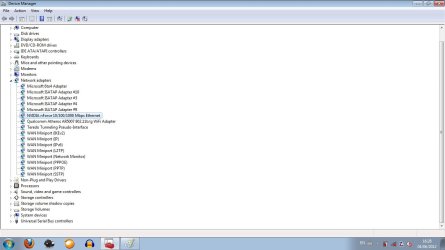
In device manager under network adapters please expand your ethernet adapter and wireless adapter and post screenshot.

As no adapters are showing at all.

Are all hardware drivers installed any question marks or exclamation marks or red x's in device manager?
 

My Computer My Computer

Computer Manufacturer/Model Number
HP Compaq 6715B
OS
Windows 7 Ultimate x64
CPU
AMD turion 64x2 TL-64 2.2Ghz
Motherboard
HC030
Memory
Sodimm DDR2 4GB
Graphics Card(s)
ATI Radeon 1250 128MB IGP
Hard Drives
Fujitsu Siemens 500GB sata 3.0 Gb/s
screenshots. Pretty damn weird.
 

Attachments

  • myinternetisfucked.jpg
    myinternetisfucked.jpg
    141.3 KB · Views: 65
  • adapters.jpg
    adapters.jpg
    69.6 KB · Views: 44

My Computer My Computer

OS
Windows 7 Ultimate 32-bit
Graphics Card(s)
Nvidia GTX 460
Please verify that all your Network Services are Started.
Click on Start, type services.msc then press enter.

• COM+ Event System (for WZC issues)
• Computer Browser
• DHCP Client
• DNS Client
• Network Connections
• Network Location Awareness
• Remote Procedure Call (RPC)
• Server
• TCP/IP Netbios helper
• Wireless Zero Configuration ( XP wireless configurations only)
• WLAN AutoConfig ( Vista/7 wireless configurations only)
• Workstation
 

My Computer My Computer

Computer Manufacturer/Model Number
HP Compaq 6715B
OS
Windows 7 Ultimate x64
CPU
AMD turion 64x2 TL-64 2.2Ghz
Motherboard
HC030
Memory
Sodimm DDR2 4GB
Graphics Card(s)
ATI Radeon 1250 128MB IGP
Hard Drives
Fujitsu Siemens 500GB sata 3.0 Gb/s
Back
Top