Solved "No Internet Access" periodically, Excellent Wi-Fi signal..

pyff123

New member
Local time
3:22 AM
Messages
21
Hello,

I don't know where I should start my search for answers to my problem, so I'll start here, in hopes that it may be something with Windows..

I'm sitting right beside my ARRIS TG1672G wireless modem. I've tried connecting via ethernet cord, and it just would not work.. but regardless, I have 5 bars of signal (Excellent) over Wi-Fi, connected through WPA2-Personal.. this NEVER changes. I don't receive any lag when playing World of Warcraft, and if I do, it doesnt affect my gameplay at all. However, periodically, and I'd say its almost every 30 minutes now, I disconnect from WoW, and when I go to my desktop, my Wi-Fi signal says Excellent, but now my connection displays the message "No Internet Access". I've found the quick fix for this, opening CMD prompt, and typing ipconfig /renew, and although I get the message that basically ipconfig cant work "without the devices plugged in" (which I've assumed just means because I'm on wireless) immediately my connection switches to the "loading icon" then comes back to display my 5 bar signal, and now no longer displaying this message, and restoring my access to the internet.

Given this information, how periodically it is, how I fix it, and the fact that I have an excellent, steady signal, what could be causing these frequent disconnect, and my connection "losing internet access"?

Thank you so much ahead of time, I just can't figure this out, and its becoming a nuisance, as I'm in groups with others, and I disconnect :o
 

My Computer My Computer

At a glance

Windows 7 Professional x64Intel Duo Core 2.0 Ghz2 GBGeforce 9600 GT
Computer type
Laptop
Computer Manufacturer/Model Number
HP Pavilion dv5 1000
OS
Windows 7 Professional x64
CPU
Intel Duo Core 2.0 Ghz
Memory
2 GB
Graphics Card(s)
Geforce 9600 GT
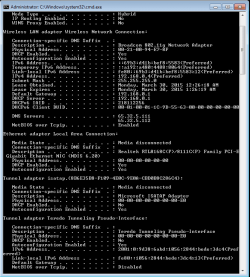
this is my ipconfig /all without the problem occurring
 

Attachments

  • ipconfig.png
    ipconfig.png
    16.3 KB · Views: 1

My Computer My Computer

At a glance

Windows 7 Professional x64Intel Duo Core 2.0 Ghz2 GBGeforce 9600 GT
Computer type
Laptop
Computer Manufacturer/Model Number
HP Pavilion dv5 1000
OS
Windows 7 Professional x64
CPU
Intel Duo Core 2.0 Ghz
Memory
2 GB
Graphics Card(s)
Geforce 9600 GT
Look in the properties for your adapter for wifi, check the power management tab at top and uncheck 'Allow the computer to turn off this device to save power'.
When you plug in an ethernet cable, it should disable the wifi by default, you may have to go in the properties for the NIC and add the gateway address of the router.
Wireless phone bases and microwave ovens can cause interference to wifi as well as location of the router, it should be high and away from walls, not tucked into a shelf.
Something really screwy with your lease time for the adapter...
 

My Computer My Computer

At a glance

Win7 Home Premium x64 W10Pro&HomeA12 9720p 4+8 TurionII M5206GB 8GBR7
Computer type
Laptop
Computer Manufacturer/Model Number
HP 17-ak0xx, dv7 3173nr
OS
Win7 Home Premium x64 W10Pro&Home
CPU
A12 9720p 4+8 TurionII M520
Motherboard
HP 3839
Memory
6GB 8GB
Graphics Card(s)
R7
Monitor(s) Displays
24" sa550
Screen Resolution
1600x900 1920x1080
Mouse
Logitechx2
Internet Speed
120Mb/s down 12up
right now, I can't find any ethernet cords, so I would like to try to fix this wireless problem, because I'm sitting right beside the modem, and get Excellent signal, no interference.. just something is causing it to periodically go "No Internet Access, yet my signal is still connected, and Excellent (5 bars). I go into CMD, ipconfig /renew, and its fixed.. but this is only a quick fix, and annoying to do every 30 minutes when I'm booted from my game.

EDITED: by fixed, I mean once I type "ipconfig /renew", the "No Internet Access" message goes away from my connection status, and I can reconnect to my game.

EDIT2: Sorry if I confused you about connecting wired, that was awhile back. Ive given up. Now I just want to fix this problem with my wireless connection (I'm not trying to connect an ethernet at the moment, im using solely wireless connection)
 

My Computer My Computer

At a glance

Windows 7 Professional x64Intel Duo Core 2.0 Ghz2 GBGeforce 9600 GT
Computer type
Laptop
Computer Manufacturer/Model Number
HP Pavilion dv5 1000
OS
Windows 7 Professional x64
CPU
Intel Duo Core 2.0 Ghz
Memory
2 GB
Graphics Card(s)
Geforce 9600 GT
I'm assuming this is an ISP provided modem/router, if you have not changed anything, then call them and see why it lists the wrong date for the lease period, may be defective.
 

My Computer My Computer

At a glance

Win7 Home Premium x64 W10Pro&HomeA12 9720p 4+8 TurionII M5206GB 8GBR7
Computer type
Laptop
Computer Manufacturer/Model Number
HP 17-ak0xx, dv7 3173nr
OS
Win7 Home Premium x64 W10Pro&Home
CPU
A12 9720p 4+8 TurionII M520
Motherboard
HP 3839
Memory
6GB 8GB
Graphics Card(s)
R7
Monitor(s) Displays
24" sa550
Screen Resolution
1600x900 1920x1080
Mouse
Logitechx2
Internet Speed
120Mb/s down 12up
thats weird.. I have no clue.

EDIT: Yes, it was provided by my ISP. okay, I will try that. Hopefully thats not it, and maybe somebody else will know the answer :(
 

My Computer My Computer

At a glance

Windows 7 Professional x64Intel Duo Core 2.0 Ghz2 GBGeforce 9600 GT
Computer type
Laptop
Computer Manufacturer/Model Number
HP Pavilion dv5 1000
OS
Windows 7 Professional x64
CPU
Intel Duo Core 2.0 Ghz
Memory
2 GB
Graphics Card(s)
Geforce 9600 GT
doing a new ipconfig /all, now my "lease obtained" changed to today's date...
 

My Computer My Computer

At a glance

Windows 7 Professional x64Intel Duo Core 2.0 Ghz2 GBGeforce 9600 GT
Computer type
Laptop
Computer Manufacturer/Model Number
HP Pavilion dv5 1000
OS
Windows 7 Professional x64
CPU
Intel Duo Core 2.0 Ghz
Memory
2 GB
Graphics Card(s)
Geforce 9600 GT
I have never seen one revert that far back... was kinda shocking to see...
 

My Computer My Computer

At a glance

Win7 Home Premium x64 W10Pro&HomeA12 9720p 4+8 TurionII M5206GB 8GBR7
Computer type
Laptop
Computer Manufacturer/Model Number
HP 17-ak0xx, dv7 3173nr
OS
Win7 Home Premium x64 W10Pro&Home
CPU
A12 9720p 4+8 TurionII M520
Motherboard
HP 3839
Memory
6GB 8GB
Graphics Card(s)
R7
Monitor(s) Displays
24" sa550
Screen Resolution
1600x900 1920x1080
Mouse
Logitechx2
Internet Speed
120Mb/s down 12up
doesn't make sense.. is that all that you can conclude from my reports, that it just might be a defective modem?
 

My Computer My Computer

At a glance

Windows 7 Professional x64Intel Duo Core 2.0 Ghz2 GBGeforce 9600 GT
Computer type
Laptop
Computer Manufacturer/Model Number
HP Pavilion dv5 1000
OS
Windows 7 Professional x64
CPU
Intel Duo Core 2.0 Ghz
Memory
2 GB
Graphics Card(s)
Geforce 9600 GT
Everything looks ok in the sense that it sees your gateway, I would try changing the DNS addresses to 8.8.8.8 and 8.8.4.4 to see if its a dns problem.
 

My Computer My Computer

At a glance

Win7 Home Premium x64 W10Pro&HomeA12 9720p 4+8 TurionII M5206GB 8GBR7
Computer type
Laptop
Computer Manufacturer/Model Number
HP 17-ak0xx, dv7 3173nr
OS
Win7 Home Premium x64 W10Pro&Home
CPU
A12 9720p 4+8 TurionII M520
Motherboard
HP 3839
Memory
6GB 8GB
Graphics Card(s)
R7
Monitor(s) Displays
24" sa550
Screen Resolution
1600x900 1920x1080
Mouse
Logitechx2
Internet Speed
120Mb/s down 12up
I would try changing the DNS addresses to 8.8.8.8 and 8.8.4.4 to see if its a dns problem.


how do I do that? would you recommend changing my MAC filters in my wireless settings, and adding the MAC address of my laptop to the list manually? could it possibly be a problem with IPV4/IPV6 conflicting with one another? and try disabling IPV6? Sorry, just trying to go over all my options
 

My Computer My Computer

At a glance

Windows 7 Professional x64Intel Duo Core 2.0 Ghz2 GBGeforce 9600 GT
Computer type
Laptop
Computer Manufacturer/Model Number
HP Pavilion dv5 1000
OS
Windows 7 Professional x64
CPU
Intel Duo Core 2.0 Ghz
Memory
2 GB
Graphics Card(s)
Geforce 9600 GT
I'll try anything lol

EDIT: anything that isn't calling Bright House, and trying to get a new modem :cry:
 

My Computer My Computer

At a glance

Windows 7 Professional x64Intel Duo Core 2.0 Ghz2 GBGeforce 9600 GT
Computer type
Laptop
Computer Manufacturer/Model Number
HP Pavilion dv5 1000
OS
Windows 7 Professional x64
CPU
Intel Duo Core 2.0 Ghz
Memory
2 GB
Graphics Card(s)
Geforce 9600 GT
They have some scan tools available at our sister forum, PCHelpforum.com that can do more indepth scans. The ipv6 can be unchecked for testing purposes, and the dns in the ipv4 properties of the adapter can be changed to see if that could be the problem. I have three networks on three different routers and six different wifi radios, sometimes they just want to be difficult...lol. And, if you are using mac access/block in the router, you need your laptop address allowed in the list. And you can turn off the MAC filter during testing to see if thats part of it.

If all else fails, start over, reset modem with paperclip, let it repower and initialize then connect a cable to one of the lan ports and to your powered down laptop, power up and if your laptop is working right, it should find the network on the ethernet cable, which would be best for gaming anyway...
 

My Computer My Computer

At a glance

Win7 Home Premium x64 W10Pro&HomeA12 9720p 4+8 TurionII M5206GB 8GBR7
Computer type
Laptop
Computer Manufacturer/Model Number
HP 17-ak0xx, dv7 3173nr
OS
Win7 Home Premium x64 W10Pro&Home
CPU
A12 9720p 4+8 TurionII M520
Motherboard
HP 3839
Memory
6GB 8GB
Graphics Card(s)
R7
Monitor(s) Displays
24" sa550
Screen Resolution
1600x900 1920x1080
Mouse
Logitechx2
Internet Speed
120Mb/s down 12up
I'm in my modem settings, I see for some reason I have "Wireless 2.4 GHz Setup" (ROUTER1, for ex.) which is the password I made, and also use to connect to my router wirelessly (enabled). This must be the connection I use. But for some reason, I have a "Wireless 5 GHz Setup" (Router2) enabled, but with a default password set by ISP, a password/connection Ive never used/connected to.. I connect to ROUTER1, so should i just disable this 5GHz ROUTER2?

EDIT: disabling IPV6 did nothing, still seeing problem.. also, should I try to just disable WPS? would that possibly help?
 

My Computer My Computer

At a glance

Windows 7 Professional x64Intel Duo Core 2.0 Ghz2 GBGeforce 9600 GT
Computer type
Laptop
Computer Manufacturer/Model Number
HP Pavilion dv5 1000
OS
Windows 7 Professional x64
CPU
Intel Duo Core 2.0 Ghz
Memory
2 GB
Graphics Card(s)
Geforce 9600 GT
I prefer to use a dual band dongle and connect with the 5G. Faster and less interference. But, if your hardware is only able to use 2.4, you can turn off the broadcast of the 5G network. WPS is considered a security risk and is suggested that it not be used.
 

My Computer My Computer

At a glance

Win7 Home Premium x64 W10Pro&HomeA12 9720p 4+8 TurionII M5206GB 8GBR7
Computer type
Laptop
Computer Manufacturer/Model Number
HP 17-ak0xx, dv7 3173nr
OS
Win7 Home Premium x64 W10Pro&Home
CPU
A12 9720p 4+8 TurionII M520
Motherboard
HP 3839
Memory
6GB 8GB
Graphics Card(s)
R7
Monitor(s) Displays
24" sa550
Screen Resolution
1600x900 1920x1080
Mouse
Logitechx2
Internet Speed
120Mb/s down 12up
Do you suggest disabling WPS/Firewall within the router? I know its unsafe, but I'm desperate.

EDIT: but its probably not causing my disconnects? Disabled that 5G from broadasting, disabled WPS.. considering unchecking Firewall in my modem settings? I'll keep you posted after testing those 2 changes
 

My Computer My Computer

At a glance

Windows 7 Professional x64Intel Duo Core 2.0 Ghz2 GBGeforce 9600 GT
Computer type
Laptop
Computer Manufacturer/Model Number
HP Pavilion dv5 1000
OS
Windows 7 Professional x64
CPU
Intel Duo Core 2.0 Ghz
Memory
2 GB
Graphics Card(s)
Geforce 9600 GT
The firewall is your first line of defence. The Windows Protected Setup is where you push a button on the router then push a button on the adapter and its setup. Opinion is that it can allow the router to be compromised.
 

My Computer My Computer

At a glance

Win7 Home Premium x64 W10Pro&HomeA12 9720p 4+8 TurionII M5206GB 8GBR7
Computer type
Laptop
Computer Manufacturer/Model Number
HP 17-ak0xx, dv7 3173nr
OS
Win7 Home Premium x64 W10Pro&Home
CPU
A12 9720p 4+8 TurionII M520
Motherboard
HP 3839
Memory
6GB 8GB
Graphics Card(s)
R7
Monitor(s) Displays
24" sa550
Screen Resolution
1600x900 1920x1080
Mouse
Logitechx2
Internet Speed
120Mb/s down 12up
Hello pyff123 ,
I think that the comminication between Mach and router needs to be reset
exampl. ( the Winsocket)

Just a thought you can try this in a Admin Command prompt:
type-
netsh winsock reset (hit enter key)
then
after tells you that this was successful and a reboot is needed-
type-
ipconfig(space)/flushdns (hit enter)
at the next prompt type-
ipconfig (space) /registerdns (hit Enter key)

last type exit and then reboot the system-
 

My Computer My Computer

At a glance

Windows 7 Ultimate x64Intel(R) Celeron(R) D CPU 3.46GHz, 3466 Mhz, ...2 2x2GB0xA0000-0xBFFFF ATI Radeon HD 3400 Series
Computer type
PC/Desktop
Computer Manufacturer/Model Number
HP Pasario/Compaq Presario SR5010NX Desktop PC
OS
Windows 7 Ultimate x64
CPU
Intel(R) Celeron(R) D CPU 3.46GHz, 3466 Mhz, orig.dou Core/
Memory
2 2x2GB
Graphics Card(s)
0xA0000-0xBFFFF ATI Radeon HD 3400 Series
Sound Card
Name AMD High Definition Audio Device
Monitor(s) Displays
Samsung 20'flat ATI display adapter (0x95C5)
Hard Drives
HDD sata 150Gb
HDD IDE 40GB
Extension(Network)500 GB
Toshiba 2TB External
Cooling
4 3' Fans
Keyboard
wireless logitech
Mouse
logitech wireless
Antivirus
Free AVG
Browser
Google/ firefox
sixwheeler, thank you for your suggestion, and I apologize for my delayed response..

attached is an image of my ipconfig after properly typing the commands, in order, like you listed, and a reboot.

I must note, that on the step before exit, it said something about all errors showing in 15 minutes.. I wasnt supposed to wait 15 minutes after the last command, before typing exit, and rebooting, was I?
 

Attachments

  • ipconfig.png
    ipconfig.png
    16.3 KB · Views: 2

My Computer My Computer

At a glance

Windows 7 Professional x64Intel Duo Core 2.0 Ghz2 GBGeforce 9600 GT
Computer type
Laptop
Computer Manufacturer/Model Number
HP Pavilion dv5 1000
OS
Windows 7 Professional x64
CPU
Intel Duo Core 2.0 Ghz
Memory
2 GB
Graphics Card(s)
Geforce 9600 GT
I haven't had a problem since disabling WPS, and also that "ROUTER2" (2nd broadcast).. is it possible that ROUTER2 was trying to communicate to my laptop, and in doing so, was interfering with the signal from "ROUTER1"? like my laptop was trying to receive both communications at once, causing a brief disrupt of internet connectivity? sorry if I sound dumb :D

EDIT:and by ROUTER1 and ROUTER2, these were a 2.4GHz and 5 GHz Wireless Connections, both on the same MODEM.. I dubbed the names, dumb to use a confusing name like router... but i only use the 2.4GHz one ("ROUTER1") so i disabled the 5GHz one and disabled WPS, and that seemed to possibly fix it.. been problem free for about an hour, ill keep you guys posted, thanks in advance!
 

My Computer My Computer

At a glance

Windows 7 Professional x64Intel Duo Core 2.0 Ghz2 GBGeforce 9600 GT
Computer type
Laptop
Computer Manufacturer/Model Number
HP Pavilion dv5 1000
OS
Windows 7 Professional x64
CPU
Intel Duo Core 2.0 Ghz
Memory
2 GB
Graphics Card(s)
Geforce 9600 GT
Back
Top