wireless periodically "No Internet Access", 5 bars EXCELLENT signal

pyff123

New member
Local time
4:27 AM
Messages
21
wireless periodically "No Internet Access", 5 bars EXCELLENT signal

Hello there,

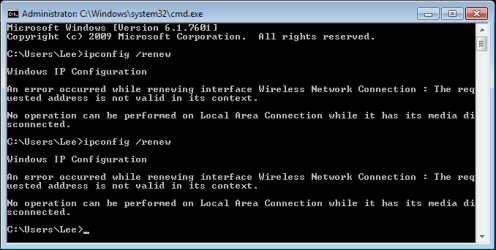
I've been having this problem for awhile now, my wireless connection periodically goes :warn: and reads "No Internet Access", despite still be "connected" to my connection, with 5 bars "Excellent" signal. The only quick"fix" I've found helps is "renewing my IP"(ipconfig /renew), and when doing so I get the message (see attached picture).

Despite the "error message", this still fixes it, causing my connection symbol to turn into a refresh symbol, and ~5 sec later the :warn: is gone and my connection is "restored".

But how can I fix this for good, what is wrong? I can only assume that my GATEWAY is scrambling IPs, and every so often (about 30-45 minutes) it does this, and I have to "reset my IP", but im CLUELESS.

Please help!

Thank you SO much!
 

Attachments
  • ipconfigrenew.png
    ipconfigrenew.png
    7.7 KB · Views: 15

My Computer My Computer

At a glance

Windows 7 Professional x64Intel Duo Core 2.0 Ghz2 GBGeforce 9600 GT
Computer type
Laptop
Computer Manufacturer/Model Number
HP Pavilion dv5 1000
OS
Windows 7 Professional x64
CPU
Intel Duo Core 2.0 Ghz
Memory
2 GB
Graphics Card(s)
Geforce 9600 GT
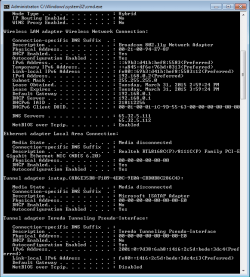
Attached is a screenshot of IPCONFIG /ALL immediately after using the IPCONFIG /RENEW cmd, and "restoring my internet access"..
 

Attachments

  • ipconfigall.png
    ipconfigall.png
    16.9 KB · Views: 0

My Computer My Computer

At a glance

Windows 7 Professional x64Intel Duo Core 2.0 Ghz2 GBGeforce 9600 GT
Computer type
Laptop
Computer Manufacturer/Model Number
HP Pavilion dv5 1000
OS
Windows 7 Professional x64
CPU
Intel Duo Core 2.0 Ghz
Memory
2 GB
Graphics Card(s)
Geforce 9600 GT
bump
 

My Computer My Computer

At a glance

Windows 7 Professional x64Intel Duo Core 2.0 Ghz2 GBGeforce 9600 GT
Computer type
Laptop
Computer Manufacturer/Model Number
HP Pavilion dv5 1000
OS
Windows 7 Professional x64
CPU
Intel Duo Core 2.0 Ghz
Memory
2 GB
Graphics Card(s)
Geforce 9600 GT
Hi pyff123,

I've been having this problem for awhile now, my wireless connection periodically goes and reads "No Internet Access", despite still be "connected" to my connection, with 5 bars "Excellent" signal.
You still have 5 bars because it was your router that is broadcasting your connection.

Have you tried connecting other device? your Phone for example. Is the connection okay?
Also, can you post your router configuration on your next reply please.
 

My Computer My Computer

At a glance

Windows 7 Pro 32bitDual Core
Computer type
PC/Desktop
Computer Manufacturer/Model Number
HP
OS
Windows 7 Pro 32bit
CPU
Dual Core
Antivirus
Trend Micro
Right, I understand this, the problem is that i'm losing internet connectivity, despite my signal/connection being excellent. I have to "renew my IP" to regain internet connectivity.

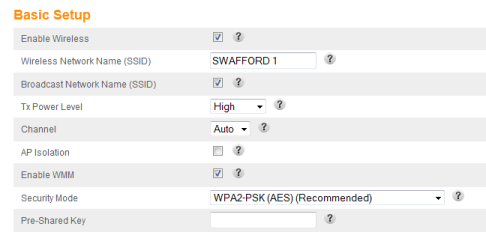
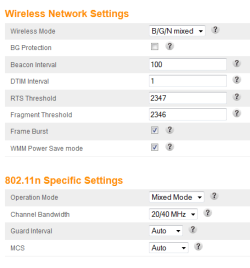
Attached is 2 photos of what I believe you mean by router configuration..

Thank You so much
 

Attachments

  • basic.png
    basic.png
    7.3 KB · Views: 6
  • wireless.png
    wireless.png
    8.9 KB · Views: 6

My Computer My Computer

At a glance

Windows 7 Professional x64Intel Duo Core 2.0 Ghz2 GBGeforce 9600 GT
Computer type
Laptop
Computer Manufacturer/Model Number
HP Pavilion dv5 1000
OS
Windows 7 Professional x64
CPU
Intel Duo Core 2.0 Ghz
Memory
2 GB
Graphics Card(s)
Geforce 9600 GT
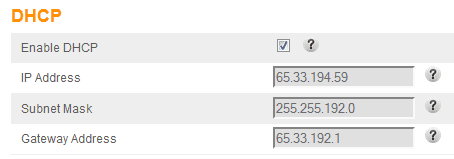
not sure if this helps or not..
 

Attachments

  • DHCP.png
    DHCP.png
    2.7 KB · Views: 9

My Computer My Computer

At a glance

Windows 7 Professional x64Intel Duo Core 2.0 Ghz2 GBGeforce 9600 GT
Computer type
Laptop
Computer Manufacturer/Model Number
HP Pavilion dv5 1000
OS
Windows 7 Professional x64
CPU
Intel Duo Core 2.0 Ghz
Memory
2 GB
Graphics Card(s)
Geforce 9600 GT
thought i hd the issue resolved..

alas, my hard drive was malfunctioning.. I replaced it, and my problem cleared..for a few days

However, this morning, I had the problem reoccur, and noticed my time is now wrong now? don't know if that signifies anything...

also, last night, I didn't properly shut down my laptop for the first time in a few nights, I simply unplugged it (the battery is basically dead) so that killed it...

and now this problem seemed to reappear.. idk if thats just a coincidence.. ANY help would be very appreciated.

Thanks
 

My Computer My Computer

At a glance

Windows 7 Professional x64Intel Duo Core 2.0 Ghz2 GBGeforce 9600 GT
Computer type
Laptop
Computer Manufacturer/Model Number
HP Pavilion dv5 1000
OS
Windows 7 Professional x64
CPU
Intel Duo Core 2.0 Ghz
Memory
2 GB
Graphics Card(s)
Geforce 9600 GT
Back
Top