I have limited computer knowqledge but manage to sort my computer problems by Googling. You learn a bit doing this and now I have become go to guy for my family's tech problems. I have been trying now for about 30+hours to solve my brother's problem. His laptop is an old sony vaio core 2 duo.
He basically has no internet despite having an excellent connection to his router. I have tried the following fixes and many others I now can't remember:
Rebooting router
Disabling firewall and antivirus
netsh winsock reset and int ip reset
checking ipv4 values in adaptor
deleting wireless adaptor and rebooting
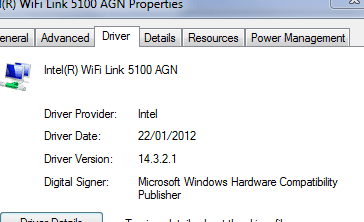
updating wireless adaptor drivers
updating OS from Vista to Win 7 home premium as vista seemingly doesnt support wpa encryption
Here is his ipconfig all results
Windows IP Configuration
Host Name . . . . . . . . . . . . : tinternet
Primary Dns Suffix . . . . . . . :
Node Type . . . . . . . . . . . . : Hybrid
IP Routing Enabled. . . . . . . . : No
WINS Proxy Enabled. . . . . . . . : No
Ethernet adapter Bluetooth Network Connection:
Media State . . . . . . . . . . . : Media disconnected
Connection-specific DNS Suffix . :
Description . . . . . . . . . . . : Bluetooth Device (Personal Area Network)
Physical Address. . . . . . . . . : 00-21-4F-4D-82-FD
DHCP Enabled. . . . . . . . . . . : Yes
Autoconfiguration Enabled . . . . : Yes
Ethernet adapter Local Area Connection:
Media State . . . . . . . . . . . : Media disconnected
Connection-specific DNS Suffix . :
Description . . . . . . . . . . . : Marvell Yukon 88E8055 PCI-E Gigabit Ethernet Controller
Physical Address. . . . . . . . . : 00-1D-BA-83-BD-07
DHCP Enabled. . . . . . . . . . . : No
Autoconfiguration Enabled . . . . : Yes
Wireless LAN adapter Wireless Network Connection:
Connection-specific DNS Suffix . :
Description . . . . . . . . . . . : Intel(R) WiFi Link 5100 AGN
Physical Address. . . . . . . . . : 00-21-5D-DD-B5-42
DHCP Enabled. . . . . . . . . . . : Yes
Autoconfiguration Enabled . . . . : Yes
Autoconfiguration IPv4 Address. . : 169.254.86.247(Preferred)
Subnet Mask . . . . . . . . . . . : 255.255.0.0
Default Gateway . . . . . . . . . :
NetBIOS over Tcpip. . . . . . . . : Enabled
Tunnel adapter isatap.{714C7CCE-8733-48B3-8F78-3E421EF5090E}:
Media State . . . . . . . . . . . : Media disconnected
Connection-specific DNS Suffix . :
Description . . . . . . . . . . . : Microsoft ISATAP Adapter
Physical Address. . . . . . . . . : 00-00-00-00-00-00-00-E0
DHCP Enabled. . . . . . . . . . . : No
Autoconfiguration Enabled . . . . : Yes
Tunnel adapter isatap.{90B9F76B-DCD6-4562-B255-78470354B63C}:
Media State . . . . . . . . . . . : Media disconnected
Connection-specific DNS Suffix . :
Description . . . . . . . . . . . : Microsoft ISATAP Adapter #2
Physical Address. . . . . . . . . : 00-00-00-00-00-00-00-E0
DHCP Enabled. . . . . . . . . . . : No
Autoconfiguration Enabled . . . . : Yes
The 169.x.x.x shows that the laptop doesn't recognise the router or vice verca. The fact there is no default gateway is also odd. I have manually tried entering it in the ipv4 value under properties in the network adaptor but it always remains blank.
My connection, and my brothers(we live in different houses) are both BTHome hubs which are fibre cable, tho the last part is on old copper telephone wire from nearest box to our houses.
To compare ipcoinfigs, here is mine from a laptop in my home which can access the internet via the same router with no problems.
Windows IP Configuration
Host Name . . . . . . . . . . . . : User-PC
Primary Dns Suffix . . . . . . . :
Node Type . . . . . . . . . . . . : Hybrid
IP Routing Enabled. . . . . . . . : No
WINS Proxy Enabled. . . . . . . . : No
DNS Suffix Search List. . . . . . : home
Ethernet adapter Local Area Connection 3:
Connection-specific DNS Suffix . :
Description . . . . . . . . . . . : TAP-Windows Adapter V9
Physical Address. . . . . . . . . : 00-FF-E2-AD-36-FF
DHCP Enabled. . . . . . . . . . . : Yes
Autoconfiguration Enabled . . . . : Yes
Link-local IPv6 Address . . . . . : fe80::f4fc:7d04:749e:b900%19(Preferred)
IPv4 Address. . . . . . . . . . . : 10.51.10.6(Preferred)
Subnet Mask . . . . . . . . . . . : 255.255.255.252
Lease Obtained. . . . . . . . . . : 22 December 2017 13:50:58
Lease Expires . . . . . . . . . . : 22 December 2018 13:50:58
Default Gateway . . . . . . . . . :
DHCP Server . . . . . . . . . . . : 10.51.10.5
DHCPv6 IAID . . . . . . . . . . . : 604045282
DHCPv6 Client DUID. . . . . . . . : 00-01-00-01-1C-1C-EA-33-24-B6-FD-FC-2E-D3
DNS Servers . . . . . . . . . . . : 209.222.18.222
209.222.18.218
NetBIOS over Tcpip. . . . . . . . : Enabled
Wireless LAN adapter Wireless Network Connection 2:
Media State . . . . . . . . . . . : Media disconnected
Connection-specific DNS Suffix . :
Description . . . . . . . . . . . : Microsoft Virtual WiFi Miniport Adapter
Physical Address. . . . . . . . . : E0-06-E6-02-20-1C
DHCP Enabled. . . . . . . . . . . : Yes
Autoconfiguration Enabled . . . . : Yes
Ethernet adapter Bluetooth Network Connection:
Media State . . . . . . . . . . . : Media disconnected
Connection-specific DNS Suffix . :
Description . . . . . . . . . . . : Bluetooth Device (Personal Area Network)
Physical Address. . . . . . . . . : C0-18-85-D6-F9-FD
DHCP Enabled. . . . . . . . . . . : Yes
Autoconfiguration Enabled . . . . : Yes
Ethernet adapter Local Area Connection:
Media State . . . . . . . . . . . : Media disconnected
Connection-specific DNS Suffix . : mar.pri
Description . . . . . . . . . . . : Intel(R) 82579LM Gigabit Network Connection
Physical Address. . . . . . . . . : 24-B6-FD-FC-2E-D3
DHCP Enabled. . . . . . . . . . . : Yes
Autoconfiguration Enabled . . . . : Yes
Wireless LAN adapter Wireless Network Connection:
Connection-specific DNS Suffix . : home
Description . . . . . . . . . . . : DW1530 Wireless-N WLAN Half-Mini Card
Physical Address. . . . . . . . . : E0-06-E6-02-20-1C
DHCP Enabled. . . . . . . . . . . : Yes
Autoconfiguration Enabled . . . . : Yes
IPv6 Address. . . . . . . . . . . : 2a00:23c4:f103:bc00:fd9e:b08c:e7ab:5041(Preferred)
IPv6 Address. . . . . . . . . . . : fdaa:bbcc:ddee:0:fd9e:b08c:e7ab:5041(Preferred)
Temporary IPv6 Address. . . . . . : 2a00:23c4:f103:bc00:9cce:6a72:56aa:af2b(Preferred)
Temporary IPv6 Address. . . . . . : fdaa:bbcc:ddee:0:9cce:6a72:56aa:af2b(Preferred)
Link-local IPv6 Address . . . . . : fe80::fd9e:b08c:e7ab:5041%11(Preferred)
IPv4 Address. . . . . . . . . . . : 192.168.1.66(Preferred)
Subnet Mask . . . . . . . . . . . : 255.255.255.0
Lease Obtained. . . . . . . . . . : 20 December 2017 08:49:15
Lease Expires . . . . . . . . . . : 23 December 2017 13:52:37
Default Gateway . . . . . . . . . : fe80::2620:c7ff:fe7c:761%11
192.168.1.254
DHCP Server . . . . . . . . . . . : 192.168.1.254
DHCPv6 IAID . . . . . . . . . . . : 249562854
DHCPv6 Client DUID. . . . . . . . : 00-01-00-01-1C-1C-EA-33-24-B6-FD-FC-2E-D3
DNS Servers . . . . . . . . . . . : 192.168.1.254
NetBIOS over Tcpip. . . . . . . . : Enabled
Connection-specific DNS Suffix Search List :
home
Tunnel adapter Teredo Tunneling Pseudo-Interface:
Media State . . . . . . . . . . . : Media disconnected
Connection-specific DNS Suffix . :
Description . . . . . . . . . . . : Teredo Tunneling Pseudo-Interface
Physical Address. . . . . . . . . : 00-00-00-00-00-00-00-E0
DHCP Enabled. . . . . . . . . . . : No
Autoconfiguration Enabled . . . . : Yes
Tunnel adapter isatap.home:
Media State . . . . . . . . . . . : Media disconnected
Connection-specific DNS Suffix . :
Description . . . . . . . . . . . : Microsoft ISATAP Adapter
Physical Address. . . . . . . . . : 00-00-00-00-00-00-00-E0
DHCP Enabled. . . . . . . . . . . : No
Autoconfiguration Enabled . . . . : Yes
Tunnel adapter isatap.{5088F9AE-833F-40EF-BD99-54DD316F31A3}:
Media State . . . . . . . . . . . : Media disconnected
Connection-specific DNS Suffix . :
Description . . . . . . . . . . . : Microsoft ISATAP Adapter #3
Physical Address. . . . . . . . . : 00-00-00-00-00-00-00-E0
DHCP Enabled. . . . . . . . . . . : No
Autoconfiguration Enabled . . . . : Yes
Tunnel adapter isatap.mar.pri:
Media State . . . . . . . . . . . : Media disconnected
Connection-specific DNS Suffix . :
Description . . . . . . . . . . . : Microsoft ISATAP Adapter #4
Physical Address. . . . . . . . . : 00-00-00-00-00-00-00-E0
DHCP Enabled. . . . . . . . . . . : No
Autoconfiguration Enabled . . . . : Yes
Tunnel adapter isatap.{E2AD36FF-BE90-4739-8A54-E8FCBB4EB19D}:
Media State . . . . . . . . . . . : Media disconnected
Connection-specific DNS Suffix . :
Description . . . . . . . . . . . : Microsoft ISATAP Adapter #5
Physical Address. . . . . . . . . : 00-00-00-00-00-00-00-E0
DHCP Enabled. . . . . . . . . . . : No
Autoconfiguration Enabled . . . . : Yes
Tunnel adapter isatap.{6AF62CE9-8D4F-47FF-8568-A1EB5AF2F596}:
Media State . . . . . . . . . . . : Media disconnected
Connection-specific DNS Suffix . :
Description . . . . . . . . . . . : Microsoft ISATAP Adapter #6
Physical Address. . . . . . . . . : 00-00-00-00-00-00-00-E0
DHCP Enabled. . . . . . . . . . . : No
Autoconfiguration Enabled . . . . : Yes
Any help greatly appreciated. I have also downloaded and run the tool listed in the sticky incase you need data from it.
He basically has no internet despite having an excellent connection to his router. I have tried the following fixes and many others I now can't remember:
Rebooting router
Disabling firewall and antivirus
netsh winsock reset and int ip reset
checking ipv4 values in adaptor
deleting wireless adaptor and rebooting
updating wireless adaptor drivers
updating OS from Vista to Win 7 home premium as vista seemingly doesnt support wpa encryption
Here is his ipconfig all results
Windows IP Configuration
Host Name . . . . . . . . . . . . : tinternet
Primary Dns Suffix . . . . . . . :
Node Type . . . . . . . . . . . . : Hybrid
IP Routing Enabled. . . . . . . . : No
WINS Proxy Enabled. . . . . . . . : No
Ethernet adapter Bluetooth Network Connection:
Media State . . . . . . . . . . . : Media disconnected
Connection-specific DNS Suffix . :
Description . . . . . . . . . . . : Bluetooth Device (Personal Area Network)
Physical Address. . . . . . . . . : 00-21-4F-4D-82-FD
DHCP Enabled. . . . . . . . . . . : Yes
Autoconfiguration Enabled . . . . : Yes
Ethernet adapter Local Area Connection:
Media State . . . . . . . . . . . : Media disconnected
Connection-specific DNS Suffix . :
Description . . . . . . . . . . . : Marvell Yukon 88E8055 PCI-E Gigabit Ethernet Controller
Physical Address. . . . . . . . . : 00-1D-BA-83-BD-07
DHCP Enabled. . . . . . . . . . . : No
Autoconfiguration Enabled . . . . : Yes
Wireless LAN adapter Wireless Network Connection:
Connection-specific DNS Suffix . :
Description . . . . . . . . . . . : Intel(R) WiFi Link 5100 AGN
Physical Address. . . . . . . . . : 00-21-5D-DD-B5-42
DHCP Enabled. . . . . . . . . . . : Yes
Autoconfiguration Enabled . . . . : Yes
Autoconfiguration IPv4 Address. . : 169.254.86.247(Preferred)
Subnet Mask . . . . . . . . . . . : 255.255.0.0
Default Gateway . . . . . . . . . :
NetBIOS over Tcpip. . . . . . . . : Enabled
Tunnel adapter isatap.{714C7CCE-8733-48B3-8F78-3E421EF5090E}:
Media State . . . . . . . . . . . : Media disconnected
Connection-specific DNS Suffix . :
Description . . . . . . . . . . . : Microsoft ISATAP Adapter
Physical Address. . . . . . . . . : 00-00-00-00-00-00-00-E0
DHCP Enabled. . . . . . . . . . . : No
Autoconfiguration Enabled . . . . : Yes
Tunnel adapter isatap.{90B9F76B-DCD6-4562-B255-78470354B63C}:
Media State . . . . . . . . . . . : Media disconnected
Connection-specific DNS Suffix . :
Description . . . . . . . . . . . : Microsoft ISATAP Adapter #2
Physical Address. . . . . . . . . : 00-00-00-00-00-00-00-E0
DHCP Enabled. . . . . . . . . . . : No
Autoconfiguration Enabled . . . . : Yes
The 169.x.x.x shows that the laptop doesn't recognise the router or vice verca. The fact there is no default gateway is also odd. I have manually tried entering it in the ipv4 value under properties in the network adaptor but it always remains blank.
My connection, and my brothers(we live in different houses) are both BTHome hubs which are fibre cable, tho the last part is on old copper telephone wire from nearest box to our houses.
To compare ipcoinfigs, here is mine from a laptop in my home which can access the internet via the same router with no problems.
Windows IP Configuration
Host Name . . . . . . . . . . . . : User-PC
Primary Dns Suffix . . . . . . . :
Node Type . . . . . . . . . . . . : Hybrid
IP Routing Enabled. . . . . . . . : No
WINS Proxy Enabled. . . . . . . . : No
DNS Suffix Search List. . . . . . : home
Ethernet adapter Local Area Connection 3:
Connection-specific DNS Suffix . :
Description . . . . . . . . . . . : TAP-Windows Adapter V9
Physical Address. . . . . . . . . : 00-FF-E2-AD-36-FF
DHCP Enabled. . . . . . . . . . . : Yes
Autoconfiguration Enabled . . . . : Yes
Link-local IPv6 Address . . . . . : fe80::f4fc:7d04:749e:b900%19(Preferred)
IPv4 Address. . . . . . . . . . . : 10.51.10.6(Preferred)
Subnet Mask . . . . . . . . . . . : 255.255.255.252
Lease Obtained. . . . . . . . . . : 22 December 2017 13:50:58
Lease Expires . . . . . . . . . . : 22 December 2018 13:50:58
Default Gateway . . . . . . . . . :
DHCP Server . . . . . . . . . . . : 10.51.10.5
DHCPv6 IAID . . . . . . . . . . . : 604045282
DHCPv6 Client DUID. . . . . . . . : 00-01-00-01-1C-1C-EA-33-24-B6-FD-FC-2E-D3
DNS Servers . . . . . . . . . . . : 209.222.18.222
209.222.18.218
NetBIOS over Tcpip. . . . . . . . : Enabled
Wireless LAN adapter Wireless Network Connection 2:
Media State . . . . . . . . . . . : Media disconnected
Connection-specific DNS Suffix . :
Description . . . . . . . . . . . : Microsoft Virtual WiFi Miniport Adapter
Physical Address. . . . . . . . . : E0-06-E6-02-20-1C
DHCP Enabled. . . . . . . . . . . : Yes
Autoconfiguration Enabled . . . . : Yes
Ethernet adapter Bluetooth Network Connection:
Media State . . . . . . . . . . . : Media disconnected
Connection-specific DNS Suffix . :
Description . . . . . . . . . . . : Bluetooth Device (Personal Area Network)
Physical Address. . . . . . . . . : C0-18-85-D6-F9-FD
DHCP Enabled. . . . . . . . . . . : Yes
Autoconfiguration Enabled . . . . : Yes
Ethernet adapter Local Area Connection:
Media State . . . . . . . . . . . : Media disconnected
Connection-specific DNS Suffix . : mar.pri
Description . . . . . . . . . . . : Intel(R) 82579LM Gigabit Network Connection
Physical Address. . . . . . . . . : 24-B6-FD-FC-2E-D3
DHCP Enabled. . . . . . . . . . . : Yes
Autoconfiguration Enabled . . . . : Yes
Wireless LAN adapter Wireless Network Connection:
Connection-specific DNS Suffix . : home
Description . . . . . . . . . . . : DW1530 Wireless-N WLAN Half-Mini Card
Physical Address. . . . . . . . . : E0-06-E6-02-20-1C
DHCP Enabled. . . . . . . . . . . : Yes
Autoconfiguration Enabled . . . . : Yes
IPv6 Address. . . . . . . . . . . : 2a00:23c4:f103:bc00:fd9e:b08c:e7ab:5041(Preferred)
IPv6 Address. . . . . . . . . . . : fdaa:bbcc:ddee:0:fd9e:b08c:e7ab:5041(Preferred)
Temporary IPv6 Address. . . . . . : 2a00:23c4:f103:bc00:9cce:6a72:56aa:af2b(Preferred)
Temporary IPv6 Address. . . . . . : fdaa:bbcc:ddee:0:9cce:6a72:56aa:af2b(Preferred)
Link-local IPv6 Address . . . . . : fe80::fd9e:b08c:e7ab:5041%11(Preferred)
IPv4 Address. . . . . . . . . . . : 192.168.1.66(Preferred)
Subnet Mask . . . . . . . . . . . : 255.255.255.0
Lease Obtained. . . . . . . . . . : 20 December 2017 08:49:15
Lease Expires . . . . . . . . . . : 23 December 2017 13:52:37
Default Gateway . . . . . . . . . : fe80::2620:c7ff:fe7c:761%11
192.168.1.254
DHCP Server . . . . . . . . . . . : 192.168.1.254
DHCPv6 IAID . . . . . . . . . . . : 249562854
DHCPv6 Client DUID. . . . . . . . : 00-01-00-01-1C-1C-EA-33-24-B6-FD-FC-2E-D3
DNS Servers . . . . . . . . . . . : 192.168.1.254
NetBIOS over Tcpip. . . . . . . . : Enabled
Connection-specific DNS Suffix Search List :
home
Tunnel adapter Teredo Tunneling Pseudo-Interface:
Media State . . . . . . . . . . . : Media disconnected
Connection-specific DNS Suffix . :
Description . . . . . . . . . . . : Teredo Tunneling Pseudo-Interface
Physical Address. . . . . . . . . : 00-00-00-00-00-00-00-E0
DHCP Enabled. . . . . . . . . . . : No
Autoconfiguration Enabled . . . . : Yes
Tunnel adapter isatap.home:
Media State . . . . . . . . . . . : Media disconnected
Connection-specific DNS Suffix . :
Description . . . . . . . . . . . : Microsoft ISATAP Adapter
Physical Address. . . . . . . . . : 00-00-00-00-00-00-00-E0
DHCP Enabled. . . . . . . . . . . : No
Autoconfiguration Enabled . . . . : Yes
Tunnel adapter isatap.{5088F9AE-833F-40EF-BD99-54DD316F31A3}:
Media State . . . . . . . . . . . : Media disconnected
Connection-specific DNS Suffix . :
Description . . . . . . . . . . . : Microsoft ISATAP Adapter #3
Physical Address. . . . . . . . . : 00-00-00-00-00-00-00-E0
DHCP Enabled. . . . . . . . . . . : No
Autoconfiguration Enabled . . . . : Yes
Tunnel adapter isatap.mar.pri:
Media State . . . . . . . . . . . : Media disconnected
Connection-specific DNS Suffix . :
Description . . . . . . . . . . . : Microsoft ISATAP Adapter #4
Physical Address. . . . . . . . . : 00-00-00-00-00-00-00-E0
DHCP Enabled. . . . . . . . . . . : No
Autoconfiguration Enabled . . . . : Yes
Tunnel adapter isatap.{E2AD36FF-BE90-4739-8A54-E8FCBB4EB19D}:
Media State . . . . . . . . . . . : Media disconnected
Connection-specific DNS Suffix . :
Description . . . . . . . . . . . : Microsoft ISATAP Adapter #5
Physical Address. . . . . . . . . : 00-00-00-00-00-00-00-E0
DHCP Enabled. . . . . . . . . . . : No
Autoconfiguration Enabled . . . . : Yes
Tunnel adapter isatap.{6AF62CE9-8D4F-47FF-8568-A1EB5AF2F596}:
Media State . . . . . . . . . . . : Media disconnected
Connection-specific DNS Suffix . :
Description . . . . . . . . . . . : Microsoft ISATAP Adapter #6
Physical Address. . . . . . . . . : 00-00-00-00-00-00-00-E0
DHCP Enabled. . . . . . . . . . . : No
Autoconfiguration Enabled . . . . : Yes
Any help greatly appreciated. I have also downloaded and run the tool listed in the sticky incase you need data from it.
My Computer
At a glance
64 bit windows 7 home premium
- Computer type
- PC/Desktop
- OS
- 64 bit windows 7 home premium