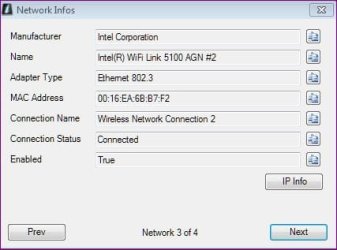
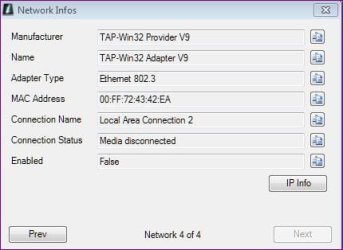
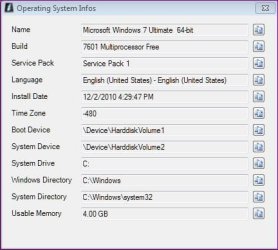
No Internet despite connection. Vuze related?

alphux

New member
Local time
6:10 PM
Messages
6
Well, I have 2x Asus G51-one is good the other refuses to throughput data even when connected either wirelessly or LAC. In each configuration the good Asus hooks up quickly thus acting as Control.
Yesterday, I formatted and re-imaged a much earlier image with Acronis TrueImage with no improvement anywhere-this may indicate hardware problems.
Additionally, System Restore is showing no drives and the property dialog error 0x81000203.
Have been into Event Collector and Services to check what might be wrong but corrections proved unsuccessful.
Task Scheduler is also displaying property errors that Task Schedule service is off. When engine was restarted it immediately dies again.
Trouble seems to be related to when Vuze refused to connect-I may have done something unseemly to rectify this in haste. The details mostly elude me. I was a new Vuze user.
Command-line ipconfig seems fine and have done everything but submit this all to Microsoft.
Also, I have not tried any diagnostic scanning software as I am not sure what to use.
I realize this is a major chunk to be presenting here but it seemed best to present all and then repost where appropriate under your guidance. Thanks for looking. :confused:

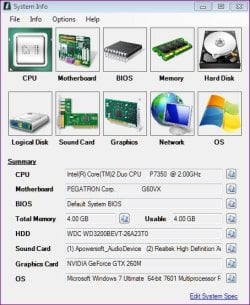
Win 7 Ultimate 2.00GHz 4G Ram 320G HD
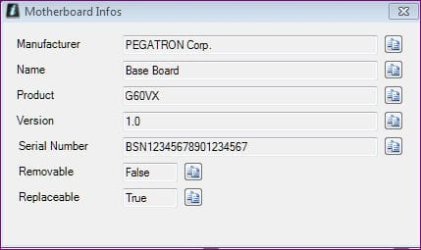
SYSTEM INFO MAIN.JPG

Capture.JPG

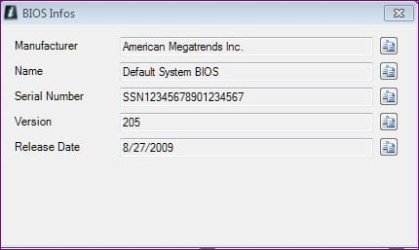
BIOS.JPG

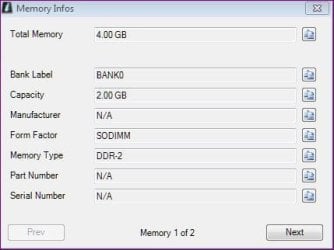
MEMORY.JPG

HD.JPG

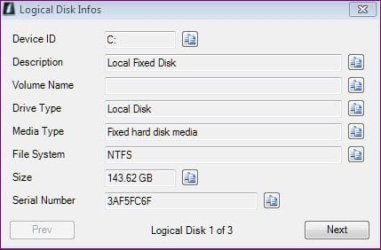
LOGICAL DISK.JPG

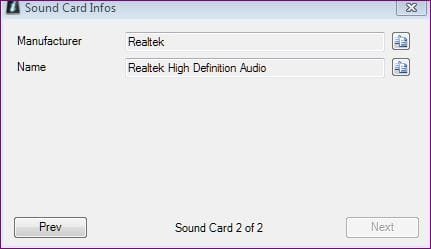
SOUND.JPG

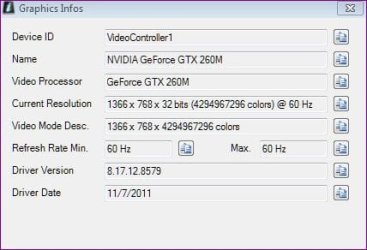
GRAPHICS.JPG

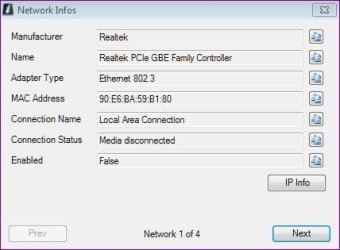
NETWORK LOCAL AREA.JPG

ETHERNET.JPG

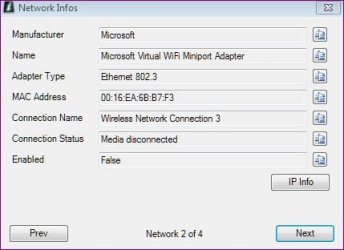
WIRELESS.JPG

ETHERNET 2.JPG

OS.JPG
 

My Computer My Computer

At a glance

Windows 7 Ultimate x642.004GGTX260M
Computer Manufacturer/Model Number
ASUS G51VX
OS
Windows 7 Ultimate x64
CPU
2.00
Motherboard
60-NV3MB1200AO3 G60VX
Memory
4G
Graphics Card(s)
GTX260M
Sound Card
REALTEK
Monitor(s) Displays
GENERIC
Screen Resolution
1366
Hard Drives
320G WD
Internet Speed
1.5Mb/s
Other Info
I use two of these in my network.
First a warning using P2P file sharing.....
It's really important, if you value your PC at all, to stay away from P2P file sharing programs,
like utorrent, Bittorrent, Azureus, Limewire, Vuze.
Criminals have "planted" thousands upon thousands of infections in the "free" shared files.
Some of the recent infections can turn your machine into a doorstop.
It's also very important to avoid any "cracks" or "Keygens" that allow unauthorized use of programs.
Besides being illegal, these files also are loaded with "planted" malware.


Disable the proxy settings in Internet Explorer:
1) Under “Tools” in the browser tool bar select “Internet Options”.
2) In the “Internet Options” window that pops up, click the “Connections” tab at the top.
3) Click “LAN Settings” near the bottom of the “Connections” section.
4) If the “Proxy server” checkbox is marked with a check, click it to deselect/uncheck it.
5) Click “Ok” to close the “Local Area Network (LAN) Settings” window.
6) Click “Ok” to close the “Internet Options” window.
Reboot
Make sure "Proxy server" is still disabled under your LAN Settings.
Test whether internet connectivity is restored.

If that's not the case, then Copy and paste these lines in Note pad.

@Echo on
pushd\windows\system32\drivers\etc
attrib -h -s -r hosts
echo 127.0.0.1 localhost>HOSTS
attrib +r +h +s hosts
popd
ipconfig /release
ipconfig /renew
ipconfig /flushdns
netsh winsock reset all
netsh int ip reset all
shutdown -r -t 1
del %0


Save as flush.bat to your desktop.
Double click on the flush.bat file to run it.Vista and Windows 7... right click the .bat file and choose to run as Administrator. Your computer will reboot itself.

Now download (free version) Malwarebytes' Anti-Malware to your desktop
Malwarebytes Special Offer!
* Double-click mbam-setup.exe and follow the prompts to install the program.
* At the end, be sure a checkmark is placed next to Update Malwarebytes' Anti-Malware and Launch Malwarebytes' Anti-Malware, then click Finish.
* If an update is found, it will download and install the latest version.
* Once the program has loaded, select Perform full scan, then click Scan.
* When the scan is complete, click OK, then Show Results to view the results.
* Be sure that everything is checked, and click Remove Selected.
* When completed, a log will open in Notepad. Please save it to a convenient location. Copy and Paste that log into your next reply.
 

My Computer My Computer

At a glance

Windows 7 Ultimate 32bit SP1Intel(R) Core(TM)2 Quad CPU @ 2.40GHz, 2400 MHz4 GBATI Radeon HD 2600 Pro
Computer type
PC/Desktop
Computer Manufacturer/Model Number
Bruce ... somewhere in his 40's
OS
Windows 7 Ultimate 32bit SP1
CPU
Intel(R) Core(TM)2 Quad CPU @ 2.40GHz, 2400 MHz
Motherboard
INTEL/D975XBX2
Memory
4 GB
Graphics Card(s)
ATI Radeon HD 2600 Pro
Monitor(s) Displays
Samsung SyncMaster 914v
Screen Resolution
1280 x 1024
Hard Drives
2/500GB each ... ST3500630AS ATA Device.
One is not connected
PSU
Rocketfish 700 W
Case
G.Skill Gigabyte Chassis
Keyboard
Standard PS/2 Keyboard
Mouse
Microsoft PS/2 Mouse
Internet Speed
DSL
Antivirus
Avira Internet Security
Browser
IE 11
Other Info
ATI HDMI Audio
Thank you Jaycee
Sorry about the delay-don't know if this is normal tho'.
Thank you for your P2P warning - I shall desist forthwith.
I completed your instructions but was unable to update Mbam within the bad Internet Asus so I had to use the latest download-I was also unable to transfer the update.
So far no luck with the Internet fixes and I was enticed back to my old Belkin WAP for it's reliability. I had previously been using a new Asus RT-N16 with Tomato firmware-but it was still good on the good PC. However, the configuration expectedly was a pretty steep learning curve for me despite the challenge.
I do hope you will not throw me at the mercy of the Linux-Tomato Forum although
I shall be posting with them as I get to grips with this.

Here is the Mbam log:

Malwarebytes Anti-Malware 1.61.0.1400
www.malwarebytes.org
Database version: v2012.04.04.08
Windows 7 Service Pack 1 x64 NTFS
Internet Explorer 8.0.7601.17514
Steven Holten :: STEVENHOLTON-PC [administrator]
4/23/2012 12:59:31 PM
mbam-log-2012-04-23 (12-59-31).txt
Scan type: Full scan
Scan options enabled: Memory | Startup | Registry | File System | Heuristics/Extra | Heuristics/Shuriken | PUP | PUM
Scan options disabled: P2P
Objects scanned: 398771
Time elapsed: 54 minute(s), 35 second(s)
Memory Processes Detected: 0
(No malicious items detected)
Memory Modules Detected: 0
(No malicious items detected)
Registry Keys Detected: 0
(No malicious items detected)
Registry Values Detected: 0
(No malicious items detected)
Registry Data Items Detected: 0
(No malicious items detected)
Folders Detected: 0
(No malicious items detected)
Files Detected: 1
P:\C BACKUP NO INTERNET\Documents\DOWNLOADS\DownloadSetup.exe (Affiliate.Downloader) -> Quarantined and deleted successfully.
(end)

Thanks again. Steve.
 

My Computer My Computer

At a glance

Windows 7 Ultimate x642.004GGTX260M
Computer Manufacturer/Model Number
ASUS G51VX
OS
Windows 7 Ultimate x64
CPU
2.00
Motherboard
60-NV3MB1200AO3 G60VX
Memory
4G
Graphics Card(s)
GTX260M
Sound Card
REALTEK
Monitor(s) Displays
GENERIC
Screen Resolution
1366
Hard Drives
320G WD
Internet Speed
1.5Mb/s
Other Info
I use two of these in my network.
Thanks for getting back to me again!

So what problems are you experiencing now (if any)?
 

My Computer My Computer

At a glance

Windows 7 Ultimate 32bit SP1Intel(R) Core(TM)2 Quad CPU @ 2.40GHz, 2400 MHz4 GBATI Radeon HD 2600 Pro
Computer type
PC/Desktop
Computer Manufacturer/Model Number
Bruce ... somewhere in his 40's
OS
Windows 7 Ultimate 32bit SP1
CPU
Intel(R) Core(TM)2 Quad CPU @ 2.40GHz, 2400 MHz
Motherboard
INTEL/D975XBX2
Memory
4 GB
Graphics Card(s)
ATI Radeon HD 2600 Pro
Monitor(s) Displays
Samsung SyncMaster 914v
Screen Resolution
1280 x 1024
Hard Drives
2/500GB each ... ST3500630AS ATA Device.
One is not connected
PSU
Rocketfish 700 W
Case
G.Skill Gigabyte Chassis
Keyboard
Standard PS/2 Keyboard
Mouse
Microsoft PS/2 Mouse
Internet Speed
DSL
Antivirus
Avira Internet Security
Browser
IE 11
Other Info
ATI HDMI Audio
Still the same-no Internet on the one Asus.

Do you think this could be a DNS problem-I still do not have a reliable method after trying 'Dual Server' which was 'listening' for a Static IP which when attempted left me with port problems unsolved-I would dearly like to know how to deal with ports.

I then tried for Dynamic DNS with 'OpenDNS' but apparently this was not the solution.

Any ideas please?
 

My Computer My Computer

At a glance

Windows 7 Ultimate x642.004GGTX260M
Computer Manufacturer/Model Number
ASUS G51VX
OS
Windows 7 Ultimate x64
CPU
2.00
Motherboard
60-NV3MB1200AO3 G60VX
Memory
4G
Graphics Card(s)
GTX260M
Sound Card
REALTEK
Monitor(s) Displays
GENERIC
Screen Resolution
1366
Hard Drives
320G WD
Internet Speed
1.5Mb/s
Other Info
I use two of these in my network.
What other Antivirus/Anti-malware programs have you run?

Take a look here and see if you can repair your Internet connection. I know that it has worked for some, but I've never needed it for my computers.
Windows Repair (All In One)
 

My Computer My Computer

At a glance

Windows 7 Ultimate 32bit SP1Intel(R) Core(TM)2 Quad CPU @ 2.40GHz, 2400 MHz4 GBATI Radeon HD 2600 Pro
Computer type
PC/Desktop
Computer Manufacturer/Model Number
Bruce ... somewhere in his 40's
OS
Windows 7 Ultimate 32bit SP1
CPU
Intel(R) Core(TM)2 Quad CPU @ 2.40GHz, 2400 MHz
Motherboard
INTEL/D975XBX2
Memory
4 GB
Graphics Card(s)
ATI Radeon HD 2600 Pro
Monitor(s) Displays
Samsung SyncMaster 914v
Screen Resolution
1280 x 1024
Hard Drives
2/500GB each ... ST3500630AS ATA Device.
One is not connected
PSU
Rocketfish 700 W
Case
G.Skill Gigabyte Chassis
Keyboard
Standard PS/2 Keyboard
Mouse
Microsoft PS/2 Mouse
Internet Speed
DSL
Antivirus
Avira Internet Security
Browser
IE 11
Other Info
ATI HDMI Audio
Back
Top