Solved No internet or system restore - format C needed?

Veronicka

New member
Local time
4:58 AM
Messages
7
It started with a conflict between Chrome and Comodo firewall. Tried uninstalling together with other security programs down to just having Windows firewall. But still Explorer "cant find the page" and all system restores are gone or wont work. Have tried solutions all day, do I really have to format and reinstall the whole computer?
 

My Computer My Computer

Computer type
PC/Desktop
OS
Win 7 64
Hello Veronika,

Short answer could be either, could you fill in yours specs a bit more, Make/model, what AV, any optimiser progs.

First step download Malwarebytes (uncheck the 30 day trial), run a full scan.
As youv'e got a desktop do you still have the OS disk?.

Roy
 

My Computer My Computer

Computer type
PC/Desktop
Computer Manufacturer/Model Number
medionl/Aspire 6930G/acer x55a
OS
W7 home premium 32bit/W7HP 64bit/w10 tp insider ring
CPU
E5300 dual core
Motherboard
medion MS7366
Memory
3gb
Graphics Card(s)
Nvidia Geforce 7100 Nforce 630i
Monitor(s) Displays
avixc
Internet Speed
n (isp resticted to 72)
Antivirus
mse/pands
Browser
palemoon
Other Info
Belkin Fd7050 n USB using Railink RT2870 drivers, more upto date
Yes, I still have the OS Cd. But I´m looking for easy solutions, and with just one windows-computer with no Internet I´m having trouble downloading... I´m investigating getting and moving programs on usb:s, but no success yet. Have tried Comodo, Zonealarm and Windows firewall. Avast, Forticlient and Windows antivirus. OI:s security programs + CCleaner and Revo uninstallers cleaning everything. Win 7 64. All on a SSD-disk, Intel i7, and good updated computer.
 

My Computer My Computer

Computer type
PC/Desktop
OS
Win 7 64
Try Safe Mode with Networking.

Run in cmd:
Code:
ipconfig
Then ping your own IP, gateway, 8.8.8.8 and google.com -- are you getting replies or timed out?
 

My Computer My Computer

Computer type
PC/Desktop
Computer Manufacturer/Model Number
Custom Build
OS
Windows 7 Ultimate x64 SP1
CPU
AMD Phenom 2 1090T
Motherboard
Gigabyte GA-890FXA-UD5
Memory
2x8GB Kingston HyperX Fury Black 1600Mhz Unganged
Graphics Card(s)
MSI GTX 970 Gaming 4G
Sound Card
Realtek On-Board HD 7.1 Audio / Logitech G35
Monitor(s) Displays
3xAcer GD245HQ
Screen Resolution
1920x1080
Hard Drives
Samsung 850 Pro 512GB SSD - OS /
WD Caviar Black SATA 3 - 1 TBx2 - Dynamic RAID 0 /
WD Caviar Green SATA 2 - 640GBx2 - Dynamic RAID 0 /
WD Caviar Green SATA 2 - 640GB - Internal Backup /
Seagate Barracude SATA 3 - 3TB - External Backup/ Sync
PSU
HighPower 1000W
Case
Cooler Master HAF 932
Cooling
Noctua NH-D14
Keyboard
Logitech G19
Mouse
Logitech G500
Internet Speed
100/4 Mbit Cable (100GB quota)
Antivirus
ZoneAlarm Extreme Security / MBAM Pro / MBAE Free / SAS Free
Browser
IE 11 - Firefox - Chrome
Other Info
Logitech F710/ G27/ G940/ Z5500 // TrackIR 5 // Nvidia 3D Surround Vision
Thanks, I got Internet working in safe mode. Downloaded and ran Malwarebytes without any big faults. Though I´m used to working with computers, I need a step-by-step explanation with: "Then ping your own IP, gateway, 8.8.8.8 and google.com -- are you getting replies or timed out?". The internet works in safe mode, so the solution shouldn´t be far away.
 

My Computer My Computer

Computer type
PC/Desktop
OS
Win 7 64
If Gokay's suggestion does not give you any luck.

Back-up your personal files/pictures/etc to a USB/disk, then go to tutorials section and search for Repair install, Follow Brinks instructions there, (thats why i asked about OS disks).

Roy

Rats typing this during your last post
 

My Computer My Computer

Computer type
PC/Desktop
Computer Manufacturer/Model Number
medionl/Aspire 6930G/acer x55a
OS
W7 home premium 32bit/W7HP 64bit/w10 tp insider ring
CPU
E5300 dual core
Motherboard
medion MS7366
Memory
3gb
Graphics Card(s)
Nvidia Geforce 7100 Nforce 630i
Monitor(s) Displays
avixc
Internet Speed
n (isp resticted to 72)
Antivirus
mse/pands
Browser
palemoon
Other Info
Belkin Fd7050 n USB using Railink RT2870 drivers, more upto date
Download firefox see if that works.

Roy
 

My Computer My Computer

Computer type
PC/Desktop
Computer Manufacturer/Model Number
medionl/Aspire 6930G/acer x55a
OS
W7 home premium 32bit/W7HP 64bit/w10 tp insider ring
CPU
E5300 dual core
Motherboard
medion MS7366
Memory
3gb
Graphics Card(s)
Nvidia Geforce 7100 Nforce 630i
Monitor(s) Displays
avixc
Internet Speed
n (isp resticted to 72)
Antivirus
mse/pands
Browser
palemoon
Other Info
Belkin Fd7050 n USB using Railink RT2870 drivers, more upto date
Try IE (no Add-ons) - http://www.sevenforums.com/tutorials/350941-internet-explorer-no-add-ons-open.html. Do you have any other browsers? Tried with them?

Try running in elevated cmd:
Code:
netsh winsock reset

Also try a clean startup - http://www.sevenforums.com/tutorial...ation-conflicts-performing-clean-startup.html

If it still fails, then in cmd:
Code:
ipconfig
it should show something like (numbers will be different and it will have more lines of info):
Code:
   IPv4 Address. . . . . . . . . . . : 192.168.0.105
   Subnet Mask . . . . . . . . . . . : 255.255.255.0
   Default Gateway . . . . . . . . . : 192.168.0.1
Once you know the addresses, also run in cmd:
ping yourIPaddress
Code:
ping 192.168.0.105
ping gateway
Code:
ping 192.168.0.1
Ping 8.8.8.8 and google.com (2 separate commands):
Code:
ping 8.8.8.8
ping google.com

Make note of each, which one fails to reply back?
 

My Computer My Computer

Computer type
PC/Desktop
Computer Manufacturer/Model Number
Custom Build
OS
Windows 7 Ultimate x64 SP1
CPU
AMD Phenom 2 1090T
Motherboard
Gigabyte GA-890FXA-UD5
Memory
2x8GB Kingston HyperX Fury Black 1600Mhz Unganged
Graphics Card(s)
MSI GTX 970 Gaming 4G
Sound Card
Realtek On-Board HD 7.1 Audio / Logitech G35
Monitor(s) Displays
3xAcer GD245HQ
Screen Resolution
1920x1080
Hard Drives
Samsung 850 Pro 512GB SSD - OS /
WD Caviar Black SATA 3 - 1 TBx2 - Dynamic RAID 0 /
WD Caviar Green SATA 2 - 640GBx2 - Dynamic RAID 0 /
WD Caviar Green SATA 2 - 640GB - Internal Backup /
Seagate Barracude SATA 3 - 3TB - External Backup/ Sync
PSU
HighPower 1000W
Case
Cooler Master HAF 932
Cooling
Noctua NH-D14
Keyboard
Logitech G19
Mouse
Logitech G500
Internet Speed
100/4 Mbit Cable (100GB quota)
Antivirus
ZoneAlarm Extreme Security / MBAM Pro / MBAE Free / SAS Free
Browser
IE 11 - Firefox - Chrome
Other Info
Logitech F710/ G27/ G940/ Z5500 // TrackIR 5 // Nvidia 3D Surround Vision
They all reply back and there´s internet connection, but both Explorer and Chrome can´t find a web page. Tried right-clicking my connection for a diagnose in control panels networks - "Your computer is right configured but the unit (DNS-server) wont answer".
 

My Computer My Computer

Computer type
PC/Desktop
OS
Win 7 64
Did you try running in cmd: "netsh winsock reset" yet?
 

My Computer My Computer

Computer type
PC/Desktop
Computer Manufacturer/Model Number
Custom Build
OS
Windows 7 Ultimate x64 SP1
CPU
AMD Phenom 2 1090T
Motherboard
Gigabyte GA-890FXA-UD5
Memory
2x8GB Kingston HyperX Fury Black 1600Mhz Unganged
Graphics Card(s)
MSI GTX 970 Gaming 4G
Sound Card
Realtek On-Board HD 7.1 Audio / Logitech G35
Monitor(s) Displays
3xAcer GD245HQ
Screen Resolution
1920x1080
Hard Drives
Samsung 850 Pro 512GB SSD - OS /
WD Caviar Black SATA 3 - 1 TBx2 - Dynamic RAID 0 /
WD Caviar Green SATA 2 - 640GBx2 - Dynamic RAID 0 /
WD Caviar Green SATA 2 - 640GB - Internal Backup /
Seagate Barracude SATA 3 - 3TB - External Backup/ Sync
PSU
HighPower 1000W
Case
Cooler Master HAF 932
Cooling
Noctua NH-D14
Keyboard
Logitech G19
Mouse
Logitech G500
Internet Speed
100/4 Mbit Cable (100GB quota)
Antivirus
ZoneAlarm Extreme Security / MBAM Pro / MBAE Free / SAS Free
Browser
IE 11 - Firefox - Chrome
Other Info
Logitech F710/ G27/ G940/ Z5500 // TrackIR 5 // Nvidia 3D Surround Vision
Let's see what ipconfig says.


Open a Elevated Command Prompt:

Click on the Start button and type cmd.
DO NOT press Enter or click Go.
Look at the upper part of the window and you will see cmd.exe.
Right click on it and select Run as Administrator.

Paste the following into the Command Prompt window, exactly as shown, including double quotes:

cmd /c "ipconfig /all > postme.txt & ping yahoo.com >> postme.txt & reg query "HKEY_CURRENT_USER\Software\Microsoft\Windows\CurrentVersion\Internet Settings" | find /i "proxy" >> postme.txt & notepad postme.txt & del postme.txt"

and press ENTER.

A file will open in Notepad. Please copy and paste the contents in a reply here. Close the Notepad window and the file will be deleted and the Command Prompt window will also close.
 

My Computer My Computer

Computer type
PC/Desktop
Computer Manufacturer/Model Number
Lenovo IdeaCenter 450
OS
Windows 10 Pro X64
CPU
Intel Quad Core i7-4770 @ 3.4Ghz
Memory
16.0GB PC3-12800 DDR3 SDRAM 1600 MHz
Graphics Card(s)
Intel Integrated HD Graphics
Sound Card
Realtek HD Audio
Monitor(s) Displays
HP 22" LCD
Screen Resolution
1680 x 1050
Hard Drives
250GB Samsung EVO SATA-3 SSD
2TB Seagate ST2000DM001 SATA-2
1.5TB Seagate ST3150041AS SATA
Keyboard
Dell USB
Mouse
Lenovo USB
Internet Speed
Cable via Road Runner 3MB Upload, 30MB Download
Antivirus
Windows Defender, MBAM Pro, MBAE
Browser
Seamonkey
Other Info
UEFI/GPT
PLDS DVD-RW DH16AERSH
Yepp, no change.
 

My Computer My Computer

Computer type
PC/Desktop
OS
Win 7 64
IP-konfiguration f”r Windows

V„rddatornamn . . . . . . . . . . : C
Prim„rt DNS-suffix. . . . . . . . :
Nodtyp. . . . . . . . . . . . . . : Hybrid
IP-routning aktiverat . . . . . . : Nej
WINS-proxy aktiverat. . . . . . . : Nej
S”klista f”r DNS-suffix . . . . . : lan

Ethernet-anslutning Bluetooth-n„tverksanslutning 8:

Tillst†nd . . . . . . . . . . . . : Fr†nkopplad
Anslutningsspecifika DNS-suffix . :
Beskrivning . . . . . . . . . . . : Bluetooth Device (Personal Area Network) #8
Fysisk adress . . . . . . . . . . : 00-02-72-BF-B4-DE
DHCP aktiverat. . . . . . . . . . : Ja
Autokonfiguration aktiverat . . . : Ja

Ethernet-anslutning Anslutning till lokalt n„tverk:

Anslutningsspecifika DNS-suffix . : lan
Beskrivning . . . . . . . . . . . : Realtek PCIe GBE Family Controller
Fysisk adress . . . . . . . . . . : F4-6D-04-00-F5-EA
DHCP aktiverat. . . . . . . . . . : Ja
Autokonfiguration aktiverat . . . : Ja
L„nklokal IPv6-adress . . . . . . : fe80::cca2:f206:e2fb:521e%13(Standard)
IPv4-adress . . . . . . . . . . . : 192.168.1.86(Standard)
N„tmask . . . . . . . . . . . . . : 255.255.255.0
L†net erh”lls . . . . . . . . . . : den 7 september 2015 17:45:25
L†net upph”r. . . . . . . . . . . : den 7 september 2015 19:15:24
Standard-gateway. . . . . . . . . : 192.168.1.1
DHCP-server . . . . . . . . . . . : 192.168.1.1
IAID f”r DHCPv6 . . . . . . . . . : 301231364
DUID f”r DHCPv6-klient. . . . . . : 00-01-00-01-16-D9-50-72-F4-6D-04-00-F5-EA
DNS-servrar . . . . . . . . . . . : 156.154.70.25
156.154.71.25
NetBIOS ”ver TCP/IP . . . . . . . : Aktiverat

Tunnelanslutning: isatap.lan:

Tillst†nd . . . . . . . . . . . . : Fr†nkopplad
Anslutningsspecifika DNS-suffix . :
Beskrivning . . . . . . . . . . . : Microsoft ISATAP Adapter
Fysisk adress . . . . . . . . . . : 00-00-00-00-00-00-00-E0
DHCP aktiverat. . . . . . . . . . : Nej
Autokonfiguration aktiverat . . . : Ja

Tunnelanslutning: isatap.{ED816441-E36E-42AB-972D-4E85845B140A}:

Tillst†nd . . . . . . . . . . . . : Fr†nkopplad
Anslutningsspecifika DNS-suffix . :
Beskrivning . . . . . . . . . . . : Microsoft ISATAP Adapter #2
Fysisk adress . . . . . . . . . . : 00-00-00-00-00-00-00-E0
DHCP aktiverat. . . . . . . . . . : Nej
Autokonfiguration aktiverat . . . : Ja

Tunnelanslutning: Teredo Tunneling Pseudo-Interface:

Tillst†nd . . . . . . . . . . . . : Fr†nkopplad
Anslutningsspecifika DNS-suffix . :
Beskrivning . . . . . . . . . . . : Teredo Tunneling Pseudo-Interface
Fysisk adress . . . . . . . . . . : 00-00-00-00-00-00-00-E0
DHCP aktiverat. . . . . . . . . . : Nej
Autokonfiguration aktiverat . . . : Ja

Tunnelanslutning: isatap.{CB782BD4-3B05-4FE9-A14E-89E4451412A2}:

Tillst†nd . . . . . . . . . . . . : Fr†nkopplad
Anslutningsspecifika DNS-suffix . :
Beskrivning . . . . . . . . . . . : Microsoft ISATAP Adapter #3
Fysisk adress . . . . . . . . . . : 00-00-00-00-00-00-00-E0
DHCP aktiverat. . . . . . . . . . : Nej
Autokonfiguration aktiverat . . . : Ja

Skickar ping-signal till yahoo.com [206.190.36.45] med 32 byte data:
Svar fr†n 206.190.36.45: byte=32 tid=154ms TTL=48

Ping-statistik f”r 206.190.36.45:
Paket: Skickade = 4, Mottagna = 4, F”rlorade = 0 (0 %),
Ungef„rlig ”verf”ringstid i millisekunder:
L„gsta = 154 ms, H”gsta = 154 ms, Medel = 154 ms
AutoConfigProxy REG_SZ wininet.dll
MigrateProxy REG_DWORD 0x1
ProxyEnable REG_DWORD 0x0
ProxyOverride REG_SZ <-loopback>
 

My Computer My Computer

Computer type
PC/Desktop
OS
Win 7 64
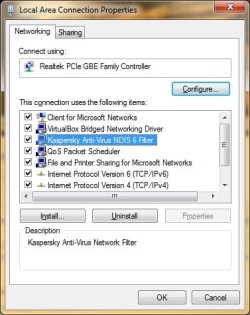
You seem to be connected and DNS is working too. All I can think of is Comodo left behind some component that is denying web access.

In Network and Sharing Center go into LAN properties, do you see any NDIS filters or anything named Comodo?
LAN properties - Kaspersky.jpg

After you check the above, next would perhaps be Complete Internet Repair.
 

My Computer My Computer

Computer type
PC/Desktop
Computer Manufacturer/Model Number
Custom Build
OS
Windows 7 Ultimate x64 SP1
CPU
AMD Phenom 2 1090T
Motherboard
Gigabyte GA-890FXA-UD5
Memory
2x8GB Kingston HyperX Fury Black 1600Mhz Unganged
Graphics Card(s)
MSI GTX 970 Gaming 4G
Sound Card
Realtek On-Board HD 7.1 Audio / Logitech G35
Monitor(s) Displays
3xAcer GD245HQ
Screen Resolution
1920x1080
Hard Drives
Samsung 850 Pro 512GB SSD - OS /
WD Caviar Black SATA 3 - 1 TBx2 - Dynamic RAID 0 /
WD Caviar Green SATA 2 - 640GBx2 - Dynamic RAID 0 /
WD Caviar Green SATA 2 - 640GB - Internal Backup /
Seagate Barracude SATA 3 - 3TB - External Backup/ Sync
PSU
HighPower 1000W
Case
Cooler Master HAF 932
Cooling
Noctua NH-D14
Keyboard
Logitech G19
Mouse
Logitech G500
Internet Speed
100/4 Mbit Cable (100GB quota)
Antivirus
ZoneAlarm Extreme Security / MBAM Pro / MBAE Free / SAS Free
Browser
IE 11 - Firefox - Chrome
Other Info
Logitech F710/ G27/ G940/ Z5500 // TrackIR 5 // Nvidia 3D Surround Vision
Im pretty sure that that DNS server belongs to Comodo.

Roy
 

My Computer My Computer

Computer type
PC/Desktop
Computer Manufacturer/Model Number
medionl/Aspire 6930G/acer x55a
OS
W7 home premium 32bit/W7HP 64bit/w10 tp insider ring
CPU
E5300 dual core
Motherboard
medion MS7366
Memory
3gb
Graphics Card(s)
Nvidia Geforce 7100 Nforce 630i
Monitor(s) Displays
avixc
Internet Speed
n (isp resticted to 72)
Antivirus
mse/pands
Browser
palemoon
Other Info
Belkin Fd7050 n USB using Railink RT2870 drivers, more upto date

My Computer My Computer

Computer type
PC/Desktop
Computer Manufacturer/Model Number
Custom Build
OS
Windows 7 Ultimate x64 SP1
CPU
AMD Phenom 2 1090T
Motherboard
Gigabyte GA-890FXA-UD5
Memory
2x8GB Kingston HyperX Fury Black 1600Mhz Unganged
Graphics Card(s)
MSI GTX 970 Gaming 4G
Sound Card
Realtek On-Board HD 7.1 Audio / Logitech G35
Monitor(s) Displays
3xAcer GD245HQ
Screen Resolution
1920x1080
Hard Drives
Samsung 850 Pro 512GB SSD - OS /
WD Caviar Black SATA 3 - 1 TBx2 - Dynamic RAID 0 /
WD Caviar Green SATA 2 - 640GBx2 - Dynamic RAID 0 /
WD Caviar Green SATA 2 - 640GB - Internal Backup /
Seagate Barracude SATA 3 - 3TB - External Backup/ Sync
PSU
HighPower 1000W
Case
Cooler Master HAF 932
Cooling
Noctua NH-D14
Keyboard
Logitech G19
Mouse
Logitech G500
Internet Speed
100/4 Mbit Cable (100GB quota)
Antivirus
ZoneAlarm Extreme Security / MBAM Pro / MBAE Free / SAS Free
Browser
IE 11 - Firefox - Chrome
Other Info
Logitech F710/ G27/ G940/ Z5500 // TrackIR 5 // Nvidia 3D Surround Vision
So I tried a special cleaning program for Comodo and then internet wouldn´t work at all... Managed to restore and have tried the tips above. Finally I got it working, thanks!
 

My Computer My Computer

Computer type
PC/Desktop
OS
Win 7 64
Back
Top