No internet with custom IP

Somacruz

New member
Local time
8:24 AM
Messages
37
Location
Sweden
Hello, instead of necroing an old thread I decided to make my own, copied what I said there:

Once I put a custom IP adress, I never got any message about programs not able to first connect. Everything was fine for a while, however suddenly I can't put a custom IP adress anymore as then I get DNS failure and things just can't at all connect. If I put automatic it works, so I used the automatic settings DNS and still the same problem. Even when I put exact same IP adress, subnet mask, gateway and DNS it still didn't work.
 

My Computer

Computer type
PC/Desktop
Computer Manufacturer/Model Number
Custom build
OS
Windows 7 Ultimate x64
CPU
Intel Core i5 4440
Motherboard
ASUSTeK B85M-G
Memory
Corsair Vengeance LP 8x2 1600MHz
Graphics Card(s)
ASUS GeForce GTX 750
Sound Card
Motherboard Realtek
Monitor(s) Displays
BenQ GL2450 (DVI-D), HP Compaq LA2205WG (VGA)
Screen Resolution
1920x1080, 1680x1050
Hard Drives
A-DATA SP900 128GB SSD
Seagate Barracuda 500GB 7200RPM HDD
PSU
Antec VP550 550W
Case
Fractal Design Core 1000
Cooling
Default Intel Fan, Front Chassi Fan, GPU Fan
Keyboard
Mad Cats v5
Mouse
Mad Catz R.A.T. 3
Internet Speed
30Mbps
Antivirus
Avast! Antivirus
Browser
Google Chrome
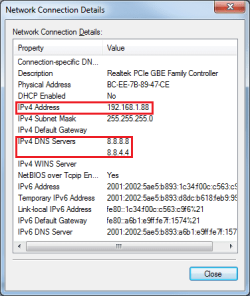
Can you provide screenshots of the IP addresses you're changing and what you're trying to change them to?

In case you're not already aware: The DNS (Domain Name Service) is essentially what is mapping the URL you type into the address bar to an IP address. Like a translator. The IP addresses you put in for the DNS must be representing a real DNS server IP which can perform this translation. Leaving the DNS on automatic should pick up the DNS IP your Internet Service Provider uses. If you manually enter them, ensure they exist. For example, Google offer a free DNS service so you could enter some IP addresses they provide: https://developers.google.com/speed/public-dns/?hl=en
 

My Computer

Computer type
Laptop
Computer Manufacturer/Model Number
Medion
OS
Windows 10 x64
CPU
Intel i5 4210M
Motherboard
N/A
Memory
6GB DDRIII
Graphics Card(s)
Intel HD4600/Nvidia GeForce 825M
Monitor(s) Displays
15.6"
Screen Resolution
1366x768
Hard Drives
Samsung EVO 850 500GB
PSU
N/A
Case
N/A
Cooling
N/A
Keyboard
N/A
Mouse
N/A
Internet Speed
13Mbps (actual)
Antivirus
N/A
Browser
Firefox ;)
A word about this: Even when I put same as the automatic ones, both with DNS and IP adress, same subnet, same gateway it still doesn't work. When I put in only custom DNS, everything works fine.
 

Attachments

  • Automatic IP.png
    Automatic IP.png
    14.3 KB · Views: 25
  • Static IP.png
    Static IP.png
    12 KB · Views: 25

My Computer

Computer type
PC/Desktop
Computer Manufacturer/Model Number
Custom build
OS
Windows 7 Ultimate x64
CPU
Intel Core i5 4440
Motherboard
ASUSTeK B85M-G
Memory
Corsair Vengeance LP 8x2 1600MHz
Graphics Card(s)
ASUS GeForce GTX 750
Sound Card
Motherboard Realtek
Monitor(s) Displays
BenQ GL2450 (DVI-D), HP Compaq LA2205WG (VGA)
Screen Resolution
1920x1080, 1680x1050
Hard Drives
A-DATA SP900 128GB SSD
Seagate Barracuda 500GB 7200RPM HDD
PSU
Antec VP550 550W
Case
Fractal Design Core 1000
Cooling
Default Intel Fan, Front Chassi Fan, GPU Fan
Keyboard
Mad Cats v5
Mouse
Mad Catz R.A.T. 3
Internet Speed
30Mbps
Antivirus
Avast! Antivirus
Browser
Google Chrome
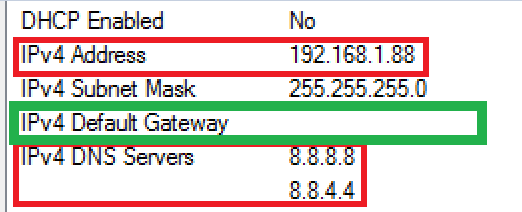
Top: Automatic IP
Bottom: Static IP
 

My Computer

Computer type
PC/Desktop
Computer Manufacturer/Model Number
Custom build
OS
Windows 7 Ultimate x64
CPU
Intel Core i5 4440
Motherboard
ASUSTeK B85M-G
Memory
Corsair Vengeance LP 8x2 1600MHz
Graphics Card(s)
ASUS GeForce GTX 750
Sound Card
Motherboard Realtek
Monitor(s) Displays
BenQ GL2450 (DVI-D), HP Compaq LA2205WG (VGA)
Screen Resolution
1920x1080, 1680x1050
Hard Drives
A-DATA SP900 128GB SSD
Seagate Barracuda 500GB 7200RPM HDD
PSU
Antec VP550 550W
Case
Fractal Design Core 1000
Cooling
Default Intel Fan, Front Chassi Fan, GPU Fan
Keyboard
Mad Cats v5
Mouse
Mad Catz R.A.T. 3
Internet Speed
30Mbps
Antivirus
Avast! Antivirus
Browser
Google Chrome
So, when you manually set them to the values in the bottom image, it works?
 

My Computer

Computer type
Laptop
Computer Manufacturer/Model Number
Medion
OS
Windows 10 x64
CPU
Intel i5 4210M
Motherboard
N/A
Memory
6GB DDRIII
Graphics Card(s)
Intel HD4600/Nvidia GeForce 825M
Monitor(s) Displays
15.6"
Screen Resolution
1366x768
Hard Drives
Samsung EVO 850 500GB
PSU
N/A
Case
N/A
Cooling
N/A
Keyboard
N/A
Mouse
N/A
Internet Speed
13Mbps (actual)
Antivirus
N/A
Browser
Firefox ;)
Opposite, as soon as I put custom IP adress it doesn't work.
 

My Computer

Computer type
PC/Desktop
Computer Manufacturer/Model Number
Custom build
OS
Windows 7 Ultimate x64
CPU
Intel Core i5 4440
Motherboard
ASUSTeK B85M-G
Memory
Corsair Vengeance LP 8x2 1600MHz
Graphics Card(s)
ASUS GeForce GTX 750
Sound Card
Motherboard Realtek
Monitor(s) Displays
BenQ GL2450 (DVI-D), HP Compaq LA2205WG (VGA)
Screen Resolution
1920x1080, 1680x1050
Hard Drives
A-DATA SP900 128GB SSD
Seagate Barracuda 500GB 7200RPM HDD
PSU
Antec VP550 550W
Case
Fractal Design Core 1000
Cooling
Default Intel Fan, Front Chassi Fan, GPU Fan
Keyboard
Mad Cats v5
Mouse
Mad Catz R.A.T. 3
Internet Speed
30Mbps
Antivirus
Avast! Antivirus
Browser
Google Chrome
Your bottom image shows no gateway:

ip.PNG
 
Last edited:

My Computer

Computer type
Laptop
Computer Manufacturer/Model Number
Employer provided Dell Latitude
OS
W7 Pro SP1 64bit
CPU
i7
Memory
8GB
Graphics Card(s)
Intel HD Graphics
Hard Drives
crappy SSD
Antivirus
Employer mandated Symantec Endpoint Protection
Browser
Pale Moon 64bit, IE11 64bit & Chrome 64bit
Why are you changing the DNS server numbers ?

Where did you get 8.8.4.4 from ?

The only number you should change is the IP4 address.

Why aren`t you using a Dynamic IP address ?
 

My Computer

Computer type
PC/Desktop
Computer Manufacturer/Model Number
Skylake Special #666
OS
Windows 10 Pro x64
CPU
Intel Core i7 6700K
Motherboard
Asus Sabertooth Z170 Mark 1
Memory
GSkill TridentZ RGB 16GB 3600 16-16-16-36
Graphics Card(s)
EVGA GTX 980 Ti SC x2
Sound Card
Realtek High Definition
Monitor(s) Displays
AOC G2460PG
Screen Resolution
1920 x 1080 144Hz
Hard Drives
Samsung 860 Pro 256GB, Seagate Barracuda 4TB x2
PSU
EVGA 1000 P2, EVGA White Custom Braided Cables
Case
Corsair Vengeance C70 Gunmetal Black
Cooling
Corsair H100i v2, Corsair ML120 x2, Thermal Grizzly Kryonaut
Keyboard
Logitech G910 Orion Spectrum
Mouse
Logitech G700s
Internet Speed
Verizon Fios Quantum Gateway 75/75
Antivirus
Windows Defender, Malwarebytes Free 3.8.3
Browser
Chrome
Other Info
Corsair SP120 x4, LG Blu-ray Drive, Durabrand HT-395 100 Watt Dolby Digital Amp, Corsair H2100 Wireless 7.1 Headset
Why are you changing the DNS server numbers ?

I once had an issue where I couldn't connect to some websites or servers with automatic. So I used Googles DNS and that fixed the issue.
 

My Computer

Computer type
PC/Desktop
Computer Manufacturer/Model Number
Custom build
OS
Windows 7 Ultimate x64
CPU
Intel Core i5 4440
Motherboard
ASUSTeK B85M-G
Memory
Corsair Vengeance LP 8x2 1600MHz
Graphics Card(s)
ASUS GeForce GTX 750
Sound Card
Motherboard Realtek
Monitor(s) Displays
BenQ GL2450 (DVI-D), HP Compaq LA2205WG (VGA)
Screen Resolution
1920x1080, 1680x1050
Hard Drives
A-DATA SP900 128GB SSD
Seagate Barracuda 500GB 7200RPM HDD
PSU
Antec VP550 550W
Case
Fractal Design Core 1000
Cooling
Default Intel Fan, Front Chassi Fan, GPU Fan
Keyboard
Mad Cats v5
Mouse
Mad Catz R.A.T. 3
Internet Speed
30Mbps
Antivirus
Avast! Antivirus
Browser
Google Chrome

My Computer

Computer type
PC/Desktop
Computer Manufacturer/Model Number
Skylake Special #666
OS
Windows 10 Pro x64
CPU
Intel Core i7 6700K
Motherboard
Asus Sabertooth Z170 Mark 1
Memory
GSkill TridentZ RGB 16GB 3600 16-16-16-36
Graphics Card(s)
EVGA GTX 980 Ti SC x2
Sound Card
Realtek High Definition
Monitor(s) Displays
AOC G2460PG
Screen Resolution
1920 x 1080 144Hz
Hard Drives
Samsung 860 Pro 256GB, Seagate Barracuda 4TB x2
PSU
EVGA 1000 P2, EVGA White Custom Braided Cables
Case
Corsair Vengeance C70 Gunmetal Black
Cooling
Corsair H100i v2, Corsair ML120 x2, Thermal Grizzly Kryonaut
Keyboard
Logitech G910 Orion Spectrum
Mouse
Logitech G700s
Internet Speed
Verizon Fios Quantum Gateway 75/75
Antivirus
Windows Defender, Malwarebytes Free 3.8.3
Browser
Chrome
Other Info
Corsair SP120 x4, LG Blu-ray Drive, Durabrand HT-395 100 Watt Dolby Digital Amp, Corsair H2100 Wireless 7.1 Headset

My Computer

Computer type
PC/Desktop
Computer Manufacturer/Model Number
Custom build
OS
Windows 7 Ultimate x64
CPU
Intel Core i5 4440
Motherboard
ASUSTeK B85M-G
Memory
Corsair Vengeance LP 8x2 1600MHz
Graphics Card(s)
ASUS GeForce GTX 750
Sound Card
Motherboard Realtek
Monitor(s) Displays
BenQ GL2450 (DVI-D), HP Compaq LA2205WG (VGA)
Screen Resolution
1920x1080, 1680x1050
Hard Drives
A-DATA SP900 128GB SSD
Seagate Barracuda 500GB 7200RPM HDD
PSU
Antec VP550 550W
Case
Fractal Design Core 1000
Cooling
Default Intel Fan, Front Chassi Fan, GPU Fan
Keyboard
Mad Cats v5
Mouse
Mad Catz R.A.T. 3
Internet Speed
30Mbps
Antivirus
Avast! Antivirus
Browser
Google Chrome

Attachments

  • Default Gateway.png
    Default Gateway.png
    13.7 KB · Views: 24

My Computer

Computer type
PC/Desktop
Computer Manufacturer/Model Number
Custom build
OS
Windows 7 Ultimate x64
CPU
Intel Core i5 4440
Motherboard
ASUSTeK B85M-G
Memory
Corsair Vengeance LP 8x2 1600MHz
Graphics Card(s)
ASUS GeForce GTX 750
Sound Card
Motherboard Realtek
Monitor(s) Displays
BenQ GL2450 (DVI-D), HP Compaq LA2205WG (VGA)
Screen Resolution
1920x1080, 1680x1050
Hard Drives
A-DATA SP900 128GB SSD
Seagate Barracuda 500GB 7200RPM HDD
PSU
Antec VP550 550W
Case
Fractal Design Core 1000
Cooling
Default Intel Fan, Front Chassi Fan, GPU Fan
Keyboard
Mad Cats v5
Mouse
Mad Catz R.A.T. 3
Internet Speed
30Mbps
Antivirus
Avast! Antivirus
Browser
Google Chrome
You can try using Device Manager to remove the device and letting Windows install it again...

ip.PNG

...then set the static IP info again.
 

My Computer

Computer type
Laptop
Computer Manufacturer/Model Number
Employer provided Dell Latitude
OS
W7 Pro SP1 64bit
CPU
i7
Memory
8GB
Graphics Card(s)
Intel HD Graphics
Hard Drives
crappy SSD
Antivirus
Employer mandated Symantec Endpoint Protection
Browser
Pale Moon 64bit, IE11 64bit & Chrome 64bit
You can try using Device Manager to remove the device and letting Windows install it again...

View attachment 379142

...then set the static IP info again.

Well I just tried, but I had to download the drivers from ASUS website (as Windows didn't want to auto detect) and the problem persists.
 

My Computer

Computer type
PC/Desktop
Computer Manufacturer/Model Number
Custom build
OS
Windows 7 Ultimate x64
CPU
Intel Core i5 4440
Motherboard
ASUSTeK B85M-G
Memory
Corsair Vengeance LP 8x2 1600MHz
Graphics Card(s)
ASUS GeForce GTX 750
Sound Card
Motherboard Realtek
Monitor(s) Displays
BenQ GL2450 (DVI-D), HP Compaq LA2205WG (VGA)
Screen Resolution
1920x1080, 1680x1050
Hard Drives
A-DATA SP900 128GB SSD
Seagate Barracuda 500GB 7200RPM HDD
PSU
Antec VP550 550W
Case
Fractal Design Core 1000
Cooling
Default Intel Fan, Front Chassi Fan, GPU Fan
Keyboard
Mad Cats v5
Mouse
Mad Catz R.A.T. 3
Internet Speed
30Mbps
Antivirus
Avast! Antivirus
Browser
Google Chrome
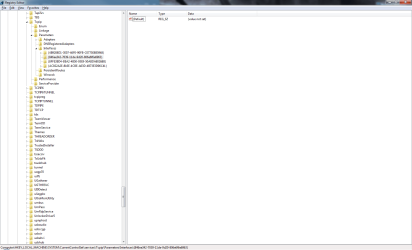
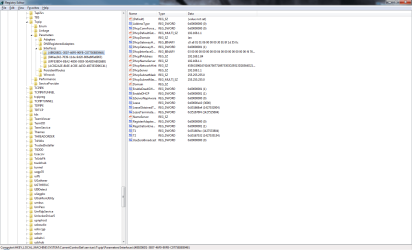
Locate the network interface of interest under this key structure:

Code:
HKEY_LOCAL_MACHINE\SYSTEM\CurrentControlSet\services\Tcpip\Parameters\Interfaces\
Manually add the desired IP address to the value named DefaultGateway.
 

My Computer

Computer type
Laptop
Computer Manufacturer/Model Number
Employer provided Dell Latitude
OS
W7 Pro SP1 64bit
CPU
i7
Memory
8GB
Graphics Card(s)
Intel HD Graphics
Hard Drives
crappy SSD
Antivirus
Employer mandated Symantec Endpoint Protection
Browser
Pale Moon 64bit, IE11 64bit & Chrome 64bit
Locate the network interface of interest under this key structure:

Code:
HKEY_LOCAL_MACHINE\SYSTEM\CurrentControlSet\services\Tcpip\Parameters\Interfaces\
Manually add the desired IP address to the value named DefaultGateway.

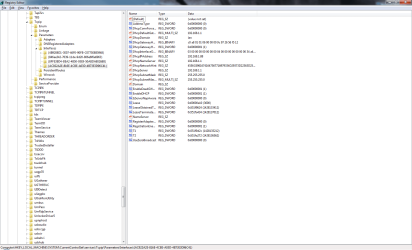
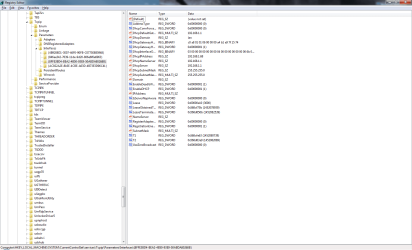
Welp... I apparently have a few.. sending the images here
 

Attachments

  • RegEdit 4.png
    RegEdit 4.png
    46.9 KB · Views: 1
  • RegEdit 3.png
    RegEdit 3.png
    47.1 KB · Views: 2
  • RegEdit 2.png
    RegEdit 2.png
    32.9 KB · Views: 1
  • RegEdit 1.png
    RegEdit 1.png
    45.9 KB · Views: 2

My Computer

Computer type
PC/Desktop
Computer Manufacturer/Model Number
Custom build
OS
Windows 7 Ultimate x64
CPU
Intel Core i5 4440
Motherboard
ASUSTeK B85M-G
Memory
Corsair Vengeance LP 8x2 1600MHz
Graphics Card(s)
ASUS GeForce GTX 750
Sound Card
Motherboard Realtek
Monitor(s) Displays
BenQ GL2450 (DVI-D), HP Compaq LA2205WG (VGA)
Screen Resolution
1920x1080, 1680x1050
Hard Drives
A-DATA SP900 128GB SSD
Seagate Barracuda 500GB 7200RPM HDD
PSU
Antec VP550 550W
Case
Fractal Design Core 1000
Cooling
Default Intel Fan, Front Chassi Fan, GPU Fan
Keyboard
Mad Cats v5
Mouse
Mad Catz R.A.T. 3
Internet Speed
30Mbps
Antivirus
Avast! Antivirus
Browser
Google Chrome
Use the regular Graphical User Interface to set the values that you see here:

379136d1452013167-no-internet-custom-ip-default-gateway.png


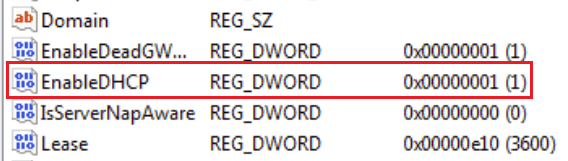
Then look in the registry for a network adapter that has this value set to zero:

DHCP.png

That is probably the network interface of interest :-)
 

My Computer

Computer type
Laptop
Computer Manufacturer/Model Number
Employer provided Dell Latitude
OS
W7 Pro SP1 64bit
CPU
i7
Memory
8GB
Graphics Card(s)
Intel HD Graphics
Hard Drives
crappy SSD
Antivirus
Employer mandated Symantec Endpoint Protection
Browser
Pale Moon 64bit, IE11 64bit & Chrome 64bit
gateway

Well if you put the correct gateway in youll get the net.

192.168 >>0<< 1

Roy
 

My Computer

Computer type
PC/Desktop
Computer Manufacturer/Model Number
medionl/Aspire 6930G/acer x55a
OS
W7 home premium 32bit/W7HP 64bit/w10 tp insider ring
CPU
E5300 dual core
Motherboard
medion MS7366
Memory
3gb
Graphics Card(s)
Nvidia Geforce 7100 Nforce 630i
Monitor(s) Displays
avixc
Internet Speed
n (isp resticted to 72)
Antivirus
mse/pands
Browser
palemoon
Other Info
Belkin Fd7050 n USB using Railink RT2870 drivers, more upto date
Well if you put the correct gateway in youll get the net.

192.168 >>0<< 1

Roy
According to posts #3 and #4, the router is using the 192.168.1.xxx subnet. When the OP lets the computer be automatically configured via DHCP, the gateway is 192.168.1.1 and the computer has access to the internet. There are plenty of routers that use 192.168.1.xxx by default. Most routers can be set to use any private IP address block:
192.168.0.0 - 192.168.255.255
172.16.0.0 - 172.31.255.255
10.0.0.0 - 10.255.255.255

:-)
 

My Computer

Computer type
Laptop
Computer Manufacturer/Model Number
Employer provided Dell Latitude
OS
W7 Pro SP1 64bit
CPU
i7
Memory
8GB
Graphics Card(s)
Intel HD Graphics
Hard Drives
crappy SSD
Antivirus
Employer mandated Symantec Endpoint Protection
Browser
Pale Moon 64bit, IE11 64bit & Chrome 64bit
Took me a while to get that to work.. and putting my IP into default gateway worked... how does that make sense? Also I did try to put it on 192.168.0.1 just for fun and.. well.. then nothing worked at all. No internet, no network, no identifying.
 

My Computer

Computer type
PC/Desktop
Computer Manufacturer/Model Number
Custom build
OS
Windows 7 Ultimate x64
CPU
Intel Core i5 4440
Motherboard
ASUSTeK B85M-G
Memory
Corsair Vengeance LP 8x2 1600MHz
Graphics Card(s)
ASUS GeForce GTX 750
Sound Card
Motherboard Realtek
Monitor(s) Displays
BenQ GL2450 (DVI-D), HP Compaq LA2205WG (VGA)
Screen Resolution
1920x1080, 1680x1050
Hard Drives
A-DATA SP900 128GB SSD
Seagate Barracuda 500GB 7200RPM HDD
PSU
Antec VP550 550W
Case
Fractal Design Core 1000
Cooling
Default Intel Fan, Front Chassi Fan, GPU Fan
Keyboard
Mad Cats v5
Mouse
Mad Catz R.A.T. 3
Internet Speed
30Mbps
Antivirus
Avast! Antivirus
Browser
Google Chrome
Back
Top