No longer able to middle mouse click for firefox?

Jarrex

New member
Local time
7:15 PM
Messages
21
I just installed updates and now I cant middle mouse click to open in new tab for firefox.. is there a way to fix this?
 

My Computer My Computer

At a glance

Windows 7
OS
Windows 7
oh no what update did you install i know there is an option for middle mouse click to open tab in the Tools->Options just not sure where if you monkey around you might find it I'll have a look
 

My Computer My Computer

At a glance

Windows 7AMD Athlon II Quad-Core6GB/Go
Computer Manufacturer/Model Number
hp p6210y
OS
Windows 7
CPU
AMD Athlon II Quad-Core
Memory
6GB/Go
Monitor(s) Displays
HP 2009m/v/f HD-ready LCD Monitor
Hard Drives
640GB/Go
Case
awesome
well thats the thing, its checked. But now for some reason, the middle mouse button is bound to switching between any windows (like how mac does if you hold down the button, except its super sensitive)
 

My Computer My Computer

At a glance

Windows 7
OS
Windows 7
maybe you should change back to 3.54 if thats what you were talking about update
cuz i love the middle mouse button

i have it set to open in a new tab with the left button anyways though
 

My Computer My Computer

At a glance

Windows 7AMD Athlon II Quad-Core6GB/Go
Computer Manufacturer/Model Number
hp p6210y
OS
Windows 7
CPU
AMD Athlon II Quad-Core
Memory
6GB/Go
Monitor(s) Displays
HP 2009m/v/f HD-ready LCD Monitor
Hard Drives
640GB/Go
Case
awesome
no its a driver for my mouse, it just got installed and for some reason it overrides all other uses for middle mouse.
 

My Computer My Computer

At a glance

Windows 7
OS
Windows 7
What mouse brand and model? What driver are you using? If it's MS or Logitech, you need to install latest mouse software/driver and open it up and configure your mouse buttons to do exactly what you want. You can even sometimes change buttons to work differently in different programs, iirc. For MS the software is called "Intellipoint." For Logitech it's "Setpoint" and latest version is 4.80 (last time I checked). Google those names to find latest updates for your particular mouse and OS if you use MS or Logitech.
 

My Computer My Computer

At a glance

Windows 7 Ultimate x64 (Retail)i7-Q 7206 GBnVidia GeForce GT 230M (1GB)
Computer Manufacturer/Model Number
HP DV8t quad
OS
Windows 7 Ultimate x64 (Retail)
CPU
i7-Q 720
Motherboard
Motherboard Chipset Intel Ibex Peak-M PM55, Intel Lynnfield
Memory
6 GB
Graphics Card(s)
nVidia GeForce GT 230M (1GB)
Sound Card
IDT High Definition Audio CODEC
Monitor(s) Displays
18.4 inch HP Infinity FHD (Samsung 184HT03-001)
Screen Resolution
1920 x 1080
Hard Drives
Hitachi 500GB 7200 rpm (x2)
Seagate FreeAgent 1.5 TB External USB (x2)
Thermaltake BlacX eSATA/USB 2.0 3.5/2.5 HD dock
Cooling
Zalman NC-2000 notebook cooling pad
Keyboard
laptop
Mouse
Logitech VX Revolution
Other Info
Backup Unit: Lenovo T61p
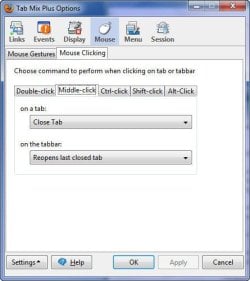
Perchance do you use the TabMixPlus extension for FF? There is an option in there to handle middleclicks:
 

Attachments

  • SNAG-0033.jpg
    SNAG-0033.jpg
    30.3 KB · Views: 41

My Computer My Computer

At a glance

Windows 7 Pro x643.00 GHz Intel Core2 Quad Q96504 GBATI Radeon HD 3400 Series
Computer Manufacturer/Model Number
Dell Vostro 420
OS
Windows 7 Pro x64
CPU
3.00 GHz Intel Core2 Quad Q9650
Memory
4 GB
Graphics Card(s)
ATI Radeon HD 3400 Series
Monitor(s) Displays
DELL 2405FPW
Screen Resolution
1920x1200
Hard Drives
System: 80GB WDC WD800JD-22MSA1
Data: 500GB Hitachi HDP725050GLA360
Internet Speed
Verizon FiOS 20/5 mbps
Other Info
Computing is primarily business use with off-time troubleshooting practice: Remote desktop, scanning and producing invoices, some minor graphics work.
no it was a microsoft one, what happened was that the divers updated and the buttons changed to new defaults as the version beforehand had separate defaults.
 

My Computer My Computer

At a glance

Windows 7
OS
Windows 7
Go into mouse settings and change the mouse wheel to middle click?
 

My Computer My Computer

At a glance

Windows 10 Pro (x64)Intel Core i7-3930K (3.2GHz - 4.5GHz)4x Samsung 4GB PC3-12800 DDR3 (16GB 1600MHz)Nvidia Geforce GTX 690
Computer type
PC/Desktop
Computer Manufacturer/Model Number
Alienware Aurora ALX R4
OS
Windows 10 Pro (x64)
CPU
Intel Core i7-3930K (3.2GHz - 4.5GHz)
Motherboard
Alienware Aurora-R4 x79
Memory
4x Samsung 4GB PC3-12800 DDR3 (16GB 1600MHz)
Graphics Card(s)
Nvidia Geforce GTX 690
Sound Card
SteelSeries Siberia Elite
Monitor(s) Displays
Dell UltraSharp U3011
Screen Resolution
2560x1600
Hard Drives
Samsung 850 Pro 256 GB, Seagate 1TB Desktop Hybrid HDD, 2x Western Digital 4TB Green HDD
PSU
875W Some Dell PSU <.<
Case
Alienware Aurora ALX
Cooling
Custom Liquid Cooling (EK CPU & GPU blocks) dual EK 480RAD
Keyboard
Logitech G710+ Mechanical
Mouse
Logitech G700s
Internet Speed
Verizon Fios (50 mbps average)
Other Info
Server: Intel NUC D54250WYK: i5-4250U, 16GB, 256 GB mSATA, Windows Server 2012 R2
When you upgrade your OS and some software, you can expect to have to do a little reconfiguring. As was said before, go into the mouse software and configure it the way you want it to behave, and preferably, update to the latest version of the intellipoint software if you haven't yet done so.

 

My Computer My Computer

At a glance

Windows 7 Ultimate x64 (Retail)i7-Q 7206 GBnVidia GeForce GT 230M (1GB)
Computer Manufacturer/Model Number
HP DV8t quad
OS
Windows 7 Ultimate x64 (Retail)
CPU
i7-Q 720
Motherboard
Motherboard Chipset Intel Ibex Peak-M PM55, Intel Lynnfield
Memory
6 GB
Graphics Card(s)
nVidia GeForce GT 230M (1GB)
Sound Card
IDT High Definition Audio CODEC
Monitor(s) Displays
18.4 inch HP Infinity FHD (Samsung 184HT03-001)
Screen Resolution
1920 x 1080
Hard Drives
Hitachi 500GB 7200 rpm (x2)
Seagate FreeAgent 1.5 TB External USB (x2)
Thermaltake BlacX eSATA/USB 2.0 3.5/2.5 HD dock
Cooling
Zalman NC-2000 notebook cooling pad
Keyboard
laptop
Mouse
Logitech VX Revolution
Other Info
Backup Unit: Lenovo T61p
Back
Top