Solved No more thumbnails on mp4 shortcuts

frederic

New member
Local time
9:32 AM
Messages
2
Hi,

In order to provide an easy access for my child to his videos, i've created a folder directly on desktop containing only shortcut files.

Since few days i experience the following problem : all thumbnails on shortcuts to mp4 files have disappeared. This concerns only shortcuts associated to mp4 files (shortcuts to .avi or .wmv files are not affected).
Surprising, the original .mp4 files are not affected as windows explorer shows thumbnails for them.

I have checked the program association for each shortcut and it seems good : "right click" , "properties" shows that WindowMediaPlayer is the default program. But, on the other hand and contrary to the others video files, there's no little orange triangle on the bottom right corner of these shortcuts (see attached screenshot).

I don't understand anything. Does somebody know how to repair this display problem ? Thanks for attention.
 

Attachments
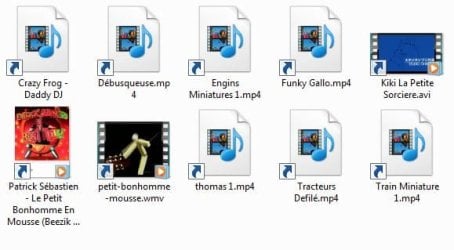
  • Capture.JPG
    Capture.JPG
    34.5 KB · Views: 142

My Computer My Computer

OS
windows 7 ultimate x 64 bits
CPU
intel core i5 750
Motherboard
asus P7P55D
Memory
4 Go
Graphics Card(s)
Radeon HD5850
Sound Card
Auzentech XFi forte 7.1
Monitor(s) Displays
Iiyama ProLite B2206WS-S1
Hard Drives
Seagate Barracuda 7200.12 1To
PSU
Corsair HX 650W
Case
Silverstone fortress FT01B
Cooling
Noctua NH U12P SE2

My Computer My Computer

Computer type
PC/Desktop
Computer Manufacturer/Model Number
Self built custom
OS
64-bit Windows 11 Pro for Workstations
CPU
Intel i7-8700K OC'd to 5 GHz
Motherboard
ASUS ROG Maximus XI Formula Z390
Memory
64 GB (4x16GB) G.SKILL TridentZ RGB DDR4 3600 MHz
Graphics Card(s)
ASUS ROG-STRIX-GTX1080TI-O11G-GAMING
Sound Card
Integrated
Monitor(s) Displays
2 x Samsung Odyssey G7 27"
Screen Resolution
2560x1440
Hard Drives
1TB Samsung 990 PRO M.2,
4TB Samsung 990 PRO PRO M.2,
TerraMaster F8 SSD Plus NAS
PSU
Seasonic Prime Titanium 850W
Case
Thermaltake Core P3
Cooling
Corsair Hydro H115i
Keyboard
Logitech wireless K800
Mouse
Logitech MX Master 4
Internet Speed
2 Gb/s Download and 100 Mb/s Upload
Antivirus
Malwarebyte Anti-Malware Premium
Browser
Google Chrome
Other Info
Logitech Z625 speaker system,
Logitech BRIO 4K Pro webcam,
HP Color LaserJet Pro MFP M477fdn,
APC SMART-UPS RT 1000 XL - SURT1000XLI,
Galaxy S23 Plus phone
Hello Brink, many thanks for reply.

I've tried the Default File Type Associations - Restore for .mp4 and .lnk but this didn't fix the problem.

However you showed me the right way (that means the registery database) and now this problem is fixed.

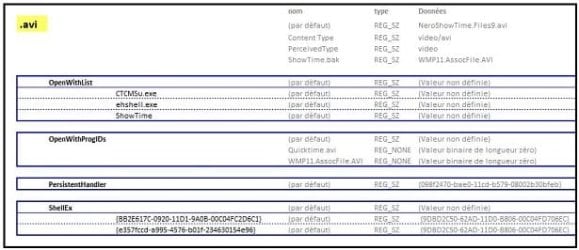
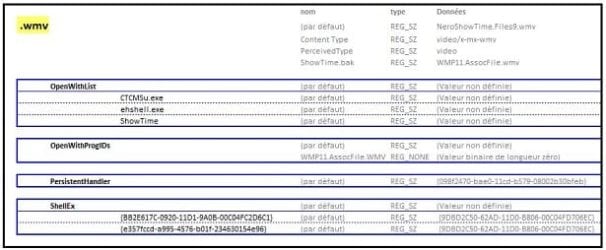
In HKEY_CLASSES_ROOT, and with a lot of patience, I've noted all keys and values associated to video file types which were not affected by this problem (I performed it with . avi and .wmv types). I've noticed that registery inputs are the same for this 2 kinds of files (see attached Reg_AVI and Reg_WMV documents).
Reg_AVI.JPG
Reg_WMV.JPG
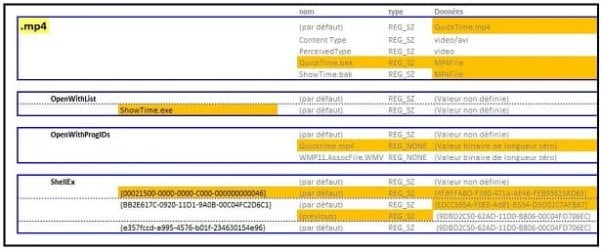
Doing the same with .mp4 extension it was easy to highlight some differences (see attached Reg_MP4 document).
Reg_MP4.JPG
These differences make me think my problem was due to a bad Quicktime installing or unistalling, putting some trouble in the .mp4 key, that's why, I think, windows (via control panel) was enable to correctly manage shortcuts to .mp4 files (even if these files were correctly played in media player).

After having manually replaced keys and values on the basis of .avi type, problem was solved ;)

I hope this post could be useful to someone.
 

My Computer My Computer

OS
windows 7 ultimate x 64 bits
CPU
intel core i5 750
Motherboard
asus P7P55D
Memory
4 Go
Graphics Card(s)
Radeon HD5850
Sound Card
Auzentech XFi forte 7.1
Monitor(s) Displays
Iiyama ProLite B2206WS-S1
Hard Drives
Seagate Barracuda 7200.12 1To
PSU
Corsair HX 650W
Case
Silverstone fortress FT01B
Cooling
Noctua NH U12P SE2
Thanks for reporting back on your problem. I'm glad that you have managed to solve it, and the information you posted regarding this will prove to be useful for others who find themselves with the same dilemna.
 

My Computer My Computer

Computer type
PC/Desktop
Computer Manufacturer/Model Number
Dwarf Dwf/11/2012 r09/2013
OS
Windows 8.1 Pro RTM x64
CPU
Intel Core-i5-3570K 4-core @ 3.4GHz (Ivy Bridge) (OC 4.4GHz)
Motherboard
ASRock Z77 Extreme4-M
Memory
4 x 4GB DDR3-1600 Corsair Vengeance CMZ8GX3M2A1600C9B (16GB)
Graphics Card(s)
MSI GeForce GTX770 Gaming OC 2GB
Sound Card
Realtek High Definition on board solution (ALC 898)
Monitor(s) Displays
ViewSonic VA1912w Widescreen (VGA)
Screen Resolution
1440x900
Hard Drives
OCZ Agility 3 SSD 120GB SATA III x2 (RAID 0)
Samsung HD501LJ 500GB SATA II x2
Hitachi HDS721010CLA332 1TB SATA II
Iomega 1.5TB Ext USB 2.0
WD 2.0TB Ext USB 3.0
PSU
XFX Pro Series 850W Semi-Modular
Case
Gigabyte IF233
Cooling
1 x 120mm Front Inlet 1 x 120mm Rear Exhaust
Keyboard
Microsoft Comfort Curve Keyboard 3000 (USB)
Mouse
Microsoft Comfort Mouse 3000 for Business (USB)
Internet Speed
NetGear DG834Gv3 ADSL Modem/Router (Ethernet) ~4.0 Mb/s (O2)
Antivirus
Avast! 8.0.1497
Browser
IE 11
Other Info
Optical Drive: HL-DT-ST BD-RE BH10LS30 SATA Bluray
Lexmark S305 Printer/Scanner/Copier (USB)
WEI Score: 8.1/8.1/8.5/8.5/8.25
Asus Eee PC 1011PX Netbook (Windows 7 x86 Starter)
That's great news Frederic. Thank you for posting back with your results and solution. :)
 

My Computer My Computer

Computer type
PC/Desktop
Computer Manufacturer/Model Number
Self built custom
OS
64-bit Windows 11 Pro for Workstations
CPU
Intel i7-8700K OC'd to 5 GHz
Motherboard
ASUS ROG Maximus XI Formula Z390
Memory
64 GB (4x16GB) G.SKILL TridentZ RGB DDR4 3600 MHz
Graphics Card(s)
ASUS ROG-STRIX-GTX1080TI-O11G-GAMING
Sound Card
Integrated
Monitor(s) Displays
2 x Samsung Odyssey G7 27"
Screen Resolution
2560x1440
Hard Drives
1TB Samsung 990 PRO M.2,
4TB Samsung 990 PRO PRO M.2,
TerraMaster F8 SSD Plus NAS
PSU
Seasonic Prime Titanium 850W
Case
Thermaltake Core P3
Cooling
Corsair Hydro H115i
Keyboard
Logitech wireless K800
Mouse
Logitech MX Master 4
Internet Speed
2 Gb/s Download and 100 Mb/s Upload
Antivirus
Malwarebyte Anti-Malware Premium
Browser
Google Chrome
Other Info
Logitech Z625 speaker system,
Logitech BRIO 4K Pro webcam,
HP Color LaserJet Pro MFP M477fdn,
APC SMART-UPS RT 1000 XL - SURT1000XLI,
Galaxy S23 Plus phone
I partly got this, but I'm afraid of screwing up my system by messing with the wrong register files. Could someone simplify the solution for me so I too can get back the thumbnails for .mp4 files?
 

My Computer My Computer

OS
Windows 7 Home Edition
Hello Threethumb, and welcome to Seven Forums.

You could do a system restore using a restore point dated before you had this issue to hopefully fix it instead.

Hope this helps some,
Shawn
 

My Computer My Computer

Computer type
PC/Desktop
Computer Manufacturer/Model Number
Self built custom
OS
64-bit Windows 11 Pro for Workstations
CPU
Intel i7-8700K OC'd to 5 GHz
Motherboard
ASUS ROG Maximus XI Formula Z390
Memory
64 GB (4x16GB) G.SKILL TridentZ RGB DDR4 3600 MHz
Graphics Card(s)
ASUS ROG-STRIX-GTX1080TI-O11G-GAMING
Sound Card
Integrated
Monitor(s) Displays
2 x Samsung Odyssey G7 27"
Screen Resolution
2560x1440
Hard Drives
1TB Samsung 990 PRO M.2,
4TB Samsung 990 PRO PRO M.2,
TerraMaster F8 SSD Plus NAS
PSU
Seasonic Prime Titanium 850W
Case
Thermaltake Core P3
Cooling
Corsair Hydro H115i
Keyboard
Logitech wireless K800
Mouse
Logitech MX Master 4
Internet Speed
2 Gb/s Download and 100 Mb/s Upload
Antivirus
Malwarebyte Anti-Malware Premium
Browser
Google Chrome
Other Info
Logitech Z625 speaker system,
Logitech BRIO 4K Pro webcam,
HP Color LaserJet Pro MFP M477fdn,
APC SMART-UPS RT 1000 XL - SURT1000XLI,
Galaxy S23 Plus phone
Also have this problem. I don't have thumbnails anymore, for .mp4 nor .flv (not shortcuts)

I looked at the pics frederic provided, but I cannot find those charts he is seeing.

I am just looking in regedit. Searching HKEY_CLASSES_ROOT for "mp4" but very lost as to where he got to and how to safely restore this. Media Player Classic is my player
 

My Computer My Computer

Computer Manufacturer/Model Number
Compaq Presario
OS
Windows 7 Home Edition 64-bit
Memory
4 gigger
Graphics Card(s)
NVIDIA GeForce GT 440
Screen Resolution
1920x1080
PSU
AMD 2.30GHz
Keyboard
USB Logitech wired..with the volume knob not buttons :)
Mouse
USB wired
Internet Speed
AT&T (384kilos down 40 kilos up) wired
Can someone please provide some advice ?
 

My Computer My Computer

Computer Manufacturer/Model Number
Compaq Presario
OS
Windows 7 Home Edition 64-bit
Memory
4 gigger
Graphics Card(s)
NVIDIA GeForce GT 440
Screen Resolution
1920x1080
PSU
AMD 2.30GHz
Keyboard
USB Logitech wired..with the volume knob not buttons :)
Mouse
USB wired
Internet Speed
AT&T (384kilos down 40 kilos up) wired
Hello Mista,

Please go ahead and create a new thread instead since your issue may not be exactly the same as the one in this older thread. :)
 

My Computer My Computer

Computer type
PC/Desktop
Computer Manufacturer/Model Number
Self built custom
OS
64-bit Windows 11 Pro for Workstations
CPU
Intel i7-8700K OC'd to 5 GHz
Motherboard
ASUS ROG Maximus XI Formula Z390
Memory
64 GB (4x16GB) G.SKILL TridentZ RGB DDR4 3600 MHz
Graphics Card(s)
ASUS ROG-STRIX-GTX1080TI-O11G-GAMING
Sound Card
Integrated
Monitor(s) Displays
2 x Samsung Odyssey G7 27"
Screen Resolution
2560x1440
Hard Drives
1TB Samsung 990 PRO M.2,
4TB Samsung 990 PRO PRO M.2,
TerraMaster F8 SSD Plus NAS
PSU
Seasonic Prime Titanium 850W
Case
Thermaltake Core P3
Cooling
Corsair Hydro H115i
Keyboard
Logitech wireless K800
Mouse
Logitech MX Master 4
Internet Speed
2 Gb/s Download and 100 Mb/s Upload
Antivirus
Malwarebyte Anti-Malware Premium
Browser
Google Chrome
Other Info
Logitech Z625 speaker system,
Logitech BRIO 4K Pro webcam,
HP Color LaserJet Pro MFP M477fdn,
APC SMART-UPS RT 1000 XL - SURT1000XLI,
Galaxy S23 Plus phone
another way is to.....

I found myself on this forum because I had exactly the same problem after an update to live essentials 12. I followed the advice and like other people I could not get the screen shots of the regedit files but I discovered another way. google media previewer and this will change the default icons back to thumnails.
found lots of ways to improve these too by putting the picture of the film on the front like a dvd case thanks to aksz on here
 

My Computer My Computer

OS
windows 7 home premium 64
Excuse the necropost but these are step by step instructions for how to fix this as I had the same problem after a Windows Update.


First, go to Start and type regedit to open the Registry Editor.
Then click the arrow next to HKEY_CLASSES_ROOT to open it and scroll down until you see the .avi folder (which is actually a registry key). Click on that arrow to open it too.
You should see several keys, including one named PersistentHandler and shellex. First, click on PersistentHandler and you'll see in the pane on the right that under Data it has one String Value. Under Name, right click that String Value (for me, it was named (Default)) and then Modify and copy the Value Data (BUT DON'T CHANGE IT) and paste it to Notepad under PH for PersistentHandler.

For me, the Value Data was {098f2470-bae0-11cd-b579-08002b30bfeb} but yours might be different.
Now go to shellex and click the arrow next to it to open it. You should see three more keys that are named:
{00021500-0000-0000-C000-000000000046}
{BB2E617C-0920-11D1-9A0B-00C04FC2D6C1}
{e357fccd-a995-4576-b01f-234630154e96}
You need to click each key to show its string value in the pane on the right and copy the value data for each string value and save them to NotePad like you did with PersistentHandler.

Now scroll down to the .mp4 key and open it, then open shellex too to show all its keys. Right away, you should see that several keys (and/or their string values) that .avi had are missing from .mp4. You need to recreate whatever's missing.
So, right click on .mp4, go to New, then Key. Type in PersistentHandler, then right click the String Value, then Modify and copy/paste the value data under PH that you saved to Notepad. And that's it, you've recreated that missing key and string value. Now do the same for the missing ones under shellex, then close the registry editor and that should fix the problem.


Now you either have to restart your computer or restart Windows Explorer. To restart explorer, open Notepad again, then copy this to Notepad and save it as a batch file by giving the saved text file the extension .bat instead of .txt:


taskkill /f /im explorer.exe
start explorer.exe


Now, double-click the .bat file and wait a few seconds, then check to see if your thumbnails have returned for your mp4 videos. And that should fix it! (It did for me.)


Credit to frederic from earlier in this thread for pointing me in the right direction, namely to the registry, though his instructions were somewhat confusing (seems to be French, so not a native English speaker?) And also to whoever originally shared that restart explorer batch file (was it on these forums?), I've been using it for years to reclaim memory whenever I've had to close down my browser and other running programs because my computer was slowing down--like restarting it without having to actually reboot it. Been very useful.
 

My Computer My Computer

Computer type
PC/Desktop
OS
Windows 7 Home Premium x64
Back
Top