No multi physical cpu support!

abeeftec

New member
Local time
3:48 PM
Messages
8
My system is a Asus L1N84 WS SLI FX74 This system has two physical processors on it. So its two dual cores making it 4 cores.(this is the main focus of this thread being started)
I have had this system since vista was new.
When I biult this system I ordered a copy of Vista Home Premium

When I got it up and running I noticed that when I went to system info it said I had 2 processors. Well I called Asus and AMD and Microsoft. And all of them said that the reason I was seeing two processors is because I have two processors. Me not wanting to hear it did alot of research until I found one thing that told me I was just being told what they thought would get me off the phone with them. And I am having the same issue with Windows7 RC1

What I told them is that is not a good answer because my previous system said I had 2 processors and that system was an AMD 4200 X2
So it said 2 processors and it was just ONE dual core.

Not to mention that this board got a horrible write up against Intel which caused AMD to trash the whole 4x4 idea. Bad for them because this is one hell of a system with all four cores running. Which were not running during those benchmarks against the Intel quad 6700 at the time. Remember I said I installed Vista Home premium. Well it turned out while I was searching Microsofts web site I looked at the differences between Vista Home premium and ULTIMATE. There was my answer staring me right in the face.... Ultimate was the only version that had MULTI PHYSICAL CPU SUPPORT! So I then purchased Vista Ultimate and checked the amount of processors in the system window and also In CPUZ . And there they were......4 processors... Needless to say that I quickly benchmarked it again on pcpitstop and 3dmark 06 and on pcpitstop my numbers doubled!!!
Literally DOUBLED. Because now the other processor was being utilized.

I add in here about the issue with the Intel benchmark just to say that this system is and was totally comparable to any intel system at that time and AMD scrapped it because of a faulty test!!! The sites that did their reviews were only running one of the dual cores which is why it was only slightly better then one FX 60 in there reports!! THIS is over DOUBLE and FX 60 with all 4 cores running!

Anyway... Now to the issue about Windows7 ULTIMATE........
THEY didnt put that support in Windows7 Ultimate making it no good to use with a server board!! And now I have this OS in here and am only running on 2 cores AGAIN!!! What will microsoft do to fix this issue for all the people that want to run Windows7 in their servers boards INSTEAD of the new WINDOWS SERVER 2008?
How do I get my processors to show up?? Anyone have any answers?
The Microsoft technical support told me that they cannot answer that and I would have to call technical support after I purchase Windows7 and have the issues!! WHY WOULD I WANT TO PURCHASE IT WITH THIS ISSUE !!! ANYONE?? Help please? Microsoft?

Just to clarify the post above for anyone that says it.... I have ULTIMATE . that IS the RC1. And it says 2 processors and cpuz which said 4 before I installed this NOW says 2!
 
Last edited by a moderator:

My Computer

Computer Manufacturer/Model Number
ME
OS
windows7
CPU
2x FX74
Motherboard
ASUS L1N64 WS SLI
Memory
Geil pc6400
Graphics Card(s)
Diamond Viper 2900XT
Sound Card
Integrated
Monitor(s) Displays
Hanspree 25"
Hard Drives
2xWD Raptor 150GB RAID0
PSU
Ultra 1000
Case
Junk
Cooling
Water and air

My Computer

Computer type
PC/Desktop
Computer Manufacturer/Model Number
Custom build
OS
Windows 10 Professional 64-bit
CPU
Ryzen 9 5900X
Motherboard
Gigabyte X570 Aorus Master
Memory
G.Skill 3600Mhz CL16 16GB × 4
Graphics Card(s)
EVGA GeForce RTX 3070 Ti FTW3 Ultra Gaming
Sound Card
On-board
Monitor(s) Displays
Dell Alienware AW3418DW
Screen Resolution
3440x1440
Hard Drives
1×Sabrent Rocket 4 Plus 2TB nvme SSD (System, internal)
2x4TB Western Digital Blue (Internal)
1x4TB HDST 7200RPM (Internal)
PSU
Seasonic Focus Plus 850W Platinum
Case
Corsair 680X
Cooling
Stock fans + 3× Corsair QL120, Corsair H100i Platinum
Keyboard
Logitech K350
Mouse
Logitech M510
Internet Speed
120Mbits dl - 20Mbits up
Antivirus
ESET NOD32 Antivirus
Browser
Firefox (latest version)
Other Info
Headphones : Audio-Technica ATH-M50x
Scanner : Canon Canoscan LiDE 220 + Plustek OptiBook 4800
it is simple Home premium does not support dual processors it supports a processor with 2 cores, Sory it is in the spec sheets. Ultimate supports dual prosessors and dual cores.
 

My Computer

Computer Manufacturer/Model Number
Me with help from a lot of news group friends
OS
windows 7 ultimate final Office 2007,27 Quad IMAC vm 7 64 bit
CPU
Dual Opteron 275 x 2
Motherboard
Tyan Thunder 2885 Highpoint 1820 raidcard
Memory
4 gigs reg ecc corsair
Graphics Card(s)
SaphireATI 3850 agp
Sound Card
AMD-8111 AC'97 Audio Controller Driver
Monitor(s) Displays
Samsung 2333,Samsung 32 inch flat screen
Screen Resolution
1920 x 1080
Hard Drives
5 raptor 37 gig in raid 5 off Highpoint 1820 card, 3 more for photos etc plus 300 gig 2 for storage 12 total
PSU
2 power supplies about 1750 total original 750 second 1000
Case
2 theramaltake married together
Cooling
air
Keyboard
logitech wireless
Mouse
wireless logitech track ball
Internet Speed
1000 down 250 up DSL, wireless net 3500 down 2000 up
Other Info
work in progress now running windows 7,Office 2007 using kvm switch sharing key board, trackball with xp 32 machine. xp machine is 2253 and 206 BW, Sat TV on 206 . add quad core 27 inch IMAC. w fusion 3 win 7 ultimate 64 as guest
Anyway... Now to the issue about Windows7 ULTIMATE........
THEY didnt put that support in Windows7 Ultimate making it no good to use with a server board!! And now I have this OS in here and am only running on 2 cores AGAIN!!! What will microsoft do to fix this issue for all the people that want to run Windows7 in their servers boards INSTEAD of the new WINDOWS SERVER 2008?

Upper-end Windows client builds have always supported 2 physical processors. A cursory web search shows that Win7 should be no different - up to 2 physical processor packages with Home Premium and Ultimate.

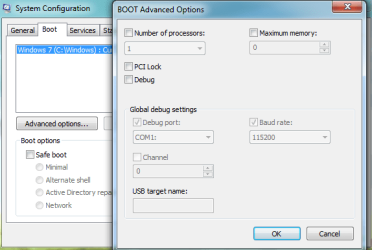
You might want to check whether your machine is artificially hobbling itself. Run MSCONFIG, "Boot" tab, "Advanced options...".

Beyond that, I don't really know why you'd bother with a "server board", unless somebody gave it to you as a present and you've got no need for a server. There's this whole mythology around "server" components, and how they're somehow magically l33ter, but that's simply not always the case. Servers are optimised for quickly switching between many tasks corresponding to multiple client requestors, and not for dispatching a single user's requests as quickly as possible. That's why Windows Server 2008 will be a slower desktop workstation than Win7, even with a few tweaks applied to make it favour desktop responsiveness over serving ability.

As far as dual-proc boards are concerned, it's an utter waste of money (for a workstation) in this day and age. You pay a premium for something which is only a little faster overall than a quad-core (less bus contention). That money would have yielded far more performance had it been invested into more RAM or a faster multi-core processor.
 

My Computer

Computer Manufacturer/Model Number
Multiple machines in various stages of decomposition.
OS
Win7x64
Anyway... Now to the issue about Windows7 ULTIMATE........
THEY didnt put that support in Windows7 Ultimate making it no good to use with a server board!! And now I have this OS in here and am only running on 2 cores AGAIN!!! What will microsoft do to fix this issue for all the people that want to run Windows7 in their servers boards INSTEAD of the new WINDOWS SERVER 2008?

Upper-end Windows client builds have always supported 2 physical processors. A cursory web search shows that Win7 should be no different - up to 2 physical processor packages with Home Premium and Ultimate.

You might want to check whether your machine is artificially hobbling itself. Run MSCONFIG, "Boot" tab, "Advanced options...".

Beyond that, I don't really know why you'd bother with a "server board", unless somebody gave it to you as a present and you've got no need for a server. There's this whole mythology around "server" components, and how they're somehow magically l33ter, but that's simply not always the case. Servers are optimised for quickly switching between many tasks corresponding to multiple client requestors, and not for dispatching a single user's requests as quickly as possible. That's why Windows Server 2008 will be a slower desktop workstation than Win7, even with a few tweaks applied to make it favour desktop responsiveness over serving ability.

As far as dual-proc boards are concerned, it's an utter waste of money (for a workstation) in this day and age. You pay a premium for something which is only a little faster overall than a quad-core (less bus contention). That money would have yielded far more performance had it been invested into more RAM or a faster multi-core processor.


Sorry but thats just not true with this board.. I score 7.1 on performance with this processor... and someone missed my point.. If it supported 2 physical processors then it would say I HAVE 4!! And it says I have 2!! which is like having a dual core! That means only one of my dual cores are being utilized.....
and this board was NOT made for WS even though it is called that. It was made as a system soon to be able to have 2 quad cores for a total of 8 cores when Intel only offered 4. It is totally redesigned to be a gaming rig. This board is an awsome board and it is comparable in real time situations in gaming to my qx9650 system. But the qx9650 beats it bad on benchmarks. nevertheless it was only a waste of money at this point because the people that did the comparisons caused AMD to scrap the whole idea. I own both systems so I know what it is capable of and what numbers it puts out.. it scores over 15,450 3dmark06 and my qx9650 system scores 19,670 and that is with a 3.9 overclock!! the AMD FX system is with a two stock 3.0 dual cores!


THE BOTTOM LINE..... IF THIS 2 PHYSICAL PROCESSOR SYSTEM WAS SUPPORTED IN WINDOWS7 IT WOULD BE SHOWING 4 PROCESSORS IN CPUZ AND in the WINDOWS SYSTEM SPECS and it does not.. therefore there is somethign wrong.. and when I reinstall VISTA ultimate it does register 4 PROCESSORS!(also proves there is nothing wrong with the system to show 2 cores in 7ultimate) and I am not confusing cores with processors.. If you guys are not reading the post then I see why you are saying things that are directly dealth with in the post!
 

My Computer

Computer Manufacturer/Model Number
ME
OS
windows7
CPU
2x FX74
Motherboard
ASUS L1N64 WS SLI
Memory
Geil pc6400
Graphics Card(s)
Diamond Viper 2900XT
Sound Card
Integrated
Monitor(s) Displays
Hanspree 25"
Hard Drives
2xWD Raptor 150GB RAID0
PSU
Ultra 1000
Case
Junk
Cooling
Water and air

My Computer

Computer Manufacturer/Model Number
ME
OS
windows7
CPU
2x FX74
Motherboard
ASUS L1N64 WS SLI
Memory
Geil pc6400
Graphics Card(s)
Diamond Viper 2900XT
Sound Card
Integrated
Monitor(s) Displays
Hanspree 25"
Hard Drives
2xWD Raptor 150GB RAID0
PSU
Ultra 1000
Case
Junk
Cooling
Water and air
It is totally redesigned to be a gaming rig. This board is an awsome board and it is comparable in real time situations in gaming to my qx9650 system.

Actually, games are not yet particularly good at spawning multiple number-crunching threads. Some big tasks are easier to break up into little chunks than others. A lot of fundamental computer science research goes into that area.

Anyway, is there any chance we could do this with less emotion? I didn't insult your beloved board - I'm sure it's great. My point was that there are cheaper ways of improving desktop performance.

THE BOTTOM LINE..... IF THIS 2 PHYSICAL PROCESSOR SYSTEM WAS SUPPORTED IN WINDOWS7 IT WOULD BE SHOWING 4 PROCESSORS IN CPUZ AND in the WINDOWS SYSTEM SPECS and it does not.. therefore there is somethign wrong.. and when I reinstall VISTA ultimate it does register 4 PROCESSORS!(also proves there is nothing wrong with the system to show 2 cores in 7ultimate) and I am not confusing cores with processors..

It does seem as if something is wrong. However, it may be localised to your installation and not a general limitation of Win 7. Anecdotal web evidence suggests that Win7 Ultimate, like Vista premium, XP Pro, Win2k Pro, and NT4 workstation before it, all support 2 physical processor packages.

Did you actually check what MSCONFIG says on your machine? Is the number of processors being artificially limited?

If you guys are not reading the post then I see why you are saying things that are directly dealth with in the post!

I did read your post. It's what made me suggest you check MSCONFIG, for starters.
 

My Computer

Computer Manufacturer/Model Number
Multiple machines in various stages of decomposition.
OS
Win7x64
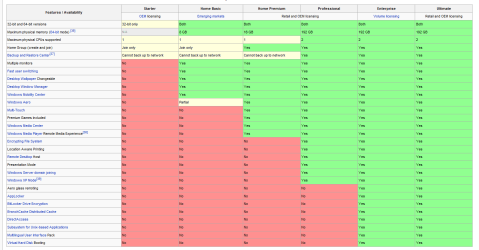
I think you will find that Home Premium only supports ONE Physical Processor as shown in the shot below (from Windows 7 editions - Wikipedia, the free encyclopedia )

Microsoft would not expect users of Home Premium to be using Server type Motherboards and those that do can use Professional, Enterprise or Ultimate depending on their needs.
You will also notice that Home Premium also only supports up to 16gb Ram where the higher spec builds support up to 192 gb.

I suggest you might want to look at an Anytime Upgrade to Professional as the minimum spec to use both Processors.
 

Attachments

  • Capture.PNG
    Capture.PNG
    27.4 KB · Views: 1,018

My Computer

Computer Manufacturer/Model Number
Home Build
OS
Windows 7 RTM Ultimate - Activated (Technet)
CPU
Athlon 4800+
Motherboard
Gigabyte M56S-S3
Memory
2 gig
Graphics Card(s)
ATI Radeon 2400+
Sound Card
On board
Monitor(s) Displays
Samsung 22" LCD
Screen Resolution
1680 x 1050
Hard Drives
WD 250 gig Sata
PSU
550 w
Case
Antec LS100
Keyboard
Logitech MX5000 BT
Mouse
Logitech MX 5000 BT
Internet Speed
ADSL 2+
I think you will find that Home Premium only supports ONE Physical Processor as shown in the shot below (from Windows 7 editions - Wikipedia, the free encyclopedia )

You responded to my post, so perhaps the comment is aimed at me?

Yes, you're quite right (according to that table), Home Premium is limited to one processor package. I got that wrong in my initial post.

However, the OP is now having trouble getting a Win7 Ultimate box to register the second processor package, if I understand correctly.
 

My Computer

Computer Manufacturer/Model Number
Multiple machines in various stages of decomposition.
OS
Win7x64

My Computer

Computer type
PC/Desktop
Computer Manufacturer/Model Number
Alienware Aurora ALX R4
OS
Windows 10 Pro (x64)
CPU
Intel Core i7-3930K (3.2GHz - 4.5GHz)
Motherboard
Alienware Aurora-R4 x79
Memory
4x Samsung 4GB PC3-12800 DDR3 (16GB 1600MHz)
Graphics Card(s)
Nvidia Geforce GTX 690
Sound Card
SteelSeries Siberia Elite
Monitor(s) Displays
Dell UltraSharp U3011
Screen Resolution
2560x1600
Hard Drives
Samsung 850 Pro 256 GB, Seagate 1TB Desktop Hybrid HDD, 2x Western Digital 4TB Green HDD
PSU
875W Some Dell PSU <.<
Case
Alienware Aurora ALX
Cooling
Custom Liquid Cooling (EK CPU & GPU blocks) dual EK 480RAD
Keyboard
Logitech G710+ Mechanical
Mouse
Logitech G700s
Internet Speed
Verizon Fios (50 mbps average)
Other Info
Server: Intel NUC D54250WYK: i5-4250U, 16GB, 256 GB mSATA, Windows Server 2012 R2
I think you will find that Home Premium only supports ONE Physical Processor as shown in the shot below (from Windows 7 editions - Wikipedia, the free encyclopedia )

You responded to my post, so perhaps the comment is aimed at me?

Yes, you're quite right (according to that table), Home Premium is limited to one processor package. I got that wrong in my initial post.

However, the OP is now having trouble getting a Win7 Ultimate box to register the second processor package, if I understand correctly.

Nope...it was a general post...not directed at your post...

Having re-read the OP's post again....and again (it gets a little convoluted) you are right....but the interesting thing is that the problem is with the RC Ultimate.
I just wonder (and I don't know the answer to this) if the RC has or had any limitation on processors....
The other thing the OP has not stated is if he is running 32 bit or 64 bit.....

Basically a long rant without sufficient info for anyone to really help with.
 

My Computer

Computer Manufacturer/Model Number
Home Build
OS
Windows 7 RTM Ultimate - Activated (Technet)
CPU
Athlon 4800+
Motherboard
Gigabyte M56S-S3
Memory
2 gig
Graphics Card(s)
ATI Radeon 2400+
Sound Card
On board
Monitor(s) Displays
Samsung 22" LCD
Screen Resolution
1680 x 1050
Hard Drives
WD 250 gig Sata
PSU
550 w
Case
Antec LS100
Keyboard
Logitech MX5000 BT
Mouse
Logitech MX 5000 BT
Internet Speed
ADSL 2+
I am using an older Tyan 2885 servor board with 2 dual core opterons they show as 4 seperate cores
 

My Computer

Computer Manufacturer/Model Number
Me with help from a lot of news group friends
OS
windows 7 ultimate final Office 2007,27 Quad IMAC vm 7 64 bit
CPU
Dual Opteron 275 x 2
Motherboard
Tyan Thunder 2885 Highpoint 1820 raidcard
Memory
4 gigs reg ecc corsair
Graphics Card(s)
SaphireATI 3850 agp
Sound Card
AMD-8111 AC'97 Audio Controller Driver
Monitor(s) Displays
Samsung 2333,Samsung 32 inch flat screen
Screen Resolution
1920 x 1080
Hard Drives
5 raptor 37 gig in raid 5 off Highpoint 1820 card, 3 more for photos etc plus 300 gig 2 for storage 12 total
PSU
2 power supplies about 1750 total original 750 second 1000
Case
2 theramaltake married together
Cooling
air
Keyboard
logitech wireless
Mouse
wireless logitech track ball
Internet Speed
1000 down 250 up DSL, wireless net 3500 down 2000 up
Other Info
work in progress now running windows 7,Office 2007 using kvm switch sharing key board, trackball with xp 32 machine. xp machine is 2253 and 206 BW, Sat TV on 206 . add quad core 27 inch IMAC. w fusion 3 win 7 ultimate 64 as guest
I think you will find that Home Premium only supports ONE Physical Processor as shown in the shot below (from Windows 7 editions - Wikipedia, the free encyclopedia )

I suppose Paul Thurrott could have gotten it wrong but in his table, Home Premium is listed for 2 Physical Processors. http://www.winsupersite.com/win7/win7_skus_compare.asp#performance

I would say he got it wrong for sure because the reason I know that vista ultimate is the only version that supports multi physical is because like I said in the original post but not in exact words..............................

When I was biulding my pc I bought home premium and noticed that it said in msconfig that it only had 2 processors and i called AMD and ASUS and both of them(trying to pacify me off the phone I am sure) told me that it is showing 2 because I have 2 physical processors. That is when I said....No my dual core 4200 athlon showed 2 processors in the same place and it was 1 dual core. This new biuld is 2 dual cores which means it is 4 processors. And when they ran out of crap to feed me I had to go research it myself. ( this was the week that Vista was released) So I went to the Microsoft site and looked at everything I could and found that there at the bottom was something that only ultimate had checked and none of the others did...... MULTI PHYSICAL PROCESSOR SUPPORT...YES....how many.....2. SO when I purchased and installed Ultimate I went back to msconfig and it said I had 4 processors which was satisfactory to me that the issue was solved.. I then ran the benchmarks again and the system processor scores DOUBLED!


@ H2S04 who quoted and commented


Quote: Originally Posted by abeeftec
It is totally redesigned to be a gaming rig. This board is an awsome board and it is comparable in real time situations in gaming to my qx9650 system.


Actually, games are not yet particularly good at spawning multiple number-crunching threads. Some big tasks are easier to break up into little chunks than others. A lot of fundamental computer science research goes into that area.

Anyway, is there any chance we could do this with less emotion? I didn't insult your beloved board - I'm sure it's great. My point was that there are cheaper ways of improving desktop performance.


I dont think that I am emotional about the issue at all. I just try to put emphasis on things I would like someone to remember so that the thread doesnt turn into what it has already.... A bunch of people fast reading and commenting before they understand what is going on. I have noticed that alot of comments have been regarding things that are clearly posted in my original post. Like the comment I just made above. I didnt think you were insulting my board because of any knowledge about the board personally but possibly another issue that i have online.. ALot of people that are genius level( and they really are) know things from being around and have preconcieved ideas about some things... Maybe your idea is that server boards are not for gaming... which is true totally. But getting away from the norm and thinking about growth and technological advancments would suggest that if a company biulds something like that and calls it a name that would be associated with speed and put on the same board the first 4 PCI-E x16 lanes on a board then you would assume since you can hook 4 video cards to it that it would automatically make it for more then data or server. So they just may know something about what they are doing.
And per your original comments... these processors together were cheaper then ONE intel processor. I paid 600 for 2 processors with the inclination that I would have an 8 core system within Q1 08 which was promised to all that went this route and was scrapped due to fear of intel kicking AMDs ass. Which I say they didnt. Well Intel did beat them but not by what the numbers showed. The numbers showed that the platform I have was only ever so slightly faster then ONE FX 60 and that was not true either because of this very issue we are talking about here. PHYSICAL PROCESSOR SUPPORT. All the testers posted results saying that but they also said it would get a little closer when Vista came out because of the NUMA support. But when Vista did come out they posted almost the same numbers. And the reason was they tested in HOME PREMIUM. And yes though they had the NUMA support they were hoping would make it closer they lost the processor support which killed it. And instead of seeing that they posted the results and noone. Not AMD neither ASUS caught that. So it went on that Intel had beaten the 4x4 Quadfather system hands down! And when I biult one and had this issue I was talking to people at ASUS and AMD And both of them were unaware of the fact that VISTAS LESS THEN TOP OPERATING SYSTEMS DID NOT HAVE MULTI SUPPORT. THEY WERE ALL UNDER THE IMPRESSION THAT IT HAD IT!!!! So was I because the way they advertised Vista was that it was going to be such an advanced and elaborate OS that you would be in need of nothing! Of course they didnt say that but they DID in fact imply it.

where in MSCONFIG does it tell you how many cores you have?
the place I am talking about is DXDIAG first page where the sytem info is. that is where I looked it up then and where I am looking now.


1 Day Ago 03:03 AMH2SO4Quote: Originally Posted by abeeftec
It is totally redesigned to be a gaming rig. This board is an awsome board and it is comparable in real time situations in gaming to my qx9650 system.


Actually, games are not yet particularly good at spawning multiple number-crunching threads. Some big tasks are easier to break up into little chunks than others. A lot of fundamental computer science research goes into that area.

Anyway, is there any chance we could do this with less emotion? I didn't insult your beloved board - I'm sure it's great. My point was that there are cheaper ways of improving desktop performance.

1 Day Ago 03:03 AMH2SO4Quote: Originally Posted by abeeftec
It is totally redesigned to be a gaming rig. This board is an awsome board and it is comparable in real time situations in gaming to my qx9650 system.


Actually, games are not yet particularly good at spawning multiple number-crunching threads. Some big tasks are easier to break up into little chunks than others. A lot of fundamental computer science research goes into that area.

Anyway, is there any chance we could do this with less emotion? I didn't insult your beloved board - I'm sure it's great. My point was that there are cheaper ways of improving desktop performance.
 

My Computer

Computer Manufacturer/Model Number
ME
OS
windows7
CPU
2x FX74
Motherboard
ASUS L1N64 WS SLI
Memory
Geil pc6400
Graphics Card(s)
Diamond Viper 2900XT
Sound Card
Integrated
Monitor(s) Displays
Hanspree 25"
Hard Drives
2xWD Raptor 150GB RAID0
PSU
Ultra 1000
Case
Junk
Cooling
Water and air
I would say he got it wrong for sure because the reason I know that vista ultimate is the only version that supports multi physical is because like I said in the original post but not in exact words..............................

That is Windows Vista, it may or may not apply to Windows 7. However its not like I can go about testing that myself.

Just to test things out, what output would this give you: Coreinfo However, I can probably already assume the output.

As for MSCONFIG that was mentioned, maybe this screenshot would help.
 

Attachments

  • Untitled.png
    Untitled.png
    15.8 KB · Views: 37

My Computer

Computer type
PC/Desktop
Computer Manufacturer/Model Number
Alienware Aurora ALX R4
OS
Windows 10 Pro (x64)
CPU
Intel Core i7-3930K (3.2GHz - 4.5GHz)
Motherboard
Alienware Aurora-R4 x79
Memory
4x Samsung 4GB PC3-12800 DDR3 (16GB 1600MHz)
Graphics Card(s)
Nvidia Geforce GTX 690
Sound Card
SteelSeries Siberia Elite
Monitor(s) Displays
Dell UltraSharp U3011
Screen Resolution
2560x1600
Hard Drives
Samsung 850 Pro 256 GB, Seagate 1TB Desktop Hybrid HDD, 2x Western Digital 4TB Green HDD
PSU
875W Some Dell PSU <.<
Case
Alienware Aurora ALX
Cooling
Custom Liquid Cooling (EK CPU & GPU blocks) dual EK 480RAD
Keyboard
Logitech G710+ Mechanical
Mouse
Logitech G700s
Internet Speed
Verizon Fios (50 mbps average)
Other Info
Server: Intel NUC D54250WYK: i5-4250U, 16GB, 256 GB mSATA, Windows Server 2012 R2
Hi there
I'm not getting involved in this argument about what Windows supports or not - but I echo the advice about there's no need to use server boards on a home computer.

I've got one machine with a Lower end QUAD processor (Q9400) which STLL gives a 7.2 processor score on calculations per second which is better than the OP's rating with TWO processors (7.1).

We sometimes get carried away with this stuff - but it really depends on what you are actually DOING on the machine.

A server board in any case won't be the best choice for games - you need a board where you can slot in the best possiple graphics GPU - this is in W7 more important than a really fast CPU as the graphics stuff is now done much more in the GPU itself than by the main OS.

Bus speed, fast data transfer with hard disks and adequate fast RAM are the requirements here.

I would probably hazard a guess that around 75% of peoples machines suffer from lack of RAM, poor network cards giving only 10 / 100 mb/s network speed or bad disks than not having enough enough CPU power.

Incidentally if you want a bit of fun go into your local equivalent of PC World or Media Mart and ask the poor hapless "salesman" to show you Gigabit ethernet cards -- he'll probably look for a manufacturer called gigabit if he even understands what you are talking about. :D

Cheers
jimbo
 

My Computer

Computer type
PC/Desktop
Computer Manufacturer/Model Number
Custom built, several laptops HP/ASUS
OS
Linux CENTOS 7 / various Windows OS'es and servers
CPU
Intel i7 Intel i5
Memory
8GB, 16GB
Graphics Card(s)
On Motherboard
Sound Card
Realtek HD audio
Monitor(s) Displays
Apple Cinema display, Samsung LCD
Screen Resolution
1920 X 1080
Hard Drives
4 X 1TB SATA
Mouse
Toshiba wireless laser
Internet Speed
> 20MB up
Hi all

Just found this forum searching for this particular "limitation" on Windows 7.
Yesterday I installed Windows 7 Home Premium on a dual Xeon, 8 cores each (with hyperthreading). Well, Windows only recognizes one CPU, as it's telling me that I have only 8 processors, when on the Ultimate RC1 I had all 16 available.

Just to clarify this -disappointing- limitation on Home Premium.

Bye!!
 

My Computer

OS
Windows 7
Hi all

Just found this forum searching for this particular "limitation" on Windows 7.
Yesterday I installed Windows 7 Home Premium on a dual Xeon, 8 cores each (with hyperthreading). Well, Windows only recognizes one CPU, as it's telling me that I have only 8 processors, when on the Ultimate RC1 I had all 16 available.

Just to clarify this -disappointing- limitation on Home Premium.

Bye!!

That's pure licensing. MS is a commercial software development outfit. They are not only in it for the money - they are legally bound to seek to make a profit, being a publicly traded company.

You'd have to agree that there's something of a disconnect between the types of workloads likely to employ a HT dual Xeon and the notion of "home" use. If you think forking out a few bucks more for Ultimate is bad, you should see what Oracle would charge you per-processor for their stuff ;)
 

My Computer

Computer Manufacturer/Model Number
Multiple machines in various stages of decomposition.
OS
Win7x64
Well, it is a home computer. I use it for 3D rendering, but for now it's just a hobby. Maybe a Dual Xeon is not commonly used as a home computer, but I wouldn't be surprised if a ultra-high end gaming computer, comes with a dual Core2Duo (or even i7) setup or something like that.

I really could understand that limitation if MS had made it clear from the beginning. But right now I still can't find anything on their website that clearly says that Home Premium doesn't support more than one physical CPU.

I checked their product comparison web, and based on that information, i decided that I needed no more than Home Premium. I wouldn't had a problem on purchasing Professional or even Ultimate if clearly that was the OS I needed for a dual CPU setup.

And by finding info I mean official MS info. Other websites with that information can be found on the net (although some of them are contradictory about this limitation), but normally you find them once you have the problem and searched for it.

Bye!! :)
 

My Computer

OS
Windows 7
Back
Top