No NAS in W7 network

binks

New member
Local time
10:12 PM
Messages
62
Location
UK
I'm running QNAP TS-419P+ NAS and Windows professional x64. In windows explorer I'd like to have folders from my NAS mounted as a network drives. When I click "network" in the explorer, all devices I can see in my network is my own pc. I should be seeing here my pc and NAS as it's connected to my router and "nas finder" software from qnap sees my NAS. Why my network storage is not displayed in my network then and because of that I can't mount it's folders as my local discs in explorer?
 

My Computer

Computer type
Laptop
Computer Manufacturer/Model Number
Dell XPS M1530
OS
Windows 7 Professional 64bit
CPU
Core2Duo T8100
Motherboard
Dell
Memory
3GB DDR2
Graphics Card(s)
GForce 8600M GT
Monitor(s) Displays
LG W2361
Screen Resolution
1920x1080
Hello,

Check to see if you have turned on network discovery:

Open Control Panel - Network and Sharing Center - Advanced sharing settings (left hand side).
 

My Computer

Computer type
PC/Desktop
Computer Manufacturer/Model Number
Custom
OS
Windows 7 Ultimate x64
CPU
Intel Core i7 2600K (O/C 4.7GHz)
Motherboard
Asus ROG Maximus IV Extreme-Z - Intel Z68 Chipset
Memory
8GB Corsair Vengeance LP, DDR3, 1600Mhz
Graphics Card(s)
Nvidia GTX 460 Graphics Card
Sound Card
Onboard
Monitor(s) Displays
Dell E228WFP
Hard Drives
2 x 500GB Samsung SpinPoint Drives (1 for OS, 1 for Data and Apps)
PSU
CoolerMaster 1000W
Case
CoolerMaster HAF
Cooling
Air
Internet Speed
Fibre - 60MB Down, 30MB Up
Antivirus
ESET NOD32 Antivirus
Just checked, it was on, pc is in the home network, although I don't know what for, so I thing all should be good connection wise. Still, this bloody think don't want to cooperate..
 

My Computer

Computer type
Laptop
Computer Manufacturer/Model Number
Dell XPS M1530
OS
Windows 7 Professional 64bit
CPU
Core2Duo T8100
Motherboard
Dell
Memory
3GB DDR2
Graphics Card(s)
GForce 8600M GT
Monitor(s) Displays
LG W2361
Screen Resolution
1920x1080
Just checked, it was on, pc is in the home network, although I don't know what for, so I thing all should be good connection wise. Still, this bloody think don't want to cooperate..

Have your checked your DNS settings? For a device to appear in the network section it needs to either have an appropriate DNS entry available or a multicast DNS gratuitous reply sent out from the device.

Do you have a static IP address assigned to it? You could try a manual mapping which will work if it is statically assigned an IP. For example, if the NAS had the IP address of 192.168.0.10 then you could enter the following into explorer:

\\192.168.0.10\

From there you can then right click and map any shared folders.

Hope This Helps,
Josh :)
 

My Computer

Computer type
PC/Desktop
Computer Manufacturer/Model Number
Custom Built
OS
Windows 7 Professional x64 SP1 ; Windows Server 2012 R2 Standard
CPU
Intel Core i5 2400 @ 3.10GHz
Motherboard
Foxconn H67MP-S/-V/H67MP
Memory
8.0GB DDR3 @ 665MHz (2GBx4)
Graphics Card(s)
AMD Radeon HD 6870
Sound Card
Realtek High Definition Audio
Monitor(s) Displays
AOC 2243W & SMB1930NW
Screen Resolution
1440x900 & 1920x1080
Hard Drives
977GB Seagate ST31000524AS ATA Drive (SATA)
250GB WD iSCSI attached Drive
PSU
750W Gaming PSU
Case
Novatech Night
Cooling
Fan
Keyboard
Dell Standard PS/2 Keyboard
Mouse
R.A.T 07 Gaming Mouse
Internet Speed
Download: 10 Mbps Ping: 30ms Upload: 0.81 Mbps
Browser
Google Chrome
Other Info
Optiarc DVD RW AD-5260S ATA Device
Hi binks,

If I may jump in, in addition to others great feedback... I use a free open source called AdvancedIPScanner. You may install this on any computers in your network and you'll see the IP, Hosts Names and Mac Adresses of each network device connected in your network including your NAS.

You may easily create a map network drive or a shortcut of the NAS's IP address on your computers desktop to conveniently access your files.
 

My Computer

Computer Manufacturer/Model Number
Lenovo Desktop/Samsung Laptop
OS
Win7 & Win8 64bit
CPU
Intel i5
Internet Speed
Charter-20 Mbps
Antivirus
Avast
Browser
FF, IE9 and Chrome
Have your checked your DNS settings? For a device to appear in the network section it needs to either have an appropriate DNS entry available or a multicast DNS gratuitous reply sent out from the device.

Do you have a static IP address assigned to it? You could try a manual mapping which will work if it is statically assigned an IP. For example, if the NAS had the IP address of 192.168.0.10 then you could enter the following into explorer:

\\192.168.0.10\

From there you can then right click and map any shared folders.

Hope This Helps,
Josh :)
Thanks for that. I don't know what's going on with DNS here and how to check it. I've just set up in my router admin panel to always assign the same IP address by DHCP, hope that's it. Now in my router admin panel settings are: IP address assignment: DHCP,IP address: 192.168.1.67, Always use the same IP address: yes, DHCP lease time: Infinite
Hope that's correct. I just want to have it in my network as it will show me, when I expand the NAS, what exact folders are on it. I don't remember what each folder name is, so I'll have to open some additional windows like NAS admin panel, just to find out what is the exact mane of the folder that I want to mount in explorer. Beside, with the settings like this, i mean if I won't see NAS in network, will I still have access to mounted folders even after restart? Won't explorer just somehow "forget" the correct path to those folders?
 

My Computer

Computer type
Laptop
Computer Manufacturer/Model Number
Dell XPS M1530
OS
Windows 7 Professional 64bit
CPU
Core2Duo T8100
Motherboard
Dell
Memory
3GB DDR2
Graphics Card(s)
GForce 8600M GT
Monitor(s) Displays
LG W2361
Screen Resolution
1920x1080
Hi binks,

If I may jump in, in addition to others great feedback... I use a free open source called AdvancedIPScanner. You may install this on any computers in your network and you'll see the IP, Hosts Names and Mac Adresses of each network device connected in your network including your NAS.

You may easily create a map network drive or a shortcut of the NAS's IP address on your computers desktop to conveniently access your files.
Thanks for the tip:) Nice software, just downloaded it and will try.
 

My Computer

Computer type
Laptop
Computer Manufacturer/Model Number
Dell XPS M1530
OS
Windows 7 Professional 64bit
CPU
Core2Duo T8100
Motherboard
Dell
Memory
3GB DDR2
Graphics Card(s)
GForce 8600M GT
Monitor(s) Displays
LG W2361
Screen Resolution
1920x1080
Last edited:

My Computer

Computer type
Laptop
Computer Manufacturer/Model Number
Dell XPS M1530
OS
Windows 7 Professional 64bit
CPU
Core2Duo T8100
Motherboard
Dell
Memory
3GB DDR2
Graphics Card(s)
GForce 8600M GT
Monitor(s) Displays
LG W2361
Screen Resolution
1920x1080
Have your checked your DNS settings? For a device to appear in the network section it needs to either have an appropriate DNS entry available or a multicast DNS gratuitous reply sent out from the device.

Do you have a static IP address assigned to it? You could try a manual mapping which will work if it is statically assigned an IP. For example, if the NAS had the IP address of 192.168.0.10 then you could enter the following into explorer:

\\192.168.0.10\

From there you can then right click and map any shared folders.

Hope This Helps,
Josh :)
Thanks for that. I don't know what's going on with DNS here and how to check it. I've just set up in my router admin panel to always assign the same IP address by DHCP, hope that's it. Now in my router admin panel settings are: IP address assignment: DHCP,IP address: 192.168.1.67, Always use the same IP address: yes, DHCP lease time: Infinite
Hope that's correct. I just want to have it in my network as it will show me, when I expand the NAS, what exact folders are on it. I don't remember what each folder name is, so I'll have to open some additional windows like NAS admin panel, just to find out what is the exact mane of the folder that I want to mount in explorer. Beside, with the settings like this, i mean if I won't see NAS in network, will I still have access to mounted folders even after restart? Won't explorer just somehow "forget" the correct path to those folders?

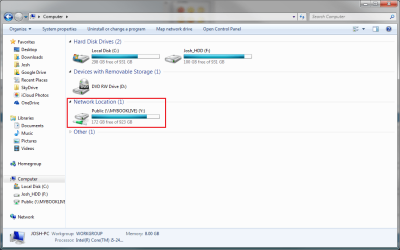
The mounted folders are local to the computer. If it cannot connect you will have a red X next to your drive. When connection is restored you will be able to have access to the share again. An example of mine can be seen below!

Untitled.png

Typically you would create a master share if you will called something like "Public" and then map that to your computer. Then you can make folders inside and control security that way. This will help to reduce the amount of administration required as you only need to map one share.

Hope This Helps,
Josh :)
 

My Computer

Computer type
PC/Desktop
Computer Manufacturer/Model Number
Custom Built
OS
Windows 7 Professional x64 SP1 ; Windows Server 2012 R2 Standard
CPU
Intel Core i5 2400 @ 3.10GHz
Motherboard
Foxconn H67MP-S/-V/H67MP
Memory
8.0GB DDR3 @ 665MHz (2GBx4)
Graphics Card(s)
AMD Radeon HD 6870
Sound Card
Realtek High Definition Audio
Monitor(s) Displays
AOC 2243W & SMB1930NW
Screen Resolution
1440x900 & 1920x1080
Hard Drives
977GB Seagate ST31000524AS ATA Drive (SATA)
250GB WD iSCSI attached Drive
PSU
750W Gaming PSU
Case
Novatech Night
Cooling
Fan
Keyboard
Dell Standard PS/2 Keyboard
Mouse
R.A.T 07 Gaming Mouse
Internet Speed
Download: 10 Mbps Ping: 30ms Upload: 0.81 Mbps
Browser
Google Chrome
Other Info
Optiarc DVD RW AD-5260S ATA Device
I've just logged to my work laptop that I've bought from ebay so have no idea what network settings are there and there in the explorer's network my NAS is visible. Strangely enough I can't see there my home pc which is 2 feet away. If I was rocking server and my computers would be in Active Directory, there wouldn't be any problems, but here... :/ Is something like "workgroup" still exist? I do remember that some time ago when computers wasn't in the domain and if I wanted for them to see each other I was putting them into the same workgroup. Does it still exist?
 

My Computer

Computer type
Laptop
Computer Manufacturer/Model Number
Dell XPS M1530
OS
Windows 7 Professional 64bit
CPU
Core2Duo T8100
Motherboard
Dell
Memory
3GB DDR2
Graphics Card(s)
GForce 8600M GT
Monitor(s) Displays
LG W2361
Screen Resolution
1920x1080
I've just logged to my work laptop that I've bought from ebay so have no idea what network settings are there and there in the explorer's network my NAS is visible. Strangely enough I can't see there my home pc which is 2 feet away. If I was rocking server and my computers would be in Active Directory, there wouldn't be any problems, but here... :/ Is something like "workgroup" still exist? I do remember that some time ago when computers wasn't in the domain and if I wanted for them to see each other I was putting them into the same workgroup. Does it still exist?

Unless you have changed the workgroup settings it should be the default of WORKGROUP. Some NAS devices have an option to set the workgroup and you should verify that this is listed as WORKGROUP. This is one of the factors in whether or not it will show up in the network section.

If you had Active Directory all these issues will be eradicated as shares are pushed down via the domain controller.

Josh :)
 

My Computer

Computer type
PC/Desktop
Computer Manufacturer/Model Number
Custom Built
OS
Windows 7 Professional x64 SP1 ; Windows Server 2012 R2 Standard
CPU
Intel Core i5 2400 @ 3.10GHz
Motherboard
Foxconn H67MP-S/-V/H67MP
Memory
8.0GB DDR3 @ 665MHz (2GBx4)
Graphics Card(s)
AMD Radeon HD 6870
Sound Card
Realtek High Definition Audio
Monitor(s) Displays
AOC 2243W & SMB1930NW
Screen Resolution
1440x900 & 1920x1080
Hard Drives
977GB Seagate ST31000524AS ATA Drive (SATA)
250GB WD iSCSI attached Drive
PSU
750W Gaming PSU
Case
Novatech Night
Cooling
Fan
Keyboard
Dell Standard PS/2 Keyboard
Mouse
R.A.T 07 Gaming Mouse
Internet Speed
Download: 10 Mbps Ping: 30ms Upload: 0.81 Mbps
Browser
Google Chrome
Other Info
Optiarc DVD RW AD-5260S ATA Device
Back
Top