Solved No permission to remove a folder on MY COMPUTER?

Sponge

New member
Local time
7:54 PM
Messages
18
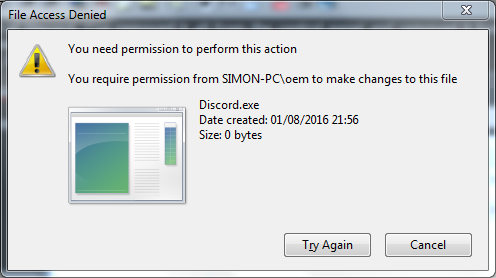
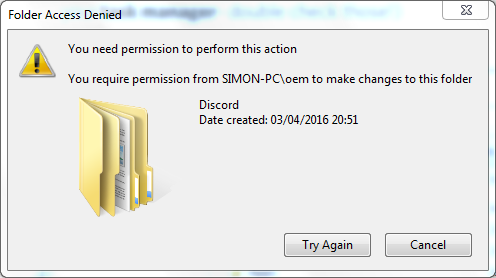
Trying to do a clean install of Discord, I've removed it all from the control panel and removed it from %AppData%/Discord. Having one problem though, I am unable to remove it from %LocalAppData%/Discord, it keeps saying I do not have permission.
NRWOBj6.png


The folder contains this -
0wfYOSN.png


I am the admin and everything but this folder just won't go. :/
 

My Computer My Computer

Computer type
PC/Desktop
Computer Manufacturer/Model Number
HP
OS
Windows 7 Professional x64
CPU
Intel Core 2 Duo E8400 @ 3.00GHz
Motherboard
Hewlett-Packard 0AA8h (XU1 PROCESSOR)
Memory
8.00GB Dual-Channel DDR2 @ 398MHz (6-6-6-18)
Graphics Card(s)
2047MB NVIDIA GeForce GTX 750 Ti (EVGA)
Sound Card
High Definition Audio Device
Monitor(s) Displays
SyncMaster (1280x1024@75Hz)
Hard Drives
931GB HITACHI HUA721010KLA330 ATA Device (SATA)
465GB Seagate Expansion USB Device (USB (SATA))
Internet Speed
http://www.speedtest.net/result/5622549473.png
Antivirus
Avast Free Antivirus
Browser
Chrome
Hi Sponge

This is to say that they already use this name oem after installation completed.
The name of your computer name is SIMON-PC


Admin and Administrator is different.

Administrator by default is not enable.
If you want to enable refer to the tutorial

Built-in Administrator Account - Enable or Disable

The other is the regarding to change of account username

Built-in Administrator Account - Change Name


The message mean that only the account username oem can only delete.
And so your account username is not oem


You can try to enable the Administrator and then delete it.
Once done, then unable it, or you can leave it.

Or you can ignore it as it do not interfere the system.

And see if anyone could help you, if the above method do not work.


Eric.
 

My Computer My Computer

Computer type
Laptop
Computer Manufacturer/Model Number
Toshiba L630 and L735
OS
Windows 7 x64
Hard Drives
240 GB SSD
Hi Sponge

This is to say that they already use this name oem after installation completed.
The name of your computer name is SIMON-PC


Admin and Administrator is different.

Administrator by default is not enable.
If you want to enable refer to the tutorial

Built-in Administrator Account - Enable or Disable

The other is the regarding to change of account username

Built-in Administrator Account - Change Name


The message mean that only the account username oem can only delete.
And so your account username is not oem


You can try to enable the Administrator and then delete it.
Once done, then unable it, or you can leave it.

Or you can ignore it as it do not interfere the system.

And see if anyone could help you, if the above method do not work.


Eric.
No luck unfortunately, even on the Administrator account I am still getting folder access denied.

pU5YC4Y.png
 

My Computer My Computer

Computer type
PC/Desktop
Computer Manufacturer/Model Number
HP
OS
Windows 7 Professional x64
CPU
Intel Core 2 Duo E8400 @ 3.00GHz
Motherboard
Hewlett-Packard 0AA8h (XU1 PROCESSOR)
Memory
8.00GB Dual-Channel DDR2 @ 398MHz (6-6-6-18)
Graphics Card(s)
2047MB NVIDIA GeForce GTX 750 Ti (EVGA)
Sound Card
High Definition Audio Device
Monitor(s) Displays
SyncMaster (1280x1024@75Hz)
Hard Drives
931GB HITACHI HUA721010KLA330 ATA Device (SATA)
465GB Seagate Expansion USB Device (USB (SATA))
Internet Speed
http://www.speedtest.net/result/5622549473.png
Antivirus
Avast Free Antivirus
Browser
Chrome
Is there a user OEM? Failing that you can take ownership of the folder then remove it
 

My Computer My Computer

Computer type
PC/Desktop
OS
win 8 32 bit
Is there a user OEM? Failing that you can take ownership of the folder then remove it

C:\Users -
hYMYjlK.png


Everything gets installed into the oem folder.

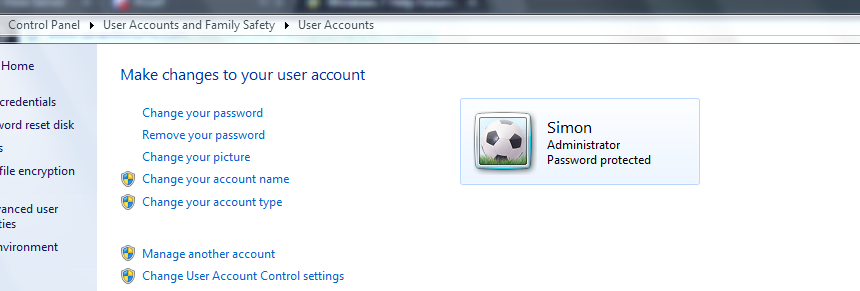
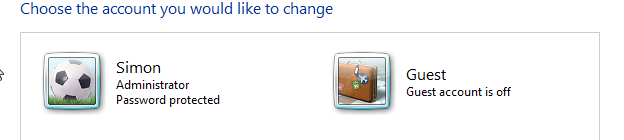
But there's only one account -
L8j0ZSv.png


At this point I am completely confused. All I wanted to do was remove a folder, why is it so hard lol.
 

My Computer My Computer

Computer type
PC/Desktop
Computer Manufacturer/Model Number
HP
OS
Windows 7 Professional x64
CPU
Intel Core 2 Duo E8400 @ 3.00GHz
Motherboard
Hewlett-Packard 0AA8h (XU1 PROCESSOR)
Memory
8.00GB Dual-Channel DDR2 @ 398MHz (6-6-6-18)
Graphics Card(s)
2047MB NVIDIA GeForce GTX 750 Ti (EVGA)
Sound Card
High Definition Audio Device
Monitor(s) Displays
SyncMaster (1280x1024@75Hz)
Hard Drives
931GB HITACHI HUA721010KLA330 ATA Device (SATA)
465GB Seagate Expansion USB Device (USB (SATA))
Internet Speed
http://www.speedtest.net/result/5622549473.png
Antivirus
Avast Free Antivirus
Browser
Chrome
Do you have a Puppy Linux usb or dvd boot? Its file manager is all you need to get rid of that pesky folder.
 

My Computer My Computer

Computer type
PC/Desktop
Computer Manufacturer/Model Number
Antec desktop; Acer Aspire laptops
OS
Windows 7 Professional 64-bit
CPU
Desktop i5; Acers i5 & i7
Memory
desktop 16GB; 1 Acer 8GB & 1 Acer 16GB
Hard Drives
1TB split into 2 equal partitions [OS and data] usable by RJS
Internet Speed
AT&T DSL
Browser
FF, GChrome, msIE
Other Info
Windows 7 Firewall, Emsisoft AM/AV, MSE [scan-only], SpywareBlaster, Ruiware/BillP combine
Do you have a Puppy Linux usb or dvd boot? Its file manager is all you need to get rid of that pesky folder.

I have none of those.
 

My Computer My Computer

Computer type
PC/Desktop
Computer Manufacturer/Model Number
HP
OS
Windows 7 Professional x64
CPU
Intel Core 2 Duo E8400 @ 3.00GHz
Motherboard
Hewlett-Packard 0AA8h (XU1 PROCESSOR)
Memory
8.00GB Dual-Channel DDR2 @ 398MHz (6-6-6-18)
Graphics Card(s)
2047MB NVIDIA GeForce GTX 750 Ti (EVGA)
Sound Card
High Definition Audio Device
Monitor(s) Displays
SyncMaster (1280x1024@75Hz)
Hard Drives
931GB HITACHI HUA721010KLA330 ATA Device (SATA)
465GB Seagate Expansion USB Device (USB (SATA))
Internet Speed
http://www.speedtest.net/result/5622549473.png
Antivirus
Avast Free Antivirus
Browser
Chrome
Hi

Do you still need that account named oem

If not you can delete that account: oem.


There is one thing you need to understand about in install and uninstall program & application.

About installation of program and application.

Any user can install program and application.

For this example:
User oem is the one who install that Discord application.
When this happen, only user oem can uninstall this Discord.
If the Discord is not uninstalled properly, hence in your this situation.
This Discord folder cannot be deleted, as not having any permission, and can only delete by user oem.


This is a problematic issue, as i did encountered before.


I create a account for user Eric.

Somehow, i was not sure how Eric did the setting in his account.
Hence, i cannot remove and look into this account: Eric folder (top level).
Until today, i have no solution, since i had given the computer to Eric.

In another situation.
I install a AV program in my Sister computer.
When it is expire, my Sister said that she cannot uninstall that AV program.
Then i had to to go into my account and uninstall that AV program.
After that, i had to asked my Sister to log in to her account, in order i can install AV program.
It is from here, my Sister can uninstall that AV program herself.


Maybe you could try to delete the account: oem.
There are 2 options, (1) delete everything, or (2) delete and keep the data files & folders.

As i have not tested this on Windows 7.
For Vista & older version, it should not be an issue.


Your decision is on whether to keep or deleted, if able to, that account: oem.


Eric.
 

My Computer My Computer

Computer type
Laptop
Computer Manufacturer/Model Number
Toshiba L630 and L735
OS
Windows 7 x64
Hard Drives
240 GB SSD
Hi

Do you still need that account named oem

If not you can delete that account: oem.


There is one thing you need to understand about in install and uninstall program & application.

About installation of program and application.

Any user can install program and application.

For this example:
User oem is the one who install that Discord application.
When this happen, only user oem can uninstall this Discord.
If the Discord is not uninstalled properly, hence in your this situation.
This Discord folder cannot be deleted, as not having any permission, and can only delete by user oem.


This is a problematic issue, as i did encountered before.


I create a account for user Eric.

Somehow, i was not sure how Eric did the setting in his account.
Hence, i cannot remove and look into this account: Eric folder (top level).
Until today, i have no solution, since i had given the computer to Eric.

In another situation.
I install a AV program in my Sister computer.
When it is expire, my Sister said that she cannot uninstall that AV program.
Then i had to to go into my account and uninstall that AV program.
After that, i had to asked my Sister to log in to her account, in order i can install AV program.
It is from here, my Sister can uninstall that AV program herself.


Maybe you could try to delete the account: oem.
There are 2 options, (1) delete everything, or (2) delete and keep the data files & folders.

As i have not tested this on Windows 7.
For Vista & older version, it should not be an issue.


Your decision is on whether to keep or deleted, if able to, that account: oem.


Eric.

I haven't got an account called oem.

HACxWh5.png
 

My Computer My Computer

Computer type
PC/Desktop
Computer Manufacturer/Model Number
HP
OS
Windows 7 Professional x64
CPU
Intel Core 2 Duo E8400 @ 3.00GHz
Motherboard
Hewlett-Packard 0AA8h (XU1 PROCESSOR)
Memory
8.00GB Dual-Channel DDR2 @ 398MHz (6-6-6-18)
Graphics Card(s)
2047MB NVIDIA GeForce GTX 750 Ti (EVGA)
Sound Card
High Definition Audio Device
Monitor(s) Displays
SyncMaster (1280x1024@75Hz)
Hard Drives
931GB HITACHI HUA721010KLA330 ATA Device (SATA)
465GB Seagate Expansion USB Device (USB (SATA))
Internet Speed
http://www.speedtest.net/result/5622549473.png
Antivirus
Avast Free Antivirus
Browser
Chrome
Open explorer and look into the C:\Users folder.

If again no found, then this account: oem may had deleted the account, but was not done completely, leaving some behind.

If it do not interfere with the system, you may have to leave it.

Until the time that there is a solution, and meanwhile continue to look for the solution.

The only option is to find out who was the user before you, on using this computer.

Just hope that someone do have a solution for you.

Eric.
 

My Computer My Computer

Computer type
Laptop
Computer Manufacturer/Model Number
Toshiba L630 and L735
OS
Windows 7 x64
Hard Drives
240 GB SSD
I really need to use the Discord application so this is a rather annoying. :/
 

My Computer My Computer

Computer type
PC/Desktop
Computer Manufacturer/Model Number
HP
OS
Windows 7 Professional x64
CPU
Intel Core 2 Duo E8400 @ 3.00GHz
Motherboard
Hewlett-Packard 0AA8h (XU1 PROCESSOR)
Memory
8.00GB Dual-Channel DDR2 @ 398MHz (6-6-6-18)
Graphics Card(s)
2047MB NVIDIA GeForce GTX 750 Ti (EVGA)
Sound Card
High Definition Audio Device
Monitor(s) Displays
SyncMaster (1280x1024@75Hz)
Hard Drives
931GB HITACHI HUA721010KLA330 ATA Device (SATA)
465GB Seagate Expansion USB Device (USB (SATA))
Internet Speed
http://www.speedtest.net/result/5622549473.png
Antivirus
Avast Free Antivirus
Browser
Chrome
I hope I am not butting in, but in your first post the screen shot shows Discord as 0 bytes, so that indicates that the program has been uninstalled & that folder is a remnant that remained.

If you need to use the Discord application you can download a new copy from their website.

Discord - Downloads
 

My Computer My Computer

Computer type
PC/Desktop
Computer Manufacturer/Model Number
Self built using existing case
OS
Windows 7 Home Premium 64 bit sp1
CPU
Intel i5 3570 3.4Ghz Ivy Bridge SKT 1155 quad core
Motherboard
Gigabyte Z77-HD3 SKT 1155 2xSata 3, 4x USB 3.0
Memory
G-Skill Rip Jaws 16Gb (8x2) DDR3 -1600 PC3 12800 CL 10 red
Graphics Card(s)
Gigabyte NVIDIA GT610 1Gb DDR3 810/1200 PCI-E 2.0 Silent
Sound Card
NVIDIA High Definition & Realtech High Definition Audio
Monitor(s) Displays
2 x Philips 226V4L 16:9 aspect ratio
Screen Resolution
1920 x 1080 HD
Hard Drives
Samsung 840 Pro 256gb SSD, SATA 3.
Hitachi Touro Portable 1tb, USB 3.0 HDD used for image b/ups.
PSU
Corsair VS450
Case
Codeng
Cooling
PSU fan & CPU fan
Keyboard
Logitech
Mouse
Logitech Wireless trackball M570
Internet Speed
Wireless 3G. 3mg down & 550kb up.
Antivirus
Bitdefender Internet Security 2020
Browser
Opera (Current Version) & Firefox
Other Info
MS Office 2013 Pro. Davis weather station software. MGE Nova 600 avr UPS.
If that file remains it could cause problems with a reinstall of the Discord app but you could try reinstalling it as suggested.

A couple of other things to try:

Boot into safe mode and delete it.

Or try an Elevated Command Prompt:

Administrator_ Elevated Command Prompt.jpg

Use this command:

DEL /F /S /Q /A "%LocalAppData%\Discord"

Include the spaces.
 

My Computer My Computer

Computer type
Laptop
Computer Manufacturer/Model Number
ASUS
OS
Microsoft Windows 7 Home Premium 64-bit 7601 Multiprocessor Free Service Pack 1
CPU
AMD C-60 APU with Radeon(tm) HD Graphics
Motherboard
ASUSTeK COMPUTER INC. X501U
Memory
4.00 GB
Graphics Card(s)
AMD Radeon HD 6290 Graphics
Sound Card
(1) AMD High Definition Audio Device (2) Realtek High Defi
Screen Resolution
1366 x 768 x 32 bits (4294967296 colors) @ 60 Hz
Hard Drives
Hitachi HTS545050A7E380 SATA Disk Device
Antivirus
Comodo CIS & FW, SecureAplus App Whitelisting, Threatfire
Browser
Cyberfox 64bit, Opera 64bit, Airfox
Other Info
Spy-The-Spy, HitmanPro.Alert, Norton Connect Safe, MJRegWatcher, BitDefender TrafficLight, Voodoo Shield, Zemana AntiMalware
Managed to remove the folder, thanks for your help. :)

I did some more in-depth research and found out if I run the following text as a batch file as administrator it would give me access to the folder and allow me to delete it. Leaving it here in case anyone has the same issue as me.

Code:
SET DIRECTORY_NAME="C:\Locked Directory"
TAKEOWN /f %DIRECTORY_NAME% /r /d y
ICACLS %DIRECTORY_NAME% /grant administrators:F /t
PAUSE
 

My Computer My Computer

Computer type
PC/Desktop
Computer Manufacturer/Model Number
HP
OS
Windows 7 Professional x64
CPU
Intel Core 2 Duo E8400 @ 3.00GHz
Motherboard
Hewlett-Packard 0AA8h (XU1 PROCESSOR)
Memory
8.00GB Dual-Channel DDR2 @ 398MHz (6-6-6-18)
Graphics Card(s)
2047MB NVIDIA GeForce GTX 750 Ti (EVGA)
Sound Card
High Definition Audio Device
Monitor(s) Displays
SyncMaster (1280x1024@75Hz)
Hard Drives
931GB HITACHI HUA721010KLA330 ATA Device (SATA)
465GB Seagate Expansion USB Device (USB (SATA))
Internet Speed
http://www.speedtest.net/result/5622549473.png
Antivirus
Avast Free Antivirus
Browser
Chrome
I had this exact same problem with the Discord folder. Someone help, please!
 

My Computer My Computer

Computer type
PC/Desktop
Computer Manufacturer/Model Number
Asus ROG G20
OS
Windows 10 Home x64
CPU
Intel Core i5 5th Generation
Memory
8 GB DD4
Graphics Card(s)
NVidia GeForce GTX 750
Hard Drives
1TB HDD
128GB SSD
Browser
Google Chrome
Back
Top