
Solved No Problems, Checking and Found Errors

AirPower4ever

New member
Member
VIP
Local time
2:57 AM
Messages
269
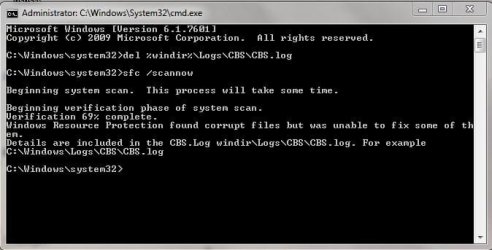
I have I decided to run the sfc /scannow on my systems at home. They are Windows 7 Pro and Home 64-bit. But one of my systems came back with corrupted files; a Pro system.

Now the system does not exhibit any issues in the everyday work, but nonetheless errors. I tried looking at the log and I cannot make heads or tails of it other than there are some failures which I do not understand what they mean.

All the systems have the same Microsoft updates except this one system; this last October rounds had one missing while all my other systems had an update (which I will find out exactly which one).

Can someone see my log and see what's going on? I also attached a screenshot of the SFC error. Thanks
 

Attachments
  • Capture.JPG
    Capture.JPG
    33.1 KB · Views: 44

My Computer

Computer type
PC/Desktop
Computer Manufacturer/Model Number
Home Built
OS
Windows 10 Pro 64-bit
CPU
Core I7-6700
Motherboard
Asus Maximus VIII Hero
Memory
8GB Corsair Dominator
Graphics Card(s)
Asus STRIX GTX 980Ti
Monitor(s) Displays
Asus PG278Q, Dell U2410
Screen Resolution
2560 x 1440, 1920 x 1200
Hard Drives
1 x Samsung 950 Pro 512GB
1 x 1TB HGST
PSU
750W Seasonic
Case
Antec 900 v3
Cooling
Stock
Internet Speed
Cable Internet
Hi AirPowerForever,
Sorry 'bout the delayed response, too few helpers, too many requests. :o
I'll see if I can help resolve your issues.
Let me look over the cbs.log. I'll get back to you shortly. ;)
 

My Computer

Computer type
Laptop
OS
Win 7 Home Premium x64/Linux Lite 2.6 x64
  1. Please download and run System Update Readiness Tool
  2. Run it double-click
  3. Post CheckSUR.log which is in CBS folder, not CBS folder.
It may take some time to complete, depending on the problems it finds.

Results are more condensed, you can look at them & clearly view your issue(s).

I'm having issues with forum e-mail notifications, but I do try to monitor my subscriptions. If I can't resolve your issues, NoelDP most likely can, he's the expert.
 
Last edited:

My Computer

Computer type
Laptop
OS
Win 7 Home Premium x64/Linux Lite 2.6 x64
Thanks wben353. So I did what you explained and the report is not that long. Looks like 6 problems total and 3 were fixed. I double checked on the system and the folders are there, but the actual file for each one is missing. I get that.

I went and read on the Microsoft site on how to copy files in to these folders and it was over my head. I do have an exact system which I compared the folders to and they have them. So if I need the files we have a source, but I just need to know how to copy them in to newly created folders by System Update Readiness Tool

Here is the attached. Thanks again for the help!
 

Attachments

My Computer

Computer type
PC/Desktop
Computer Manufacturer/Model Number
Home Built
OS
Windows 10 Pro 64-bit
CPU
Core I7-6700
Motherboard
Asus Maximus VIII Hero
Memory
8GB Corsair Dominator
Graphics Card(s)
Asus STRIX GTX 980Ti
Monitor(s) Displays
Asus PG278Q, Dell U2410
Screen Resolution
2560 x 1440, 1920 x 1200
Hard Drives
1 x Samsung 950 Pro 512GB
1 x 1TB HGST
PSU
750W Seasonic
Case
Antec 900 v3
Cooling
Stock
Internet Speed
Cable Internet
Relevant part of log

Checking Component Store
(f) CSI Payload File Missing 0x00000000 System.Data.SqlXml.dll msil_system.data.sqlxml_b77a5c561934e089_6.1.7601.18529_none_05d526a261a2bd9d
(f) CSI Store Directory Missing 0x00000002 winsxs\msil_system.data.sqlxml_b77a5c561934e089_6.1.7601.18529_none_05d526a261a2bd9d\ msil_system.data.sqlxml_b77a5c561934e089_6.1.7601.18529_none_05d526a261a2bd9d
(fix) CSI Store Directory Missing CSI Store Directory Created C:\Windows\winsxs\msil_system.data.sqlxml_b77a5c561934e089_6.1.7601.18529_none_05d526a261a2bd9d\
(f) CSI Payload File Missing 0x00000000 System.Data.SqlXml.dll msil_system.data.sqlxml_b77a5c561934e089_6.1.7601.22740_none_ef0a4d5a7b4769f9
(f) CSI Store Directory Missing 0x00000002 winsxs\msil_system.data.sqlxml_b77a5c561934e089_6.1.7601.22740_none_ef0a4d5a7b4769f9\ msil_system.data.sqlxml_b77a5c561934e089_6.1.7601.22740_none_ef0a4d5a7b4769f9
(fix) CSI Store Directory Missing CSI Store Directory Created C:\Windows\winsxs\msil_system.data.sqlxml_b77a5c561934e089_6.1.7601.22740_none_ef0a4d5a7b4769f9\
(f) CSI Payload File Missing 0x00000000 gdi32.dll wow64_microsoft-windows-gdi32_31bf3856ad364e35_6.1.7601.22982_none_c235356aadaa1970
(f) CSI Store Directory Missing 0x00000002 winsxs\wow64_microsoft-windows-gdi32_31bf3856ad364e35_6.1.7601.22982_none_c235356aadaa1970\ wow64_microsoft-windows-gdi32_31bf3856ad364e35_6.1.7601.22982_none_c235356aadaa1970
(fix) CSI Store Directory Missing CSI Store Directory Created C:\Windows\winsxs\wow64_microsoft-windows-gdi32_31bf3856ad364e35_6.1.7601.22982_none_c235356aadaa1970\

Summary:
Seconds executed: 992
Found 6 errors
Fixed 3 errors
CSI Payload File Missing Total count: 3
CSI Store Directory Missing Total count: 3
Fixed: CSI Store Directory Missing. Total count: 3

Do you have Win7x64 installation disc? If so, pop it in drive, run SFCFix.exe by Niemiro. Program will find missing files, folders, etc. and replace them. Tool is easier to use for all of us if the issue is in winsxs folder. Creates log, places log on desktop and opens it in notepad. By the way, all versions of win7 from Basic to Ultimate are on the disk. The ei.cfg file prohibits all but one from being available. If you rename it or delete it, it then become AIO all-in-one and all versions appear to choose. You can't repair install with a different version or fresh install a different version with your product key.

In the meantime, I'll look through my External HDD win7x64 Pro and see if I have the files.
 
Last edited:

My Computer

Computer type
Laptop
OS
Win 7 Home Premium x64/Linux Lite 2.6 x64
Good idea to have win7x64 disk, just in case you need to do Repair Install (excellent tutorial by Brink) which reinstalls windows and preserves all your installed programs, files, folders, music, pictures, etc. I do them all the time, piece of cake. You can download win7x64 pro ISO from Microsoft Download Center, you'll need your windows product key.

If you don't have your 25 character M$ product key handy, run attached VB Script. You can double-click or right-click choose>open, or if your interested in the code right-click choose> edit. All the program does is access the key stored in binary form (ones & zeros) in the registry, converts it to alphanumeric & displays it. Simple program.

Here's a free program to remove ei.cfg from ISO if you download the ISO (image file)

Here's link to sevenforms tutorial ei.cfg tutorial
 

Attachments

My Computer

Computer type
Laptop
OS
Win 7 Home Premium x64/Linux Lite 2.6 x64
Don't have the 3 illusive files.

I mistakenly spoke on the SFCfix.exe, the 3 missing files are system files. I don't believe SFCFix.exe will find and replace those. Wouldn't hurt a thing to run it,or run it with windows DVD inserted.

You'll have to give NoelDP a shout. He's the expert in this area. Most likely he will have the 3 files, & definitely the knowledge to install them. Problem with system files is ownership. Microsoft's TrustedInstaller has ownership, and won't let you alter, copy, delete, system files, which is exactly what viruses try to do. You can take ownership of the files/folders manually, but I have not been able, even though I followed Brink's tutorial several times, &I tried running restore ownnership.reg by Vishal Gupta, to restore ownership to TrustedInstaller. Following the process, the window says TrustedInstaller has ownership, however, I can still open, alter, rename, delete file/folder. I don't get access denied popup. I haven't figured out how to do system files yet. I looking forward to reading a post by NoelDP to learn how it's done.

Both the SURT and SFCFix.exe tools automatically take and restore ownership. Great programs.

I'm in training on another forum for Windows Update issues, & haven't been there yet. :(
 
Last edited:

My Computer

Computer type
Laptop
OS
Win 7 Home Premium x64/Linux Lite 2.6 x64
The SFC scan effectively crashed, with the following error...
Code:
2015-10-29 22:00:56, Error                 CSI    00000223 (F) STATUS_OBJECT_NAME_NOT_FOUND #5133934# from Windows::Rtl::SystemImplementation::DirectFileSystemProvider::SysCreateFile(flags = (AllowSharingViolation), handle = {provider=NULL, handle=0}, da = (SYNCHRONIZE|FILE_READ_ATTRIBUTES), oa = @0xf3ca60->OBJECT_ATTRIBUTES {s:48; rd:NULL; on:[99]"\??\C:\Windows\WinSxS\msil_system.data.sqlxml_b77a5c561934e089_6.1.7601.18529_none_05d526a261a2bd9d"; a:(OBJ_CASE_INSENSITIVE)}, iosb = @0xf3ca40, as = (null), fa = 0, sa = (FILE_SHARE_READ|FILE_SHARE_WRITE|FILE_SHARE_DELETE), cd = FILE_OPEN, co = (FILE_SYNCHRONOUS_IO_NONALERT|0x00004000), eab = NULL, eal = 0, disp = Invalid)
[gle=0xd0000034]
2015-10-29 22:00:56, Error                 CSI    00000224@2015/10/30:04:00:56.933 (F) d:\win7sp1_gdr\base\wcp\sil\merged\ntu\ntsystem.cpp(2057): Error STATUS_OBJECT_NAME_NOT_FOUND originated in function Windows::Rtl::SystemImplementation::DirectFileSystemProvider::SysCreateFile expression: (null)
[gle=0x80004005]
2015-10-29 22:00:57, Error                 CSI    00000225 (F) STATUS_OBJECT_NAME_NOT_FOUND #5133933# from Windows::Rtl::SystemImplementation::CDirectory::OpenExistingDirectory(...)[gle=0xd0000034]
2015-10-29 22:00:57, Error                 CSI    00000226 (F) STATUS_OBJECT_NAME_NOT_FOUND #5133932# from Windows::Rtl::SystemImplementation::CDirectory_IRtlDirectoryTearoff::OpenExistingDirectory(flags = 0, da = (SYNCHRONIZE), oa = @0xf3d358->SIL_OBJECT_ATTRIBUTES {s:40; on:"msil_system.data.sqlxml_b77a5c561934e089_6.1.7601.18529_none_05d526a261a2bd9d"; a:(OBJ_CASE_INSENSITIVE)}, sa = (FILE_SHARE_READ|FILE_SHARE_WRITE|FILE_SHARE_DELETE), oo = (FILE_DIRECTORY_FILE|FILE_SYNCHRONOUS_IO_NONALERT|FILE_OPEN_FOR_BACKUP_INTENT), dir = NULL, disp = Invalid)
[gle=0xd0000034]

This agrees nicely with the CheckSUR results - I'll post a fix protocol for the errors when I can get to it (I have to run for the bus!)
 

My Computer

Computer type
Laptop
Computer Manufacturer/Model Number
Asus K52F or Lenovo B51-80
OS
Win 7 x64 Home Premium (and x86 VirtualBox VM)/Win10
CPU
i3 370M/i7 6500U
Motherboard
Asus/Lenovo
Memory
8GB - finally :)/8GB
Graphics Card(s)
it's an i3, dude!/dual Intel&nVidia
Sound Card
onboard
Monitor(s) Displays
15.6" built-in
Screen Resolution
1366x768/1920x1080
Hard Drives
750GB Seagate internal
Sundry external drives attached to other computers on the local network
1TB SSD on the Lenovo
PSU
n/a
Internet Speed
as much as I can get - usually on a dongle/phone, so <1MB/s
Antivirus
MSE/Defender
Browser
IE11/12/Edge/Chrome/FF(if I must)
Thanks everyone, helping me out here. I'll stay put till NoelDP gets back.

Again, thanks everyone
 

My Computer

Computer type
PC/Desktop
Computer Manufacturer/Model Number
Home Built
OS
Windows 10 Pro 64-bit
CPU
Core I7-6700
Motherboard
Asus Maximus VIII Hero
Memory
8GB Corsair Dominator
Graphics Card(s)
Asus STRIX GTX 980Ti
Monitor(s) Displays
Asus PG278Q, Dell U2410
Screen Resolution
2560 x 1440, 1920 x 1200
Hard Drives
1 x Samsung 950 Pro 512GB
1 x 1TB HGST
PSU
750W Seasonic
Case
Antec 900 v3
Cooling
Stock
Internet Speed
Cable Internet
I've uploaded a file - a4eaa.zip - to my OneDrive at Noel's OneDrive
Please download and save it.

Right-click on the saved file and select Extract all...
Change the target to C:\ and click on Extract
Close all windows (it would be a good idea to print these instructions!)

Now reboot to the Repair Environment - as soon as the machine restarts, start tapping F8 - this should bring up the Advanced Boot Menu, at the top of which should be the option 'Repair my Computer'
Pick that
You'll have to log in with your username and password.

Pick the option to use a Command Prompt
At the prompt type
DIR C:\a4eaa
hit the enter key - if you get a 'Not Found' error try
DIR D:\a4eaa
or
DIR E:\a4eaa

The drive letter in use when you find the folder will need to be substituted (for<drive>) into the following command...

XCOPY <drive>:\a4eaa <drive>:\windows\winsxs /y /i /s /v /h

(e.g. XCOPY P:\wfire P:\windows\winsxs /y /i /s /v /h )

run the command (it should take almost no time) and when the prompt returns, type
EXIT
and hit the Enter key to exit Command Prompt - reboot to Normal Mode Windows.

Now run SFC /SCANNOW in an Elevated Command Prompt
then reboot and upload the new CBS.log file to your reply
 

My Computer

Computer type
Laptop
Computer Manufacturer/Model Number
Asus K52F or Lenovo B51-80
OS
Win 7 x64 Home Premium (and x86 VirtualBox VM)/Win10
CPU
i3 370M/i7 6500U
Motherboard
Asus/Lenovo
Memory
8GB - finally :)/8GB
Graphics Card(s)
it's an i3, dude!/dual Intel&nVidia
Sound Card
onboard
Monitor(s) Displays
15.6" built-in
Screen Resolution
1366x768/1920x1080
Hard Drives
750GB Seagate internal
Sundry external drives attached to other computers on the local network
1TB SSD on the Lenovo
PSU
n/a
Internet Speed
as much as I can get - usually on a dongle/phone, so <1MB/s
Antivirus
MSE/Defender
Browser
IE11/12/Edge/Chrome/FF(if I must)
OK, so did this and all went fine. Ran SFC and it completed without errors this time. Here is the log (was a bit larger so zipped)
 

My Computer

Computer type
PC/Desktop
Computer Manufacturer/Model Number
Home Built
OS
Windows 10 Pro 64-bit
CPU
Core I7-6700
Motherboard
Asus Maximus VIII Hero
Memory
8GB Corsair Dominator
Graphics Card(s)
Asus STRIX GTX 980Ti
Monitor(s) Displays
Asus PG278Q, Dell U2410
Screen Resolution
2560 x 1440, 1920 x 1200
Hard Drives
1 x Samsung 950 Pro 512GB
1 x 1TB HGST
PSU
750W Seasonic
Case
Antec 900 v3
Cooling
Stock
Internet Speed
Cable Internet
If SFC /scannow didn't find any errors you should be good to go.

You can Run SURT tool again & post it's logs if you wish.

Auto tool to find logs and copy to your desktop attached.

NoelDP is the best!
 

Attachments

My Computer

Computer type
Laptop
OS
Win 7 Home Premium x64/Linux Lite 2.6 x64
OK, thank you wben353 and NoelDP for your help.

A couple of questions.

Q1 - Would be OK to run the Update Readiness Tool every month just to catch problems?
Q2 - Run SFC Scannow and even if it says things are OK, any harm running the Readiness Tool?
 

My Computer

Computer type
PC/Desktop
Computer Manufacturer/Model Number
Home Built
OS
Windows 10 Pro 64-bit
CPU
Core I7-6700
Motherboard
Asus Maximus VIII Hero
Memory
8GB Corsair Dominator
Graphics Card(s)
Asus STRIX GTX 980Ti
Monitor(s) Displays
Asus PG278Q, Dell U2410
Screen Resolution
2560 x 1440, 1920 x 1200
Hard Drives
1 x Samsung 950 Pro 512GB
1 x 1TB HGST
PSU
750W Seasonic
Case
Antec 900 v3
Cooling
Stock
Internet Speed
Cable Internet
No harm running either, SFC Scannow will only fix some issues, not others and you have to search for log.

If you run SFCFix.exe it will run SFC Scannow and post log to your desktop SFCFix.txt.

If that indicates SURT problems found & not fixed, running SURT will either fix, or identify the location & file/folder at issue.

I run SFCFix.exe. faster than SURT.

Once you get your machine up and running with no issues, I'd strongly recommend a System Image backup.

I've had issues with windows backups both file/folder and full system (image) too many time to trust it. :(

I use AOMEI backupper (free) I like free. :D

You have many choices on backing up your machine, full system image, incremental, differential. Full image backup gives you choice of entire disk including free space (don't know why you would do that) or as I do backup without free space. It also gives you choice of compression ratio for backup. Anything more that recommended increases backup time but makes file smaller, less compression faster.

You can schedule whatever type of backup you wish to do. You can also mount an image and access it just like you would, say C:, D:, just like a drive. You can copy, paste, delete, any & everything you want.

You have to make recovery disk to restore Image, not sure about other backups. If you have to restore image AOMEI needs to run from cd (obviously you can't replace the system files, etc. if windows is running and using them) I create the disk Windows PE version, other choice is Linux, & if your not familiar with Linux commands this is way over your head. If you notice in my info below my name, I have dual boot win7x64 hp & Linux Lite 2.6 x64. Linux Lite entire operating system is less than 1 meg, lightning fast when I surf the net. x32 programs cannot access more than 3 gig of RAM & hard drive size limits. x64 versions have RAM limitations but it much higher, same with HDD.

If you check (Google) external hard drive, etc. you will find deals all the time. I purchased a 3 terabyte 3.0 USB External Hard Drive, Seagate Backup Plus, which by the way comes preloaded with their backup software for about $100 on sale, about a year ago.

Please see Best External Hard Drives 2015. Prices are falling continuously. I have backups for my sister's laptop, my laptop, my desktop, multiple backups, and still have gobs of space left.
 

My Computer

Computer type
Laptop
OS
Win 7 Home Premium x64/Linux Lite 2.6 x64
Oh yes. Thanks. Yes I do run images; whole. I have a 2TB drive on a network; use macrium free. Just got done imaging btw that system. Saved me a few times and imaging back in like 7 minutes or less (SSD's, gotta love 'em)

But I need to dive in to this realm of checking some more; to expand my knowledge. Just need to get in the habit. When things don't rattle it does not mean there is a problem. And usually problems do not go "hey I'm right here man".

I will do these steps more on a schedule rather just doing these checks whenever. This is why I come here; super nice ppl, super great support. I got one more system to work on in another thread, but again, thanks to everyone who helped and thanks to 7F!!!
 

My Computer

Computer type
PC/Desktop
Computer Manufacturer/Model Number
Home Built
OS
Windows 10 Pro 64-bit
CPU
Core I7-6700
Motherboard
Asus Maximus VIII Hero
Memory
8GB Corsair Dominator
Graphics Card(s)
Asus STRIX GTX 980Ti
Monitor(s) Displays
Asus PG278Q, Dell U2410
Screen Resolution
2560 x 1440, 1920 x 1200
Hard Drives
1 x Samsung 950 Pro 512GB
1 x 1TB HGST
PSU
750W Seasonic
Case
Antec 900 v3
Cooling
Stock
Internet Speed
Cable Internet
Back
Top