No programs open at start up-5+ minute delay

JDY

New member
Local time
12:18 PM
Messages
15
Recently I performed a repair install of Windows 7 as certain security updates continued to fail while attempting to install. I also had issues when running sfc/ it reported there were issues but it couldn't fix them. Another reason for the repair install was the issue stated in the title. Not all the time but about 25% of the time when I start up my computer and login many programs don't open straight away, they take well over a minute to start. This includes programs like explorer and Chrome, task manager opens fine. After about 5-7 minutes everything works fine. The repair install fixed the update and sfc issues but hasn't fixed this issue. I've found quite a few threads with similar issues but none seem to have an answer. Any help would be great.

Cheers
 

My Computer

OS
Windows 7 Home Premium 64Bit
Hi,

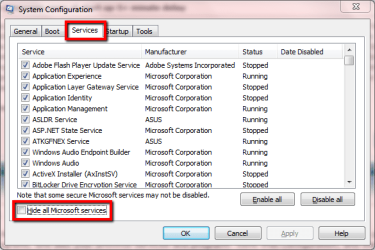
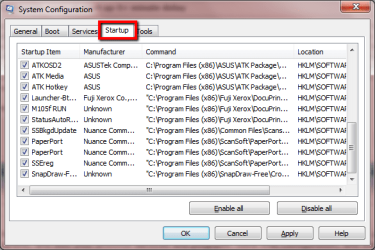
In MSCONFIG, on both the STARTUP and SERVICES tabs, deselect everything except for any Microsoft services and Programs, and also your antivirus services and programs. Save that configuration, and then reboot your system. Is it any quicker?

http://www.sevenforums.com/tutorial...ation-conflicts-performing-clean-startup.html

1.PNG 2.PNG

Also please tell us what anti-virus software is currently installed.

Regards,
Golden
 
Last edited by a moderator:

My Computer

Computer type
PC/Desktop
Computer Manufacturer/Model Number
Golden Mk. I.4
OS
Windows 10 Pro x64 ; Xubuntu x64
CPU
Intel i7 860 @ 2.80 GHz O/C'ed to 4.0GHz
Motherboard
Gigabyte P55A-UD3R Rev.1. Award BIOS F13
Memory
16GB Corsair Vengance DDR3 @ 661 MHz Dual Channel (9-9-9-24)
Graphics Card(s)
EVGA NVidia GTX 560 1024MB
Sound Card
Realtek Integrated
Monitor(s) Displays
Dual Samsung SyncMaster 2494HS
Screen Resolution
1920*1080 and 1920*1080
Hard Drives
1*Samsung 840 EVO 120GB SSD;
1*OCZ Vertex 2 60GB SSD;
2*Samsung F3 SpinPoint 1TB in RAID0;
1*Samsung F1 SpinPoint 1TB;
2*Western Digital 1TB External USB 3.0
1*Western Digital 500GB External USB 3.0
1*Seagate 500GB External USB 2.0
PSU
Thermaltake ToughPower QFan 750W
Case
Thermaltake Element S VK60001W2Z
Cooling
Corsair H60 Water Cooling, 2*230mm and 2*80mm case fans
Keyboard
Logitech G110
Mouse
Logitech MX518
Win7 should never hang or bog on adequate, tested hardware with a perfect install. If this is factory preinstalled WIn7 then it is the worst possible install one can have, smothering the OS with corrupt bloatware and useless duplicate utilities that have better versions built into the OS.

Judge how close to a perfect install you have by comparing to Clean Reinstall - Factory OEM Windows 7.

To attempt to clean up factory preinstall you can try to Clean Up Factory Bloatware. But even removing the bloatware can damage the OS beyond repair.

Otherwise work through these Troubleshooting Steps for Windows 7 to gather clues.
 
Attempting to turn off all non-microsft services results in msconfig freezing-some have been turned off although many are still enabled. I have however managed to turn off all start up programs without an issue. I'm pretty sure the repair should be clean as I used an ISO from the internet as my computer didn't come with it's own repair disc. During the last 24hours the issues hasn't occurred but it was rather sporadic in occurring before so I will have to wait a while to see if the issue is fixed.


*Edit* Issue is still occurring
 
Last edited:

My Computer

OS
Windows 7 Home Premium 64Bit
Issues seems to be fixed, not sure what fixed it but was probably one of my programs/services starting up which has now been turned off.

Cheers
 

My Computer

OS
Windows 7 Home Premium 64Bit
Your AV should still be starting with Win7, and should be a lightweight one that won't interfere as suggested in tutorial.

I asked how your last reinstall compares to the recommended steps to get a perfect reinstall. Did you delete all partitions during reinstall? Did you follow the steps given for drivers?
 
Back
Top