no sata in device manager

mark0159

New member
Local time
7:07 AM
Messages
5
Hey everyone. I am using windows 7 Rc1 7100 x86

hardware is asus a8n-sli motherboard which has a nforce4 sli chip set,
2x seagate hdd's
1 sata optical drive by LG

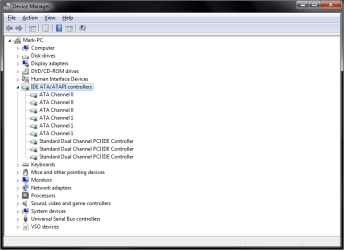
but anyway the problem I have is that windows 7 isn't showing any sata devices in the control panel (see attached picture)

while I was running vista I had downloaded and installed the correct drivers and didn't have a problem. I like win7 way more than vista so no going back.

I have done internet search for some drivers, found Fernandos_Vista&Win7_32bit_NF4-7_Test_Driverpack_v5.6 but they caused the machine to bosd. not helpful :p

I have also tried 15.23_nforce_winvista32_international_whql and had no luck what so ever.

so did see a couple of people say that win7 has built in drivers but if that's the case then why aren't these load :(

any help would be greatly appreciated
 

Attachments
  • no sata.png
    no sata.png
    16.5 KB · Views: 234

My Computer

OS
Windows 7 RC1
I wonder if you need to enable the SATA controller in the BIOS. You may try that or get in there and see what the setting is. Good luck!
 

My Computer

Computer Manufacturer/Model Number
Keeps changing - (Custom)
OS
Windows 7 Professional x64
CPU
Intel Core i7 860
Motherboard
Gigabyte GA-P55-UD4P
Memory
4GB DDR3 Mushkin 1600Mhz @ 7-8-7-20
Graphics Card(s)
MSI GTS250 1GB DDR3 Twin Frozr
Sound Card
Onboard realtek
Monitor(s) Displays
Samsung SyncMaster 24" P2450 + Samsung 20" 2033
Screen Resolution
1920 X 1080 and 1600 X 900 (#2 system 1440 X 900)
Hard Drives
Patriot Inferno 120GB SSD + 3 WD Blue 640GB drives
PSU
Corsair 750 HX Modular
Case
Lancool PC-K62
Cooling
Cooler Master TX3 CPU cooler and 4-140mm and 1-120mm case
Keyboard
Gigabyte USB keyboard
Mouse
Microsoft wireless laser mouse 5000
Internet Speed
7 Mb down 1.5 up
Other Info
System #2: AMD Phenom II X6 1055T (Freezer 7 Pro cooler) - Gigabyte 880GMA-UD2H - WD 500GB Black - 9500GT (1GB) 500W OCZ modular PSU - Antec 200 case. System #3 (LapTop) Core 2 Duo T6670 - 320GB 7200RPM HD - 4GB DDR3 RAM.
I have the same Issue. I have been led to believe that the last 3 entries you have there are the SATA controllers? I have exact what you have. There is settings in the BIOS relating to SATA. One id the AHCI setting which is related to SATA and the other is the SATA native mode. I use an EP45 DS3R GB board and I enabled the SATA native mode but NOT the AHCI mode. The last setting ya need to set before you install an OS. Again, this is what I have been told.
 

My Computer

Computer type
PC/Desktop
Computer Manufacturer/Model Number
Hybrid
OS
Win7 SP1 + Ultimate 64 bit
CPU
Intel G3258
Motherboard
GA Z97X Gaming 3
Memory
32gb Gskill
Graphics Card(s)
GTX 660Ti EVGA x 2
Monitor(s) Displays
Asus 23" LCD Widescreen
Screen Resolution
1920/1080
Hard Drives
1 x Samsung EVO840 250gb SSD
1 X 1 TB Velociraptor
1 x 1 Seagate 7200rpm
PSU
750W Thermaltake
Case
Thermaltake A60
Cooling
Xigmatek Dark Knight CPU and stock case fans
Keyboard
Alienware
Mouse
Microsoft USB
Internet Speed
Optusnet Cable
Antivirus
MS, Malwarebytes
Browser
Palemoon 64Bit
If you are not running a RAID configuration I believe enabling AHCI would be advantageous. You are running IDE otherwise. (if you're not using RAID)

I don't know if it would fix your problem but it may be worth a try.
 

My Computer

Computer Manufacturer/Model Number
Keeps changing - (Custom)
OS
Windows 7 Professional x64
CPU
Intel Core i7 860
Motherboard
Gigabyte GA-P55-UD4P
Memory
4GB DDR3 Mushkin 1600Mhz @ 7-8-7-20
Graphics Card(s)
MSI GTS250 1GB DDR3 Twin Frozr
Sound Card
Onboard realtek
Monitor(s) Displays
Samsung SyncMaster 24" P2450 + Samsung 20" 2033
Screen Resolution
1920 X 1080 and 1600 X 900 (#2 system 1440 X 900)
Hard Drives
Patriot Inferno 120GB SSD + 3 WD Blue 640GB drives
PSU
Corsair 750 HX Modular
Case
Lancool PC-K62
Cooling
Cooler Master TX3 CPU cooler and 4-140mm and 1-120mm case
Keyboard
Gigabyte USB keyboard
Mouse
Microsoft wireless laser mouse 5000
Internet Speed
7 Mb down 1.5 up
Other Info
System #2: AMD Phenom II X6 1055T (Freezer 7 Pro cooler) - Gigabyte 880GMA-UD2H - WD 500GB Black - 9500GT (1GB) 500W OCZ modular PSU - Antec 200 case. System #3 (LapTop) Core 2 Duo T6670 - 320GB 7200RPM HD - 4GB DDR3 RAM.
thanks for your help but that option I don't have in my bios. In fact I don't have AHCI anywhere in my BIOS :(

anyway I hadn't touched my computer bios in going from Vista (where it was working fine) to windows 7.

due to the age of the motherboard, there isn't any updates. it's an Asus A8N Sli motherboard running an amd 939 chipset. I need to upgrade but having some troubles finding the gear that I want for the price that I want to spend. :(

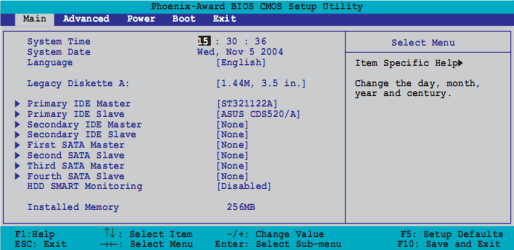
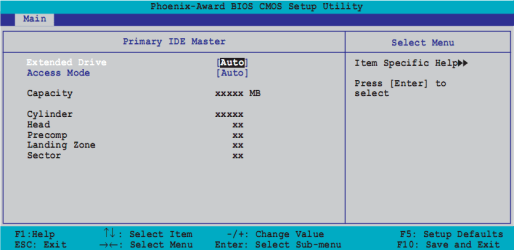
Anyway I did a couple of screen dumps from the manual (which looks just like the real thing) and here you have 1, the first page where it will list date/time etc. As it stands with my computer, the two HDD's that I have will be listed on the first and second sata controller and the dvd drive on the 3rd. If you go in to each of those options for the device you get number 2, The only two options for Exteneded Drive is None and Auto. If I set the HDD on Sata 1 to None then I can't boot up. INSERT SYSTEM DISK AND PRESS ANY TO CONTINUE message. For Access Mode the only options you have is Large and auto. but this changes the cylinder size etc and have nothing to do with the access mode.

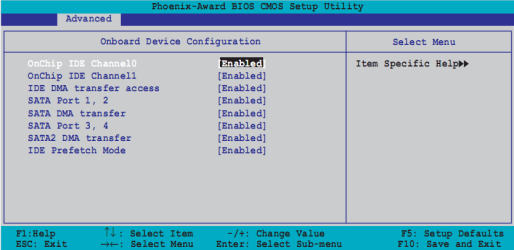
So moving right along I go in to chipset settings (Where you would expect these settings to live) and you get to number 3,
I have disabled IDE channel 0 and 1. I don't have a need for them and really don't see why they should be turned on.
IDE DMA transfer access only options are Enabled/Disabled. With this disabled I can't boot.
SATA Port 1, 2 Enabled/Disabled, enables and disabled the deivce.
SATA DMA Access is Enabled/Disabled. I thought that this might have been it. DMA is like IDE access, but again with this disabled I can't boot.

I have done things like loaded the setup defaults and again this has made no change.

I am really starting to think that this is just down to the motherboard being to old for windows 7.
 

Attachments

  • 1.png
    1.png
    22.3 KB · Views: 109
  • 2.png
    2.png
    13.9 KB · Views: 78
  • 3.png
    3.png
    15.4 KB · Views: 82

My Computer

OS
Windows 7 RC1
I think you're right. It's too old. You might see if there's an update for that bios but even if there is.....you need more RAM and probably a new computer. You can get one pretty cheap on-line. $300 will get you one that you could use for a couple of years.

However if you have been running Vista....you should have no problem running Se7en it takes lees resources.
 
Last edited:

My Computer

Computer Manufacturer/Model Number
Keeps changing - (Custom)
OS
Windows 7 Professional x64
CPU
Intel Core i7 860
Motherboard
Gigabyte GA-P55-UD4P
Memory
4GB DDR3 Mushkin 1600Mhz @ 7-8-7-20
Graphics Card(s)
MSI GTS250 1GB DDR3 Twin Frozr
Sound Card
Onboard realtek
Monitor(s) Displays
Samsung SyncMaster 24" P2450 + Samsung 20" 2033
Screen Resolution
1920 X 1080 and 1600 X 900 (#2 system 1440 X 900)
Hard Drives
Patriot Inferno 120GB SSD + 3 WD Blue 640GB drives
PSU
Corsair 750 HX Modular
Case
Lancool PC-K62
Cooling
Cooler Master TX3 CPU cooler and 4-140mm and 1-120mm case
Keyboard
Gigabyte USB keyboard
Mouse
Microsoft wireless laser mouse 5000
Internet Speed
7 Mb down 1.5 up
Other Info
System #2: AMD Phenom II X6 1055T (Freezer 7 Pro cooler) - Gigabyte 880GMA-UD2H - WD 500GB Black - 9500GT (1GB) 500W OCZ modular PSU - Antec 200 case. System #3 (LapTop) Core 2 Duo T6670 - 320GB 7200RPM HD - 4GB DDR3 RAM.
Oh I have no problems with running 7, in fact I'm not going to go back to Vista just because of this. I am going to be upgrading the hardware this year.

I am running 7 with only 2gb and 4gb page file and don't have any issues.

I would like faster access to my HDD, it's makes browsing all those thumbnails that much quicker. I would like to replace my hdd with SSD but hey dreams are free.
 

My Computer

OS
Windows 7 RC1
Back
Top