
No sound after upgrading to Win 7

PandaPan

New member
Local time
3:16 AM
Messages
3
(solved) No sound after upgrading to Win 7

I upgraded from Win XP to Win7 and realized there's no sound or whatsoever at all.
My computer is custom built and it use Realtek HD Audio manager.
When I tried to play a song, the mixer has green bars going up and down indicating sound available.
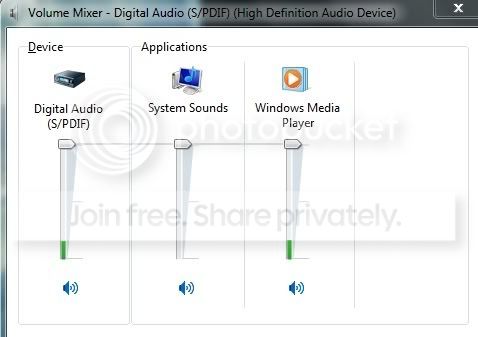
volumemixer.jpg

but there were no sound at all. I also tried to use headphone, different monitor with build-in speaker....etc....

volume.jpg

Also here it said not plugged in.
I scanned for driver using a driver finder scanner and it said I have:
-Avance AC97 audio
-REaltek High Definition Audio
-NVIDIA nForce Serial ATA controller
I'm not sure what these are but I hope this would help in finding the update for my soundcard....
Thanks:o
 
Last edited:

My Computer My Computer

OS
i dunno
You need to set the Speakers to the default device just right click on the "Speakers" and click Set to default device.
 

My Computer My Computer

OS
Windows 7 Ultimate x64 Service Pack 1 (Build 6.1.7601)
CPU
Intel Core 2 Quad Q6600 (G0 Kentsfield) LGA775 (FC-LGA6)
Motherboard
GIGABYTE GA-EP35C-DS3R (Rev. 2.1)
Memory
Corsair TW3X4G1333C9A 4GB PC-10600 (2x XMS3 2GB)
Graphics Card(s)
ASUS nVIDIA GeForce 560
Sound Card
RealTek ALC885/889A/890
Monitor(s) Displays
ChiMei CMV CT-730D 17inch (LCD Monitor)
Screen Resolution
1280-1024 60Hertz (Ture Colour 32bit)
Hard Drives
2x Barracuda 7200.10 SATA 3.0Gb/s 160-GB Hard Drive ST3160815AS (AHCI)
PSU
ANTEC 750w Earthwatts
Case
Thermaltake Shark (VA7000SWA ATX) Full Tower
Cooling
Front 120mm fan (1400 RPM) /Rear 120mm (1400 RPM) blue LED
Keyboard
Labtec Media Desktop Y-SAD65
Mouse
Razer DeathAdder 3G Infrared Sensor (1800DPI)
Internet Speed
Telstra BigPond Elite Liberty ADSL2+ 24Mbps/256kbps
Other Info
ASUS PCE-N13 802.11n Wireless LAN card
Is this a laptop? If it is... plug headphones in and you should then be able to choose a different output device. As long as you have Digital Audio s/pdif as the default output device you will not hear anything.

If it's a desktop, do you have speakers plugged in the light green speaker output jack?

Ap
 

My Computer My Computer

Computer Manufacturer/Model Number
Assembled in my workshop
OS
Windows 7 Home Premium
CPU
Intel Core 2 Duo @ 3.00gHz
Motherboard
Gigabyte GA-P35-S3G
Memory
4 GB
Graphics Card(s)
ATI Radeon HD 2600 XT
Sound Card
RME 24/96 Card, Realtek Internal Audio PreSonus FireStudio
Monitor(s) Displays
Acer 1917 (x2)
Screen Resolution
1280 x 1024 on both monitors
Hard Drives
Three 250GB Seagate SATA Barracuda 7200rpm
PSU
Rosewill 500-watt
Case
Rosewill mid-tower
Cooling
Noctua NH-U9B (CPU), PwrSupply fan + single large case Fan
Keyboard
Macally w/2/USB ports.
Mouse
Trackman Wheel
Other Info
Event 20/20 bas studio monitors, Yamaha sub.
Rackmount Korg/Roland/Yamaha synthesizers,
Cubase MIDI/audio recording. Sony Soundforge audio/mastering software. CD Architect Mastering. RME & Presonus audio interfaces.
Thanks for the reply, my computer is a desktop :)
my Speaker is the default device, like Crispy said, but it still doesnt make sound
my desktop does have a green jack right above the pink mic jack. I tried plugging in headphones, external speakers and such but no use. RIght now I'm trying to install the newest Realtek update and hope it will work
Any other suggestions would be much appreciated!
 

My Computer My Computer

OS
i dunno
All the plugs are colour coated so it would not be hard to plug it all in and you should be fine then.
 

My Computer My Computer

OS
Windows 7 Ultimate x64 Service Pack 1 (Build 6.1.7601)
CPU
Intel Core 2 Quad Q6600 (G0 Kentsfield) LGA775 (FC-LGA6)
Motherboard
GIGABYTE GA-EP35C-DS3R (Rev. 2.1)
Memory
Corsair TW3X4G1333C9A 4GB PC-10600 (2x XMS3 2GB)
Graphics Card(s)
ASUS nVIDIA GeForce 560
Sound Card
RealTek ALC885/889A/890
Monitor(s) Displays
ChiMei CMV CT-730D 17inch (LCD Monitor)
Screen Resolution
1280-1024 60Hertz (Ture Colour 32bit)
Hard Drives
2x Barracuda 7200.10 SATA 3.0Gb/s 160-GB Hard Drive ST3160815AS (AHCI)
PSU
ANTEC 750w Earthwatts
Case
Thermaltake Shark (VA7000SWA ATX) Full Tower
Cooling
Front 120mm fan (1400 RPM) /Rear 120mm (1400 RPM) blue LED
Keyboard
Labtec Media Desktop Y-SAD65
Mouse
Razer DeathAdder 3G Infrared Sensor (1800DPI)
Internet Speed
Telstra BigPond Elite Liberty ADSL2+ 24Mbps/256kbps
Other Info
ASUS PCE-N13 802.11n Wireless LAN card
Thanks for the reply, my computer is a desktop :)
my Speaker is the default device, like Crispy said, but it still doesnt make sound
my desktop does have a green jack right above the pink mic jack. I tried plugging in headphones, external speakers and such but no use. RIght now I'm trying to install the newest Realtek update and hope it will work
Any other suggestions would be much appreciated!


In the graphic you posted... your speaker is not the default device.

Stereo speakers go in the light green jack.

Ap
 

My Computer My Computer

Computer Manufacturer/Model Number
Assembled in my workshop
OS
Windows 7 Home Premium
CPU
Intel Core 2 Duo @ 3.00gHz
Motherboard
Gigabyte GA-P35-S3G
Memory
4 GB
Graphics Card(s)
ATI Radeon HD 2600 XT
Sound Card
RME 24/96 Card, Realtek Internal Audio PreSonus FireStudio
Monitor(s) Displays
Acer 1917 (x2)
Screen Resolution
1280 x 1024 on both monitors
Hard Drives
Three 250GB Seagate SATA Barracuda 7200rpm
PSU
Rosewill 500-watt
Case
Rosewill mid-tower
Cooling
Noctua NH-U9B (CPU), PwrSupply fan + single large case Fan
Keyboard
Macally w/2/USB ports.
Mouse
Trackman Wheel
Other Info
Event 20/20 bas studio monitors, Yamaha sub.
Rackmount Korg/Roland/Yamaha synthesizers,
Cubase MIDI/audio recording. Sony Soundforge audio/mastering software. CD Architect Mastering. RME & Presonus audio interfaces.
thanks for all the helps, I got the sound again :)!
Problem solved, close thread pls
 

My Computer My Computer

OS
i dunno
hey guys, I got that same problem too, but I cant set the speakers to default device, it won't allow me to, my speakers was working fine till just now... tried installing Realtek and still its the same problem, HELP?:cry:
 

My Computer My Computer

OS
Windows 7
Back
Top