
Hello,
I recently updated a Windows 7 service pack and while it was updating, I opened GeForce Experience to see if there was an update for my graphics driver. When I did this, my PC crashed and after it booted up, I've had no sound ever since. I've done everything I can think of. Ran scans, an SFC scan, plugged my speakers and headphones in and out of every port, etc. There's that red X at the bottom of my volume control and it just says that no speakers or headphones are plugged in. I can't even configure or set defaults in the sound panel. When I click on the volume icon, it runs a troubleshoot, asks me what sound devices I'm wanting to get help with, and when I pick speakers or headphones, it simply says that they're unplugged.
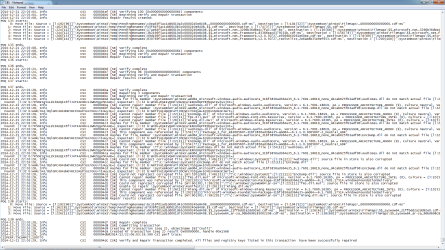
Microsoft Support said that my audio is messed up due to the conflict between Windows updating and a third party program (GeForce) being ran at the same time. As far as the sfc scan goes, I've ran it multiple times with no luck, and I've even gone into my CBS.log to find out what the problem is. Towards the end of the results, there's about a paragraph length including "Audiocodec" problems and "Audioess.dll" corrupted files. This obviously is the problem. I've attached a picture where this occurs.
I'm hoping that this can be fixed without having to buy a new copy of Windows or a new soundcard. But if that ends up being the case then I will of course.
Please help! I will be eternally grateful. As you can imagine, a PC really isn't useful without sound.
Thank you,
stigzmata
I recently updated a Windows 7 service pack and while it was updating, I opened GeForce Experience to see if there was an update for my graphics driver. When I did this, my PC crashed and after it booted up, I've had no sound ever since. I've done everything I can think of. Ran scans, an SFC scan, plugged my speakers and headphones in and out of every port, etc. There's that red X at the bottom of my volume control and it just says that no speakers or headphones are plugged in. I can't even configure or set defaults in the sound panel. When I click on the volume icon, it runs a troubleshoot, asks me what sound devices I'm wanting to get help with, and when I pick speakers or headphones, it simply says that they're unplugged.
Microsoft Support said that my audio is messed up due to the conflict between Windows updating and a third party program (GeForce) being ran at the same time. As far as the sfc scan goes, I've ran it multiple times with no luck, and I've even gone into my CBS.log to find out what the problem is. Towards the end of the results, there's about a paragraph length including "Audiocodec" problems and "Audioess.dll" corrupted files. This obviously is the problem. I've attached a picture where this occurs.
I'm hoping that this can be fixed without having to buy a new copy of Windows or a new soundcard. But if that ends up being the case then I will of course.
Please help! I will be eternally grateful. As you can imagine, a PC really isn't useful without sound.
Thank you,
stigzmata
Attachments
My Computer
At a glance
Windows 7 Professional, 64Intel(R) Core(TM)2 Duo CPU E8500 @ 3.16 GHz4GB RAMGeForce GTX 560
- Computer type
- PC/Desktop
- Computer Manufacturer/Model Number
- Antec
- OS
- Windows 7 Professional, 64
- CPU
- Intel(R) Core(TM)2 Duo CPU E8500 @ 3.16 GHz
- Memory
- 4GB RAM
- Graphics Card(s)
- GeForce GTX 560
- Hard Drives
- Corsair 64 GB SSD (C:)
Seagate 300GB HDD (E:)
Lacie 1TB HD (G:)
- Antivirus
- aVast
- Browser
- Mozilla Firefox


