
No sound from internet, but have system sounds

KenY7744

New member
Local time
11:42 AM
Messages
26
Location
Glenside, PA
I'm working on a rebuild of an old Dell. I disabled the onboard sound, and installed several different PCI sound cards. The system is not my main system, but a spare. It's a 32-bit processor, but has Win7 Pro 64 OS.

The onboard sound adapter is so old, I could not get 64-bit drivers from Dell, so I disabled it and bought a couple of PCI sound cards. The drivers installed properly, but I can not get sound from internet, such as YouTube, Pandora no matter which sound adapter is used. This is true in either FireFox or IE9.

But I **DO** get sound from system events such as opening or closing Windows, beeps, errors, etc. **AND** I can play MP3 files from my HD through WMP.

I have downloaded the latest Flash player from Adobe, but I'm not sure if it was 32-bit or 64-bit Flash Player. Would this matter?

Any help would be greatly appreciated.
 

My Computer My Computer

At a glance

Windows 7 Enterprise Edition 32-bitPentium Dual Core 2.4 GHz4GbATI Radeon HD 3400
Computer Manufacturer/Model Number
Dell Vostro 200
OS
Windows 7 Enterprise Edition 32-bit
CPU
Pentium Dual Core 2.4 GHz
Memory
4Gb
Graphics Card(s)
ATI Radeon HD 3400
Sound Card
On board
Monitor(s) Displays
2 Dell flatscreen
Hard Drives
WD 160Gb Internal (Containing OS & Installed Programs)
Seagate 1Tb Internal (DATA, MUSIC, PHOTOS, VIDEOS, DOWNLOADS)
Various external HDs 500Gb & 1Tb for backups
There is no possible way you can install a 64-bit OS onto a 32-bit Processor. It won't work. Period. End of Story.
Either you have a 64-bit processor, or your confused as to which version of Windows 7 you have.

Goto Control Panel -> System. Under "System Type" it will say either 32-bit or 64-bit OS.

Try some of these first:
http://support.mozilla.com/en-US/kb/No sound in Firefox

Do me a favor in Firefox too - goto Tools -> Addons -> Plugins.
Tell me if Flash is listed in there and what it says.
 

My Computer My Computer

At a glance

Win7 64-bit UltimateIntel Core2 Extrme X9650 3.0Ghz @ 3.33Ghz8GB DDR-2 1333Mhz2x SLI NVIDIA 780GTX
Computer Manufacturer/Model Number
XFX NForce 780i SLI
OS
Win7 64-bit Ultimate
CPU
Intel Core2 Extrme X9650 3.0Ghz @ 3.33Ghz
Motherboard
XFX Intel 780i
Memory
8GB DDR-2 1333Mhz
Graphics Card(s)
2x SLI NVIDIA 780GTX
Sound Card
PCI Express X-Fi Titanium Fatal1ty Champion PCI-X
Monitor(s) Displays
2x Samsung LCD
Screen Resolution
1280x1024
Hard Drives
4x Seagate Barracuda 500GB something.10
PSU
PC Power & Cooling 1000W
Case
Thermaltake
Cooling
Water - 2x Koolance EXOS 2.5
Keyboard
Logitech DiNovo
Mouse
Logitech MX1000
Internet Speed
25 Down/5 Up
Are you sure about that? Because it's a 7-year-old DELL (pretty sure that preceeds 64-bit processors), and it does have a 32-bit processor (Pentium 2.6GHz) and the system properties screen does show that it's a 64-bit OS.

So... not confused.

And almost everything does work except the sound from internet sites.

So, I take exception to "no possible way" and "period, end of story." It may be your experience that you can't do this, but other's experiences may be different.

I will explore the link you gave me.

Thanks,
Ken
 

My Computer My Computer

At a glance

Windows 7 Enterprise Edition 32-bitPentium Dual Core 2.4 GHz4GbATI Radeon HD 3400
Computer Manufacturer/Model Number
Dell Vostro 200
OS
Windows 7 Enterprise Edition 32-bit
CPU
Pentium Dual Core 2.4 GHz
Memory
4Gb
Graphics Card(s)
ATI Radeon HD 3400
Sound Card
On board
Monitor(s) Displays
2 Dell flatscreen
Hard Drives
WD 160Gb Internal (Containing OS & Installed Programs)
Seagate 1Tb Internal (DATA, MUSIC, PHOTOS, VIDEOS, DOWNLOADS)
Various external HDs 500Gb & 1Tb for backups
Ken,

If you are going to tell me I don't know what I am doing when I do, ESPECIALLY when I am, ask someone else on another forum. If it says you are running a 64-bit OS, it is a 64-bit processor. PERIOD.

First off, it's a 64-bit processor, you can run 32-bit programs too on a 64-bit processor. You CANNOT run 64-bit on a 32-bit processor.....if I didnt make that clear... Your getting ahead of yourself for someone who has 18+ years of experience.

See these:

http://windows.microsoft.com/en-US/...and-64-bit-Windows-frequently-asked-questions

http://answers.yahoo.com/question/index?qid=20090821194723AAryjtX

Download this and run it:
CPUID - System & hardware benchmark, monitoring, reporting

I want to know the processor name. I GUARANTEE it has 64-bit.

If you still don't want to believe me, wait for someone else or like I said post somewhere else.
I will not argue any more.
 

My Computer My Computer

At a glance

Win7 64-bit UltimateIntel Core2 Extrme X9650 3.0Ghz @ 3.33Ghz8GB DDR-2 1333Mhz2x SLI NVIDIA 780GTX
Computer Manufacturer/Model Number
XFX NForce 780i SLI
OS
Win7 64-bit Ultimate
CPU
Intel Core2 Extrme X9650 3.0Ghz @ 3.33Ghz
Motherboard
XFX Intel 780i
Memory
8GB DDR-2 1333Mhz
Graphics Card(s)
2x SLI NVIDIA 780GTX
Sound Card
PCI Express X-Fi Titanium Fatal1ty Champion PCI-X
Monitor(s) Displays
2x Samsung LCD
Screen Resolution
1280x1024
Hard Drives
4x Seagate Barracuda 500GB something.10
PSU
PC Power & Cooling 1000W
Case
Thermaltake
Cooling
Water - 2x Koolance EXOS 2.5
Keyboard
Logitech DiNovo
Mouse
Logitech MX1000
Internet Speed
25 Down/5 Up
32-bit versus 64-bit processors

So what do you need to run a 64-bit version of Windows? That’s no mystery either. You need a computer with a 64-bit processor (also called an x64 processor, or CPU).

Source: Taking the mystery out of 64-bit Windows

End of argument.
 

My Computer My Computer

At a glance

Windows 7 Ultimate SP1 64-BitIntel Core i7 870 @ 2.93GHz8Gb Dual-Channel DDR3 @ 664MHznVidia GeForce GTX 460 1024MB dedicated RAM
Computer Manufacturer/Model Number
HP Pavilion Elite 495UK
OS
Windows 7 Ultimate SP1 64-Bit
CPU
Intel Core i7 870 @ 2.93GHz
Motherboard
MSI 2A9C (CPU1)
Memory
8Gb Dual-Channel DDR3 @ 664MHz
Graphics Card(s)
nVidia GeForce GTX 460 1024MB dedicated RAM
Sound Card
Realtek HD Audio
Monitor(s) Displays
HP2310i
Screen Resolution
1920 x 1080
Hard Drives
1x1954GB Hitachi HDS22020ALA 330 (RAID), 1x1954GB Hitachi External for backup and storage
PSU
460W
Case
HP Elite
Cooling
Air cooled
Keyboard
Logitech K750 solar-powered keyboard
Mouse
Logitech Wireless M180 mouse
Internet Speed
2Mb
Other Info
Pure Avanti Flow Internet Radio with iPod Dock, 64Gb iPod, HP USB Speakers, Sony MDR-V500 Headphones, Sony Vaio F-Series Laptop

My Computer My Computer

At a glance

Win7 64-bit UltimateIntel Core2 Extrme X9650 3.0Ghz @ 3.33Ghz8GB DDR-2 1333Mhz2x SLI NVIDIA 780GTX
Computer Manufacturer/Model Number
XFX NForce 780i SLI
OS
Win7 64-bit Ultimate
CPU
Intel Core2 Extrme X9650 3.0Ghz @ 3.33Ghz
Motherboard
XFX Intel 780i
Memory
8GB DDR-2 1333Mhz
Graphics Card(s)
2x SLI NVIDIA 780GTX
Sound Card
PCI Express X-Fi Titanium Fatal1ty Champion PCI-X
Monitor(s) Displays
2x Samsung LCD
Screen Resolution
1280x1024
Hard Drives
4x Seagate Barracuda 500GB something.10
PSU
PC Power & Cooling 1000W
Case
Thermaltake
Cooling
Water - 2x Koolance EXOS 2.5
Keyboard
Logitech DiNovo
Mouse
Logitech MX1000
Internet Speed
25 Down/5 Up
OK. I am humbled. I stand corrected and apologize for the attitude. (I was acting on information given by someone else who claims to have installed a 64 bit version of Win7 on a 32 bit machine, and apparently he does not know as much as he claims to know.)

I have attached a screen shot of the system properties of this machine. As is evident from the screen shot, it does indeed have 64 bit Win7, and the processor is a Pentium D CPU 2.8Ghz, which is apparentlyly enough like a 64 bit CPU that you can install the 64 bit Win7 OS. I thought the system was old enough to preceed the use of 64 bit processors. Apparently I was wrong, and I apologize and I'm willing to learn something new.

But this gets back to the original question of why we can't get sound from websites like Pandora and YouTube.

But we can still get sound from ITunes or WMP to play MP3s, DVDs and CDs play audio, and system sounds are fine, such as starting and closing Win7, beeps, Skype startup and quit, plugging in USB devices, etc.

We have done the following to try to remedy this situation:

Disabled the onboard sound card (because Dell said there were not any 64 bit drivers available after we gave them the Service Tag number) and installed two different PCI sound cards, a Diamond and a Rocketfish 5.1. Even reinstalled the drivers a few different times.

Backgraded from IE9 to IE8.

Uninstalled FireFox V6 and reinstalled it.

Uninstalled and reinstalled Flash Player 10.3 and Shockwave (several times).

After all this, still no sound from YouTube and Pandora.

What else is left to try?

Thanks for any help given.

Ken
 

Attachments

My Computer My Computer

At a glance

Windows 7 Enterprise Edition 32-bitPentium Dual Core 2.4 GHz4GbATI Radeon HD 3400
Computer Manufacturer/Model Number
Dell Vostro 200
OS
Windows 7 Enterprise Edition 32-bit
CPU
Pentium Dual Core 2.4 GHz
Memory
4Gb
Graphics Card(s)
ATI Radeon HD 3400
Sound Card
On board
Monitor(s) Displays
2 Dell flatscreen
Hard Drives
WD 160Gb Internal (Containing OS & Installed Programs)
Seagate 1Tb Internal (DATA, MUSIC, PHOTOS, VIDEOS, DOWNLOADS)
Various external HDs 500Gb & 1Tb for backups
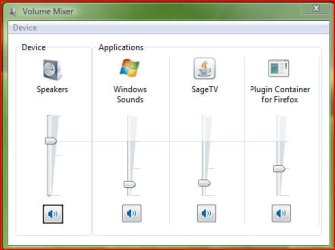
What does the Firefox Plugin Container look like in the Windows Volume mixer?
Does it appear when playing a video on Youtube and is the volume slider turned up?
Capture.JPG
 

My Computer My Computer

At a glance

Windows 7 Home Premium 64 bitIntel Core i7-4790G.SKILL 8GB (2 x 4GB) DDR3 F3-10666CL9D-8GBNTAMD Radeon R7 250
Computer type
PC/Desktop
Computer Manufacturer/Model Number
Custom Build
OS
Windows 7 Home Premium 64 bit
CPU
Intel Core i7-4790
Motherboard
GA-Z87X-D3H
Memory
G.SKILL 8GB (2 x 4GB) DDR3 F3-10666CL9D-8GBNT
Graphics Card(s)
AMD Radeon R7 250
Sound Card
Realtek ALC892
Monitor(s) Displays
Samsung UN32EH5000, Dell 1703FPT
Screen Resolution
1920 x 1080, 1280 x 1024
Hard Drives
WD5003AZEX
WD10EZEX
Samsung HD103SJ
Samsung 128 GB 840 PRO
PSU
SeaSonic M12II SS-500GM
Case
Fractal Design Define R4
Cooling
Zalman CNPS9900ALED
Keyboard
Logitech K800
Mouse
Logitech M705
Internet Speed
16 Mbps
Antivirus
Avast
Browser
Firefox
Other Info
Bose Companion 2 Multimedia Speakers
Two things:

1. Couldn't you just re-enable the onboard sound and see if Windows can find 64-bit drivers on its own? I wouldn't trust Dell to just make the assumption that no 64-bit drivers are available, "period." I'd want to see that for myself.

2. Actually, PCI cards will generally have better sound quality, so let's stick with that. But, why have two of them installed? Why not just one? Are both soundcards actually connected to any speakers/headphones, or just one of them? I just can't help but wonder if sound from your browser/Flash player is coming out through the other card...
 

My Computer My Computer

At a glance

Windows 7 Professional SP1 32-bitIntel Core 2 Duo E6600 2.4GHz4GB DDR2-667 (4x1GB in dual-channel config)nVidia GeForce 9800 GT
Computer type
PC/Desktop
Computer Manufacturer/Model Number
Custom-built
OS
Windows 7 Professional SP1 32-bit
CPU
Intel Core 2 Duo E6600 2.4GHz
Motherboard
Asus PL5D2
Memory
4GB DDR2-667 (4x1GB in dual-channel config)
Graphics Card(s)
nVidia GeForce 9800 GT
Sound Card
Creative X-Fi XtremeMusic
Monitor(s) Displays
Acer P236H
Screen Resolution
1920x1200 (DVI)
Hard Drives
OCZ SSD Vertex Plus 60GB SATA (Firmware 3.55), 64MB cache
Hitachi HD321KJ SATA, 320GB, 7200rpm, 16MB cache
PSU
Antec TruePower 2.0
Case
Cooler Master Centurion
Cooling
Too many fans
Keyboard
Standard
Mouse
Microsoft wireless optical mouse
Internet Speed
AT&T U-verse (18mbit/sec)
Antivirus
Microsoft Security Essentials
Browser
Firefox
Other Info
Other devices:
Compaq CQ-60 laptop
Google Nexus 7 (2012) tablet
Nvidia SHIELD tablet (US/LTE)
Hardkernel ODROID-XU single-board computer (Samsung Exynos 5420)
It might be worth having a look in the BIOS and seeing what's going on there.
 

My Computer My Computer

At a glance

Windows 7 Ultimate SP1 64-BitIntel Core i7 870 @ 2.93GHz8Gb Dual-Channel DDR3 @ 664MHznVidia GeForce GTX 460 1024MB dedicated RAM
Computer Manufacturer/Model Number
HP Pavilion Elite 495UK
OS
Windows 7 Ultimate SP1 64-Bit
CPU
Intel Core i7 870 @ 2.93GHz
Motherboard
MSI 2A9C (CPU1)
Memory
8Gb Dual-Channel DDR3 @ 664MHz
Graphics Card(s)
nVidia GeForce GTX 460 1024MB dedicated RAM
Sound Card
Realtek HD Audio
Monitor(s) Displays
HP2310i
Screen Resolution
1920 x 1080
Hard Drives
1x1954GB Hitachi HDS22020ALA 330 (RAID), 1x1954GB Hitachi External for backup and storage
PSU
460W
Case
HP Elite
Cooling
Air cooled
Keyboard
Logitech K750 solar-powered keyboard
Mouse
Logitech Wireless M180 mouse
Internet Speed
2Mb
Other Info
Pure Avanti Flow Internet Radio with iPod Dock, 64Gb iPod, HP USB Speakers, Sony MDR-V500 Headphones, Sony Vaio F-Series Laptop
Sorry...edit
 

My Computer My Computer

At a glance

Windows 7 Home Premium 64biti7 930 2.8gCorsair xms3 CMX6GX3M3C 1600 C7 2gx3HIS ATI pcie HD5670
OS
Windows 7 Home Premium 64bit
CPU
i7 930 2.8g
Motherboard
x58A-Ud3R rev2.0 FB
Memory
Corsair xms3 CMX6GX3M3C 1600 C7 2gx3
Graphics Card(s)
HIS ATI pcie HD5670
Sound Card
Presonus Firebox
Monitor(s) Displays
Flatron W2343T x2
Hard Drives
1x500g Seagate Sata2 7200
2x1TB Seagate Sata2 7200
PSU
Cooler Master 700W Silent Pro
Case
Antec
Cooling
Zalman CPU Cooler CNPS10x-Quiet
LOL @ the first 7 posts of this thread :roflmao:
 

My Computer My Computer

At a glance

Windows 7 Professional x64AMD Phenom II X4 980 Black Edition @ 4.1Ghz8GB Crucial DDR2 PC5300Asus Radeon HD 5450
Computer Manufacturer/Model Number
Custom Box
OS
Windows 7 Professional x64
CPU
AMD Phenom II X4 980 Black Edition @ 4.1Ghz
Motherboard
ECS Elite Group IC780M-A V2.0
Memory
8GB Crucial DDR2 PC5300
Graphics Card(s)
Asus Radeon HD 5450
Sound Card
On Board
Monitor(s) Displays
Dual Monitor Setup
Hard Drives
60GB OCZ Vertex 3 SSD,
320GB, 250GB, & Dual 160GB HDD's
PSU
Cooler Master eXtreme Power Plus 500w
Case
Cooler Master Elite 310
Cooling
Dual 120mm Cooler Master Case Fans
Keyboard
Logitech...
Mouse
Microsoft Mouse 4000
Internet Speed
Super Fast
In response to the suggestion that I look at the mixer. Firefox Plugin Container is not one of the sliders in the mixer. Also, the sound problem is the same in IE9 and IE8, and Chrome as well.

In response to the question about the sound cards, I should clarify that I installed 2 sound cards after disabling the onboard sound card, but only one at a time. At no time was more than 1 PCI sound card installed at one time. The onboard sound card is still disabled.

I also tried to let Windows find a 64 bit driver for the onboard sound card, but this failed.

Seavixen suggested looking at the BIOS, but I don't know what else to look for other than having the onboard sound card DISABLED.

Thanks for all the suggestions, and I'm still open for more suggestions.

Ken
 

My Computer My Computer

At a glance

Windows 7 Enterprise Edition 32-bitPentium Dual Core 2.4 GHz4GbATI Radeon HD 3400
Computer Manufacturer/Model Number
Dell Vostro 200
OS
Windows 7 Enterprise Edition 32-bit
CPU
Pentium Dual Core 2.4 GHz
Memory
4Gb
Graphics Card(s)
ATI Radeon HD 3400
Sound Card
On board
Monitor(s) Displays
2 Dell flatscreen
Hard Drives
WD 160Gb Internal (Containing OS & Installed Programs)
Seagate 1Tb Internal (DATA, MUSIC, PHOTOS, VIDEOS, DOWNLOADS)
Various external HDs 500Gb & 1Tb for backups
KenY7744, apology accepted. :)
I'm plain out of ideas unless I can get remote access to the computer :confused:
You can PM me if you want, but others may still chime in that can help you...
 

My Computer My Computer

At a glance

Win7 64-bit UltimateIntel Core2 Extrme X9650 3.0Ghz @ 3.33Ghz8GB DDR-2 1333Mhz2x SLI NVIDIA 780GTX
Computer Manufacturer/Model Number
XFX NForce 780i SLI
OS
Win7 64-bit Ultimate
CPU
Intel Core2 Extrme X9650 3.0Ghz @ 3.33Ghz
Motherboard
XFX Intel 780i
Memory
8GB DDR-2 1333Mhz
Graphics Card(s)
2x SLI NVIDIA 780GTX
Sound Card
PCI Express X-Fi Titanium Fatal1ty Champion PCI-X
Monitor(s) Displays
2x Samsung LCD
Screen Resolution
1280x1024
Hard Drives
4x Seagate Barracuda 500GB something.10
PSU
PC Power & Cooling 1000W
Case
Thermaltake
Cooling
Water - 2x Koolance EXOS 2.5
Keyboard
Logitech DiNovo
Mouse
Logitech MX1000
Internet Speed
25 Down/5 Up
Thanks for your offer to remote in to look at the PC in question.

We've pretty much arrived at the conclusion that it's a lost cause, and rather than spend more time (=money) trying to resolve the issues, my client has resigned herself to purchasing a new PC.

We had pretty much decided to purchase a new PC, but someone sold her on the idea of upgrading her XP class PC and putting on Win7 Prof. To my client, it was an attractive idea, since this guy is supposedly some PC/Windows guru, and he said he did the same thing with his wife's 8 year old PC. He promised that there was another 5 years of life in the refurbed PC. And he contributed some old RAM and an old 320Gb HD, so my client's cash outlay was pretty much just the shipping cost.

But when the issue with the sound card(s) arose, he was not there to help resolve it. He pretty much disappeared. And left me to resolve the issues. I have a barter relationship with my client, so it didn't cost her cash, but it did cost her about $1200 in barter value. I finally convinced her that this refurb project was not cost-effective, even though it's barter not cash.

So, now off to Staples or BestBuy or Dell to find a good PC for about $400-500 that will work with everything she's got to do.

Thanks again for your help, and for putting up with my lofty attytood (at least until I corrected my opinion of that "expert").

Have a great day!

Ken
 

My Computer My Computer

At a glance

Windows 7 Enterprise Edition 32-bitPentium Dual Core 2.4 GHz4GbATI Radeon HD 3400
Computer Manufacturer/Model Number
Dell Vostro 200
OS
Windows 7 Enterprise Edition 32-bit
CPU
Pentium Dual Core 2.4 GHz
Memory
4Gb
Graphics Card(s)
ATI Radeon HD 3400
Sound Card
On board
Monitor(s) Displays
2 Dell flatscreen
Hard Drives
WD 160Gb Internal (Containing OS & Installed Programs)
Seagate 1Tb Internal (DATA, MUSIC, PHOTOS, VIDEOS, DOWNLOADS)
Various external HDs 500Gb & 1Tb for backups
dont know if ya want to bother trying this now but there is one other thing ya can try. i had the same problem before but it was with xp and i think it was a certain version of flash that cause the problem.

if ya try this

control panal > system and security > admin tools > services

than scroll down to windows audio and restart them (there is two instances of windows audio) that should fix your problem.

well if she gettin a new comp now anyway no point but im sure you would like to find out what the problem was!
 

My Computer My Computer

At a glance

Windows 7 Home Premium 64bitAMD Athlon x23g Ram and 10g VirtualNivida Gforce 9
Computer Manufacturer/Model Number
Acer Aspire x33000
OS
Windows 7 Home Premium 64bit
CPU
AMD Athlon x2
Motherboard
Acer wmcp78m
Memory
3g Ram and 10g Virtual
Graphics Card(s)
Nivida Gforce 9
Screen Resolution
1920 x 1080
Thanks for the tip, Graemzy. If my client hasn't bought her new PC yet, I'll give it a try. I'll post something here if it works.

Yeah, I'd love to know what's causing this weird behavior. I've never seen it before, and I hate not being able to figure it out, even with the help of all the knowledgeable people on this forum.

Ken
 

My Computer My Computer

At a glance

Windows 7 Enterprise Edition 32-bitPentium Dual Core 2.4 GHz4GbATI Radeon HD 3400
Computer Manufacturer/Model Number
Dell Vostro 200
OS
Windows 7 Enterprise Edition 32-bit
CPU
Pentium Dual Core 2.4 GHz
Memory
4Gb
Graphics Card(s)
ATI Radeon HD 3400
Sound Card
On board
Monitor(s) Displays
2 Dell flatscreen
Hard Drives
WD 160Gb Internal (Containing OS & Installed Programs)
Seagate 1Tb Internal (DATA, MUSIC, PHOTOS, VIDEOS, DOWNLOADS)
Various external HDs 500Gb & 1Tb for backups
: No sound from internet, but have system sounds

Thanks for your suggestions Graemzy.

When I went into the Services, both audio items were already running.

So.. it's definitely off to buy a new PC soon.

:cry:
 

My Computer My Computer

At a glance

Windows 7 Enterprise Edition 32-bitPentium Dual Core 2.4 GHz4GbATI Radeon HD 3400
Computer Manufacturer/Model Number
Dell Vostro 200
OS
Windows 7 Enterprise Edition 32-bit
CPU
Pentium Dual Core 2.4 GHz
Memory
4Gb
Graphics Card(s)
ATI Radeon HD 3400
Sound Card
On board
Monitor(s) Displays
2 Dell flatscreen
Hard Drives
WD 160Gb Internal (Containing OS & Installed Programs)
Seagate 1Tb Internal (DATA, MUSIC, PHOTOS, VIDEOS, DOWNLOADS)
Various external HDs 500Gb & 1Tb for backups
ye thats the thing tho, they will be running, ya just have to restart them is all. it will say they are running but ya just have to restart them!

thats no problem anyway! hope it helps!
 

My Computer My Computer

At a glance

Windows 7 Home Premium 64bitAMD Athlon x23g Ram and 10g VirtualNivida Gforce 9
Computer Manufacturer/Model Number
Acer Aspire x33000
OS
Windows 7 Home Premium 64bit
CPU
AMD Athlon x2
Motherboard
Acer wmcp78m
Memory
3g Ram and 10g Virtual
Graphics Card(s)
Nivida Gforce 9
Screen Resolution
1920 x 1080
I know this post is rather old, but maybe it will help somebody else. would bet the only problem here was flash player codec, and/or flash player plugin. had exact issue with win7 x64. reinstalled flash thru microsoft I.E 8 instead of firefox. while I was at it quicktime lite and realplayer lite. all internet sound worked after that thru I.E 8, firefox and chrome. guessing it was flashplayer as most websites including youtube use it. various websites do use java, quicktime, real or divx codec but flash is the most prevalent. those codecs are a must for complete internet, and not always there when you buy a computer and need to be installed. if they are already installed, most likely need updating. anytime I've ever had internet sound trouble, it was always a missing codec or incorrect codec settings or installation. this problem was fixed by reinstalling flash thru I.E.8 instead of firefox though I don't know why. very doubtful the posters trouble was hardware related if sound was present elsewhere. (like my problem).
 
Last edited:

My Computer My Computer

At a glance

Windows 7 Ultimate x64
OS
Windows 7 Ultimate x64
Back
Top