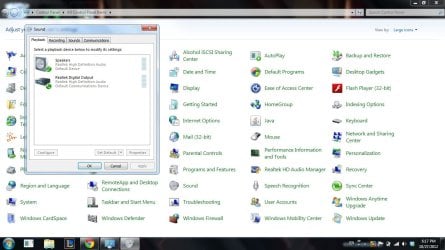
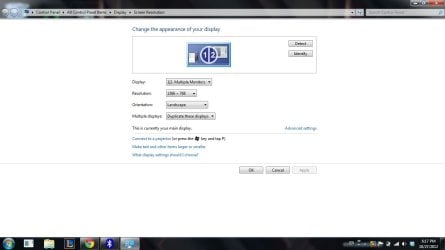
There is NO HDMI audio listed in the snapshot you show. You will need HDMI audio enabled (if you have it). In the Sound Playback panel, RIGHT click in an empty area and then LEFT click Show Disabled and Disconnected devices. If the HDMI is now shown you can select it as the default playback device.
If it is not shown, and the PC is supposed to have it, update the Video driver.
My Computer
Computer type
PC/Desktop
Computer Manufacturer/Model Number
My Own Build
OS
Windows 10 64 bit
CPU
Intel i7 6700K
Motherboard
ASUS ROG Maximus VIII Hero
Memory
16GB Corsair Dominator
Graphics Card(s)
Intel CPU Graphics
Sound Card
RealTek
Monitor(s) Displays
27" Dell S2719dgf
Screen Resolution
2560X1440
Hard Drives
1 TB Samsung 850 EVO SSD for Win 10 Pro
500GB Samsung 850 EVO SSD for Win 10 Insider
2 TB drive for backup
PSU
EVGA Supernova 750G2
Case
BeQuiet Silent Base 600
Cooling
Deepcool Captain 120EX
Keyboard
Microsoft Wireless 2000
Mouse
Microsoft wireless
Internet Speed
100 MB/sec (Cable)
Antivirus
Microsoft Defender and Malwarebytes
Browser
Edge/Firefox
Other Info
Cakewalk (Sonar) by BandLab and Studio One 4.1 Pro recording studio software. MOTU 896Mk3 Hybrid recording interface, Frontier Tranzport wireless control unit, Behringer X-Touch Control Surface.
Five USB connected optical drives for CD Audio production using Nero BurningROM
There is NO HDMI audio listed in the snapshot you show. You will need HDMI audio enabled (if you have it). In the Sound Playback panel, RIGHT click in an empty area and then LEFT click Show Disabled and Disconnected devices. If the HDMI is now shown you can select it as the default playback device.
If it is not shown, and the PC is supposed to have it, update the Video driver.
Could you tell me how to do that ?? I've tried a lot but to no avail....
I've got a Lenovo Y560 with ATI Mobility Radeon HD 5730 and Intel HD Graphics.
As you have both the Intel HD Graphics and the ATI, I don't know how you select which one to use. The ATI Radeon has HDMI audio listed in its specifications. I don't know if the Intel HD Graphics also has that.
The Lenovo users manual (should be one loaded on the PC, I have a different model Lenovo ideapad and it has it) should detail how to select which video device.
The latest AMD (ATI) driver can be downloaded and it will contain the needed HDMI audio driver. But, I can't guarantee that will fix the problem. This is really a subject for a different forum section, even though it is on audio, since it involves proper PC configuration.
Here is the AMD (ATI) driver download: AMD Catalyst
Otherwise you may want to repost about the HDMI configuration issue on a different forum section.
Here is one that may be applicable: Installation & Setup - Windows 7 Forums
My Computer
Computer type
PC/Desktop
Computer Manufacturer/Model Number
My Own Build
OS
Windows 10 64 bit
CPU
Intel i7 6700K
Motherboard
ASUS ROG Maximus VIII Hero
Memory
16GB Corsair Dominator
Graphics Card(s)
Intel CPU Graphics
Sound Card
RealTek
Monitor(s) Displays
27" Dell S2719dgf
Screen Resolution
2560X1440
Hard Drives
1 TB Samsung 850 EVO SSD for Win 10 Pro
500GB Samsung 850 EVO SSD for Win 10 Insider
2 TB drive for backup
PSU
EVGA Supernova 750G2
Case
BeQuiet Silent Base 600
Cooling
Deepcool Captain 120EX
Keyboard
Microsoft Wireless 2000
Mouse
Microsoft wireless
Internet Speed
100 MB/sec (Cable)
Antivirus
Microsoft Defender and Malwarebytes
Browser
Edge/Firefox
Other Info
Cakewalk (Sonar) by BandLab and Studio One 4.1 Pro recording studio software. MOTU 896Mk3 Hybrid recording interface, Frontier Tranzport wireless control unit, Behringer X-Touch Control Surface.
Five USB connected optical drives for CD Audio production using Nero BurningROM
I did it !!
For all the others with ATI or Y560 related problems -->
Just head to Device Manager -> System Devices and enable both High Definition Controllers. Then go to Sound[Control Panel] and enable HDMI output from there !!
good stuff!!! (works for audio and video / display)
anyone having these problems, try Uchiha solution first (above)... easy and quick!!! if doesn't help then do the harder things. nearly gave up and settled on a lousy old VGA and mic / earphone cord.. what a waste.. next i'm going to get the wireless thing going to TV. have to buy a thingamejig for it though. just wondering how bloody hard the config changes will be :/ know original post was an old one but THANKS MATE!!!!!! so simple yet so difficult to spot.. should be auto these days don't you think???????? Cheers buddy from me
for interest. i had an htpc hooked thru amp then from there to tv (hdmi cables) worked great. sold that and just pulled and reinserted cables to my Y560. think it would work? no. so went from there and fixed via this thread. if you connect your new lappy or pc like i did and change settings as detailed above they will revert back to your device settings (Y560 anyway) when you pull the hdmi cable out. just thought i'd mention that function does seem to work on auto
just in case any wiz bang techies are shaking thier heads... i duplicated process with my HP beats lappy and THAT did all on auto... so it's an ibm thang