NO video from Logitech C270 webcam

Iluvatar

New member
Local time
2:48 AM
Messages
11
My Logitech C270 webcam has stopped working. I cannot point to any particular event that might have caused this. The O/S is Win 7 Pro, 32bit.

By way of remediation I have done the following:

  1. Uninstalled the driver software
  2. uninstalled the camera in Device Manager
  3. unplugged the camera
  4. rebooted the machine
  5. re-checked the absence of the camera in Device Manager
  6. plugged in the camera
  7. confirmed that Win 7 installed a driver for the camera
  8. checked the camera using with an online test site

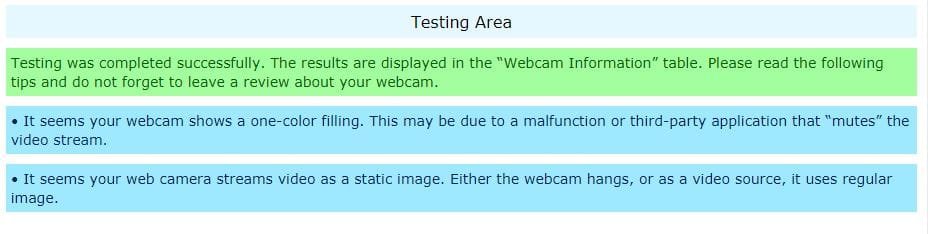
The result was absolutely nothing ! No image, still or moving, came from the camera !
I have attached the results of the test to this message.

I then installed the driver portion of the Logitech software suite that came with the camera & re-booted the m/c. Again, no result.

If anyone could offer some solution to this I would be grateful.
 

Attachments

  • Cam specs #1.JPG
    Cam specs #1.JPG
    61.6 KB · Views: 11
  • Cam specs #2.JPG
    Cam specs #2.JPG
    44.4 KB · Views: 0

My Computer

Computer type
PC/Desktop
OS
New South Wales
Hello Iluvatar,

The online test software points to a camera malfunction or an application that can modify the camera settings, such as SplitCam or Webcam Toy.

If the issue is a webcam malfunction, then an error code should show up in the Details Pane of Device Manager for that device.

If it is a Third Party application, then you may want to check Window's Programs and Features for any such viable program.
 

My Computer

Computer type
PC/Desktop
OS
Windows 7 x64, Vista x64, 8.1 smartphone
CPU
Intel E8400 65W 64-bit
Motherboard
Gigabyte EP45-UD3LR
Memory
DDR2 2 x 2GB, 1GB x 2
Graphics Card(s)
XFX Radeon HD5750
Sound Card
AMD High Definition Audio; Realtek High Definition Audio
Monitor(s) Displays
iiyama prolite X2377HDS
Screen Resolution
1920 x 1080
Hard Drives
500GB 7200 rpm Seagate ST3500413AS 16MB, 500GB 5400 rpm Toshiba MQ02ABF050H 32MB, 200GB 7200 rpm Seagate ST3200820AS 8MB, 2TB 7200 rpm Western Digital WD20EZRX 64MB
PSU
Enermax Liberty Modular
Case
Antec P193 Midi Tower
Keyboard
Mionix ZIBAL 60
Mouse
Razer USB 2.0 Diamondback Mouse or Huion Graphics Tablet
Browser
Internet Explorer, Lunascape, Firefox, Opera, Avast Safezone
Hi iko22,

Thank you for the reply.

I took your advice and checked the various attributes under the Details Pane of Device Manager. I couldn't find anything that indicated a software error, or fault with the camera.

I guess this leaves the option of an application that is blocking the camera's function. Unfortunately, I have no idea where to start. :confused:

Before all of this I did have Skype installed on the machine, which I removed this prior to initiating my investigations of the problem. I am not aware of any other application that could commandeer the camera or modify its settings e.g. zoom agent or Teamviewer.

Could someone guide me on a path to find such an application or service?

Thanks.
 

My Computer

Computer type
PC/Desktop
OS
New South Wales

My Computers

System One System Two

  • Computer type
    PC/Desktop
    OS
    7 X64
    CPU
    i5 8400
    Motherboard
    gigabyte b365m ds3h
    Memory
    2x8gb 3200mhz
    Hard Drives
    various
    PSU
    pure power 11 400w cm
    Case
    Coolermaster
    Cooling
    cryorig m9i
  • Computer type
    PC/Desktop
    OS
    7x64
    CPU
    g5400
    Motherboard
    ga b365m ds3h
    Memory
    8gb ddr4 2400
    PSU
    xfx pro 450w
Hi SIW2,

Yes, I downloaded the driver LogiCameraSettings_2.5.17.exe package from the Logitech website. Unfortunately, it yields no result either :(

Thanks.
 

My Computer

Computer type
PC/Desktop
OS
New South Wales
Do you have a restore point to a time before the problem?

Alternatively, do you have another machine/os installed for you to test the camera?

If not, another possibilty is to install fresh Win 7 Pro, 32bit on another partition/disk on your current machine and test there. I often do this for checking out various things..
 

My Computers

System One System Two

  • Computer type
    PC/Desktop
    OS
    7 X64
    CPU
    i5 8400
    Motherboard
    gigabyte b365m ds3h
    Memory
    2x8gb 3200mhz
    Hard Drives
    various
    PSU
    pure power 11 400w cm
    Case
    Coolermaster
    Cooling
    cryorig m9i
  • Computer type
    PC/Desktop
    OS
    7x64
    CPU
    g5400
    Motherboard
    ga b365m ds3h
    Memory
    8gb ddr4 2400
    PSU
    xfx pro 450w
no video or if I got video, it would not capture

This has been a toughie. If you are using Bitdefender as a virus checker. Go to privacy/settings/video and audio protections/uncheck webcam protection. Then reboot. That took care of my image coming up and when I chose to capture in video and stills and it worked. Hope that helps, because I was at the end of my rope.
 

My Computer

Computer type
PC/Desktop
Computer Manufacturer/Model Number
custom
OS
windows 7 64 bit
CPU
Intel i5 4670 cpu @3.40 GHz
Motherboard
gigabyte gtx 650 Ti
Memory
16 gb
Graphics Card(s)
Nvidia GeForce GTX 650 Ti, Intel Hd Graphic 4600
Hard Drives
2 internal hard drives, 1- 1tb, 1-3 tb, 2 external hd, 1-4 tb, 1-1tb
Antivirus
bitdefender antivirus plus 2016
Browser
Google Chrome
I just found that my webcam is not longer working as well. Not sure when it stopped working. Logictech C270 as well. Microphone works but no video in any application (Windows Camera, Teams, Google Meet, Zoom). Tried everything in this thread to no avail - Uninstall from device manager, reboot, and let it add drives again, privacy settings, . No special drivers from Logitech from what I can tell. Device manager just shows USB Video device and indicates nothing wrong.

Windows 10.0.19042 Build 19042. Have McAfee virus scanner, but don't see how that could be doing anything.
 

My Computers

System One System Two

  • Computer type
    PC/Desktop
    Computer Manufacturer/Model Number
    Dell
    OS
    Windows 10 Home
    CPU
    Intel(R) Core(TM) i7-10700 CPU @ 2.90GHz, 2904 Mhz
    Memory
    16.0 GB
    Graphics Card(s)
    Nvidia Geforce GTX 1660 Ti
    Hard Drives
    SN530 NVMe WDC 512G
    Browser
    Chrome
  • Computer type
    PC/Desktop
I suggest that the people experiencing this problem run a clean boot to see if some other software is causing the problem. If one doesn't know how to do that, either I or one of the others can provide the instructions.
 

My Computer

Computer type
Laptop
Computer Manufacturer/Model Number
Dell M6500 Precision Work Station
OS
Windows 7 Pro SP1 64 bit
Memory
8 GB
Screen Resolution
1920x
Internet Speed
30 Mbps
Antivirus
Norton Security
Browser
IE 11
Back
Top