
No sound on video only

Neophile

New member
Power User
Local time
11:07 AM
Messages
171
I recently came back to Windows 7, making a new installation. Everything has been working fine, but two days ago, videos only, stopped having sound from speakers or headphones on Firefox, YouTube, WMP or VLC. All other sounds remain normal, like music or Windows system sounds. The Sounds - Playback control still show activity when playing video (attached picture). For a very long time I have had no issues I couldn't solve, but this one. I couldn't find this issue on posts here. Some look very similar, but not exactly as my case. Any idea, please?
 

Attachments
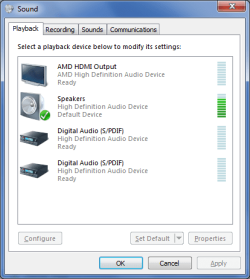
  • PlaybackSounds.png
    PlaybackSounds.png
    14 KB · Views: 13

My Computer My Computer

Computer type
PC/Desktop
Computer Manufacturer/Model Number
Home assembled
OS
Windows 7 Ultimate 64-bit SP1
CPU
AMD Athlon 64 II X3 440
Motherboard
M4A785TD-V EVO
Memory
Kingston kit 4GB DDR3 1333MHz (KVR1333D3N9K2/4)
Monitor(s) Displays
ASUS AS VH198S
Screen Resolution
1440x900
Hard Drives
Crucial MX300 2.5" SSD SATA,
Western Digital Caviar Black WD1002FAEX SATA-III,
Samsung HD161HJ SATA-II,
Seagate Barracuda ST3120022A ATA,
Western Digital WD800BB ATA.
Case
Standard
Cooling
Standard
Keyboard
Safeway SW-20
Mouse
Logitech Anywhere, Logitech MX Anywhere 2S, Technet M006
Internet Speed
130 Mbs fiber
Antivirus
Avast Premier
Browser
Firefox, Ice Dragon and Opera
Other Info
PCI ATA-133 Adapter,
Parallel Port Card PCI - PU005V2.
A shot in the dark but, right click on the speaker icon in the system tray and select open volume mixer. What is the volume set for Firefox?
 

My Computer My Computer

Computer type
Laptop
Computer Manufacturer/Model Number
Dell M6500 Precision Work Station
OS
Windows 7 Pro SP1 64 bit
Memory
8 GB
Screen Resolution
1920x
Internet Speed
30 Mbps
Antivirus
Norton Security
Browser
IE 11
Hi, thanks.They are as usually. That is Speakers at 75% and the others 60%.
 

My Computer My Computer

Computer type
PC/Desktop
Computer Manufacturer/Model Number
Home assembled
OS
Windows 7 Ultimate 64-bit SP1
CPU
AMD Athlon 64 II X3 440
Motherboard
M4A785TD-V EVO
Memory
Kingston kit 4GB DDR3 1333MHz (KVR1333D3N9K2/4)
Monitor(s) Displays
ASUS AS VH198S
Screen Resolution
1440x900
Hard Drives
Crucial MX300 2.5" SSD SATA,
Western Digital Caviar Black WD1002FAEX SATA-III,
Samsung HD161HJ SATA-II,
Seagate Barracuda ST3120022A ATA,
Western Digital WD800BB ATA.
Case
Standard
Cooling
Standard
Keyboard
Safeway SW-20
Mouse
Logitech Anywhere, Logitech MX Anywhere 2S, Technet M006
Internet Speed
130 Mbs fiber
Antivirus
Avast Premier
Browser
Firefox, Ice Dragon and Opera
Other Info
PCI ATA-133 Adapter,
Parallel Port Card PCI - PU005V2.
Whew, those settings would blow me out.

I kind of screwed up because I was focusing on Firefox and YT and ignoring WMP and VLC player.

Couple of things-

In the Playback settings, right click on Speakers and select Properties.

In the Custom tab, is Digital Playback Only selected. if so, deselect it.

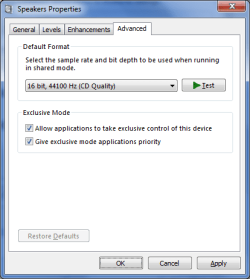
In the Advanced tab, Exclusive Mode, are both options selected? If not, select them.

In the General tab, what is set as the Controller?
 

My Computer My Computer

Computer type
Laptop
Computer Manufacturer/Model Number
Dell M6500 Precision Work Station
OS
Windows 7 Pro SP1 64 bit
Memory
8 GB
Screen Resolution
1920x
Internet Speed
30 Mbps
Antivirus
Norton Security
Browser
IE 11
In the Custom tab, is Digital Playback Only selected. if so, deselect it.
I don't have a Custom tab. I have General, Levels, Enhancements and Advanced.

In the Advanced tab, Exclusive Mode, are both options selected? If not, select them.
They were both already selected. So I didn't change.

In the General tab, what is set as the Controller?
High Definition Audio Device, which must be the default Windows setting. All seems normal on Device Manager, where there is also an AMD High Definition Audio Device.


The settings were already as they are now, and according to your reply.
It is very strange having perfect audio on everything, except on video.
 

My Computer My Computer

Computer type
PC/Desktop
Computer Manufacturer/Model Number
Home assembled
OS
Windows 7 Ultimate 64-bit SP1
CPU
AMD Athlon 64 II X3 440
Motherboard
M4A785TD-V EVO
Memory
Kingston kit 4GB DDR3 1333MHz (KVR1333D3N9K2/4)
Monitor(s) Displays
ASUS AS VH198S
Screen Resolution
1440x900
Hard Drives
Crucial MX300 2.5" SSD SATA,
Western Digital Caviar Black WD1002FAEX SATA-III,
Samsung HD161HJ SATA-II,
Seagate Barracuda ST3120022A ATA,
Western Digital WD800BB ATA.
Case
Standard
Cooling
Standard
Keyboard
Safeway SW-20
Mouse
Logitech Anywhere, Logitech MX Anywhere 2S, Technet M006
Internet Speed
130 Mbs fiber
Antivirus
Avast Premier
Browser
Firefox, Ice Dragon and Opera
Other Info
PCI ATA-133 Adapter,
Parallel Port Card PCI - PU005V2.
My apologies for taking so long to get back. Lots of things going and with spring here, I'll be curtailing my participation in numerous forums.

Did you look for the setting in the other tabs (I'm not on my Win 7 system right now.

Right click on your AMD HDMI device and select Properties. If there's a Supported Formats tab, what is it set for? It should be Dolby Digital.
 

My Computer My Computer

Computer type
Laptop
Computer Manufacturer/Model Number
Dell M6500 Precision Work Station
OS
Windows 7 Pro SP1 64 bit
Memory
8 GB
Screen Resolution
1920x
Internet Speed
30 Mbps
Antivirus
Norton Security
Browser
IE 11
It's OK, take your time, just don't forget, please. All I want is to put the sound back on videos.

The speaker properties is set to High Definition Audio Device (not AMD). I clicked on buttom Restore Defaults where ever available. The Test button on the Speakers Properties –› Advanced tab produces the usual test sound.

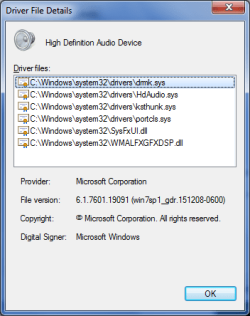
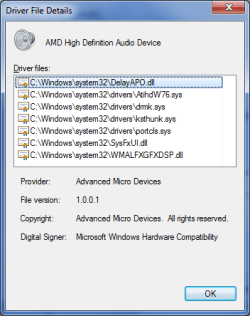
There are no yellow or red warnings on Device Manager. The only difference I find on Device Manager, between High Definition Audio Device and AMD High Definition Audio Device is on the respective drivers, as can be seen on the two attaches screen shots. Even thelocation, on the General tab is the same for both (Location 0 (Internal High Definition Audio Bus)).

Sorry, I don't know what is or where is the AMD HDMI device that you mention on your last paragraph. If it is the one on the Volume Control Options, through the speaker icon in the system tray, there is no tab. Must be another one.
 

Attachments

  • High Definition Audio Device.png
    High Definition Audio Device.png
    11.3 KB · Views: 8
  • AMD High Definition Audio Device.png
    AMD High Definition Audio Device.png
    11.8 KB · Views: 9

My Computer My Computer

Computer type
PC/Desktop
Computer Manufacturer/Model Number
Home assembled
OS
Windows 7 Ultimate 64-bit SP1
CPU
AMD Athlon 64 II X3 440
Motherboard
M4A785TD-V EVO
Memory
Kingston kit 4GB DDR3 1333MHz (KVR1333D3N9K2/4)
Monitor(s) Displays
ASUS AS VH198S
Screen Resolution
1440x900
Hard Drives
Crucial MX300 2.5" SSD SATA,
Western Digital Caviar Black WD1002FAEX SATA-III,
Samsung HD161HJ SATA-II,
Seagate Barracuda ST3120022A ATA,
Western Digital WD800BB ATA.
Case
Standard
Cooling
Standard
Keyboard
Safeway SW-20
Mouse
Logitech Anywhere, Logitech MX Anywhere 2S, Technet M006
Internet Speed
130 Mbs fiber
Antivirus
Avast Premier
Browser
Firefox, Ice Dragon and Opera
Other Info
PCI ATA-133 Adapter,
Parallel Port Card PCI - PU005V2.
In the screenshot shown in post 1, the AMD HDMI is right above the speakers.
 

My Computer My Computer

Computer type
Laptop
Computer Manufacturer/Model Number
Dell M6500 Precision Work Station
OS
Windows 7 Pro SP1 64 bit
Memory
8 GB
Screen Resolution
1920x
Internet Speed
30 Mbps
Antivirus
Norton Security
Browser
IE 11
Sorry, I missed that.

At the bottom of the AMD HDMI Output properties there is a box for the Encoded Formats with Dolby Digital inside.

On the Enhancements tab of the same AMD HDMI Output There is also a Preview button, but when I click on it there is no sound, everything disappears in the tab and is replaced by an error message in the middle: The device you are configuring has been removed. However, when I right click on AMD HDMI Output, on the screenshot of my first post and then on Test, the green audio level on the right goes up.
 

My Computer My Computer

Computer type
PC/Desktop
Computer Manufacturer/Model Number
Home assembled
OS
Windows 7 Ultimate 64-bit SP1
CPU
AMD Athlon 64 II X3 440
Motherboard
M4A785TD-V EVO
Memory
Kingston kit 4GB DDR3 1333MHz (KVR1333D3N9K2/4)
Monitor(s) Displays
ASUS AS VH198S
Screen Resolution
1440x900
Hard Drives
Crucial MX300 2.5" SSD SATA,
Western Digital Caviar Black WD1002FAEX SATA-III,
Samsung HD161HJ SATA-II,
Seagate Barracuda ST3120022A ATA,
Western Digital WD800BB ATA.
Case
Standard
Cooling
Standard
Keyboard
Safeway SW-20
Mouse
Logitech Anywhere, Logitech MX Anywhere 2S, Technet M006
Internet Speed
130 Mbs fiber
Antivirus
Avast Premier
Browser
Firefox, Ice Dragon and Opera
Other Info
PCI ATA-133 Adapter,
Parallel Port Card PCI - PU005V2.
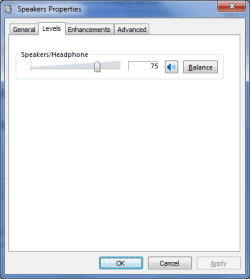
Right click on Speakers and select Properties.

Provide screenshots for the contents of the General, Level and Advanced tabs.

We can go back to the AMD if necessary.
 

My Computer My Computer

Computer type
Laptop
Computer Manufacturer/Model Number
Dell M6500 Precision Work Station
OS
Windows 7 Pro SP1 64 bit
Memory
8 GB
Screen Resolution
1920x
Internet Speed
30 Mbps
Antivirus
Norton Security
Browser
IE 11
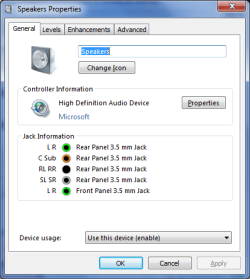
Thank you. Here are the three tabs.

By the way, to follow your instructions I had to pass through the Playback (Sound) tab. The AMD HDMI Output entry, just above the Speakers, that has no sound, and yesterday had a little green icon on the right, has now a small red arrow pointing down. Furthermore, on my first post it had no icon at all!

This issue must be very rare, because I searched a lot and couldn't find any, and what makes it more difficult to search is because there are a lot of issues about sound in general, but none on video only.
 

Attachments

  • General.png
    General.png
    14.8 KB · Views: 7
  • Levels.png
    Levels.png
    9.3 KB · Views: 5
  • Advamced.png
    Advamced.png
    11.5 KB · Views: 7

My Computer My Computer

Computer type
PC/Desktop
Computer Manufacturer/Model Number
Home assembled
OS
Windows 7 Ultimate 64-bit SP1
CPU
AMD Athlon 64 II X3 440
Motherboard
M4A785TD-V EVO
Memory
Kingston kit 4GB DDR3 1333MHz (KVR1333D3N9K2/4)
Monitor(s) Displays
ASUS AS VH198S
Screen Resolution
1440x900
Hard Drives
Crucial MX300 2.5" SSD SATA,
Western Digital Caviar Black WD1002FAEX SATA-III,
Samsung HD161HJ SATA-II,
Seagate Barracuda ST3120022A ATA,
Western Digital WD800BB ATA.
Case
Standard
Cooling
Standard
Keyboard
Safeway SW-20
Mouse
Logitech Anywhere, Logitech MX Anywhere 2S, Technet M006
Internet Speed
130 Mbs fiber
Antivirus
Avast Premier
Browser
Firefox, Ice Dragon and Opera
Other Info
PCI ATA-133 Adapter,
Parallel Port Card PCI - PU005V2.
I don't see anything untoward in your screenshots-

Go to Device Manager, Sound.........................

Double click on your sound device.

In the Driver tab, uninstall it.

Reboot.

Does that help?

One thing that bothers me is that your using a Microsoft driver whereas the specs for your motherboard indicate a VIA driver is used. We can pursue that later.
 

My Computer My Computer

Computer type
Laptop
Computer Manufacturer/Model Number
Dell M6500 Precision Work Station
OS
Windows 7 Pro SP1 64 bit
Memory
8 GB
Screen Resolution
1920x
Internet Speed
30 Mbps
Antivirus
Norton Security
Browser
IE 11
It didn't work, no change. :cry:

Shall I download the old original sound driver from ASUS, 6.0.1.7400? Or the more recent 13-9-legacy_vista_win7_64_dd_ccc_whql.exe (AMD Catalyst) the one that I installed initially?


Edit

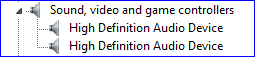
I repeated what you told me to do, and then surprise, the drivers on the the driver details tab became the same, and now there are two exactly same entries on Device Manager, under Sound, for High Definition Audio Device, none of them named AMD (attached snapshot).

The Sound tab – on Catalyst, AMD Vision Engine Control Center, that had the monitor and TV greyed because the AMD was not working – just disappeared. However video sound now plays on computer, but not on TV. Should I try to install the original 6.0.1.7400 ASUS audio driver? It is old, but newer than to one that cane with the CD. These drivers are available from the ASUS site.
 

Attachments

  • Audio.PNG
    Audio.PNG
    1.4 KB · Views: 6
Last edited:

My Computer My Computer

Computer type
PC/Desktop
Computer Manufacturer/Model Number
Home assembled
OS
Windows 7 Ultimate 64-bit SP1
CPU
AMD Athlon 64 II X3 440
Motherboard
M4A785TD-V EVO
Memory
Kingston kit 4GB DDR3 1333MHz (KVR1333D3N9K2/4)
Monitor(s) Displays
ASUS AS VH198S
Screen Resolution
1440x900
Hard Drives
Crucial MX300 2.5" SSD SATA,
Western Digital Caviar Black WD1002FAEX SATA-III,
Samsung HD161HJ SATA-II,
Seagate Barracuda ST3120022A ATA,
Western Digital WD800BB ATA.
Case
Standard
Cooling
Standard
Keyboard
Safeway SW-20
Mouse
Logitech Anywhere, Logitech MX Anywhere 2S, Technet M006
Internet Speed
130 Mbs fiber
Antivirus
Avast Premier
Browser
Firefox, Ice Dragon and Opera
Other Info
PCI ATA-133 Adapter,
Parallel Port Card PCI - PU005V2.
As I understand it, you uninstalled the Microsoft driver and rebooted. After that, you're getting sound from your videos. Is that correct?

If that's the case, how is your TV connected to your PC for playback?
 

My Computer My Computer

Computer type
Laptop
Computer Manufacturer/Model Number
Dell M6500 Precision Work Station
OS
Windows 7 Pro SP1 64 bit
Memory
8 GB
Screen Resolution
1920x
Internet Speed
30 Mbps
Antivirus
Norton Security
Browser
IE 11
Not exactly that. I uninstalled the AMD HDMI Output driver, the first one on the picture of my first post. Then I had audio on video played on my PC, bat still none on my TV connected through HDMI, which is controlled with the AMD HDMI.

After editing my last post, just a moment ago, so I didn't have the opportunity to edit it again to include that right after that I reinstalled the Catalyst video/audio driver on top of it, just like you install an update. No errors on the log, but nothing changed either.

Then, I remembered you said the audio driver shout be VIA, what of course is correct. So I uninstalled the AMD HDMI Output driver (it had the same drivers as the Windows, as you wrote) and tried to install the VIA Audio Driver V6.0.1.7400 I mentioned before, downloaded now form the ASUS site. It should work because it is the right one. However, there are some problems.

I uninstalled through the speaker icon in the system, not the Device Manager because there, they are both the same, and I can't know which is which. Them I tried to instal. The problem is that it always fails to install, and every time I reboot the computer I end up with the windows drivers automatically installed.

You are obviously right when you say the AMD HDMI Output driver should have Via driver files, but Windows doesn't let it be. I'll have to forbid Windows to install their own drivers.

What I don't understand is how this thing began, and I believe I never will.Because if I knew I might be able to undo it. Well, may be not.
 
Last edited:

My Computer My Computer

Computer type
PC/Desktop
Computer Manufacturer/Model Number
Home assembled
OS
Windows 7 Ultimate 64-bit SP1
CPU
AMD Athlon 64 II X3 440
Motherboard
M4A785TD-V EVO
Memory
Kingston kit 4GB DDR3 1333MHz (KVR1333D3N9K2/4)
Monitor(s) Displays
ASUS AS VH198S
Screen Resolution
1440x900
Hard Drives
Crucial MX300 2.5" SSD SATA,
Western Digital Caviar Black WD1002FAEX SATA-III,
Samsung HD161HJ SATA-II,
Seagate Barracuda ST3120022A ATA,
Western Digital WD800BB ATA.
Case
Standard
Cooling
Standard
Keyboard
Safeway SW-20
Mouse
Logitech Anywhere, Logitech MX Anywhere 2S, Technet M006
Internet Speed
130 Mbs fiber
Antivirus
Avast Premier
Browser
Firefox, Ice Dragon and Opera
Other Info
PCI ATA-133 Adapter,
Parallel Port Card PCI - PU005V2.
Back
Top