no sound windows media player and vlc, youtube fine

Maxheadroom

New member
Power User
VIP
Local time
3:14 AM
Messages
246
was working fine, my kid was on youtube watching vids and as far as i can tell didnt change anything but now i cant get any music or video files to play sound through vlc or media player, the video plays fine but no sound,
video and sound work fine on youtube though, ive done a system restore to 3 days ago but that hasnt helped :confused:
 

My Computer My Computer

At a glance

windows 7 64bit build 7600Intel I7 920Corsair 6GB (3x2GB) 1600MHz Triple Channel i7XFX RADEON HD 5870
Computer Manufacturer/Model Number
home built
OS
windows 7 64bit build 7600
CPU
Intel I7 920
Motherboard
ASUS P6T Deluxe V2
Memory
Corsair 6GB (3x2GB) 1600MHz Triple Channel i7
Graphics Card(s)
XFX RADEON HD 5870
Sound Card
Creative Xfi Elite pro
Monitor(s) Displays
Hyundai W240D 24" Samsung Syncmaster 930
Screen Resolution
1920x1200 and 1280x1024
Hard Drives
WD Velociraptor 150gb
Western Digital WD7502ABYS 750GB Raid Edition
PSU
Corsair 850W TX Series PSU
Case
Coolermaster HAF 932 Full Tower
Cooling
Noctua NH-U12P
Keyboard
logitech G15 orange
Mouse
logitech mx revolution
Internet Speed
13mb
any help please i still havent found a solution for this.
 

My Computer My Computer

At a glance

windows 7 64bit build 7600Intel I7 920Corsair 6GB (3x2GB) 1600MHz Triple Channel i7XFX RADEON HD 5870
Computer Manufacturer/Model Number
home built
OS
windows 7 64bit build 7600
CPU
Intel I7 920
Motherboard
ASUS P6T Deluxe V2
Memory
Corsair 6GB (3x2GB) 1600MHz Triple Channel i7
Graphics Card(s)
XFX RADEON HD 5870
Sound Card
Creative Xfi Elite pro
Monitor(s) Displays
Hyundai W240D 24" Samsung Syncmaster 930
Screen Resolution
1920x1200 and 1280x1024
Hard Drives
WD Velociraptor 150gb
Western Digital WD7502ABYS 750GB Raid Edition
PSU
Corsair 850W TX Series PSU
Case
Coolermaster HAF 932 Full Tower
Cooling
Noctua NH-U12P
Keyboard
logitech G15 orange
Mouse
logitech mx revolution
Internet Speed
13mb
I'll guess that you checked the speaker jack, the volume is up, and it is not muted. And I'll guess that you checked the volume mixer and volume controls as well
Have you tried headphones?

I sat in front of a PC for 5 or 10 minutes wondering why it wouldn't boot - disks spun, lights blinked..
along comes a colleague and turns the monitor brightness up - sheesh! This was a longggg time ago.

I'm looking at the g-15 page to see if there are any other keys "the kid" might have clicked that are predefined for sound operations.

I'll post anything relevant, but you know the keyboard better than I do (I don't know the keyboard at all)
 

My Computer My Computer

At a glance

x64 (6.3.9600) Win8.1 Pro & soon dual boot x6...AMD A6-3420M APU with Radeon(tm) HD Graphics6.00 GBAMD Radeon(TM) HD 6520G
Computer type
Laptop
Computer Manufacturer/Model Number
HP Pavilion dv6-6c10us
OS
x64 (6.3.9600) Win8.1 Pro & soon dual boot x64 (6.1.7601) Win7_SP1 HomePrem
CPU
AMD A6-3420M APU with Radeon(tm) HD Graphics
Motherboard
Hewlett-Packard 1805
Memory
6.00 GB
Graphics Card(s)
AMD Radeon(TM) HD 6520G
Sound Card
(1) AMD High Definition Audio Device (2) IDT High Definiti
Monitor(s) Displays
HP W2072a 20" LCD (1600 x 900) @ 60 Hz
Screen Resolution
1366 x 768 x 32 bits (4294967296 colors) @ 60 Hz
Hard Drives
ST640LM0 00 HM641JI SATA Disk Device
Keyboard
Logitech k520 wireless KB
Mouse
Logitech m320 wireless mouse (bundled with KB)
Internet Speed
15/5 | 54 MB Wireless 'n'
Antivirus
Realtime: Defender or Avast | On-demand: Malwarebytes, ESET
Browser
IE 11 on Win8, IE 10 on win 7
Other Info
Media: [Gimp, Audacity, VLC] || Comm: [WEmail 2012, Skype] || Productivity: [OpenOffice,| Textpad] || Utils: [Sysinternals, cCleaner, Speccy, Defraggler]
Well, that was fruitless - you can do a lot with that keyboard.

One place I forgot was Sound-> playback

Another anecdotal story: I was Skyping with one of my daughters and she couldn't hear me. Looking through Skype I found nothing - went to sound and saw that only my communications headset was ticked, not the internal mic. That wasn't that long ago :o

Sorry I couldn't help

Bill
 

My Computer My Computer

At a glance

x64 (6.3.9600) Win8.1 Pro & soon dual boot x6...AMD A6-3420M APU with Radeon(tm) HD Graphics6.00 GBAMD Radeon(TM) HD 6520G
Computer type
Laptop
Computer Manufacturer/Model Number
HP Pavilion dv6-6c10us
OS
x64 (6.3.9600) Win8.1 Pro & soon dual boot x64 (6.1.7601) Win7_SP1 HomePrem
CPU
AMD A6-3420M APU with Radeon(tm) HD Graphics
Motherboard
Hewlett-Packard 1805
Memory
6.00 GB
Graphics Card(s)
AMD Radeon(TM) HD 6520G
Sound Card
(1) AMD High Definition Audio Device (2) IDT High Definiti
Monitor(s) Displays
HP W2072a 20" LCD (1600 x 900) @ 60 Hz
Screen Resolution
1366 x 768 x 32 bits (4294967296 colors) @ 60 Hz
Hard Drives
ST640LM0 00 HM641JI SATA Disk Device
Keyboard
Logitech k520 wireless KB
Mouse
Logitech m320 wireless mouse (bundled with KB)
Internet Speed
15/5 | 54 MB Wireless 'n'
Antivirus
Realtime: Defender or Avast | On-demand: Malwarebytes, ESET
Browser
IE 11 on Win8, IE 10 on win 7
Other Info
Media: [Gimp, Audacity, VLC] || Comm: [WEmail 2012, Skype] || Productivity: [OpenOffice,| Textpad] || Utils: [Sysinternals, cCleaner, Speccy, Defraggler]
thanks for the help Slarty, ive checked through all the obvious stuff but i know everything is working fine because i can go onto youtube and i can hear fine on there,

seems odd thats its VLC and windows media player so kind of rules out that its just a setting that was changed, what ever happened effected both players could the codecs gone bad or would that also effect youtube?
 

My Computer My Computer

At a glance

windows 7 64bit build 7600Intel I7 920Corsair 6GB (3x2GB) 1600MHz Triple Channel i7XFX RADEON HD 5870
Computer Manufacturer/Model Number
home built
OS
windows 7 64bit build 7600
CPU
Intel I7 920
Motherboard
ASUS P6T Deluxe V2
Memory
Corsair 6GB (3x2GB) 1600MHz Triple Channel i7
Graphics Card(s)
XFX RADEON HD 5870
Sound Card
Creative Xfi Elite pro
Monitor(s) Displays
Hyundai W240D 24" Samsung Syncmaster 930
Screen Resolution
1920x1200 and 1280x1024
Hard Drives
WD Velociraptor 150gb
Western Digital WD7502ABYS 750GB Raid Edition
PSU
Corsair 850W TX Series PSU
Case
Coolermaster HAF 932 Full Tower
Cooling
Noctua NH-U12P
Keyboard
logitech G15 orange
Mouse
logitech mx revolution
Internet Speed
13mb
Hi there,
I am having the same issue as MaxHeadroom and wondering if you ever were able to resolve the problem? I checked the things that Slartybart suggested and still nothing.
 

My Computer My Computer

At a glance

Windows 7 Home 64bit
Computer type
PC/Desktop
Computer Manufacturer/Model Number
Acer Aspire
OS
Windows 7 Home 64bit
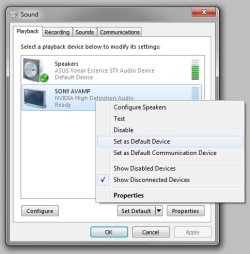
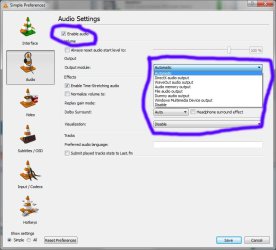
What is your guys default playback devices, and what output is vlc set to use? Windows media player should use default regardless.
 

Attachments

  • sound.jpg
    sound.jpg
    60 KB · Views: 30
  • vlc.jpg
    vlc.jpg
    75.3 KB · Views: 4

My Computer My Computer

At a glance

10 Pro x64Ryzen 9 3900X64GB(4x16GB) DDR4EVGA 1080ti FTW3
Computer type
PC/Desktop
Computer Manufacturer/Model Number
Custom
OS
10 Pro x64
CPU
Ryzen 9 3900X
Motherboard
Asrock x370 Tachi
Memory
64GB(4x16GB) DDR4
Graphics Card(s)
EVGA 1080ti FTW3
Sound Card
ASUS Xonar Essence STX (V4 Bursons), ODAC rev B, NFB-11, O2
Monitor(s) Displays
3xASUS PB278Q/R, Optoma HD142X
Screen Resolution
3x1440p, 1080p
Hard Drives
512GB 850 EVO(OS, Programs)
4TB (Movies)
3TB (Downloads)
3TB (Programs)
1TB HDD (Games)
2x6TB R1 (videos)
PSU
AX760
Case
Fractal Define R5
Cooling
NH-D15S
Keyboard
Massdrop Ctrl with Box Navy's
Mouse
G903, Alioth XXL Mat
Internet Speed
280/40
Antivirus
MBAM, ESET
Browser
Canary 64 Bit
Other Info
I also own a Thinkpad P50 Xeon 4K, X220T, X1C5
Thanks rvcjew for responding. Windows Media Player is set to the default settings and VLC is the same as what you have shown in your response.

I should mention that I also found a Youtube video that suggested to turn off windows features, disable WMP and restart computer, then enabled it and restart again. It did not resolve the issue.

Thanks again for trying to help.
 

My Computer My Computer

At a glance

Windows 7 Home 64bit
Computer type
PC/Desktop
Computer Manufacturer/Model Number
Acer Aspire
OS
Windows 7 Home 64bit
Having the same issue

I'm having the same issue, no audio for anything I download from email but youtube works just fine. Anyone figure anything out???
 

My Computer My Computer

At a glance

Windows 8 64-bit8 gb ddr3 L memory
Computer type
PC/Desktop
Computer Manufacturer/Model Number
Acer
OS
Windows 8 64-bit
Memory
8 gb ddr3 L memory
Hard Drives
1000 gb HDD
Antivirus
Kaspersky
Browser
Internet explorer
Have you guys installed anything like ffdshow or mad vr? K lite codec , or shark pack ring a bell?
 

My Computer My Computer

At a glance

10 Pro x64Ryzen 9 3900X64GB(4x16GB) DDR4EVGA 1080ti FTW3
Computer type
PC/Desktop
Computer Manufacturer/Model Number
Custom
OS
10 Pro x64
CPU
Ryzen 9 3900X
Motherboard
Asrock x370 Tachi
Memory
64GB(4x16GB) DDR4
Graphics Card(s)
EVGA 1080ti FTW3
Sound Card
ASUS Xonar Essence STX (V4 Bursons), ODAC rev B, NFB-11, O2
Monitor(s) Displays
3xASUS PB278Q/R, Optoma HD142X
Screen Resolution
3x1440p, 1080p
Hard Drives
512GB 850 EVO(OS, Programs)
4TB (Movies)
3TB (Downloads)
3TB (Programs)
1TB HDD (Games)
2x6TB R1 (videos)
PSU
AX760
Case
Fractal Define R5
Cooling
NH-D15S
Keyboard
Massdrop Ctrl with Box Navy's
Mouse
G903, Alioth XXL Mat
Internet Speed
280/40
Antivirus
MBAM, ESET
Browser
Canary 64 Bit
Other Info
I also own a Thinkpad P50 Xeon 4K, X220T, X1C5
No Sound In Windows Media Player + Media Player Crashes

I have just discovered my intermittent problem losing my sound disappears when I remove my Logitech K520 USB stick from my laptop and reboot. Frequently, after rebooting and logging back in again, I can plug in the USB stick for the Keyboard and Mouse combination and it'll continue to work. Regardless, once it quits working, a reboot is necessary. Sometimes with the USB stick plugged in and the Keyboard and Mouse on, it'll work fine, then other times its DOA. Sometimes Windows Media Player will fault when I start to play a file and other times it'll play the file w/o any sound. Device Manager shows a Microsoft driver for the Logitech KB and Mouse. I checked for a new driver and it replies that it is the latest and best.

When Windows Media Player wouldn't fault and the only problem was no sound, I played around with the sound buttons on the Logitech KB (volume and Mute) and that didn't make any difference.

One very interesting observation is the mute button on the laptop is lighted to show when it has been muted. When I'm having either problem (windows media player crashing or just no sound) the mute button light is OFF and pressing the button doesn't turn it on. I thought I had a bad KB on my laptop but apparently there is something funky about the use of the Logitech KB/Mouse that messes up something.

For now, I've just switched to a different Logitech KB, Mouse, USB stick - still the same model. We'll see how that goes. I hope this helps other people that may be encountering the same situation.
AV-BitDefender + IOLO System Mechanic + Windows 7 Ultimate + Intel I5 + Hybrid HD
 

My Computer My Computer

At a glance

W7 Ultimate x64
Computer type
PC/Desktop
Computer Manufacturer/Model Number
HP
OS
W7 Ultimate x64
Browser
IE, Firefox
Good find, yeah that sucks I wonder if it was a power draw issue, most likely drivers though. Have you tried deleting them and letting windows update find its own? Uninstall the software then reboot, then rightclick the keyboard in the device manger and say uninstall and check the box saying to remove drivers then reboot and it will look at windows update.
 

My Computer My Computer

At a glance

10 Pro x64Ryzen 9 3900X64GB(4x16GB) DDR4EVGA 1080ti FTW3
Computer type
PC/Desktop
Computer Manufacturer/Model Number
Custom
OS
10 Pro x64
CPU
Ryzen 9 3900X
Motherboard
Asrock x370 Tachi
Memory
64GB(4x16GB) DDR4
Graphics Card(s)
EVGA 1080ti FTW3
Sound Card
ASUS Xonar Essence STX (V4 Bursons), ODAC rev B, NFB-11, O2
Monitor(s) Displays
3xASUS PB278Q/R, Optoma HD142X
Screen Resolution
3x1440p, 1080p
Hard Drives
512GB 850 EVO(OS, Programs)
4TB (Movies)
3TB (Downloads)
3TB (Programs)
1TB HDD (Games)
2x6TB R1 (videos)
PSU
AX760
Case
Fractal Define R5
Cooling
NH-D15S
Keyboard
Massdrop Ctrl with Box Navy's
Mouse
G903, Alioth XXL Mat
Internet Speed
280/40
Antivirus
MBAM, ESET
Browser
Canary 64 Bit
Other Info
I also own a Thinkpad P50 Xeon 4K, X220T, X1C5
No Audio / Crashed Windows Media Player

I had tried what you suggested but w/o the reboot. So, I tried exactly what you suggested and still no cigar. I previously had also checked for new drivers within Device Manager for the two items and each reported that they are the latest.

One more interesting observation, it now seems like 100% of the time when the mute button on the keyboard will not toggle its light when you press it, that the audio will not play. Unplugging the USB stick for the KB and mouse won't help - a reboot without the stick being plugged in is what is required.

For what its worth, the drives for the Logitech KB and Mouse are listed as Microsoft drivers. When this started happening was about 3-4 months ago and following on the heals of a Windows Update.

I also went to MSConfig / Startup and deselected a lot of stuff that wasn't critical but that didn't help any either. As another point of reference, both my Bluetooth and WiFi are off. Logitech doesn't offer their own driver. It may be an interrupt conflict.

Thanks for the suggestion anyway.
 

My Computer My Computer

At a glance

W7 Ultimate x64
Computer type
PC/Desktop
Computer Manufacturer/Model Number
HP
OS
W7 Ultimate x64
Browser
IE, Firefox

My Computer My Computer

At a glance

10 Pro x64Ryzen 9 3900X64GB(4x16GB) DDR4EVGA 1080ti FTW3
Computer type
PC/Desktop
Computer Manufacturer/Model Number
Custom
OS
10 Pro x64
CPU
Ryzen 9 3900X
Motherboard
Asrock x370 Tachi
Memory
64GB(4x16GB) DDR4
Graphics Card(s)
EVGA 1080ti FTW3
Sound Card
ASUS Xonar Essence STX (V4 Bursons), ODAC rev B, NFB-11, O2
Monitor(s) Displays
3xASUS PB278Q/R, Optoma HD142X
Screen Resolution
3x1440p, 1080p
Hard Drives
512GB 850 EVO(OS, Programs)
4TB (Movies)
3TB (Downloads)
3TB (Programs)
1TB HDD (Games)
2x6TB R1 (videos)
PSU
AX760
Case
Fractal Define R5
Cooling
NH-D15S
Keyboard
Massdrop Ctrl with Box Navy's
Mouse
G903, Alioth XXL Mat
Internet Speed
280/40
Antivirus
MBAM, ESET
Browser
Canary 64 Bit
Other Info
I also own a Thinkpad P50 Xeon 4K, X220T, X1C5
No Audio - Windows Media Player Crashes - Logitech KB & Mouse

No, I don't have it installed.
BTW, Audio also does not work on-line even with You-Tube.

I did find out that if I login as another user and then switch to my login, that it will work correctly.

I also, found that the mute button the LAPTOP and its light works initially after logging in but shortly thereafter, it will stop.
 

My Computer My Computer

At a glance

W7 Ultimate x64
Computer type
PC/Desktop
Computer Manufacturer/Model Number
HP
OS
W7 Ultimate x64
Browser
IE, Firefox
What model is your laptop, you should fill out your specs using the guide my signature. I also just realized your not the OP so in the future you might want to make a new thread for your issue as we have kinda hijacked this one.
 

My Computer My Computer

At a glance

10 Pro x64Ryzen 9 3900X64GB(4x16GB) DDR4EVGA 1080ti FTW3
Computer type
PC/Desktop
Computer Manufacturer/Model Number
Custom
OS
10 Pro x64
CPU
Ryzen 9 3900X
Motherboard
Asrock x370 Tachi
Memory
64GB(4x16GB) DDR4
Graphics Card(s)
EVGA 1080ti FTW3
Sound Card
ASUS Xonar Essence STX (V4 Bursons), ODAC rev B, NFB-11, O2
Monitor(s) Displays
3xASUS PB278Q/R, Optoma HD142X
Screen Resolution
3x1440p, 1080p
Hard Drives
512GB 850 EVO(OS, Programs)
4TB (Movies)
3TB (Downloads)
3TB (Programs)
1TB HDD (Games)
2x6TB R1 (videos)
PSU
AX760
Case
Fractal Define R5
Cooling
NH-D15S
Keyboard
Massdrop Ctrl with Box Navy's
Mouse
G903, Alioth XXL Mat
Internet Speed
280/40
Antivirus
MBAM, ESET
Browser
Canary 64 Bit
Other Info
I also own a Thinkpad P50 Xeon 4K, X220T, X1C5
No Audio, Windows Media Player Crashes

I have solved the problem. In the startup folder for "All Users" was a "Intuit Data Protect" item. After I deleted that item and rebooted, everything worked like normal. The file date was 4/10/2015 and MS Update was 4/14/2015. So, I guess it could have been either one or both of them.

FWIW, this AM when I decided to exterminate this problem, I logged in again as a different user as I had done before and THIS time that technique did not work to preserve my sound and media player. This has been the norm for birddogging this problem... it was as if the background issue kept morphing every time I'm make some headway. I hope my experiences will help others.

Lastly, I had the big "duh" last night and realized that I had not yet checked event viewer... which is what I should have done initially.

rvcjew: This is my first time posting to this forum and I apologize for any improper postings. I will go re-read the rules. I also don't understand "guide my signature" and don't know what OP means.
Thank you for your tips and coaxing!
 

My Computer My Computer

At a glance

W7 Ultimate x64
Computer type
PC/Desktop
Computer Manufacturer/Model Number
HP
OS
W7 Ultimate x64
Browser
IE, Firefox
I have solved the problem. In the startup folder for "All Users" was a "Intuit Data Protect" item. After I deleted that item and rebooted, everything worked like normal. The file date was 4/10/2015 and MS Update was 4/14/2015. So, I guess it could have been either one or both of them.

FWIW, this AM when I decided to exterminate this problem, I logged in again as a different user as I had done before and THIS time that technique did not work to preserve my sound and media player. This has been the norm for birddogging this problem... it was as if the background issue kept morphing every time I'm make some headway. I hope my experiences will help others.

Lastly, I had the big "duh" last night and realized that I had not yet checked event viewer... which is what I should have done initially.

rvcjew: This is my first time posting to this forum and I apologize for any improper postings. I will go re-read the rules. I also don't understand "guide my signature" and don't know what OP means.
Thank you for your tips and coaxing!

No problem as long as you understand why your good. My signature is the area below the post where some have pictures instead of text. Where it says guide in blue is a link to the guide i'm talking about.
 

Attachments

  • ss (2015-08-13 at 04.54.00).png
    ss (2015-08-13 at 04.54.00).png
    8.5 KB · Views: 3

My Computer My Computer

At a glance

10 Pro x64Ryzen 9 3900X64GB(4x16GB) DDR4EVGA 1080ti FTW3
Computer type
PC/Desktop
Computer Manufacturer/Model Number
Custom
OS
10 Pro x64
CPU
Ryzen 9 3900X
Motherboard
Asrock x370 Tachi
Memory
64GB(4x16GB) DDR4
Graphics Card(s)
EVGA 1080ti FTW3
Sound Card
ASUS Xonar Essence STX (V4 Bursons), ODAC rev B, NFB-11, O2
Monitor(s) Displays
3xASUS PB278Q/R, Optoma HD142X
Screen Resolution
3x1440p, 1080p
Hard Drives
512GB 850 EVO(OS, Programs)
4TB (Movies)
3TB (Downloads)
3TB (Programs)
1TB HDD (Games)
2x6TB R1 (videos)
PSU
AX760
Case
Fractal Define R5
Cooling
NH-D15S
Keyboard
Massdrop Ctrl with Box Navy's
Mouse
G903, Alioth XXL Mat
Internet Speed
280/40
Antivirus
MBAM, ESET
Browser
Canary 64 Bit
Other Info
I also own a Thinkpad P50 Xeon 4K, X220T, X1C5
Back
Top