
Solved no sounds after updating computer

sakuraever

New member
Local time
8:36 AM
Messages
2
Hi everyone I am new to this forum so if I wrote anything wrong please pardon me because I don't know much about computers. So to begin with like the title says my laptop (DELL Inspiron N4010) have no sounds after I update it. It appear a cross on the sounds icon and when I click on it it will auto pop up the troubleshooter that actually doesn't work. I am not sure how this happen because it was working all fine when suddenly it ask me to update my laptop to service pack 1 (and it fail to update several times) so I decided to download it manually from the microsoft website and it was working again but then I installed other updates that was supposedly required.
Well I don't know if I have written it detailed if any info is needed let me know. Thanks!
 

Attachments
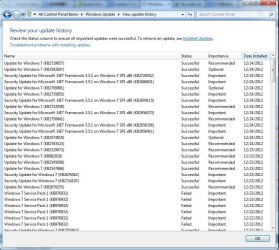
  • updates.jpg
    updates.jpg
    115.3 KB · Views: 6

My Computer My Computer

OS
window 7 professional sp1 32bit
Hi everyone I am new to this forum so if I wrote anything wrong please pardon me because I don't know much about computers. So to begin with like the title says my laptop (DELL Inspiron N4010) have no sounds after I update it. It appear a cross on the sounds icon and when I click on it it will auto pop up the troubleshooter that actually doesn't work. I am not sure how this happen because it was working all fine when suddenly it ask me to update my laptop to service pack 1 (and it fail to update several times) so I decided to download it manually from the microsoft website and it was working again but then I installed other updates that was supposedly required.
Well I don't know if I have written it detailed if any info is needed let me know. Thanks!

ok so I search the forum and found this http://www.sevenforums.com/sound-audio/3756-latest-realtek-hd-audio-driver-version.html so I download latest version of the sounds driver and is working now.
 

My Computer My Computer

OS
window 7 professional sp1 32bit
Back
Top