No valid IP config?

4left

New member
Local time
5:37 PM
Messages
61
Location
NCR
I've checked several threads but I'm stil unsure what action to take.

Clean install of 7HU over XP Pro SP3, both 32bit. XP Pro SP3 was on two HDDs, is still on one.

7 starts up fine, even better than XP used to on my relic of a PC.

Main issue with 7 is I cannot access the 'net. 7 did not recognized my ethernet card at first, but I was able to un/reinstall using the drivers from the manufacturer's CD.

Now I get the old "local Area Connection doesn't have a valid IP configuation" message. I have always been able to just plug and go in my house before. I do have a cable router and a 10/100 switch that send the 'net to the whole house, and seperate modem for the whole house VOIP. I have tried rebooting both of these routers individually and neither has resolved the connection issue.

Any and all help will be GREATLY appreciated:D.
 
Last edited:

My Computer

Computer Manufacturer/Model Number
Custom built, McGyver style ;)
OS
Win 7 HP (upgrade from XP Pro SP3)
CPU
Intel(R) Pentium(R) 4 CPU 3.00GHz
Motherboard
Intel D865GBF
Memory
4 GB
Graphics Card(s)
ATI Radeon HD 3800 Series
Sound Card
CMI8738/C3DX PCI Audio Device
Monitor(s) Displays
Acer H233H
Screen Resolution
1920X1080
Hard Drives
Drive: C:
Free Space: 84.4 GB
Total Space: 84.4 GB
File System: NTFS
Model: Maxtor 6Y080P0

Drive: D:
Free Space: 42.3 GB
Total Space: 58.6 GB
File System: NTFS
Model: Maxtor 4D060H3

Drive: G: (Win7HP drive)
Free Spa
Case
Antec
Cooling
some fans, in cool dry basement
Keyboard
Logitech MK700 wireless
Mouse
HID-compliant MX500 Optical Mouse and wireless MK700 mouse
Internet Speed
100.0 Mbps
Open up a command prompt (Win + R, type cmd) and do an ipconfig /all command. What IP address are you getting assigned via DHCP from the router?
 

My Computer

Computer Manufacturer/Model Number
Dell XPS 15 L502x
OS
Windows 7 Ultimate x64 SP1
CPU
Core i7-2670QM
Memory
8GB DDR3 PC3-10600
Graphics Card(s)
Intel HD Graphics 3000 + GeForce GT 540M
Screen Resolution
1920x1080
Hard Drives
1TB 5400RPM Seagate
Not at home at the mo, but this morning my IPv4 addy was 169.254.162.124 and this was assigned automatically. I have not made any changes from the default settings.
 

My Computer

Computer Manufacturer/Model Number
Custom built, McGyver style ;)
OS
Win 7 HP (upgrade from XP Pro SP3)
CPU
Intel(R) Pentium(R) 4 CPU 3.00GHz
Motherboard
Intel D865GBF
Memory
4 GB
Graphics Card(s)
ATI Radeon HD 3800 Series
Sound Card
CMI8738/C3DX PCI Audio Device
Monitor(s) Displays
Acer H233H
Screen Resolution
1920X1080
Hard Drives
Drive: C:
Free Space: 84.4 GB
Total Space: 84.4 GB
File System: NTFS
Model: Maxtor 6Y080P0

Drive: D:
Free Space: 42.3 GB
Total Space: 58.6 GB
File System: NTFS
Model: Maxtor 4D060H3

Drive: G: (Win7HP drive)
Free Spa
Case
Antec
Cooling
some fans, in cool dry basement
Keyboard
Logitech MK700 wireless
Mouse
HID-compliant MX500 Optical Mouse and wireless MK700 mouse
Internet Speed
100.0 Mbps
If you have a router, then you should be getting 192.168.xx.xx addresses. That's probably the reason why you can't get online. Once you get home we can start troubleshooting the problem.
 

My Computer

Computer Manufacturer/Model Number
Dell XPS 15 L502x
OS
Windows 7 Ultimate x64 SP1
CPU
Core i7-2670QM
Memory
8GB DDR3 PC3-10600
Graphics Card(s)
Intel HD Graphics 3000 + GeForce GT 540M
Screen Resolution
1920x1080
Hard Drives
1TB 5400RPM Seagate

My Computer

OS
Windows 7 Ultimate (64 bit)
CPU
Intel Core2Duo E8400 (3.00 GHz)
Motherboard
Asus P5Q SE
Memory
2GB Kingston DDR2
Graphics Card(s)
GeForce 9800 GT
Sound Card
Realtek High Definition Audio
Monitor(s) Displays
SyncMaster 940BF
Hard Drives
Western Digital 300GB
Case
CoolerMaster Centurion 590 Mid tower
Cooling
Cooler Master
Keyboard
Logitech Classic Keyboard
Mouse
Logitech MX518
Internet Speed
3 Mbps
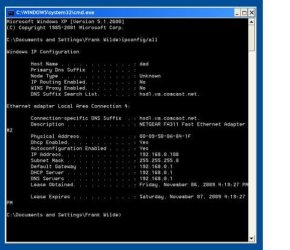
I was able to boot into XP and access the 'net. So this info is different from the W7 info. For instance, in W7 I had NO addy for the default gateway, but I had a legit IPv4 addy (no x's).
 

Attachments

  • XPSP3 CONFIG.jpg
    XPSP3 CONFIG.jpg
    28.4 KB · Views: 407

My Computer

Computer Manufacturer/Model Number
Custom built, McGyver style ;)
OS
Win 7 HP (upgrade from XP Pro SP3)
CPU
Intel(R) Pentium(R) 4 CPU 3.00GHz
Motherboard
Intel D865GBF
Memory
4 GB
Graphics Card(s)
ATI Radeon HD 3800 Series
Sound Card
CMI8738/C3DX PCI Audio Device
Monitor(s) Displays
Acer H233H
Screen Resolution
1920X1080
Hard Drives
Drive: C:
Free Space: 84.4 GB
Total Space: 84.4 GB
File System: NTFS
Model: Maxtor 6Y080P0

Drive: D:
Free Space: 42.3 GB
Total Space: 58.6 GB
File System: NTFS
Model: Maxtor 4D060H3

Drive: G: (Win7HP drive)
Free Spa
Case
Antec
Cooling
some fans, in cool dry basement
Keyboard
Logitech MK700 wireless
Mouse
HID-compliant MX500 Optical Mouse and wireless MK700 mouse
Internet Speed
100.0 Mbps
Please update your system specs - Intel makes a lot of motherboards, you know? ;) The link is in my signature.

There are quite a few threads about lack of valid IP addresses on Windows 7. You mentioned you read some of them. What actions are you unsure of to try?
 

My Computer

Computer Manufacturer/Model Number
Dell XPS 15 L502x
OS
Windows 7 Ultimate x64 SP1
CPU
Core i7-2670QM
Memory
8GB DDR3 PC3-10600
Graphics Card(s)
Intel HD Graphics 3000 + GeForce GT 540M
Screen Resolution
1920x1080
Hard Drives
1TB 5400RPM Seagate
Well, I tried Dinesh's complete internet troubleshooting guide and I got answers that were not addressed. like no default gateway addy. My DHCP client was already automatic ans started.

I tried to stop Bonour but could not find it in services.msc either.

If I try these fixes in XP, will they fix W7?

And yes, now I will update my specs ;) .
 

My Computer

Computer Manufacturer/Model Number
Custom built, McGyver style ;)
OS
Win 7 HP (upgrade from XP Pro SP3)
CPU
Intel(R) Pentium(R) 4 CPU 3.00GHz
Motherboard
Intel D865GBF
Memory
4 GB
Graphics Card(s)
ATI Radeon HD 3800 Series
Sound Card
CMI8738/C3DX PCI Audio Device
Monitor(s) Displays
Acer H233H
Screen Resolution
1920X1080
Hard Drives
Drive: C:
Free Space: 84.4 GB
Total Space: 84.4 GB
File System: NTFS
Model: Maxtor 6Y080P0

Drive: D:
Free Space: 42.3 GB
Total Space: 58.6 GB
File System: NTFS
Model: Maxtor 4D060H3

Drive: G: (Win7HP drive)
Free Spa
Case
Antec
Cooling
some fans, in cool dry basement
Keyboard
Logitech MK700 wireless
Mouse
HID-compliant MX500 Optical Mouse and wireless MK700 mouse
Internet Speed
100.0 Mbps
Here is a weird thing I just noticed...when on XP, it only shows two HDDs. I does not show the WD that has 7HP on it.:confused:
 

My Computer

Computer Manufacturer/Model Number
Custom built, McGyver style ;)
OS
Win 7 HP (upgrade from XP Pro SP3)
CPU
Intel(R) Pentium(R) 4 CPU 3.00GHz
Motherboard
Intel D865GBF
Memory
4 GB
Graphics Card(s)
ATI Radeon HD 3800 Series
Sound Card
CMI8738/C3DX PCI Audio Device
Monitor(s) Displays
Acer H233H
Screen Resolution
1920X1080
Hard Drives
Drive: C:
Free Space: 84.4 GB
Total Space: 84.4 GB
File System: NTFS
Model: Maxtor 6Y080P0

Drive: D:
Free Space: 42.3 GB
Total Space: 58.6 GB
File System: NTFS
Model: Maxtor 4D060H3

Drive: G: (Win7HP drive)
Free Spa
Case
Antec
Cooling
some fans, in cool dry basement
Keyboard
Logitech MK700 wireless
Mouse
HID-compliant MX500 Optical Mouse and wireless MK700 mouse
Internet Speed
100.0 Mbps
There's nothing wrong with the hard drives. You won't see the Windows 7 drive, unless you assign it a drive letter while using XP. Don't worry about that.

Have you tried rebooting your router? Just unplug it for about 30 seconds, then plug it back in. Have all of your computers off when you do that. After the router reboots, turn on the Windows 7 computer and see if it gets an IP assigned.
 

My Computer

Computer Manufacturer/Model Number
Dell XPS 15 L502x
OS
Windows 7 Ultimate x64 SP1
CPU
Core i7-2670QM
Memory
8GB DDR3 PC3-10600
Graphics Card(s)
Intel HD Graphics 3000 + GeForce GT 540M
Screen Resolution
1920x1080
Hard Drives
1TB 5400RPM Seagate
I'll give that a shot, tyvm.

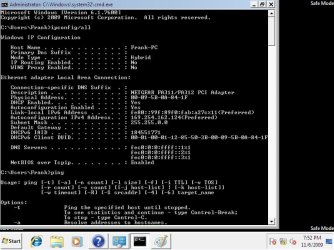
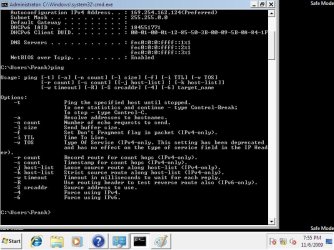
I took these screenshots of the ipconfig/all and ping that I attempted in Win7HP.
 

Attachments

  • ipconfigall.jpg
    ipconfigall.jpg
    67.5 KB · Views: 89
  • ping.jpg
    ping.jpg
    70.7 KB · Views: 57

My Computer

Computer Manufacturer/Model Number
Custom built, McGyver style ;)
OS
Win 7 HP (upgrade from XP Pro SP3)
CPU
Intel(R) Pentium(R) 4 CPU 3.00GHz
Motherboard
Intel D865GBF
Memory
4 GB
Graphics Card(s)
ATI Radeon HD 3800 Series
Sound Card
CMI8738/C3DX PCI Audio Device
Monitor(s) Displays
Acer H233H
Screen Resolution
1920X1080
Hard Drives
Drive: C:
Free Space: 84.4 GB
Total Space: 84.4 GB
File System: NTFS
Model: Maxtor 6Y080P0

Drive: D:
Free Space: 42.3 GB
Total Space: 58.6 GB
File System: NTFS
Model: Maxtor 4D060H3

Drive: G: (Win7HP drive)
Free Spa
Case
Antec
Cooling
some fans, in cool dry basement
Keyboard
Logitech MK700 wireless
Mouse
HID-compliant MX500 Optical Mouse and wireless MK700 mouse
Internet Speed
100.0 Mbps
That's exactly what I would expect if a default gateway isn't found. The computer isn't receiving any DHCP information from the router. Once it connects to a DHCP server (in this case, your router) you'll see Default Gateway, DHCP Server, and you'll see one or two DNS Servers entries.
 

My Computer

Computer Manufacturer/Model Number
Dell XPS 15 L502x
OS
Windows 7 Ultimate x64 SP1
CPU
Core i7-2670QM
Memory
8GB DDR3 PC3-10600
Graphics Card(s)
Intel HD Graphics 3000 + GeForce GT 540M
Screen Resolution
1920x1080
Hard Drives
1TB 5400RPM Seagate
Well, I tried resetting the router, modem and switch. Still I can get online in my XP profile, but not Win7HP.

On the brightside? I think I solved my dual boot issue...well, I hope. I'll test that soon. BTW, in XP I can see all 3 HDDs again...weird:huh:

OK, now I am back to a dual boot option of XP and XP. No idea what happened to 7HP.

Any other ideas?
 

My Computer

Computer Manufacturer/Model Number
Custom built, McGyver style ;)
OS
Win 7 HP (upgrade from XP Pro SP3)
CPU
Intel(R) Pentium(R) 4 CPU 3.00GHz
Motherboard
Intel D865GBF
Memory
4 GB
Graphics Card(s)
ATI Radeon HD 3800 Series
Sound Card
CMI8738/C3DX PCI Audio Device
Monitor(s) Displays
Acer H233H
Screen Resolution
1920X1080
Hard Drives
Drive: C:
Free Space: 84.4 GB
Total Space: 84.4 GB
File System: NTFS
Model: Maxtor 6Y080P0

Drive: D:
Free Space: 42.3 GB
Total Space: 58.6 GB
File System: NTFS
Model: Maxtor 4D060H3

Drive: G: (Win7HP drive)
Free Spa
Case
Antec
Cooling
some fans, in cool dry basement
Keyboard
Logitech MK700 wireless
Mouse
HID-compliant MX500 Optical Mouse and wireless MK700 mouse
Internet Speed
100.0 Mbps
Well, let's try disabling ipV6. Go to control panel -> network and internet -> network connections, right click on your connection, select properties, then deselect the internet protocol version 6 box. Reboot.
 

My Computer

Computer Manufacturer/Model Number
Dell XPS 15 L502x
OS
Windows 7 Ultimate x64 SP1
CPU
Core i7-2670QM
Memory
8GB DDR3 PC3-10600
Graphics Card(s)
Intel HD Graphics 3000 + GeForce GT 540M
Screen Resolution
1920x1080
Hard Drives
1TB 5400RPM Seagate
tyvm for the help keg. I need to reinstall 7hp it looks like now since I can't boot to it. Any idea if I should reformat the drive I want to install it to? It's just a slave storage drive now.
 

My Computer

Computer Manufacturer/Model Number
Custom built, McGyver style ;)
OS
Win 7 HP (upgrade from XP Pro SP3)
CPU
Intel(R) Pentium(R) 4 CPU 3.00GHz
Motherboard
Intel D865GBF
Memory
4 GB
Graphics Card(s)
ATI Radeon HD 3800 Series
Sound Card
CMI8738/C3DX PCI Audio Device
Monitor(s) Displays
Acer H233H
Screen Resolution
1920X1080
Hard Drives
Drive: C:
Free Space: 84.4 GB
Total Space: 84.4 GB
File System: NTFS
Model: Maxtor 6Y080P0

Drive: D:
Free Space: 42.3 GB
Total Space: 58.6 GB
File System: NTFS
Model: Maxtor 4D060H3

Drive: G: (Win7HP drive)
Free Spa
Case
Antec
Cooling
some fans, in cool dry basement
Keyboard
Logitech MK700 wireless
Mouse
HID-compliant MX500 Optical Mouse and wireless MK700 mouse
Internet Speed
100.0 Mbps

My Computer

Computer Manufacturer/Model Number
Dell XPS 15 L502x
OS
Windows 7 Ultimate x64 SP1
CPU
Core i7-2670QM
Memory
8GB DDR3 PC3-10600
Graphics Card(s)
Intel HD Graphics 3000 + GeForce GT 540M
Screen Resolution
1920x1080
Hard Drives
1TB 5400RPM Seagate
OK, will report back afterwards. Thanks again bro (or is that brew?)
 

My Computer

Computer Manufacturer/Model Number
Custom built, McGyver style ;)
OS
Win 7 HP (upgrade from XP Pro SP3)
CPU
Intel(R) Pentium(R) 4 CPU 3.00GHz
Motherboard
Intel D865GBF
Memory
4 GB
Graphics Card(s)
ATI Radeon HD 3800 Series
Sound Card
CMI8738/C3DX PCI Audio Device
Monitor(s) Displays
Acer H233H
Screen Resolution
1920X1080
Hard Drives
Drive: C:
Free Space: 84.4 GB
Total Space: 84.4 GB
File System: NTFS
Model: Maxtor 6Y080P0

Drive: D:
Free Space: 42.3 GB
Total Space: 58.6 GB
File System: NTFS
Model: Maxtor 4D060H3

Drive: G: (Win7HP drive)
Free Spa
Case
Antec
Cooling
some fans, in cool dry basement
Keyboard
Logitech MK700 wireless
Mouse
HID-compliant MX500 Optical Mouse and wireless MK700 mouse
Internet Speed
100.0 Mbps
Good news? The install went well. I can boot from 7HP or XP with no issues.

Bad News? Still can't get to the 'net on 7HP.

I think this might be an issue...when doing the install I have not been prompted to move my files and settings back. I did not use the Windows Easy Transfer thing, heard it was not a good tool. There are those files on the drive where 7HP resides called Windows old...could the fix be in this folder?

It's getting late here, I'll be up for a few then check back in the morning.

Thanks for your help again kegobeer, it is much appreciated.:D
 

My Computer

Computer Manufacturer/Model Number
Custom built, McGyver style ;)
OS
Win 7 HP (upgrade from XP Pro SP3)
CPU
Intel(R) Pentium(R) 4 CPU 3.00GHz
Motherboard
Intel D865GBF
Memory
4 GB
Graphics Card(s)
ATI Radeon HD 3800 Series
Sound Card
CMI8738/C3DX PCI Audio Device
Monitor(s) Displays
Acer H233H
Screen Resolution
1920X1080
Hard Drives
Drive: C:
Free Space: 84.4 GB
Total Space: 84.4 GB
File System: NTFS
Model: Maxtor 6Y080P0

Drive: D:
Free Space: 42.3 GB
Total Space: 58.6 GB
File System: NTFS
Model: Maxtor 4D060H3

Drive: G: (Win7HP drive)
Free Spa
Case
Antec
Cooling
some fans, in cool dry basement
Keyboard
Logitech MK700 wireless
Mouse
HID-compliant MX500 Optical Mouse and wireless MK700 mouse
Internet Speed
100.0 Mbps
The only thing you might need for your internet issue from windows.old is the ethernet driver, browsing from Device Manager to windows/system32/drivers.

I have been lucky having all of my connection issues solved by Win7's highly automated troubleshooter. Have you tried it by right clicking on connection in systray?

Hopefully kegobeer will be back here now that you reinstalled because he knows these issues well. You might rework his suggestions further above.
 
Thanks Greg.

Unfortunately, I have tried all of keg's tips except IPv6 disable. I'll give it a go, then I think sleep is in order :sleepy:.
 

My Computer

Computer Manufacturer/Model Number
Custom built, McGyver style ;)
OS
Win 7 HP (upgrade from XP Pro SP3)
CPU
Intel(R) Pentium(R) 4 CPU 3.00GHz
Motherboard
Intel D865GBF
Memory
4 GB
Graphics Card(s)
ATI Radeon HD 3800 Series
Sound Card
CMI8738/C3DX PCI Audio Device
Monitor(s) Displays
Acer H233H
Screen Resolution
1920X1080
Hard Drives
Drive: C:
Free Space: 84.4 GB
Total Space: 84.4 GB
File System: NTFS
Model: Maxtor 6Y080P0

Drive: D:
Free Space: 42.3 GB
Total Space: 58.6 GB
File System: NTFS
Model: Maxtor 4D060H3

Drive: G: (Win7HP drive)
Free Spa
Case
Antec
Cooling
some fans, in cool dry basement
Keyboard
Logitech MK700 wireless
Mouse
HID-compliant MX500 Optical Mouse and wireless MK700 mouse
Internet Speed
100.0 Mbps
Back
Top