no wireless connection

bluesfloyd

New member
Local time
7:36 PM
Messages
38
hi guys,
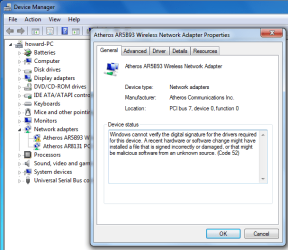
reinstalled win7 got all the updates, Ethernet connection good, but no wireless connection, see image below
thanks for your time, can give more info if needed,

all the best, bluesfloyd,
 

Attachments

  • device.png
    device.png
    79 KB · Views: 27

My Computer

Computer type
PC/Desktop
OS
32 bits window7
driver

Hi Blues,
The driver is already on your system.
Select update driver>>browse my comp>> let me choose> UNTICK show compatible device,
Scroll down to Atheros Communications(select)then in the right hand box scroll down to you adapter.
(select and update.)

Roy
 

My Computer

Computer type
PC/Desktop
Computer Manufacturer/Model Number
medionl/Aspire 6930G/acer x55a
OS
W7 home premium 32bit/W7HP 64bit/w10 tp insider ring
CPU
E5300 dual core
Motherboard
medion MS7366
Memory
3gb
Graphics Card(s)
Nvidia Geforce 7100 Nforce 630i
Monitor(s) Displays
avixc
Internet Speed
n (isp resticted to 72)
Antivirus
mse/pands
Browser
palemoon
Other Info
Belkin Fd7050 n USB using Railink RT2870 drivers, more upto date
hi, Roy
did what you said, spot on, I have now got my wireless working just fine, thank you very much,
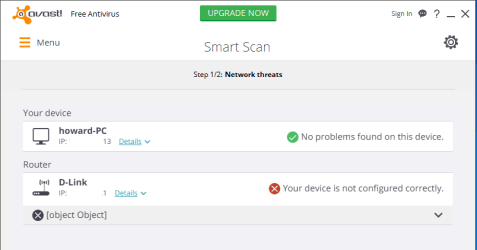
I did do a smart scan with advast, and it says I have a router problem, image below, I removed IP numbers from image, both numbers the same, but top line ended (13) bottom line ended (1)
how do I fix the router config problem???? thanks again for your time,

bluesfloyd,

 

Attachments

  • 1234.png
    1234.png
    25.7 KB · Views: 2

My Computer

Computer type
PC/Desktop
OS
32 bits window7
Router

Hi Blues,
Can you click on the details and post that info.

By the way who's your ISP Talk/Talk BT sky Virgin, didnt think any of them used Dlink routers, can you also post the model no:

Roy

Dont worry about deleting 192.168.0.1 or subnet 255 255 255
 

My Computer

Computer type
PC/Desktop
Computer Manufacturer/Model Number
medionl/Aspire 6930G/acer x55a
OS
W7 home premium 32bit/W7HP 64bit/w10 tp insider ring
CPU
E5300 dual core
Motherboard
medion MS7366
Memory
3gb
Graphics Card(s)
Nvidia Geforce 7100 Nforce 630i
Monitor(s) Displays
avixc
Internet Speed
n (isp resticted to 72)
Antivirus
mse/pands
Browser
palemoon
Other Info
Belkin Fd7050 n USB using Railink RT2870 drivers, more upto date
hi, Roy
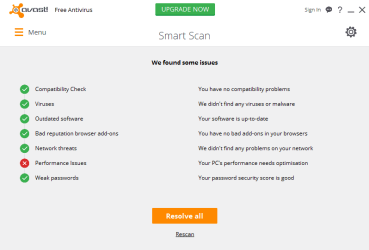
I did rescan using avast smart scan, but now no problem with network, see below, do you think I need to check any other thing on my network just to be safe/sure network is OK????? please let me know,

all the best, bluesfloyd
 

Attachments

  • mm.png
    mm.png
    20.4 KB · Views: 2

My Computer

Computer type
PC/Desktop
OS
32 bits window7
tidy up

Hi Blues,

I Wouldn't worry about the performance optimisation 7 pretty good at looking after itself.

You could run the MS inbuilt disk cleanup utility , if you have NOT run it before,
>>after its finished RESTART the comp and have a cuppa could take up to 30mins.

I would also download and run TFC by old timer, that will clear your browsers temp folders.

Last thing i would do
Change the password on your Router most people dont know or bother.
Type 192.168.0.1 in the location bar it will open up the router and you can change it from admin/12345, the standard defaults, if its not either of these it will be in the ISP booklets you have.

Thats about it.
Safe surfing

Roy
 

My Computer

Computer type
PC/Desktop
Computer Manufacturer/Model Number
medionl/Aspire 6930G/acer x55a
OS
W7 home premium 32bit/W7HP 64bit/w10 tp insider ring
CPU
E5300 dual core
Motherboard
medion MS7366
Memory
3gb
Graphics Card(s)
Nvidia Geforce 7100 Nforce 630i
Monitor(s) Displays
avixc
Internet Speed
n (isp resticted to 72)
Antivirus
mse/pands
Browser
palemoon
Other Info
Belkin Fd7050 n USB using Railink RT2870 drivers, more upto date
Back
Top