No working Media buttons, keyboard

Toby91

New member
Member
Local time
4:24 AM
Messages
17
Hello


Just reinstalled windows 7 this weekend together with new hardware. But i have encountered some problems, both with sound and keyboard. On my keyboard which is a Logitech Ultra X (Ultra X) i have some buttons at the top, like Media, play/pause, www, email and mute. These have been working earlier on both windows xp and vista, but now they are not working.. :confused: Very frustrating as i use them very often.

Do any of you guys in here have any idea about how this may be fixed? :)


Toby91 :)
 

My Computer My Computer

Computer Manufacturer/Model Number
Custom
OS
Windows 7 64-bit
CPU
Intel Core i7 920 2.66GHz
Motherboard
Gigabyte GA-EX58 UD3R
Memory
Corsair TWIN3X 1333MHz DDR3, 6GB
Graphics Card(s)
ASUS Radeon HD 5870 1GB GDDR5
Sound Card
Asus Xonar D2
PSU
Corsair TX750W
Cooling
CPU Cooling, Noctua NH U12P
Keyboard
Logitech G15
Mouse
Logitech G5 Gaming Mouse
Hey mate, welcome to the forums.

Have you downloaded drivers for your keyboard?
 

My Computer My Computer

Computer Manufacturer/Model Number
Custom Build
OS
W7 RTM Ultimate x64
CPU
Intel Q8400 @ 2.66GHZ
Motherboard
Gigabyte GA-EG45M-UD2H
Memory
4GB DDR2-800
Graphics Card(s)
Gainward GTS 450 GLH 1GB Edition
Sound Card
Integrated 8 Channel
Monitor(s) Displays
AOC 23.6 Inch Widescreen LCD
Screen Resolution
1920x1080
Hard Drives
Seagate 500GB Internal
Western Digital 1TB Internal

Hitachi 1TB External
PSU
Apevia Java Power 500W
Case
Cooler Master HAF 922 Black
Cooling
Stock Intel CPU Fan
Keyboard
HP SK-2960 Multimedia Keyboard
Mouse
Logitech M350 Wireless Gaming Mouse
Internet Speed
1.5MB
Thank.. Ehm, the problem is that all the time i have used this keyboard i have never installed any driver for it.. It even says on the logitech site that the keyboard uses native USB drivers already existing in the OS. So i guess thats where the problem is, there are no places i can find drivers. :confused:
 

My Computer My Computer

Computer Manufacturer/Model Number
Custom
OS
Windows 7 64-bit
CPU
Intel Core i7 920 2.66GHz
Motherboard
Gigabyte GA-EX58 UD3R
Memory
Corsair TWIN3X 1333MHz DDR3, 6GB
Graphics Card(s)
ASUS Radeon HD 5870 1GB GDDR5
Sound Card
Asus Xonar D2
PSU
Corsair TX750W
Cooling
CPU Cooling, Noctua NH U12P
Keyboard
Logitech G15
Mouse
Logitech G5 Gaming Mouse
Hei Toby og velkommen til de 7 Forums.

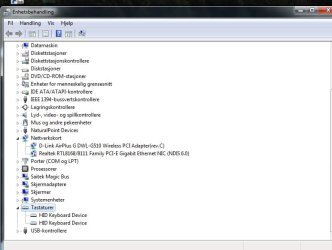
Could you please attach a screenshot showing your Device Manager, keyboard section expanded.

Kari
 

My Computer My Computer

Computer type
Laptop
Computer Manufacturer/Model Number
HP ENVY 17-1150eg
OS
Windows 10 Pro x64 EN-GB
CPU
1.6 GHz Intel Core i7-720QM Processor
Memory
6 GB
Graphics Card(s)
ATI Mobility Radeon HD 5850 Graphics
Sound Card
Beats sound system with integrated subwoofer
Monitor(s) Displays
17" laptop display, 22" LED and 32" Full HD TV through HDMI
Screen Resolution
1600*900 (1), 1920*1080 (2&3)
Hard Drives
Internal: 2 x 500 GB SATA Hard Disk Drive 7200 rpm
External: 2TB for backups, 3TB USB3 network drive for media
Cooling
As Envy runs a bit warm, I have it on a Cooler Master pad
Keyboard
Logitech diNovo Media Desktop Laser (bluetooth)
Mouse
Logitech Performance Mouse MX
Internet Speed
50/10 Mbps VDSL
Antivirus
Windows Defender 4.3.9431.0
Browser
Maxthon 3.5.2., IE11
Here it is.

It just says HID keyboard.
 

Attachments

  • Enhetsbehandling.jpg
    Enhetsbehandling.jpg
    61 KB · Views: 654

My Computer My Computer

Computer Manufacturer/Model Number
Custom
OS
Windows 7 64-bit
CPU
Intel Core i7 920 2.66GHz
Motherboard
Gigabyte GA-EX58 UD3R
Memory
Corsair TWIN3X 1333MHz DDR3, 6GB
Graphics Card(s)
ASUS Radeon HD 5870 1GB GDDR5
Sound Card
Asus Xonar D2
PSU
Corsair TX750W
Cooling
CPU Cooling, Noctua NH U12P
Keyboard
Logitech G15
Mouse
Logitech G5 Gaming Mouse
OK. You could try this:

  • Disconnect the keyboard
  • Right click HID Keyboard device in Device Manager, choose Uninstall. Do this for both instances
  • Shut down your computer
  • Reconnect the keyboard
  • Reboot and let Windows find the keyboard and install the drivers
Might work...

Kari
 

My Computer My Computer

Computer type
Laptop
Computer Manufacturer/Model Number
HP ENVY 17-1150eg
OS
Windows 10 Pro x64 EN-GB
CPU
1.6 GHz Intel Core i7-720QM Processor
Memory
6 GB
Graphics Card(s)
ATI Mobility Radeon HD 5850 Graphics
Sound Card
Beats sound system with integrated subwoofer
Monitor(s) Displays
17" laptop display, 22" LED and 32" Full HD TV through HDMI
Screen Resolution
1600*900 (1), 1920*1080 (2&3)
Hard Drives
Internal: 2 x 500 GB SATA Hard Disk Drive 7200 rpm
External: 2TB for backups, 3TB USB3 network drive for media
Cooling
As Envy runs a bit warm, I have it on a Cooler Master pad
Keyboard
Logitech diNovo Media Desktop Laser (bluetooth)
Mouse
Logitech Performance Mouse MX
Internet Speed
50/10 Mbps VDSL
Antivirus
Windows Defender 4.3.9431.0
Browser
Maxthon 3.5.2., IE11
Ok, i'll try.. Will give you a comment on how it works.. :)
 

My Computer My Computer

Computer Manufacturer/Model Number
Custom
OS
Windows 7 64-bit
CPU
Intel Core i7 920 2.66GHz
Motherboard
Gigabyte GA-EX58 UD3R
Memory
Corsair TWIN3X 1333MHz DDR3, 6GB
Graphics Card(s)
ASUS Radeon HD 5870 1GB GDDR5
Sound Card
Asus Xonar D2
PSU
Corsair TX750W
Cooling
CPU Cooling, Noctua NH U12P
Keyboard
Logitech G15
Mouse
Logitech G5 Gaming Mouse
Nope, that didn't work... still some not responding buttons..
 

My Computer My Computer

Computer Manufacturer/Model Number
Custom
OS
Windows 7 64-bit
CPU
Intel Core i7 920 2.66GHz
Motherboard
Gigabyte GA-EX58 UD3R
Memory
Corsair TWIN3X 1333MHz DDR3, 6GB
Graphics Card(s)
ASUS Radeon HD 5870 1GB GDDR5
Sound Card
Asus Xonar D2
PSU
Corsair TX750W
Cooling
CPU Cooling, Noctua NH U12P
Keyboard
Logitech G15
Mouse
Logitech G5 Gaming Mouse
Don't know what to suggest next... I'll check something and come back.

Kari
 

My Computer My Computer

Computer type
Laptop
Computer Manufacturer/Model Number
HP ENVY 17-1150eg
OS
Windows 10 Pro x64 EN-GB
CPU
1.6 GHz Intel Core i7-720QM Processor
Memory
6 GB
Graphics Card(s)
ATI Mobility Radeon HD 5850 Graphics
Sound Card
Beats sound system with integrated subwoofer
Monitor(s) Displays
17" laptop display, 22" LED and 32" Full HD TV through HDMI
Screen Resolution
1600*900 (1), 1920*1080 (2&3)
Hard Drives
Internal: 2 x 500 GB SATA Hard Disk Drive 7200 rpm
External: 2TB for backups, 3TB USB3 network drive for media
Cooling
As Envy runs a bit warm, I have it on a Cooler Master pad
Keyboard
Logitech diNovo Media Desktop Laser (bluetooth)
Mouse
Logitech Performance Mouse MX
Internet Speed
50/10 Mbps VDSL
Antivirus
Windows Defender 4.3.9431.0
Browser
Maxthon 3.5.2., IE11
Hi again!


Eventually bought myself a new keyboard, a Logitech G15. But when i installed it, i still had the problem with non working media buttons. So i went again searching for an soulution and found one! :D


I seems to be an startupentry which you manually have to change from manual to automatic.. If there are anyone having this problem, here is the solution:


- Go to controlpanel --> Performance and maintenance --> Administrative tools

- Choose services and scroll down to find "Human interface devices"

- Right click and choose properties --> and change startup type from manual to automatic --> Reboot and your media buttons should now be working again! :D


At least it did here, and i'm now happy with my new keyboard!


Toby91 :p
 

My Computer My Computer

Computer Manufacturer/Model Number
Custom
OS
Windows 7 64-bit
CPU
Intel Core i7 920 2.66GHz
Motherboard
Gigabyte GA-EX58 UD3R
Memory
Corsair TWIN3X 1333MHz DDR3, 6GB
Graphics Card(s)
ASUS Radeon HD 5870 1GB GDDR5
Sound Card
Asus Xonar D2
PSU
Corsair TX750W
Cooling
CPU Cooling, Noctua NH U12P
Keyboard
Logitech G15
Mouse
Logitech G5 Gaming Mouse
Thanks for sharing your fix... it is appreciated... ;)
 

My Computer My Computer

Computer type
PC/Desktop
Computer Manufacturer/Model Number
LENOVO K450 @3.0GHZ
OS
64-bit Windows 8.1 Pro
CPU
Core(TM) i5 CPU 4330 Haswell @ 3.20GHz
Motherboard
LENOVO
Memory
12.00 GB
Graphics Card(s)
Intel(R) HD Graphics
Sound Card
Intel HD integtrated
Monitor(s) Displays
HP 25' ISP Monitor
Screen Resolution
1900/1020
Hard Drives
(1) ST1000DM003-1CH162 (2) Generic STORAGE DEVICE USB Device (3) Generic STORAGE DEVICE USB Device
Internet Speed
100mb down/10mb up

My Computer My Computer

Computer type
Laptop
Computer Manufacturer/Model Number
HP ENVY 17-1150eg
OS
Windows 10 Pro x64 EN-GB
CPU
1.6 GHz Intel Core i7-720QM Processor
Memory
6 GB
Graphics Card(s)
ATI Mobility Radeon HD 5850 Graphics
Sound Card
Beats sound system with integrated subwoofer
Monitor(s) Displays
17" laptop display, 22" LED and 32" Full HD TV through HDMI
Screen Resolution
1600*900 (1), 1920*1080 (2&3)
Hard Drives
Internal: 2 x 500 GB SATA Hard Disk Drive 7200 rpm
External: 2TB for backups, 3TB USB3 network drive for media
Cooling
As Envy runs a bit warm, I have it on a Cooler Master pad
Keyboard
Logitech diNovo Media Desktop Laser (bluetooth)
Mouse
Logitech Performance Mouse MX
Internet Speed
50/10 Mbps VDSL
Antivirus
Windows Defender 4.3.9431.0
Browser
Maxthon 3.5.2., IE11
Thanks for sharing your fix... it is appreciated... ;)
+1

Kari

+2

It's great when you get a solution and you post back, helps us help you by not having to reply to repeat posts because someone didn't post his/her solution.
 

My Computer My Computer

Computer Manufacturer/Model Number
Custom Build
OS
W7 RTM Ultimate x64
CPU
Intel Q8400 @ 2.66GHZ
Motherboard
Gigabyte GA-EG45M-UD2H
Memory
4GB DDR2-800
Graphics Card(s)
Gainward GTS 450 GLH 1GB Edition
Sound Card
Integrated 8 Channel
Monitor(s) Displays
AOC 23.6 Inch Widescreen LCD
Screen Resolution
1920x1080
Hard Drives
Seagate 500GB Internal
Western Digital 1TB Internal

Hitachi 1TB External
PSU
Apevia Java Power 500W
Case
Cooler Master HAF 922 Black
Cooling
Stock Intel CPU Fan
Keyboard
HP SK-2960 Multimedia Keyboard
Mouse
Logitech M350 Wireless Gaming Mouse
Internet Speed
1.5MB
+2

It's great when you get a solution and you post back, helps us help you by not having to reply to repeat posts because someone didn't post his/her solution.
Maybe a wrong place to write this, but anyway:

What I am missing here on the Seven Forums is the stories about the solutions, fixed issues. I mean, a lot of posters ask help and get some possible solutions but never come back to tell how it went.

Sometimes I see a long thread, where the OP has a peculiar issue. The thread goes on and on, often weeks, and then suddenly nothing. When I see this same member posting on other threads, I'm always thinking "what happened with that issue back then?"

It is very nice to see some members think of this, think about other members and tell when and how the issue was solved. Writing this, I decided the OP has deserved some rep for doing this. It is a correct thing to do.

Had some whisky tonight, hopefully you can still understand my point.

Kari
 

My Computer My Computer

Computer type
Laptop
Computer Manufacturer/Model Number
HP ENVY 17-1150eg
OS
Windows 10 Pro x64 EN-GB
CPU
1.6 GHz Intel Core i7-720QM Processor
Memory
6 GB
Graphics Card(s)
ATI Mobility Radeon HD 5850 Graphics
Sound Card
Beats sound system with integrated subwoofer
Monitor(s) Displays
17" laptop display, 22" LED and 32" Full HD TV through HDMI
Screen Resolution
1600*900 (1), 1920*1080 (2&3)
Hard Drives
Internal: 2 x 500 GB SATA Hard Disk Drive 7200 rpm
External: 2TB for backups, 3TB USB3 network drive for media
Cooling
As Envy runs a bit warm, I have it on a Cooler Master pad
Keyboard
Logitech diNovo Media Desktop Laser (bluetooth)
Mouse
Logitech Performance Mouse MX
Internet Speed
50/10 Mbps VDSL
Antivirus
Windows Defender 4.3.9431.0
Browser
Maxthon 3.5.2., IE11
+2

It's great when you get a solution and you post back, helps us help you by not having to reply to repeat posts because someone didn't post his/her solution.
Maybe a wrong place to write this, but anyway:

What I am missing here on the Seven Forums is the stories about the solutions, fixed issues. I mean, a lot of posters ask help and get some possible solutions but never come back to tell how it went.

Sometimes I see a long thread, where the OP has a peculiar issue. The thread goes on and on, often weeks, and then suddenly nothing. When I see this same member posting on other threads, I'm always thinking "what happened with that issue back then?"

It is very nice to see some members think of this, think about other members and tell when and how the issue was solved. Writing this, I decided the OP has deserved some rep for doing this. It is a correct thing to do.

Had some whisky tonight, hopefully you can still understand my point.

Kari

With or without wisky, your point is fair and valid, couldn't have said it better myself.

Think something about replying with your solution will go into my sig.
 

My Computer My Computer

Computer Manufacturer/Model Number
Custom Build
OS
W7 RTM Ultimate x64
CPU
Intel Q8400 @ 2.66GHZ
Motherboard
Gigabyte GA-EG45M-UD2H
Memory
4GB DDR2-800
Graphics Card(s)
Gainward GTS 450 GLH 1GB Edition
Sound Card
Integrated 8 Channel
Monitor(s) Displays
AOC 23.6 Inch Widescreen LCD
Screen Resolution
1920x1080
Hard Drives
Seagate 500GB Internal
Western Digital 1TB Internal

Hitachi 1TB External
PSU
Apevia Java Power 500W
Case
Cooler Master HAF 922 Black
Cooling
Stock Intel CPU Fan
Keyboard
HP SK-2960 Multimedia Keyboard
Mouse
Logitech M350 Wireless Gaming Mouse
Internet Speed
1.5MB
Thanks, yes i did think of it when i wrote the answer in my post. I know it myself how frustrating it is to search for an answer and read page up and down which eventually just ends with no one knowing a solution. :p So i hope people find use in this fix if they were to have this type of problem. :)


Uber Philf: See that you wrote in your sig, good idea! ;) Shoulb be more people writing their solutions back!
 

My Computer My Computer

Computer Manufacturer/Model Number
Custom
OS
Windows 7 64-bit
CPU
Intel Core i7 920 2.66GHz
Motherboard
Gigabyte GA-EX58 UD3R
Memory
Corsair TWIN3X 1333MHz DDR3, 6GB
Graphics Card(s)
ASUS Radeon HD 5870 1GB GDDR5
Sound Card
Asus Xonar D2
PSU
Corsair TX750W
Cooling
CPU Cooling, Noctua NH U12P
Keyboard
Logitech G15
Mouse
Logitech G5 Gaming Mouse
Thanks, yes i did think of it when i wrote the answer in my post. I know it myself how frustrating it is to search for an answer and read page up and down which eventually just ends with no one knowing a solution. :p So i hope people find use in this fix if they were to have this type of problem. :)


Uber Philf: See that you wrote in your sig, good idea! ;) Shoulb be more people writing their solutions back!

Let's hope so! :)
 

My Computer My Computer

Computer Manufacturer/Model Number
Custom Build
OS
W7 RTM Ultimate x64
CPU
Intel Q8400 @ 2.66GHZ
Motherboard
Gigabyte GA-EG45M-UD2H
Memory
4GB DDR2-800
Graphics Card(s)
Gainward GTS 450 GLH 1GB Edition
Sound Card
Integrated 8 Channel
Monitor(s) Displays
AOC 23.6 Inch Widescreen LCD
Screen Resolution
1920x1080
Hard Drives
Seagate 500GB Internal
Western Digital 1TB Internal

Hitachi 1TB External
PSU
Apevia Java Power 500W
Case
Cooler Master HAF 922 Black
Cooling
Stock Intel CPU Fan
Keyboard
HP SK-2960 Multimedia Keyboard
Mouse
Logitech M350 Wireless Gaming Mouse
Internet Speed
1.5MB
Sorry for reviving such an old post, but I kind of only registered to thank Toby91 for his answer.
This f****ing issue had been driving me MAD for at least a whole year and now I finally got it fixed up.

Thanks a bunch pal! :dinesh:
 

My Computer My Computer

OS
Windows 7 Ultimate x64
Same here for the past 4yrs. It was the "natural MS" keyboard that came with vista some 8yrs ago. As it is not on my main machine, I came close to install the old vista drivers on 7 for this. Thx Toby91. It saved me and Miss Environment from one more keyboard ;)
 

My Computer My Computer

Computer Manufacturer/Model Number
2002 and 2007 discontinued Seanix Technology Inc
OS
VistaHomePremiumSP2, recently switch to 7Ultimate64. And 1 old 2002 PC Win98,to XP SP3,now 7ultim32
CPU
Intel Core 2 Duo [email protected]. Intel Pentium4 2.4GHz
Motherboard
Intel MB IA Skt 775 965GI uATX, Gigabits 8IG1000MK i865P....
Memory
4GB for the 2007 PC. 512MB still on the 2002 PC
Graphics Card(s)
IntelGMA 3000 256MB, ATI 9200 128MB ...whatever good Win7 ..
Sound Card
SigmaTel, SBLive 5.1 (or whatever good Win7 left from them)
Monitor(s) Displays
Generic PnP Monitor 1024 x 768 @ 60Hz
Screen Resolution
as above, so below ;)
Hard Drives
C: F: G:, and C: D: G:
PSU
Per Single User?
Case
the older they are, if I can find even more ;)
Cooling
Good old fresh air and greasy dust.
Keyboard
Microsoft and Logitech. All cordless
Mouse
as above, so .....
Internet Speed
whatever the lies my ISP tells me ;)
Other Info
Never been married, always single. Don't care what others say. I stand my ground. My freedom is somewhat a work of art now. It allow me to see the real value of things (which have none), and to value people who stands up for their own and youngs, not for some illusory rules, gods, flags. Which valued a lot more the time spent with them as much as real friends or family ;)

Peace
Just say thnx

Hi Toby,

just registered to say thnx. I'm searching the Internet for the solution of my, very not working, multimedia keys. And this voor 3 days in a row, and there you are, my saviour, my hero. The quality of your findings are pretty unique on the Internet. This was the one and only working solution. I mean, just want to say thank you very much, it almost drove me crazy.

Live long and proper, :D

Grtz, Ger.
 

My Computer My Computer

Computer type
PC/Desktop
Computer Manufacturer/Model Number
CustomBuild
OS
Windwow Ultimate 64 bit
CPU
iCore 7 920
Motherboard
Asus P6T V2
Memory
12 Gig
Graphics Card(s)
Radeon HD7900
Hard Drives
Samsung EVO 830 SSD 256 Gig
2 x 4 TB Seagate
Antivirus
Bitdefender
Browser
IE 10
Back
Top