Noob here and need help =(

FlipSideTrippin

New member
Local time
7:53 PM
Messages
11
Trying to install win 7 on a Dell inspiron 1525

"To install the device driver needed to access your hard drive, insert the installation media containing the driver files, and then click OK."
 

My Computer

Computer type
Laptop
Computer Manufacturer/Model Number
Dell
OS
Windows 7 Ultimate x32
CPU
?
Motherboard
Celeron 1.86GHZ
Memory
3gb
Did the Notebook originally come with Win7? You can get drivers from Dell Support. On the computer is a label with 2 alphanumeric 'codes'. One is the Service Tag and the other is the Express Service Code. Put the first in the search box on the linked page to get what you need. The other is for getting help from Dell but that model may be out of warranty. It's also possible there are no drivers for Win7 if the computer didn't have that available.

Sometimes one just has to accept any built-in drivers until the computer is running. The biggie is the Network adapter, may have to get that using a different computer and put on a USB Thumb/Flash drive.
 

My Computer

Computer type
PC/Desktop
Computer Manufacturer/Model Number
Customs, Dell, Gateway, HP, Toshiba, Acer, ASUS
OS
Windows 7 Ultimate 64-bit, Windows 8.1 64-bit, Mac OS X 10.10, Linux Mint 17, Windows 10 Pro TP
Keyboard
Microsoft
Mouse
Microsoft
The hard drive i had in it let me put Win 7 on it but i found a 640gb hard drive at a yard sale.. only paid $0.50 for it lol.. It's this 640gb that isn't showing any partitions.
 

My Computer

Computer type
Laptop
Computer Manufacturer/Model Number
Dell
OS
Windows 7 Ultimate x32
CPU
?
Motherboard
Celeron 1.86GHZ
Memory
3gb
No partitions means it's been wiped clean. Installing Windows usually creates a partition then formats it before starting the installation.
 

My Computer

Computer type
PC/Desktop
Computer Manufacturer/Model Number
Customs, Dell, Gateway, HP, Toshiba, Acer, ASUS
OS
Windows 7 Ultimate 64-bit, Windows 8.1 64-bit, Mac OS X 10.10, Linux Mint 17, Windows 10 Pro TP
Keyboard
Microsoft
Mouse
Microsoft
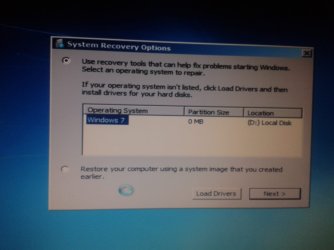
i will take a picture of it so you can see what im seeing.

edit-grrr its stuck at "Setup is starting..." with the little circle spinning and spinning.
 

My Computer

Computer type
Laptop
Computer Manufacturer/Model Number
Dell
OS
Windows 7 Ultimate x32
CPU
?
Motherboard
Celeron 1.86GHZ
Memory
3gb
except in my case the "new" button is greyed out
....and i nothing happens when i hit the "format" button
indexf1.jpg
 

My Computer

Computer type
Laptop
Computer Manufacturer/Model Number
Dell
OS
Windows 7 Ultimate x32
CPU
?
Motherboard
Celeron 1.86GHZ
Memory
3gb
Is it normal for it to say 0mb?

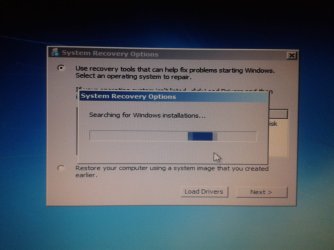
And now it's stuck searching for windows installations but the disc is in the cdrom..
 

Attachments

  • 2014-12-22 01.52.57.jpg
    2014-12-22 01.52.57.jpg
    75.5 KB · Views: 2
  • 2014-12-22 02.13.55.jpg
    2014-12-22 02.13.55.jpg
    105.3 KB · Views: 2

My Computer

Computer type
Laptop
Computer Manufacturer/Model Number
Dell
OS
Windows 7 Ultimate x32
CPU
?
Motherboard
Celeron 1.86GHZ
Memory
3gb
Try this, boot from the DVD, at the first window, where it says pick your language, do not pick the language, hold down the shift key and press F10, which will bring up a command window. Make sure the only disk connected is the one you want Windows installed on. Type diskpart and press enter. Wait for the command prompt to return saying diskpart, type list disk, you should have only 1 disk. Type select disk 0 (number 0 not letter), press enter, diskpart will reply disk 0 is the selected disk, type clean and press enter. Diskpart will reply diskpart cleaned the selected disk. Type create partition primary size=200 and press enter. Diskpart will reply that it has created the selected partition. Type select partition 1 and press enter. Next type format fs=ntfs quick and press enter and wait until it replies that it has formatted it. Type active and press enter, diskpart will respond saying it has formatted the selected partition, type exit and press enter, type exit a second time and press enter. You will now be back at the select your language page. Continue as normal, select custom install, and install Windows on the 200MB partition,. Everything else will be unallocated. The 200MB partition will become the system reserved partition.

 

My Computers

System One System Two

  • Computer type
    PC/Desktop
    Computer Manufacturer/Model Number
    ALWAYS UNDER CONSTRUCTION
    OS
    Windows 11 Pro
    CPU
    Ryzen 9 5900X
    Motherboard
    Asus X570 Crosshair Viii Hero
    Memory
    32GB G Skill DDR4-3600
    Graphics Card(s)
    EVGA RTX 3080 FTW 3 Ultra
    Sound Card
    On Board/Sennheiser PC37X Headset
    Monitor(s) Displays
    3 X Asus 27"
    Screen Resolution
    2560x1440
    Hard Drives
    2 X 1 TB NVME drives
    PSU
    EVGA 850
    Case
    Phanteks Eclipse P400A
    Cooling
    EVGA 280 AIO
    Keyboard
    Logitech G510s/ Logitech G13
    Mouse
    Logitech G502
    Internet Speed
    24/1
    Antivirus
    ESET/MBAM Pro/SAS Pro
    Browser
    Chrome/ Firefox/ Edge
  • Computer type
    Laptop
    System Manufacturer/Model Number
    Dell 16 Plus
    OS
    Windows 11 Pro
    CPU
    Intel Ultra 9 288V
    Memory
    32 GB LPDDR5X 8533
    Monitor(s) Displays
    16" Mini-LED HDR600 Touch 90 Hz
    Screen Resolution
    2560X1600
    Hard Drives
    1 TB NVME
Try this, boot from the DVD, at the first window, where it says pick your language, do not pick the language, hold down the shift key and press F10, which will bring up a command window. Make sure the only disk connected is the one you want Windows installed on. Type diskpart and press enter. Wait for the command prompt to return saying diskpart, type list disk, you should have only 1 disk. Type select disk 0 (number 0 not letter), press enter, diskpart will reply disk 0 is the selected disk, type clean and press enter. Diskpart will reply diskpart cleaned the selected disk. Type create partition primary size=200 and press enter. Diskpart will reply that it has created the selected partition. Type select partition 1 and press enter. Next type format fs=ntfs quick and press enter and wait until it replies that it has formatted it. Type active and press enter, diskpart will respond saying it has formatted the selected partition, type exit and press enter, type exit a second time and press enter. You will now be back at the select your language page. Continue as normal, select custom install, and install Windows on the 200MB partition,. Everything else will be unallocated. The 200MB partition will become the system reserved partition.

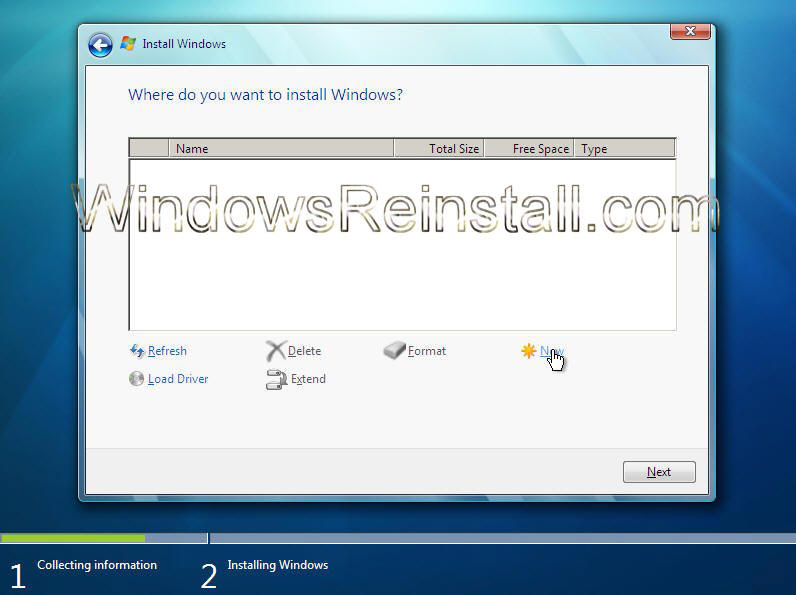
it came up be right back lol.
 

My Computer

Computer type
Laptop
Computer Manufacturer/Model Number
Dell
OS
Windows 7 Ultimate x32
CPU
?
Motherboard
Celeron 1.86GHZ
Memory
3gb
the hard drive sounds the same as when someone is on life support and the machine is breathing for them lol.
 

My Computer

Computer type
Laptop
Computer Manufacturer/Model Number
Dell
OS
Windows 7 Ultimate x32
CPU
?
Motherboard
Celeron 1.86GHZ
Memory
3gb
essenbe... windows cant be installed on partition 1 because is says it needs at least 7399mb
 

My Computer

Computer type
Laptop
Computer Manufacturer/Model Number
Dell
OS
Windows 7 Ultimate x32
CPU
?
Motherboard
Celeron 1.86GHZ
Memory
3gb
so i picked the other one that was unallocated and its been sitting at 0% for ever now lol.
 

My Computer

Computer type
Laptop
Computer Manufacturer/Model Number
Dell
OS
Windows 7 Ultimate x32
CPU
?
Motherboard
Celeron 1.86GHZ
Memory
3gb
OK, go to the cmd screen type diskpart, list disk, select disk 0 clean, then exit and exit again. If your hard drive is making noises, it may be defective, It should not be making the noises you describe.
 

My Computers

System One System Two

  • Computer type
    PC/Desktop
    Computer Manufacturer/Model Number
    ALWAYS UNDER CONSTRUCTION
    OS
    Windows 11 Pro
    CPU
    Ryzen 9 5900X
    Motherboard
    Asus X570 Crosshair Viii Hero
    Memory
    32GB G Skill DDR4-3600
    Graphics Card(s)
    EVGA RTX 3080 FTW 3 Ultra
    Sound Card
    On Board/Sennheiser PC37X Headset
    Monitor(s) Displays
    3 X Asus 27"
    Screen Resolution
    2560x1440
    Hard Drives
    2 X 1 TB NVME drives
    PSU
    EVGA 850
    Case
    Phanteks Eclipse P400A
    Cooling
    EVGA 280 AIO
    Keyboard
    Logitech G510s/ Logitech G13
    Mouse
    Logitech G502
    Internet Speed
    24/1
    Antivirus
    ESET/MBAM Pro/SAS Pro
    Browser
    Chrome/ Firefox/ Edge
  • Computer type
    Laptop
    System Manufacturer/Model Number
    Dell 16 Plus
    OS
    Windows 11 Pro
    CPU
    Intel Ultra 9 288V
    Memory
    32 GB LPDDR5X 8533
    Monitor(s) Displays
    16" Mini-LED HDR600 Touch 90 Hz
    Screen Resolution
    2560X1600
    Hard Drives
    1 TB NVME
When i type list volume status is healthy, Fs says RAW, type says partition, under Ltr and Labe1 there's nothing
 

My Computer

Computer type
Laptop
Computer Manufacturer/Model Number
Dell
OS
Windows 7 Ultimate x32
CPU
?
Motherboard
Celeron 1.86GHZ
Memory
3gb
Yep seems defective, that's why you got it for 0.50$. You should connect it to another computer to check it
 

My Computer

OS
Win7 64 bits FR
CPU
2500K @ 4.5 GHz
Motherboard
Asrock Z68 Gen3 Extreme3
Memory
4x4GB 1600MHz GSkill CL9.
Graphics Card(s)
HD6850 Powercolor stock
Sound Card
Integrated
Monitor(s) Displays
Samsung 2343 + Dell 20in 4/3
Screen Resolution
2048x1152, 1600x1200
Hard Drives
OCZ Vertex LE SSD, 50GB
OCZ Solid 3 120GB
OCZ Vertex 2 240GB
Western Digital Scorpio 320GB 5400 rpm
PSU
KingWin Lazer Platinum (90+) 550Watts
Case
HAF912
Cooling
CPU: OCZ Vendetta 2
Keyboard
MX5500 revolution bluetooth
Mouse
MX5500 revolution bluetooth
Internet Speed
Cable 7 Mbps
Back
Top