
Noob in need of a little help

jree

New member
Local time
3:57 PM
Messages
6
Hey guys, as you can tell I'm new to these forums and after reading through some of the post on the site I feel like I'm new to computers now. I had Vista and just recently installed 7 pro from a digital download that they were offering to students. I did some searching on this site and didn't quite find the answer that I though suited me.

Here are the issues:

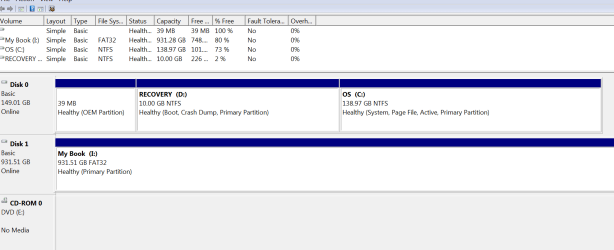
Recover drive D is almost full

When installing new drivers (i.e. Microsoft intellipoint mouse, Explorer 9) they save in the recovery drive automatically instead of C

when booting it gives me the option to either run Vista or 7


I saw on here that Barefoot Kid suggested to do a clean install but I read somewhere that if I tried to reinstall my upgrade version it wouldn't let me
Clean Install Windows 7 With Upgrade Media and Product Key on Formatted or Empty Blank Hard Drive » My Digital Life


Any help is appreciated guys, thanks and if any more info is needed just let me know
 

Attachments
  • Capture.PNG
    Capture.PNG
    20.6 KB · Views: 9

My Computer My Computer

At a glance

Windows 7 professional 32bit
OS
Windows 7 professional 32bit

My Computer My Computer

At a glance

Windows 7 32 bitAMD 5200+ dual core2 GBNVidia GeForce 6150SE 128 MB
Computer Manufacturer/Model Number
HP Media Center
OS
Windows 7 32 bit
CPU
AMD 5200+ dual core
Memory
2 GB
Graphics Card(s)
NVidia GeForce 6150SE 128 MB
Monitor(s) Displays
CRT
Screen Resolution
1280x1024
Hard Drives
500 GB Sata internal :

SIIG USB 3.0 docking stations w/WD Caviar Black 6 Gb/s drives
Keyboard
PS/2
Mouse
PS/2 Wheel Mouse
Other Info
SIIG USB 3.0 PCIexpress card.
The recovery partition and OEM partition in that disk management window are the remains of your vista install. Some OEMs configure their machines to write restore points etc. to the recovery partition which is a terrible idea.

Anyhoo, I suggest you do a clean install with the upgrade disk using the workaround described in the tutorial MilesAhead linked. During the install, use the Advanced drive options to delete all the partitions so that the entire drive becomes one big unallocated space, then follow this tut.

http://www.sevenforums.com/tutorials/1649-clean-install-windows-7-a.html

(Dont get confused, this tut is also linked in the upgrade media tut).

Backup all critical data before doing this. If you wish you can copy the contents of the recovery partition to an external drive, this may enable you to restore the factory vista in the future. Although it remains to be seen whether that partition is uncorrupted.
 

My Computer My Computer

At a glance

Windows 7 x64 pro/ Windows 7 x86 Pro/ XP SP3 x86
Computer Manufacturer/Model Number
Too many to describe...
OS
Windows 7 x64 pro/ Windows 7 x86 Pro/ XP SP3 x86
I'm sorry for being a little slow at this stuff but I am not that versed in computers. Should I put my "window.old" file back on my D drive, revert back to Vista, and then do a clean install of my upgrade? I'm just trying to be very cautious with this cause I really don't want to lose out on my $30(I know its not much but to a colleg kid with a mortgage and family it is) and I definitley don't want to lose Windows 7.

I really appreciate the help but more than anything I appreciate the patience with me and I honestly apologize for any aggrevation
 

My Computer My Computer

At a glance

Windows 7 professional 32bit
OS
Windows 7 professional 32bit
You dont need to go back in time. Windows.old contains the vista files so you may like to just save it somewhere like on an external drive. One can actually recover files from that folder. If you are certain you dont need anything from the previous install, just delete windows.old.

You dont need to revert to vista. Just boot from the win7 upgrade dvd and do a clean install, as described in this tutorial.

http://www.sevenforums.com/tutorials/1649-clean-install-windows-7-a.html

but with just two special things- use the advanced drive options to completely delete all partitions and format the drive during the install and second UNCHECK the box "Automatically activate windows when I'm online".

Once install is complete, use the registry workaround (Option 3) in this tut.

http://www.sevenforums.com/tutorials/31402-clean-install-upgrade-windows-7-version.html

Feel free to refer back after each step.
 

My Computer My Computer

At a glance

Windows 7 x64 pro/ Windows 7 x86 Pro/ XP SP3 x86
Computer Manufacturer/Model Number
Too many to describe...
OS
Windows 7 x64 pro/ Windows 7 x86 Pro/ XP SP3 x86
Hello jree, welcome to Seven Forums!


In the post above this one Bill has given you the best way to complete the process.


If you need to back anything up, have a look at this tutorial at the link below.

How to Backup User and System Files in Windows 7
 

My Computer My Computer

At a glance

W 7 64-bit UltimateIntel Q9550 Yorkfield8GB Dominator 8500C5DATI : XFX 5870
Computer Manufacturer/Model Number
* BFK Customs *
OS
W 7 64-bit Ultimate
CPU
Intel Q9550 Yorkfield
Motherboard
ASUS P5Q Pro
Memory
8GB Dominator 8500C5D
Graphics Card(s)
ATI : XFX 5870
Sound Card
Realtek HD Audio 7-1
Monitor(s) Displays
1x 47" LCD HDMI & 3x 26" LCD HDMI
Screen Resolution
1920x1080P & 1920x1200
Hard Drives
1x 80GB Intel X25-M G2 SSD : 1x 500GB & 1x 640GB WD Caviar Black(s)
PSU
Corsair 620HX
Case
Cooler Master RC-690
Cooling
Tuniq Tower 120, 2x 140mm and 3x 120mm case fans
Keyboard
Microsoft 500
Mouse
Razer Diamondback 3G
Internet Speed
14 Mb/s
Other Info
1x Koutech 3Gb/s SATA HDD Hot Swap Rack
Thank you very much guys!! I'm going to give it a shot
 

My Computer My Computer

At a glance

Windows 7 professional 32bit
OS
Windows 7 professional 32bit
If you are going to back up Windows.old take a look at RichCopy:

Free Utility: RichCopy, an Advanced Alternative to RoboCopy

If you try dragging the folder to another drive in Explorer the dialog will sit there for 4 hours while it counts how many files it's going to copy. I copied my Windows.old and there were over 200,000 files and folders in it. Your system may even crash if you try to do it with drag & drop. RichCopy will be done by the time Explorer starts the actual copy.
 

My Computer My Computer

At a glance

Windows 7 32 bitAMD 5200+ dual core2 GBNVidia GeForce 6150SE 128 MB
Computer Manufacturer/Model Number
HP Media Center
OS
Windows 7 32 bit
CPU
AMD 5200+ dual core
Memory
2 GB
Graphics Card(s)
NVidia GeForce 6150SE 128 MB
Monitor(s) Displays
CRT
Screen Resolution
1280x1024
Hard Drives
500 GB Sata internal :

SIIG USB 3.0 docking stations w/WD Caviar Black 6 Gb/s drives
Keyboard
PS/2
Mouse
PS/2 Wheel Mouse
Other Info
SIIG USB 3.0 PCIexpress card.
I would like to thank everybody for helping me out....Great advice guys, again, thank you
 

My Computer My Computer

At a glance

Windows 7 professional 32bit
OS
Windows 7 professional 32bit
It's been our pleasure, if you need further assistance we'll be around!
 

My Computer My Computer

At a glance

W 7 64-bit UltimateIntel Q9550 Yorkfield8GB Dominator 8500C5DATI : XFX 5870
Computer Manufacturer/Model Number
* BFK Customs *
OS
W 7 64-bit Ultimate
CPU
Intel Q9550 Yorkfield
Motherboard
ASUS P5Q Pro
Memory
8GB Dominator 8500C5D
Graphics Card(s)
ATI : XFX 5870
Sound Card
Realtek HD Audio 7-1
Monitor(s) Displays
1x 47" LCD HDMI & 3x 26" LCD HDMI
Screen Resolution
1920x1080P & 1920x1200
Hard Drives
1x 80GB Intel X25-M G2 SSD : 1x 500GB & 1x 640GB WD Caviar Black(s)
PSU
Corsair 620HX
Case
Cooler Master RC-690
Cooling
Tuniq Tower 120, 2x 140mm and 3x 120mm case fans
Keyboard
Microsoft 500
Mouse
Razer Diamondback 3G
Internet Speed
14 Mb/s
Other Info
1x Koutech 3Gb/s SATA HDD Hot Swap Rack
Back
Top