
Normal CPU temperature

geniulmalefic

Push the limits!
Member
VIP
Local time
12:20 PM
Messages
186
Location
Look behind you...
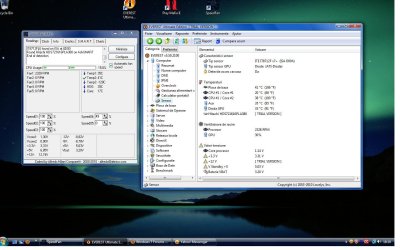
Hi,I've reviwed my CPu temperature and I think is a little higher,but I want to hear other people opinion,down is a print screen for you guys.

My specs are:
AMD Athlon 64x2 dual core 4400, 2,3 GHz
ATI Radeon 2400 HD
HDD 160GB
2GB RAM DDR2 667 MHz
Sometimes the Core 2 climb up to 54-61 but only on heavy load.(ex mozilla)
On video games isn't that high temp.
Thanks again for help.
P.S. My computer is still freezing when I'm browsing the internet,so I tought this is the problem.
I've run Memtest and everything is ok.
 

Attachments
  • temp.jpg
    temp.jpg
    142.1 KB · Views: 805

My Computer

Computer Manufacturer/Model Number
AMD Athlon 64x2 dual core 4400+
OS
Windows 7 Enterprise x64
CPU
2,3GHz
Motherboard
ASUS
Memory
2GB DDR2
Graphics Card(s)
ATI Radeon HD 2400
Sound Card
Realtek
Monitor(s) Displays
Benq G900W
Screen Resolution
1440x900
Hard Drives
160 GB
i dont think the heat is your problem. my cpu seems to run about 10 degrees celcius above the ambient temp at idle, but will go up to 50c or more when i am playing games... can u give more details about freezing while using the net? do you mean just browsing, or watching youtube or downloading torrents?
 

My Computer

Computer Manufacturer/Model Number
HP dv6519tx
OS
Windows 7 Ultimate x64
CPU
1.80 GHz Intel Core 2 Duo processor T7100
Memory
3 gig ddr2
Graphics Card(s)
NVIDIA GeForce 8400M GS
Sound Card
Realtek High Definition Audio
Monitor(s) Displays
15.4” WXGA High Definition BrightView Widescreen
Screen Resolution
1280 x 800
Hard Drives
Hitachi 320 GB (5400 rpm)
PSU
90 W AC Power Adapter
Cooling
Kitchen plate under the lappy
Keyboard
101 key compatible
Mouse
Touch Pad with On/Off button and dedicated vertical Scroll
Internet Speed
Three Wireless internet prepaid using E160G USB dongle
i dont think the heat is your problem. my cpu seems to run about 10 degrees celcius above the ambient temp at idle, but will go up to 50c or more when i am playing games... can u give more details about freezing while using the net? do you mean just browsing, or watching youtube or downloading torrents?

When I'm browsing the internet.
When I use programs that need a connection to internet.
When I download files.
It's freezing and I have to restart my computer.
It's annoying..
 

My Computer

Computer Manufacturer/Model Number
AMD Athlon 64x2 dual core 4400+
OS
Windows 7 Enterprise x64
CPU
2,3GHz
Motherboard
ASUS
Memory
2GB DDR2
Graphics Card(s)
ATI Radeon HD 2400
Sound Card
Realtek
Monitor(s) Displays
Benq G900W
Screen Resolution
1440x900
Hard Drives
160 GB
firstly, no its not your temperatures, from those screenshots you posted, it looks like Core 0 was idle at 20C and Core 1 was doing something, hence the 38 degrees.

Quite frankly those temperatures are amazing if their accurate, My PC Idles at 30C if im lucky and can get as high as 50 if its doing something particularly intense, and I live in England for gods sake! not exactly renowned for our high temperatures.

Which means that there is a problem with your internet somewhere most likely,

In particular im looking at this:
My computer is still freezing when I'm browsing the internet,so I tought this is the problem.

So, onto the standard questions:
1) What AV/Firewall do you use?
2) How do you connect to the internet
3) DO you use any software to connect your PC to the Internet (like an ISP program or something)
")
 

My Computer

Computer type
PC/Desktop
Computer Manufacturer/Model Number
Medion Erazer (note to self: insert model number) - with custom additions
OS
Windows 10 Pro x64
CPU
Intel Core i5 7400 @ 3.00GHz
Motherboard
OEM supllied with PC
Memory
8GB 2133Mhz DDR4 (OEM supplied)
Graphics Card(s)
Gygabyte Windforce GTX 1050Ti (Factory Overclocked)
Sound Card
Realtek
Monitor(s) Displays
Acer Al1980 + HKC
Screen Resolution
1360*768(HKC) / 1280*1024(Acer)
Hard Drives
1TB Toshiba
1TB WD Caviar Green
120GB Samsung Evo 840
PSU
OEM supplied (no power rating on case)
Case
OEM Supplied
Cooling
Stock
Keyboard
Logitech Wireless
Mouse
Logitect Wireless
Internet Speed
40Mb/s Down 10Mb/s Up
Antivirus
Defender
Browser
Firefox
firstly, no its not your temperatures, from those screenshots you posted, it looks like Core 0 was idle at 20C and Core 1 was doing something, hence the 38 degrees.

Quite frankly those temperatures are amazing if their accurate, My PC Idles at 30C if im lucky and can get as high as 50 if its doing something particularly intense, and I live in England for gods sake! not exactly renowned for our high temperatures.

Which means that there is a problem with your internet somewhere most likely,

In particular im looking at this:
My computer is still freezing when I'm browsing the internet,so I tought this is the problem.
So, onto the standard questions:
1) What AV/Firewall do you use?
2) How do you connect to the internet
3) DO you use any software to connect your PC to the Internet (like an ISP program or something)
")
well,it's a broadband connection.
I've just updated the network driver.
Hope I this end my problems.
I don't know anymore information.
and sometimes my CPU goes up to 64 degrease.
 

My Computer

Computer Manufacturer/Model Number
AMD Athlon 64x2 dual core 4400+
OS
Windows 7 Enterprise x64
CPU
2,3GHz
Motherboard
ASUS
Memory
2GB DDR2
Graphics Card(s)
ATI Radeon HD 2400
Sound Card
Realtek
Monitor(s) Displays
Benq G900W
Screen Resolution
1440x900
Hard Drives
160 GB
64°C is a little high, but not panicky levels - especially if it does not sit there for a long time, but spikes then drops back down after a few minutes. Still, you need to make sure the interior is clean of heat trapping dust, and that you have good front to back air flow through the case. Reroute wires to minimize disrupting that flow. Replace any flat ribbon cables with round cables. And if necessary, add another or larger case fans.

I would also replace your Ethernet cable. They are not very robust and can only take so many yanks. You might try a different port on your router, if not directly connected to your gateway device.
 

My Computer

Computer Manufacturer/Model Number
BrightWorks Systems B4
OS
Windows 7 Profession 64-bit
CPU
Intel Core i7-860 Quad
Motherboard
Gigabyte P55-UD4P
Memory
Mushkin 4x2Gb PC12800
Graphics Card(s)
Gigabyte GTX260 896Mb
Sound Card
Integrated 7.1 HD Dolby
Monitor(s) Displays
2 Samsung 2220wm-HAS 22"
Screen Resolution
1680 x 1050 | 1680 x 1050
Hard Drives
WD HE 1Tb
PSU
Corsair TX-750W
Case
Ultra M998
Cooling
OEM
Keyboard
MS Wireless Comfort 5000
Mouse
MS Wireless 5000
Internet Speed
Cable and pretty darn fast
1) Try upgrading your network drivers.

2) Check in task manager (right click on task bar, select task manager) for processes hogging CPU and RAM, particularly at freeze times.

2) Go to Event viewer (Click Start orb, type "eventvwr.msc" without quotes in the search box, hit enter) and look for critical and warning errors. Try to correlate with the freeze times, that might give a clue.

3) Would suggest, you upgrade RAM as well.
 

My Computer

Computer Manufacturer/Model Number
Too many to describe...
OS
Windows 7 x64 pro/ Windows 7 x86 Pro/ XP SP3 x86
Checking Event Viewer is an excellent idea. It may provide a valuable clue. I note however, he did upgrade his drivers and while 2Gb of RAM is not a lot these days, having only 2Gb does not cause a system to freeze, unless bad. And while not conclusive, he ran Memtest with no errors.

Not sure how one goes about checking Task Manager at freeze times unless you can accurately predict when it will freeze - unless I'm missing something here.
 

My Computer

Computer Manufacturer/Model Number
BrightWorks Systems B4
OS
Windows 7 Profession 64-bit
CPU
Intel Core i7-860 Quad
Motherboard
Gigabyte P55-UD4P
Memory
Mushkin 4x2Gb PC12800
Graphics Card(s)
Gigabyte GTX260 896Mb
Sound Card
Integrated 7.1 HD Dolby
Monitor(s) Displays
2 Samsung 2220wm-HAS 22"
Screen Resolution
1680 x 1050 | 1680 x 1050
Hard Drives
WD HE 1Tb
PSU
Corsair TX-750W
Case
Ultra M998
Cooling
OEM
Keyboard
MS Wireless Comfort 5000
Mouse
MS Wireless 5000
Internet Speed
Cable and pretty darn fast
Checking Event Viewer is an excellent idea. It may provide a valuable clue. I note however, he did upgrade his drivers and while 2Gb of RAM is not a lot these days, having only 2Gb does not cause a system to freeze, unless bad. And while not conclusive, he ran Memtest with no errors.

Not sure how one goes about checking Task Manager at freeze times unless you can accurately predict when it will freeze - unless I'm missing something here.


Sometimes when I browse the internet the PC just freeze,I can't do anything at that moment.
I have to restart my PC from the button.
 

My Computer

Computer Manufacturer/Model Number
AMD Athlon 64x2 dual core 4400+
OS
Windows 7 Enterprise x64
CPU
2,3GHz
Motherboard
ASUS
Memory
2GB DDR2
Graphics Card(s)
ATI Radeon HD 2400
Sound Card
Realtek
Monitor(s) Displays
Benq G900W
Screen Resolution
1440x900
Hard Drives
160 GB
1) It could be a software/ drivers conflict. Try Clean Boot, heres how.

1. Click the Start Button, type MSCONFIG in the Search Bar and Press Enter.

2. Click the Services tab, check the "Hide All Microsoft Services" box and click Disable All.

3. Click the Startup tab, click Disable All and click OK.

4. Restart the computer and test the result.

http://support.microsoft.com/kb/929135

2) Try out different network drivers, even older ones, you can install them in compatibility mode if required.

3) Are you using a wired or a wireless connection, does the issue occur in both? Also, can you test the issue with a different internet connection?
 

My Computer

Computer Manufacturer/Model Number
Too many to describe...
OS
Windows 7 x64 pro/ Windows 7 x86 Pro/ XP SP3 x86
I run windows 7 with 2 GB of Ram and never had a problem with freezing, 1gb or more Is all that Is needed to run windows 7.
 

My Computer

Computer Manufacturer/Model Number
Packard Bell/I Media B2619UK
OS
Window's 7 Home Premium 32 Bit
CPU
Intel(R)Celeron(R)[email protected],2203Mhz,2 Core(S)2 Logic..
Motherboard
Denver 10
Memory
2GB/DDR2
Graphics Card(s)
nVidia Geforce 7050/Nforce 610i
Sound Card
Microsoft High Def Audio Device
Monitor(s) Displays
Dell 15 In
Screen Resolution
1024X768X60 Hertz
Hard Drives
Specifications
Capacity 160 GB
Speed 7200 rpm
Disk Buffer 8 MB
Brand HGST
Type HDT721016SLA380
Family Deskstar 7K1000.B
Form Factor 3.5"
IDE Interface SATA 3Gb/s
Keyboard
Standard Ps/2
Mouse
Mirosoft Ps/2
Internet Speed
4.1Mbps
You might check your BIOS PC Health Settings to see if any heat thresholds are being touched - maybe one is set to 65°C Have you notice the temps just before it freezes? Although leaky capacitors are rare on newer boards, you might inspect your motherboard for caps that are bulging or leaking. The caps look like tall soda cans and there are typically a bunch surrounding the CPU socket.

A stressed or failing PSU can cause sudden reboots and freezes.

If overclocking, don't - at least not until this is resolve.
 

My Computer

Computer Manufacturer/Model Number
BrightWorks Systems B4
OS
Windows 7 Profession 64-bit
CPU
Intel Core i7-860 Quad
Motherboard
Gigabyte P55-UD4P
Memory
Mushkin 4x2Gb PC12800
Graphics Card(s)
Gigabyte GTX260 896Mb
Sound Card
Integrated 7.1 HD Dolby
Monitor(s) Displays
2 Samsung 2220wm-HAS 22"
Screen Resolution
1680 x 1050 | 1680 x 1050
Hard Drives
WD HE 1Tb
PSU
Corsair TX-750W
Case
Ultra M998
Cooling
OEM
Keyboard
MS Wireless Comfort 5000
Mouse
MS Wireless 5000
Internet Speed
Cable and pretty darn fast
Back
Top