Normal service is resumed as Windows 7's growth once again.....

Dear Lady, please let me to assure you I did not mean that OK, now you should like Windows 8. I only meant that wrong information based on invalid facts can have consequences, a casual reader might read it and decide "Oh, you have to have an MS account. That's a No No for me".

I am a devoted Windows 8 advocate. A few years back I had not even dreamed about so flexible and customizable easy to use OS, when I installed the first beta I knew this is my thing. The XP brought me back to World of Windows from Linux / Unix scene, Seven showed I was right returning "home", Eight told me I will most definitely stay.

As a part of this advocacy I see correcting false information and rumors not only important but also necessary. And it must be corrected fast, rather in the next post. Go a few posts back and you see what I am fighting against: correcting invalid information is considered as starting a fight.

My only purpose to post here, the content in my posts has been to correct some invalid information and untruths. In doing so I of course understand I "rock the boat" because as you can clearly see, the pro-Eight arguments are not very much tolerated.

Kari
 

My Computer My Computer

At a glance

Windows 10 Pro x64 EN-GB1.6 GHz Intel Core i7-720QM Processor6 GBATI Mobility Radeon HD 5850 Graphics
Computer type
Laptop
Computer Manufacturer/Model Number
HP ENVY 17-1150eg
OS
Windows 10 Pro x64 EN-GB
CPU
1.6 GHz Intel Core i7-720QM Processor
Memory
6 GB
Graphics Card(s)
ATI Mobility Radeon HD 5850 Graphics
Sound Card
Beats sound system with integrated subwoofer
Monitor(s) Displays
17" laptop display, 22" LED and 32" Full HD TV through HDMI
Screen Resolution
1600*900 (1), 1920*1080 (2&3)
Hard Drives
Internal: 2 x 500 GB SATA Hard Disk Drive 7200 rpm
External: 2TB for backups, 3TB USB3 network drive for media
Cooling
As Envy runs a bit warm, I have it on a Cooler Master pad
Keyboard
Logitech diNovo Media Desktop Laser (bluetooth)
Mouse
Logitech Performance Mouse MX
Internet Speed
50/10 Mbps VDSL
Antivirus
Windows Defender 4.3.9431.0
Browser
Maxthon 3.5.2., IE11
Got to love a good debate,
I have to admit I'm a bit bias being a member of Sevenforums and not eight :D
 

My Computer My Computer

At a glance

Win-7-Pro64bit 7-H-Prem-64biti7-5930K 2nd i9-9940x both water blocked VRM'...Trident-z 3200C14 2nd Trident-z 3600C16EVGA 1080ti ftw3 2nd Titan Xp both water blocked
Computer type
PC/Desktop
Computer Manufacturer/Model Number
Custom assembled by me :}
OS
Win-7-Pro64bit 7-H-Prem-64bit
CPU
i7-5930K 2nd i9-9940x both water blocked VRM's too
Motherboard
ASUS SABERTOOTH X99 2nd ASUS x299 Apex
Memory
Trident-z 3200C14 2nd Trident-z 3600C16
Graphics Card(s)
EVGA 1080ti ftw3 2nd Titan Xp both water blocked
Sound Card
Built-in Realtek
Monitor(s) Displays
1-AOC G2460PG 24"G-Sync 144Hz/ 2nd 1-ASUS VG248QE 24" 144Hz
Screen Resolution
1920 x 1080 144Hz
Hard Drives
2-Samsung M.2 Evo & Evo Plus
2-Samsung 850 EVO 500GB SSD's/ 3-2.5 W.D. Black 1tb-&3-1tb/3-3.5 WD Black 1tb hdd's
PSU
EVGA SuperNOVA 1000-P2 2nd 1200-P2
Case
2-Corsair Obsidian Series 450D Black ATX Mid Tower
Cooling
Custom water loops
Keyboard
Logitech G710+/ 2nd Logitech G910
Mouse
2-RedDragon M901 Perdition 16400 dpi Gaming mouse = wired
Internet Speed
Comcast Ping 19ms 89.31mbps download speed 6.12mbps upload
Antivirus
Malwarebytes Pro/ Superantispyware Pro
Browser
FireFox & Pale moon
Other Info
2nd ASUS X299 Apex/Intel i9-9940x with Custom water loop/7H-Prem-x64/Corsair 450D case/Ram Trident-z 3600C16 4x8gb / Samsung970Evo plus 500gb SSD/Dual ssd EZ swap evo/PSU EVGA SuperNova 1200w-P2 80+Platinum/GPU Titan Xp /8-ML-140 on push-pull on 2-280GTX rads
Microsoft and their shareholders look at these three things for sure.
1. Market share
2. Sales
3. Profit
Windows 8.xx does not do well in any of those three. No I'm not going to post a bunch of web sites.

Whether the information about Windows 8.xx is misleading or the truth at this point doesn't matter.
The mass market indicated what they prefer by spending their money.
They spent their money on Windows 7 over Windows 8 for their own reasons.
Whether I like Windows 8 or not probably wasn't even in the equation. Hell I know it wasn't.

If a company makes 100 million ding dongs, they best make sure the ding dongs are made in such a fashion that a 100 million want to buy them.
If the consumers don't buy 100 million ding dongs it not the consumers fault.
 

My Computer My Computer

At a glance

Windows 10 Pro. 64/ version 1709 Windows 7 Pr...Intel i7-6800K @ 4.3Corsair Platinum 16 gig @2400EVGA GTX 1070 OC
Computer type
PC/Desktop
Computer Manufacturer/Model Number
Home made Desktop
OS
Windows 10 Pro. 64/ version 1709 Windows 7 Pro/64
CPU
Intel i7-6800K @ 4.3
Motherboard
ASUS X-99 Deluxe II
Memory
Corsair Platinum 16 gig @2400
Graphics Card(s)
EVGA GTX 1070 OC
Monitor(s) Displays
Asus 27" LED LCD/VE278Q
Screen Resolution
1920-1080 or 1280-720 HDMI
Hard Drives
INTEL SSD 730-240 Gb Sata 3.0/
PSU
EVGA Platium 1200W
Case
Phanteks Luxe Tempered Glass 8 fans/ one radiator
Cooling
XSPC/ Water Cooled CPU
Keyboard
Das 4 Professional
Mouse
Logitech M705/MX Anywhere 2-S
Internet Speed
100 mbits
Antivirus
Microsoft Security Essentials/ Malwarebytes Premium 3.0/ SAS
Browser
I.E. 11 default/Firefox/ ISP Time Warner Cable/Spectrum
Other Info
LG BluRay Burner/
Sound system-KLipsch-THX/
Icy Dock ssd Hot Swap bays.
Whether the information about Windows 8.xx is misleading or the truth at this point doesn't matter.
Instead of trying to find a fight as has been suggested, I really do my best to avoid fighting. This is why I cannot even comment that statement.

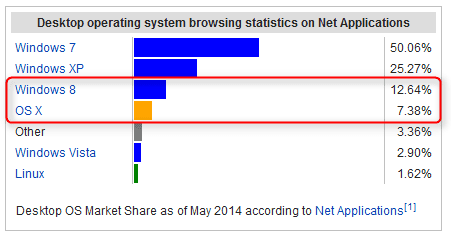
Microsoft is still making a lot of money, more than the competitors. It's funny how even some respected tech bloggers and journalists have been hinting about a lost race when Windows 8 & 8.1 have grown to be over 50% bigger in just under two years than Mac OS and Mac OS X in 30 years.

From http://en.wikipedia.org/wiki/Usage_share_of_operating_systems:

2014-06-09_02h01_34.png

Yet, nobody is suggesting Apple should give up.
 

My Computer My Computer

At a glance

Windows 10 Pro x64 EN-GB1.6 GHz Intel Core i7-720QM Processor6 GBATI Mobility Radeon HD 5850 Graphics
Computer type
Laptop
Computer Manufacturer/Model Number
HP ENVY 17-1150eg
OS
Windows 10 Pro x64 EN-GB
CPU
1.6 GHz Intel Core i7-720QM Processor
Memory
6 GB
Graphics Card(s)
ATI Mobility Radeon HD 5850 Graphics
Sound Card
Beats sound system with integrated subwoofer
Monitor(s) Displays
17" laptop display, 22" LED and 32" Full HD TV through HDMI
Screen Resolution
1600*900 (1), 1920*1080 (2&3)
Hard Drives
Internal: 2 x 500 GB SATA Hard Disk Drive 7200 rpm
External: 2TB for backups, 3TB USB3 network drive for media
Cooling
As Envy runs a bit warm, I have it on a Cooler Master pad
Keyboard
Logitech diNovo Media Desktop Laser (bluetooth)
Mouse
Logitech Performance Mouse MX
Internet Speed
50/10 Mbps VDSL
Antivirus
Windows Defender 4.3.9431.0
Browser
Maxthon 3.5.2., IE11
I never suggested Microsoft should give up.
I like Microsoft, I need Microsoft.
 

My Computer My Computer

At a glance

Windows 10 Pro. 64/ version 1709 Windows 7 Pr...Intel i7-6800K @ 4.3Corsair Platinum 16 gig @2400EVGA GTX 1070 OC
Computer type
PC/Desktop
Computer Manufacturer/Model Number
Home made Desktop
OS
Windows 10 Pro. 64/ version 1709 Windows 7 Pro/64
CPU
Intel i7-6800K @ 4.3
Motherboard
ASUS X-99 Deluxe II
Memory
Corsair Platinum 16 gig @2400
Graphics Card(s)
EVGA GTX 1070 OC
Monitor(s) Displays
Asus 27" LED LCD/VE278Q
Screen Resolution
1920-1080 or 1280-720 HDMI
Hard Drives
INTEL SSD 730-240 Gb Sata 3.0/
PSU
EVGA Platium 1200W
Case
Phanteks Luxe Tempered Glass 8 fans/ one radiator
Cooling
XSPC/ Water Cooled CPU
Keyboard
Das 4 Professional
Mouse
Logitech M705/MX Anywhere 2-S
Internet Speed
100 mbits
Antivirus
Microsoft Security Essentials/ Malwarebytes Premium 3.0/ SAS
Browser
I.E. 11 default/Firefox/ ISP Time Warner Cable/Spectrum
Other Info
LG BluRay Burner/
Sound system-KLipsch-THX/
Icy Dock ssd Hot Swap bays.
I am awaiting a response still for post 15.
 

My Computer My Computer

At a glance

Windows 10 ProAMD Ryzen 5 2400G Processor with Radeon RX Ve...G.SKILL Ripjaws V Series 16GB (2 x 8GB) 288-P...2047MB NVIDIA GeForce GTX 1060 6GB (EVGA)
Computer type
PC/Desktop
Computer Manufacturer/Model Number
Custom Built
OS
Windows 10 Pro
CPU
AMD Ryzen 5 2400G Processor with Radeon RX Vega 11 Graphics
Motherboard
ASRock X470 Master SLI/AC AM4 AMD Promontory X470 SATA 6Gb/s
Memory
G.SKILL Ripjaws V Series 16GB (2 x 8GB) 288-Pin DDR4 SDRAM D
Graphics Card(s)
2047MB NVIDIA GeForce GTX 1060 6GB (EVGA)
Sound Card
Motherboard Built in
Monitor(s) Displays
Acer R240HY bidx 23.8-Inch IPS HDMI DVI VGA (1920 x 1080) Wi
Screen Resolution
1920 x 1080
Hard Drives
1TB Sandisk SSD PLUS (Main drive)
500 GB Seagate 7200 RPM (Games)
500 GB Western Digital 7200 RPM (Virtual Machines)
PSU
CORSAIR TX Series TX650M 650W 80+ Gold Modular Power Supply
Case
CORSAIR CARBIDE SPEC-02 Mid-Tower Gaming Case, Red LED Fan
Cooling
220mm, two 120mm, and four 60mm fans
Keyboard
Wired Dell keyboard
Mouse
Wireless Logitech mouse
Internet Speed
250mb down, 30mb up
Antivirus
Panda Cloud Antivirus
Browser
Chrome-ish x64
Other Info
Your awesome for reading this.
I am awaiting a response still for post 15.
To avoid fight, I saw no reason to comment your post but OK, you asked it so here we go although there's not much to comment.

Extract from your post #15:
Kari I think you are taking my opinions and reading them like I am saying they are facts. I know I do not have to use the store, I know I can avoid and not use metro completely. I know I can do simple tasks with just a much different way in 8, I know windows 8 is a desktop operating system etc.

Let's go back to my answers (post #5) to your first post (#4) in this thread. I was referring for instance to the highlighted parts of your post as "false information" and clearly more than an opinion:

I don't need every app taking up my entire screen. I want to multitask. Yes you can snap apps, yes you can resize. But everything is ridiculous giant and cumbersome. It speaks volumes that it has such as low market-share as it does.
The stupidest BS argument I have ever heard of. If you do not like Store Apps and how they behave, you do not have to use nor see them ever again. The same if you do not like the Start Screen, boot to desktop and never use Start Screen again. Multitask with desktop apps exactly as you do with Windows Seven.

Previous versions is a perfect example. It is a fantastic tool and is gone and replaced with the dumber file history. That requires a external hard drive hooked up at all times to restore previous versions of files. What good is that? Why make it harder to do something?
Again BS. File history does not require an external HDD. For example I am using a separate partition in my system disk for it.
Both of the highlighted statements are not true.

Windows 8 Desktop Apps work just as their Windows 7 counterparts. They are not bigger, they are not more cumbersome, in most cases they even take less PC resources and start faster than in Windows 7. You cannot compare Windows 8 Store Apps and Windows 7 Desktop Apps. Apples and oranges.

Your statement about File History requiring an external HDD to be always connected was and remains BS.

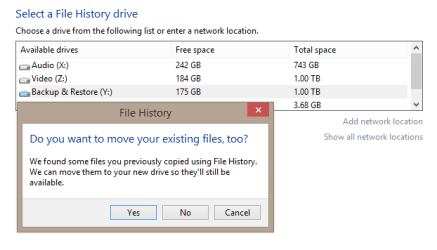
A bit OT but I like the flexibility of File History; if I want to keep more old versions not wanting to delete the older ones but my File History drive is getting full, I can change the target drive on the fly. Can you tell me how it's done with Previous Versions?

2014-06-09_03h00_45.png

By the way, in post #5 I asked you something that you have not answered yet:

To me it still takes longer to do simple tasks.
Name a few "simple tasks" that takes more time to do in Eight that in Seven.

Kari
 

My Computer My Computer

At a glance

Windows 10 Pro x64 EN-GB1.6 GHz Intel Core i7-720QM Processor6 GBATI Mobility Radeon HD 5850 Graphics
Computer type
Laptop
Computer Manufacturer/Model Number
HP ENVY 17-1150eg
OS
Windows 10 Pro x64 EN-GB
CPU
1.6 GHz Intel Core i7-720QM Processor
Memory
6 GB
Graphics Card(s)
ATI Mobility Radeon HD 5850 Graphics
Sound Card
Beats sound system with integrated subwoofer
Monitor(s) Displays
17" laptop display, 22" LED and 32" Full HD TV through HDMI
Screen Resolution
1600*900 (1), 1920*1080 (2&3)
Hard Drives
Internal: 2 x 500 GB SATA Hard Disk Drive 7200 rpm
External: 2TB for backups, 3TB USB3 network drive for media
Cooling
As Envy runs a bit warm, I have it on a Cooler Master pad
Keyboard
Logitech diNovo Media Desktop Laser (bluetooth)
Mouse
Logitech Performance Mouse MX
Internet Speed
50/10 Mbps VDSL
Antivirus
Windows Defender 4.3.9431.0
Browser
Maxthon 3.5.2., IE11
Where is the response to this since you only took the first bit out of post 15?

The previous versions thing from post 6, I stated file history must have a drive set up to use it.

Windows 7 uses previous versions (shadow copies) and restores files from restore points. No external hard drive or another drive needed for setup, nothing needs to be turned on etc.

File history requires a drive to be set up and file history must be turned on. I am not able to use my C drive on my windows 8.1 pro vm.

From Microsoft article: Restore files or folders using File History - Windows Help

Windows Tutorials, Howtos, and More!: Windows 8: How To Recover Previous Versions Of Files
 

My Computer My Computer

At a glance

Windows 10 ProAMD Ryzen 5 2400G Processor with Radeon RX Ve...G.SKILL Ripjaws V Series 16GB (2 x 8GB) 288-P...2047MB NVIDIA GeForce GTX 1060 6GB (EVGA)
Computer type
PC/Desktop
Computer Manufacturer/Model Number
Custom Built
OS
Windows 10 Pro
CPU
AMD Ryzen 5 2400G Processor with Radeon RX Vega 11 Graphics
Motherboard
ASRock X470 Master SLI/AC AM4 AMD Promontory X470 SATA 6Gb/s
Memory
G.SKILL Ripjaws V Series 16GB (2 x 8GB) 288-Pin DDR4 SDRAM D
Graphics Card(s)
2047MB NVIDIA GeForce GTX 1060 6GB (EVGA)
Sound Card
Motherboard Built in
Monitor(s) Displays
Acer R240HY bidx 23.8-Inch IPS HDMI DVI VGA (1920 x 1080) Wi
Screen Resolution
1920 x 1080
Hard Drives
1TB Sandisk SSD PLUS (Main drive)
500 GB Seagate 7200 RPM (Games)
500 GB Western Digital 7200 RPM (Virtual Machines)
PSU
CORSAIR TX Series TX650M 650W 80+ Gold Modular Power Supply
Case
CORSAIR CARBIDE SPEC-02 Mid-Tower Gaming Case, Red LED Fan
Cooling
220mm, two 120mm, and four 60mm fans
Keyboard
Wired Dell keyboard
Mouse
Wireless Logitech mouse
Internet Speed
250mb down, 30mb up
Antivirus
Panda Cloud Antivirus
Browser
Chrome-ish x64
Other Info
Your awesome for reading this.
Where is the response to this since you only took the first bit out of post 15?

The previous versions thing from post 6, I stated file history must have a drive set up to use it.
...
...

I see no question there to answer. Only a bit misleading statement: The drive for File history does not need to be set up. Any connected and formatted internal drive except system reserved partitions and drive C:, external or flash drive is OK, even memory cards.

What about the list of simple tasks taking longer in Windows 8? Is that list going to be so big you need more time to compose it?
 

My Computer My Computer

At a glance

Windows 10 Pro x64 EN-GB1.6 GHz Intel Core i7-720QM Processor6 GBATI Mobility Radeon HD 5850 Graphics
Computer type
Laptop
Computer Manufacturer/Model Number
HP ENVY 17-1150eg
OS
Windows 10 Pro x64 EN-GB
CPU
1.6 GHz Intel Core i7-720QM Processor
Memory
6 GB
Graphics Card(s)
ATI Mobility Radeon HD 5850 Graphics
Sound Card
Beats sound system with integrated subwoofer
Monitor(s) Displays
17" laptop display, 22" LED and 32" Full HD TV through HDMI
Screen Resolution
1600*900 (1), 1920*1080 (2&3)
Hard Drives
Internal: 2 x 500 GB SATA Hard Disk Drive 7200 rpm
External: 2TB for backups, 3TB USB3 network drive for media
Cooling
As Envy runs a bit warm, I have it on a Cooler Master pad
Keyboard
Logitech diNovo Media Desktop Laser (bluetooth)
Mouse
Logitech Performance Mouse MX
Internet Speed
50/10 Mbps VDSL
Antivirus
Windows Defender 4.3.9431.0
Browser
Maxthon 3.5.2., IE11
To address the other things:

I know I do not have to use the store, I know I can avoid and not use metro completely. I know I can do simple tasks with just a much different way in 8, I know windows 8 is a desktop operating system etc.

I am saying I do not like or care for windows 8, nor do not see why people with windows 7 would want it. No where did I say you must use the store, you must have apps full screened etc. I was giving my opinion on it that is all.

My opinion is saying, windows 8 does not improved on the experience I have now, so why would I upgrade?

This is what I am saying.

It is not the fact that these things can be changed, it is that they have to be in order for it to function well.

Example, photos open in the photos metro app instead of the desktop app. This makes no sense, the operating system constantly flips back and forth from desktop to metro like crazy.

I'll say it differently,

When I clean install 7, I set the following number of preferences to make windows 7 the way I like.

6.

In windows 8, I have to configure almost 30 settings (28) to make it usable. I have to turn off booting to metro, I have to disable and reset all file associations, gettting rid of the 2 different internet explorers, etc. For me, (imho) usable. When I have customer who come in to have their PC reset up, that is several settings to go through each and every time.

Now maybe I am wrong on this, but I have attempted to use a clean install with a system image with prebuilt settings set so I do not get customers calling me asking how to close out of internet explorer. Even with improvements made, my customers cannot get around. Even after spending time to show them. I have not found a way to make a system image with windows 8 to apply to all pcs and pop in a key, as there is no lisence key found on these new pcs. So maybe I am doing something wrong, but windows 8 constantly keeps refusing to activate and causes so many headaches. Not just windows 8 itself, but the licensing way of things.

Maybe I am confused, in the wrong I do not know. But things should not be this difficult that I have to spend so much time on 1 pc to get it to a point where my customer does not throw the thing out the window. (The real one.)

I have people that buy windows 8 pcs and return them without anyone but them touching them. When I ask why and offer to show them how to use it, they say I should not need to configure the computer in order to make it work simply. That is the real issue.
 

My Computer My Computer

At a glance

Windows 10 ProAMD Ryzen 5 2400G Processor with Radeon RX Ve...G.SKILL Ripjaws V Series 16GB (2 x 8GB) 288-P...2047MB NVIDIA GeForce GTX 1060 6GB (EVGA)
Computer type
PC/Desktop
Computer Manufacturer/Model Number
Custom Built
OS
Windows 10 Pro
CPU
AMD Ryzen 5 2400G Processor with Radeon RX Vega 11 Graphics
Motherboard
ASRock X470 Master SLI/AC AM4 AMD Promontory X470 SATA 6Gb/s
Memory
G.SKILL Ripjaws V Series 16GB (2 x 8GB) 288-Pin DDR4 SDRAM D
Graphics Card(s)
2047MB NVIDIA GeForce GTX 1060 6GB (EVGA)
Sound Card
Motherboard Built in
Monitor(s) Displays
Acer R240HY bidx 23.8-Inch IPS HDMI DVI VGA (1920 x 1080) Wi
Screen Resolution
1920 x 1080
Hard Drives
1TB Sandisk SSD PLUS (Main drive)
500 GB Seagate 7200 RPM (Games)
500 GB Western Digital 7200 RPM (Virtual Machines)
PSU
CORSAIR TX Series TX650M 650W 80+ Gold Modular Power Supply
Case
CORSAIR CARBIDE SPEC-02 Mid-Tower Gaming Case, Red LED Fan
Cooling
220mm, two 120mm, and four 60mm fans
Keyboard
Wired Dell keyboard
Mouse
Wireless Logitech mouse
Internet Speed
250mb down, 30mb up
Antivirus
Panda Cloud Antivirus
Browser
Chrome-ish x64
Other Info
Your awesome for reading this.
Where is the response to this since you only took the first bit out of post 15?

The previous versions thing from post 6, I stated file history must have a drive set up to use it.
...
...

I see no question there to answer. Only a bit misleading statement: The drive for File history does not need to be set up. Any connected and formatted internal, external or flash drive is OK, even memory cards.

What about the list of simple tasks taking longer in Windows 8? Is that list going to be so big you need more time to compose it?

So without setting up a drive, your telling me I can restore my files using previous versions?

That is not true. Windows file history must be using a drive. Any connected? So drive c then? Nope, does not work. You say it does not need set up, but you have to turn it on to restore previous versions of files. Windows 7 did not need to do that. No media was required to restore old versions of files.

I also want to point out, the average windows user here. The average window user does not back up their files. In windows 7, that was usually not a issue as you can easily restore lost documents etc with previous versions. Windows 8 you cannot. You must turn it on and set it up, and have it use a external or another internal storage device.
 

My Computer My Computer

At a glance

Windows 10 ProAMD Ryzen 5 2400G Processor with Radeon RX Ve...G.SKILL Ripjaws V Series 16GB (2 x 8GB) 288-P...2047MB NVIDIA GeForce GTX 1060 6GB (EVGA)
Computer type
PC/Desktop
Computer Manufacturer/Model Number
Custom Built
OS
Windows 10 Pro
CPU
AMD Ryzen 5 2400G Processor with Radeon RX Vega 11 Graphics
Motherboard
ASRock X470 Master SLI/AC AM4 AMD Promontory X470 SATA 6Gb/s
Memory
G.SKILL Ripjaws V Series 16GB (2 x 8GB) 288-Pin DDR4 SDRAM D
Graphics Card(s)
2047MB NVIDIA GeForce GTX 1060 6GB (EVGA)
Sound Card
Motherboard Built in
Monitor(s) Displays
Acer R240HY bidx 23.8-Inch IPS HDMI DVI VGA (1920 x 1080) Wi
Screen Resolution
1920 x 1080
Hard Drives
1TB Sandisk SSD PLUS (Main drive)
500 GB Seagate 7200 RPM (Games)
500 GB Western Digital 7200 RPM (Virtual Machines)
PSU
CORSAIR TX Series TX650M 650W 80+ Gold Modular Power Supply
Case
CORSAIR CARBIDE SPEC-02 Mid-Tower Gaming Case, Red LED Fan
Cooling
220mm, two 120mm, and four 60mm fans
Keyboard
Wired Dell keyboard
Mouse
Wireless Logitech mouse
Internet Speed
250mb down, 30mb up
Antivirus
Panda Cloud Antivirus
Browser
Chrome-ish x64
Other Info
Your awesome for reading this.
And as hard as this is to believe, I know people think I am just not liking it when things change. The reality is, I like change. But when instead of improving or creating better ways to do things, and frankly doing the opposite; it makes things so complicated, where before it was streamlined and simplified I see little reason to upgrade.

I like windows 8 on a tablet. For me it should stay there. You will not hear me saying windows 8 sucks or is a pile of trash. It is a great OS. Even on the desktop once the settings are set up.

But again, these are my opinions and what I have discovered. If they are BS and not fact, ok I will be glad to be proven wrong. But there are differences when I say I do not like the way it does things vs me saying you cannot do those things. There are facts and opinions in what I write. I am not saying they are all fact or opinion.

I also mean no disrespect or attack on windows 8. Or anyone personally.
 

My Computer My Computer

At a glance

Windows 10 ProAMD Ryzen 5 2400G Processor with Radeon RX Ve...G.SKILL Ripjaws V Series 16GB (2 x 8GB) 288-P...2047MB NVIDIA GeForce GTX 1060 6GB (EVGA)
Computer type
PC/Desktop
Computer Manufacturer/Model Number
Custom Built
OS
Windows 10 Pro
CPU
AMD Ryzen 5 2400G Processor with Radeon RX Vega 11 Graphics
Motherboard
ASRock X470 Master SLI/AC AM4 AMD Promontory X470 SATA 6Gb/s
Memory
G.SKILL Ripjaws V Series 16GB (2 x 8GB) 288-Pin DDR4 SDRAM D
Graphics Card(s)
2047MB NVIDIA GeForce GTX 1060 6GB (EVGA)
Sound Card
Motherboard Built in
Monitor(s) Displays
Acer R240HY bidx 23.8-Inch IPS HDMI DVI VGA (1920 x 1080) Wi
Screen Resolution
1920 x 1080
Hard Drives
1TB Sandisk SSD PLUS (Main drive)
500 GB Seagate 7200 RPM (Games)
500 GB Western Digital 7200 RPM (Virtual Machines)
PSU
CORSAIR TX Series TX650M 650W 80+ Gold Modular Power Supply
Case
CORSAIR CARBIDE SPEC-02 Mid-Tower Gaming Case, Red LED Fan
Cooling
220mm, two 120mm, and four 60mm fans
Keyboard
Wired Dell keyboard
Mouse
Wireless Logitech mouse
Internet Speed
250mb down, 30mb up
Antivirus
Panda Cloud Antivirus
Browser
Chrome-ish x64
Other Info
Your awesome for reading this.
This thread is bizarre.

Nobody cares what the personal peccadilos of Andrew or Kari are.
The fact is, win 8 has done badly for MS. The public do not like it much, to put it kindly. Blaming the customers is extremely foolish.
 

My Computers My Computers

  • At a glance

    7 X64i5 84002x8gb 3200mhz
    Computer type
    PC/Desktop
    OS
    7 X64
    CPU
    i5 8400
    Motherboard
    gigabyte b365m ds3h
    Memory
    2x8gb 3200mhz
    Hard Drives
    various
    PSU
    pure power 11 400w cm
    Case
    Coolermaster
    Cooling
    cryorig m9i
  • At a glance

    7x64g54008gb ddr4 2400
    Computer type
    PC/Desktop
    OS
    7x64
    CPU
    g5400
    Motherboard
    ga b365m ds3h
    Memory
    8gb ddr4 2400
    PSU
    xfx pro 450w
This thread is bizarre.

Nobody cares what the personal peccadilos of Andrew or Kari are.
The fact is, win 8 has done badly for MS. The public do not like it much, to put it kindly. Blaming the customers is extremely foolish.

I did not mean to cause your thread to go nutz, I see it as talking about windows 8 and discussing it. Sorry about derailing your thread....
 

My Computer My Computer

At a glance

Windows 10 ProAMD Ryzen 5 2400G Processor with Radeon RX Ve...G.SKILL Ripjaws V Series 16GB (2 x 8GB) 288-P...2047MB NVIDIA GeForce GTX 1060 6GB (EVGA)
Computer type
PC/Desktop
Computer Manufacturer/Model Number
Custom Built
OS
Windows 10 Pro
CPU
AMD Ryzen 5 2400G Processor with Radeon RX Vega 11 Graphics
Motherboard
ASRock X470 Master SLI/AC AM4 AMD Promontory X470 SATA 6Gb/s
Memory
G.SKILL Ripjaws V Series 16GB (2 x 8GB) 288-Pin DDR4 SDRAM D
Graphics Card(s)
2047MB NVIDIA GeForce GTX 1060 6GB (EVGA)
Sound Card
Motherboard Built in
Monitor(s) Displays
Acer R240HY bidx 23.8-Inch IPS HDMI DVI VGA (1920 x 1080) Wi
Screen Resolution
1920 x 1080
Hard Drives
1TB Sandisk SSD PLUS (Main drive)
500 GB Seagate 7200 RPM (Games)
500 GB Western Digital 7200 RPM (Virtual Machines)
PSU
CORSAIR TX Series TX650M 650W 80+ Gold Modular Power Supply
Case
CORSAIR CARBIDE SPEC-02 Mid-Tower Gaming Case, Red LED Fan
Cooling
220mm, two 120mm, and four 60mm fans
Keyboard
Wired Dell keyboard
Mouse
Wireless Logitech mouse
Internet Speed
250mb down, 30mb up
Antivirus
Panda Cloud Antivirus
Browser
Chrome-ish x64
Other Info
Your awesome for reading this.
It isn't about any individual enthusiasts love/dislike. It is much more fundamental.

Here is a product which MS have spent a lot on, which has huge shelf presence, and it is going down like a lead balloon.

MS have made a series of basic mistakes. I have posted repeatedly about them.

They are now starting to do the things I posted. There is more to it than that. Let's see if they can figure it out.
 

My Computers My Computers

  • At a glance

    7 X64i5 84002x8gb 3200mhz
    Computer type
    PC/Desktop
    OS
    7 X64
    CPU
    i5 8400
    Motherboard
    gigabyte b365m ds3h
    Memory
    2x8gb 3200mhz
    Hard Drives
    various
    PSU
    pure power 11 400w cm
    Case
    Coolermaster
    Cooling
    cryorig m9i
  • At a glance

    7x64g54008gb ddr4 2400
    Computer type
    PC/Desktop
    OS
    7x64
    CPU
    g5400
    Motherboard
    ga b365m ds3h
    Memory
    8gb ddr4 2400
    PSU
    xfx pro 450w
So without setting up a drive, your telling me I can restore my files using previous versions?

That is not true. Windows file history must be using a drive. Any connected? So drive c then? Nope, does not work. You say it does not need set up, but you have to turn it on to restore previous versions of files. Windows 7 did not need to do that. No media was required to restore old versions of files.

Yes, I noticed my own mistake and edited it already but apparently too late for the sake of this argument :). The edited versions of my statement goes like this:

Any connected and formatted internal drive except system reserved partitions and drive C:, external or flash drive is OK, even memory cards.

Next: in an earlier post of yours, you separated setting up and enabling / turning on the drive needed for File History. My point was that there's only one step, to enable it, instead of two as you hinted, setting first a drive up for File History. You don't even have to select the drive, Windows is quite good in selecting the most suitable drive.

In windows 8, I have to configure almost 30 settings (28) to make it usable. I have to turn off booting to metro, I have to disable and reset all file associations, gettting rid of the 2 different internet explorers, etc. For me, (imho) usable. When I have customer who come in to have their PC reset up, that is several settings to go through each and every time.

Now maybe I am wrong on this, but I have attempted to use a clean install with a system image with prebuilt settings set so I do not get customers calling me asking how to close out of internet explorer. Even with improvements made, my customers cannot get around. Even after spending time to show them. I have not found a way to make a system image with windows 8 to apply to all pcs and pop in a key, as there is no lisence key found on these new pcs. So maybe I am doing something wrong, but windows 8 constantly keeps refusing to activate and causes so many headaches. Not just windows 8 itself, but the licensing way of things.

Maybe I am confused, in the wrong I do not know. But things should not be this difficult that I have to spend so much time on 1 pc to get it to a point where my customer does not throw the thing out the window. (The real one.)

I have people that buy windows 8 pcs and return them without anyone but them touching them. When I ask why and offer to show them how to use it, they say I should not need to configure the computer in order to make it work simply. That is the real issue.

This can of course be due different working methods, different way in presenting 8 to people or different approach in general but I have never needed more than 10 minutes after installation to make a Windows 8 computer behave as closely as Windows 7 as possible. Also, again maybe due different approach, not a single person or company I have helped or consulted both privately and professionally in for instance lately quite common upgrade from XP to 8 have complained after initial day or two learning period when they have seen what they have got.

In fact, as we speak I am sipping bourbon I got from a neighbor after I helped him last weekend to get rid of a 10+ year old PC with XP, get a new one with 8.1 and set it up. Initially he only gave me a few bottles of wine but he saw me on Friday and gave an extra bottle of bourbon (might be he knows my hobbies...) saying: "If I had known how smooth it is, I had discarded XP the day it (8) came out" (free but quite accurate translation).
 

My Computer My Computer

At a glance

Windows 10 Pro x64 EN-GB1.6 GHz Intel Core i7-720QM Processor6 GBATI Mobility Radeon HD 5850 Graphics
Computer type
Laptop
Computer Manufacturer/Model Number
HP ENVY 17-1150eg
OS
Windows 10 Pro x64 EN-GB
CPU
1.6 GHz Intel Core i7-720QM Processor
Memory
6 GB
Graphics Card(s)
ATI Mobility Radeon HD 5850 Graphics
Sound Card
Beats sound system with integrated subwoofer
Monitor(s) Displays
17" laptop display, 22" LED and 32" Full HD TV through HDMI
Screen Resolution
1600*900 (1), 1920*1080 (2&3)
Hard Drives
Internal: 2 x 500 GB SATA Hard Disk Drive 7200 rpm
External: 2TB for backups, 3TB USB3 network drive for media
Cooling
As Envy runs a bit warm, I have it on a Cooler Master pad
Keyboard
Logitech diNovo Media Desktop Laser (bluetooth)
Mouse
Logitech Performance Mouse MX
Internet Speed
50/10 Mbps VDSL
Antivirus
Windows Defender 4.3.9431.0
Browser
Maxthon 3.5.2., IE11
It isn't about any individual enthusiasts love/dislike. It is much more fundamental.

Here is a product which MS have spent a lot on, which has huge shelf presence, and it is going down like a lead balloon.

MS have made a series of basic mistakes. I have posted repeatedly about them.

They are now starting to do the things I posted. There is more to it than that. Let's see if they can figure it out.
This is exactly why wrong and misleading information must be corrected. I know quite a many geeks who believe these untrue horror stories and use them as a reason not to upgrade.

I really have big issues in understanding that it is considered as fighting when someone tries to correct this wrong information spread even here, a dedicated Windows forum.
 

My Computer My Computer

At a glance

Windows 10 Pro x64 EN-GB1.6 GHz Intel Core i7-720QM Processor6 GBATI Mobility Radeon HD 5850 Graphics
Computer type
Laptop
Computer Manufacturer/Model Number
HP ENVY 17-1150eg
OS
Windows 10 Pro x64 EN-GB
CPU
1.6 GHz Intel Core i7-720QM Processor
Memory
6 GB
Graphics Card(s)
ATI Mobility Radeon HD 5850 Graphics
Sound Card
Beats sound system with integrated subwoofer
Monitor(s) Displays
17" laptop display, 22" LED and 32" Full HD TV through HDMI
Screen Resolution
1600*900 (1), 1920*1080 (2&3)
Hard Drives
Internal: 2 x 500 GB SATA Hard Disk Drive 7200 rpm
External: 2TB for backups, 3TB USB3 network drive for media
Cooling
As Envy runs a bit warm, I have it on a Cooler Master pad
Keyboard
Logitech diNovo Media Desktop Laser (bluetooth)
Mouse
Logitech Performance Mouse MX
Internet Speed
50/10 Mbps VDSL
Antivirus
Windows Defender 4.3.9431.0
Browser
Maxthon 3.5.2., IE11
Now we are getting somewhere. Okay,

So without setting up a drive, your telling me I can restore my files using previous versions?

That is not true. Windows file history must be using a drive. Any connected? So drive c then? Nope, does not work. You say it does not need set up, but you have to turn it on to restore previous versions of files. Windows 7 did not need to do that. No media was required to restore old versions of files.

Yes, I noticed my own mistake and edited it already but apparently too late for the sake of this argument :). The edited versions of my statement goes like this:

Any connected and formatted internal drive except system reserved partitions and drive C:, external or flash drive is OK, even memory cards.

Next: in an earlier post of yours, you separated setting up and enabling / turning on the drive needed for File History. My point was that there's only one step, to enable it, instead of two as you hinted, setting first a drive up for File History. You don't even have to select the drive, Windows is quite good in selecting the most suitable drive.

Ok agreed.

So I think we are clear here now....

This can of course be due different working methods, different way in presenting 8 to people or different approach in general but I have never needed more than 10 minutes to make a Windows 8 computer behave as closely as Windows 7 as possible. Also, again maybe due different approach, not a single person or company I have helped or consulted both privately and professionally in for instance lately quite common upgrade from XP to 8 have complained after initial day or two learning period when they have seen what they have got.

In fact, as we speak I am sipping bourbon I got from a neighbor after I helped him last weekend to get rid of a 10+ year old PC with XP, get a new one with 8.1 and set it up. Initially he only gave me a few bottles of wine but he saw me on Friday and gave an extra bottle of bourbon (might be he knows my hobbies...) saying: "If I had known how smooth it is, I had discarded XP the day it (8) came out" (free but quite accurate translation).

Ok, Honest question here:

With windows 8 I noticed new pc's have no license sticker on them with a key. There is a sticker that says windows 8 and it glows but no key. Now, I have done reading up on this but cannot get a definate answer. It looks like the key for 8 is stored in the bios/uefi chip.....so If I want to get the key I must use something like speccy or something to retrieve it, on order to do a clean install correct?
 

My Computer My Computer

At a glance

Windows 10 ProAMD Ryzen 5 2400G Processor with Radeon RX Ve...G.SKILL Ripjaws V Series 16GB (2 x 8GB) 288-P...2047MB NVIDIA GeForce GTX 1060 6GB (EVGA)
Computer type
PC/Desktop
Computer Manufacturer/Model Number
Custom Built
OS
Windows 10 Pro
CPU
AMD Ryzen 5 2400G Processor with Radeon RX Vega 11 Graphics
Motherboard
ASRock X470 Master SLI/AC AM4 AMD Promontory X470 SATA 6Gb/s
Memory
G.SKILL Ripjaws V Series 16GB (2 x 8GB) 288-Pin DDR4 SDRAM D
Graphics Card(s)
2047MB NVIDIA GeForce GTX 1060 6GB (EVGA)
Sound Card
Motherboard Built in
Monitor(s) Displays
Acer R240HY bidx 23.8-Inch IPS HDMI DVI VGA (1920 x 1080) Wi
Screen Resolution
1920 x 1080
Hard Drives
1TB Sandisk SSD PLUS (Main drive)
500 GB Seagate 7200 RPM (Games)
500 GB Western Digital 7200 RPM (Virtual Machines)
PSU
CORSAIR TX Series TX650M 650W 80+ Gold Modular Power Supply
Case
CORSAIR CARBIDE SPEC-02 Mid-Tower Gaming Case, Red LED Fan
Cooling
220mm, two 120mm, and four 60mm fans
Keyboard
Wired Dell keyboard
Mouse
Wireless Logitech mouse
Internet Speed
250mb down, 30mb up
Antivirus
Panda Cloud Antivirus
Browser
Chrome-ish x64
Other Info
Your awesome for reading this.

My Computer My Computer

At a glance

Windows 10 ProAMD Ryzen 5 2400G Processor with Radeon RX Ve...G.SKILL Ripjaws V Series 16GB (2 x 8GB) 288-P...2047MB NVIDIA GeForce GTX 1060 6GB (EVGA)
Computer type
PC/Desktop
Computer Manufacturer/Model Number
Custom Built
OS
Windows 10 Pro
CPU
AMD Ryzen 5 2400G Processor with Radeon RX Vega 11 Graphics
Motherboard
ASRock X470 Master SLI/AC AM4 AMD Promontory X470 SATA 6Gb/s
Memory
G.SKILL Ripjaws V Series 16GB (2 x 8GB) 288-Pin DDR4 SDRAM D
Graphics Card(s)
2047MB NVIDIA GeForce GTX 1060 6GB (EVGA)
Sound Card
Motherboard Built in
Monitor(s) Displays
Acer R240HY bidx 23.8-Inch IPS HDMI DVI VGA (1920 x 1080) Wi
Screen Resolution
1920 x 1080
Hard Drives
1TB Sandisk SSD PLUS (Main drive)
500 GB Seagate 7200 RPM (Games)
500 GB Western Digital 7200 RPM (Virtual Machines)
PSU
CORSAIR TX Series TX650M 650W 80+ Gold Modular Power Supply
Case
CORSAIR CARBIDE SPEC-02 Mid-Tower Gaming Case, Red LED Fan
Cooling
220mm, two 120mm, and four 60mm fans
Keyboard
Wired Dell keyboard
Mouse
Wireless Logitech mouse
Internet Speed
250mb down, 30mb up
Antivirus
Panda Cloud Antivirus
Browser
Chrome-ish x64
Other Info
Your awesome for reading this.

My Computer My Computer

At a glance

Windows 10 Pro x64 EN-GB1.6 GHz Intel Core i7-720QM Processor6 GBATI Mobility Radeon HD 5850 Graphics
Computer type
Laptop
Computer Manufacturer/Model Number
HP ENVY 17-1150eg
OS
Windows 10 Pro x64 EN-GB
CPU
1.6 GHz Intel Core i7-720QM Processor
Memory
6 GB
Graphics Card(s)
ATI Mobility Radeon HD 5850 Graphics
Sound Card
Beats sound system with integrated subwoofer
Monitor(s) Displays
17" laptop display, 22" LED and 32" Full HD TV through HDMI
Screen Resolution
1600*900 (1), 1920*1080 (2&3)
Hard Drives
Internal: 2 x 500 GB SATA Hard Disk Drive 7200 rpm
External: 2TB for backups, 3TB USB3 network drive for media
Cooling
As Envy runs a bit warm, I have it on a Cooler Master pad
Keyboard
Logitech diNovo Media Desktop Laser (bluetooth)
Mouse
Logitech Performance Mouse MX
Internet Speed
50/10 Mbps VDSL
Antivirus
Windows Defender 4.3.9431.0
Browser
Maxthon 3.5.2., IE11
Back
Top