Solved Normal windows 7 RAM usage

Chani

New member
Local time
1:34 AM
Messages
6
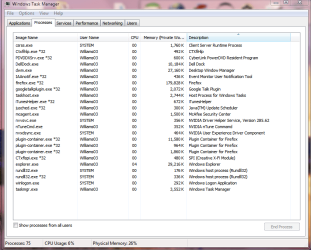
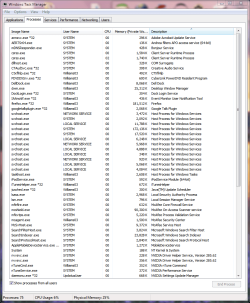
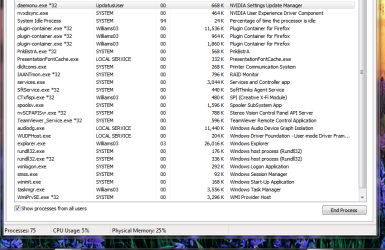
High, I'm just wondering if 2.10gb or somewhere around that is normal ram usage for windows 7. My ram used to be @1.2gb or so and not much has changed since then except for a few upgrades in hardware being the graphics card and the PSU. I have attached a few screen shots of the task manager. Snip 1.1 is from processes and Snip 2 & 3 are from processes with all users selected. Earlier today when my system was sitting idle and had absolutely no other programs running, as I had shut them all down, it was running at 2.50gb. I dunno maybe I'm being overly obsessive about it. Let me know if you need any other info or screen shots.
-thanks so much
 

Attachments

  • Snip 1.1.PNG
    Snip 1.1.PNG
    33.7 KB · Views: 203
  • Snip 2.PNG
    Snip 2.PNG
    46 KB · Views: 152
  • Snip 3.PNG
    Snip 3.PNG
    44.9 KB · Views: 110

My Computer

Computer Manufacturer/Model Number
dell studio xps 435T/9000
OS
windows 7 home premium x64
CPU
i7 920 @2.67ghz
Motherboard
generic dell mobo (I know) x58 ATX intel chipset (I think)
Memory
8gb
Graphics Card(s)
nvidia GTX 570
Sound Card
creative sound blaster x-fi xtreme gamer
Monitor(s) Displays
1 dell 1920x1080p
Hard Drives
1 TB samsung HD103UJ
PSU
corsair 700 watt
Case
factory case
Cooling
factory dell cooling for this model
Other Info
I run McAfee for my av.

I keep all my drivers constantly updated.
High, I'm just wondering if 2.10gb or somewhere around that is normal ram usage for windows 7. My ram used to be @1.2gb or so and not much has changed since then except for a few upgrades in hardware being the graphics card and the PSU. I have attached a few screen shots of the task manager. Snip 1.1 is from processes and Snip 2 & 3 are from processes with all users selected. Earlier today when my system was sitting idle and had absolutely no other programs running, as I had shut them all down, it was running at 2.50gb. I dunno maybe I'm being overly obsessive about it. Let me know if you need any other info or screen shots.
-thanks so much

Perfectly normal looking. Firefox and McA are using their normal high usage. WIn 7 takes approx half of the avail ram for fast cache and that is a good thing.

When you think about it you want it to use ram. If it doesnt use ram to do a task it will have to use the much slower pagefile on HD.

I maximize ram use by making the pagefile much smaller and forcing things to run in ram.
 

My Computer

Computer Manufacturer/Model Number
HP Pavillion dv-7 1005 Tx
OS
Win 8 Release candidate 8400
CPU
[email protected]
Memory
4 gigs
Graphics Card(s)
Nvidia 9600M
Sound Card
HD built-in
Monitor(s) Displays
17" Wxga
Screen Resolution
1440x900
Cooling
none
Internet Speed
45Mb down 5Mb up
You have 8 fricken gigabytes! It is time that you STOP fussing over usage levels.
Seriously I wish I had as much RAM as you then maybe I can join the club of savin ram for a rainy day.
 

My Computer

Computer type
PC/Desktop
Computer Manufacturer/Model Number
Alienware Aurora ALX R4
OS
Windows 10 Pro (x64)
CPU
Intel Core i7-3930K (3.2GHz - 4.5GHz)
Motherboard
Alienware Aurora-R4 x79
Memory
4x Samsung 4GB PC3-12800 DDR3 (16GB 1600MHz)
Graphics Card(s)
Nvidia Geforce GTX 690
Sound Card
SteelSeries Siberia Elite
Monitor(s) Displays
Dell UltraSharp U3011
Screen Resolution
2560x1600
Hard Drives
Samsung 850 Pro 256 GB, Seagate 1TB Desktop Hybrid HDD, 2x Western Digital 4TB Green HDD
PSU
875W Some Dell PSU <.<
Case
Alienware Aurora ALX
Cooling
Custom Liquid Cooling (EK CPU & GPU blocks) dual EK 480RAD
Keyboard
Logitech G710+ Mechanical
Mouse
Logitech G700s
Internet Speed
Verizon Fios (50 mbps average)
Other Info
Server: Intel NUC D54250WYK: i5-4250U, 16GB, 256 GB mSATA, Windows Server 2012 R2
Welcome to Windows Seven Forums.

Zigzag offers good advice as there's no point in buying extra RAM if you are not going to use it.

That said, Windows 7 will just take what it needs - you have nothing to worry about.
 

My Computer

Computer Manufacturer/Model Number
HP Pavilion Elite 495UK
OS
Windows 7 Ultimate SP1 64-Bit
CPU
Intel Core i7 870 @ 2.93GHz
Motherboard
MSI 2A9C (CPU1)
Memory
8Gb Dual-Channel DDR3 @ 664MHz
Graphics Card(s)
nVidia GeForce GTX 460 1024MB dedicated RAM
Sound Card
Realtek HD Audio
Monitor(s) Displays
HP2310i
Screen Resolution
1920 x 1080
Hard Drives
1x1954GB Hitachi HDS22020ALA 330 (RAID), 1x1954GB Hitachi External for backup and storage
PSU
460W
Case
HP Elite
Cooling
Air cooled
Keyboard
Logitech K750 solar-powered keyboard
Mouse
Logitech Wireless M180 mouse
Internet Speed
2Mb
Other Info
Pure Avanti Flow Internet Radio with iPod Dock, 64Gb iPod, HP USB Speakers, Sony MDR-V500 Headphones, Sony Vaio F-Series Laptop
Windows 7 is good at RAM management, it will use the RAM you have and move it to an application that needs more when required.
It's not like previous Windows OS that would not give it up even if needed, your system has ample RAM and is using it as it should be used.

It's all good.
 

My Computer

Computer type
PC/Desktop
Computer Manufacturer/Model Number
76~2.0
OS
Windows 7 Ult x64 - SP1/ Windows 8 Pro x64
CPU
Intel Core i5-3570K 4.6GHz
Motherboard
Gigabyte GA-Z77X UD3H, f18
Memory
8GB (2X4GB) DDR3 1600 Corsair Vengeance CL8 1.5v
Graphics Card(s)
Sapphire HD 7770 Vapor-X OC 1GB DDR5
Sound Card
Onboard VIA VT2021
Monitor(s) Displays
22" LCD Dell
Screen Resolution
1680x1050
Hard Drives
Samsung 840Pro 128GB SSD,
Seagate Barracuda 500GB SATA2 7200rpm 32MB cache, Seagate Barracuda 1TB SATA2 7200rpm 32MB cache,
PSU
Corsair HX650W
Case
Cooler Master Storm Scout
Cooling
Corsair H80 2x12cm Noctua NF P12 , 2x14cm case fans
Keyboard
Logitech Wave
Mouse
CM Sentinel
Internet Speed
Dismal
Antivirus
Avast
Browser
Opera Next
Other Info
Haswell laptop: HP Envy 17t-j, i7-4700MQ, GeForce 740M 2GB DDR3, 17.3" Full HD 1920x1080, 16GB RAM, Samsung 840 Pro 128GB, 1TB Hitachi 7200 HDD,
Desktop: eSATA ports,
External eSATA Seagate 500GB SATA2 7200rpm,
External WD USB 500GB
Windows 7 will try to keep your idle (with no extra applications loaded) RAM usage around 40%, roughly. As you upgrade your RAM, as the amount it has to load is somewhat finite, this falls to 25-30%.

It does not fall as sharp as you would expect because as Windows 7 memory manager ''realizes'' it has more room, it will scale down page file usage, irrespectively of how much space you have reserved for it. I have 6054 MB reserved (equal to the amount of my available physical RAM) yet it uses 100-300 MB, probably to page out that small amount of memory that almost never gets called into use.

Superfetch (cached memory) really begins to shine when you have a lot of RAM. If you analyze it with some tools, you realize it's mostly made up of memory-backed files.

What are those memory backed files? Superfetch literally loads files from your disk into RAM - executables, dll's, Firefox, IE and Chrome cache files, and so on. As you equip your system with more RAM, the more it loads - and after it has had some idle time after boot to load'em, most applications you use often will start quickly because they don't need to be read from the disk, they are already in memory.

Of course, if you equip your machine with an SSD disk, the last two paragraphs I wrote become irrelevant. :D
 

My Computer

Computer Manufacturer/Model Number
Asus N73SV
OS
Windows 7 x64 Ultimate SP1
CPU
Core i7-2630QM
Motherboard
Intel HM 65
Memory
6 GB DDR3
Graphics Card(s)
Nvidia GT 540M / Intel HD 3000 - Optimus switching
Sound Card
HD Audio (Intel Azalia/Realtek) ALC269
Monitor(s) Displays
LED flat panel
Screen Resolution
1920 x 1080
Hard Drives
2x Seagate Momentus 640 GB - 1,28 TB in total
Internet Speed
4 MB/256 kbps
Other Info
External HDs

WD Elements 1,5 TB
WD MyBook 500 GB
Ok thanks everyone! I didn't know how windows 7 used ram or any older os for that matter... I just always get a little worried about viruses :confused: but you've all helped me not to worry about it! ~thank you all~
 

My Computer

Computer Manufacturer/Model Number
dell studio xps 435T/9000
OS
windows 7 home premium x64
CPU
i7 920 @2.67ghz
Motherboard
generic dell mobo (I know) x58 ATX intel chipset (I think)
Memory
8gb
Graphics Card(s)
nvidia GTX 570
Sound Card
creative sound blaster x-fi xtreme gamer
Monitor(s) Displays
1 dell 1920x1080p
Hard Drives
1 TB samsung HD103UJ
PSU
corsair 700 watt
Case
factory case
Cooling
factory dell cooling for this model
Other Info
I run McAfee for my av.

I keep all my drivers constantly updated.
You're very welcome, Chani.

In terms of virus protection RAM is the least of your worries.

Keep your anti-virus software up to date, be very careful of what you download and never open e-mail attachments unless you trust their source.

Generally speaking, if something looks too good to be true, you can guarantee it is and should be treated with suspicion.
 

My Computer

Computer Manufacturer/Model Number
HP Pavilion Elite 495UK
OS
Windows 7 Ultimate SP1 64-Bit
CPU
Intel Core i7 870 @ 2.93GHz
Motherboard
MSI 2A9C (CPU1)
Memory
8Gb Dual-Channel DDR3 @ 664MHz
Graphics Card(s)
nVidia GeForce GTX 460 1024MB dedicated RAM
Sound Card
Realtek HD Audio
Monitor(s) Displays
HP2310i
Screen Resolution
1920 x 1080
Hard Drives
1x1954GB Hitachi HDS22020ALA 330 (RAID), 1x1954GB Hitachi External for backup and storage
PSU
460W
Case
HP Elite
Cooling
Air cooled
Keyboard
Logitech K750 solar-powered keyboard
Mouse
Logitech Wireless M180 mouse
Internet Speed
2Mb
Other Info
Pure Avanti Flow Internet Radio with iPod Dock, 64Gb iPod, HP USB Speakers, Sony MDR-V500 Headphones, Sony Vaio F-Series Laptop
The more RAM you have, the more Windows will happily use.

Mine often uses 2GB give or take a bit, with 8GB installed.
Completely normal behavior.

Let it do its thing :). If you happen to need a lot of RAM for a app, it will make room when needed.
 

My Computer

Computer Manufacturer/Model Number
Custom (Self Build)
OS
Windows 7 Home Premium 64bit
CPU
Intel Core i7 2700k
Motherboard
eVGA P67 SLI
Memory
8GB Mushkin Redline Ridgebacks @1866
Graphics Card(s)
EVGA GTX570 SC
Sound Card
XiFi Titanium HD
Monitor(s) Displays
LG W2453V
Screen Resolution
1920x1080
Hard Drives
Intel 320 80GB -- Intel X25-V 40GB --WD Black 1TB x2 -- WD Blue 640GB
PSU
Seasonic x750
Case
Corsair 600T SE White
Cooling
eVGA Superclocked CPU Cooler
Keyboard
Saitek Cyborg
Antivirus
Kaspersky
Browser
IE
Other Info
LG BD/DVD
hey i have 4gb ram in my system and ANYTIME it uses 1.2 -1.4 gb ram!! why is it using this much ram?? is it normal? how?
my laptop is one month old only!!
pls clear my doubts!
 

My Computer

Computer Manufacturer/Model Number
Dell Inspiron N5050
OS
Windows 7 Ultimate 64bit
Motherboard
Intel 2nd generation core i5
Memory
4GB
Screen Resolution
1366x768
Hard Drives
500GB
It's normal.

If you really want it to use less, remove some of your RAM. That way, Windows can't possibly use it.

If you leave it in the laptop, Windows will use it. RAM is meant to be used.
 

My Computer

Computer type
PC/Desktop
Computer Manufacturer/Model Number
Ignatz Special; 4 speed manual gearbox; factory air conditioning; one of one
OS
Windows 7 Home Premium SP1, 64-bit
CPU
Intel Skylake i5-6600K, not overclocked
Motherboard
AsRock Z170M Extreme 4, micro ATX
Memory
8 GB HyperX DDR4-2666 (2 x 4 GB)
Graphics Card(s)
none; graphics are integrated on CPU
Sound Card
onboard: Realtek ALC1150; external: USB Behringer UF0-202
Monitor(s) Displays
Dell S2340M 23 inch IPS
Screen Resolution
1600 x 900
Hard Drives
System: Crucial MX100 series SSD, 128 GB;
Data: Samsung Spinpoint 103SJ, 1 TB;
Backup: WD Caviar Green WD30EZRX-00D8PB0, 3 TB
PSU
Rosewill SilentNight 500 watt fanless, semi-modular
Case
Antec Solo II
Cooling
Noctua NH-U12S; Noctua F12 intake, Noctua S12A exhaust
Keyboard
Microsoft 200 6JH-00001 USB
Mouse
Dell or Microsoft optical wired; USB
Antivirus
Microsoft Security Essentials and Malwarebytes Premium
Browser
Pale Moon
Other Info
All fans PWM; speeds at idle: CPU circa 500 rpm; intake circa 600 rpm; exhaust circa 600 rpm; CPU temps 27 idle and 47 C load in a warm room (27 C/81 F) when running Intel Extreme Tuning Utility stress test.
hey i have 4gb ram in my system and ANYTIME it uses 1.2 -1.4 gb ram!! why is it using this much ram?? is it normal? how?
my laptop is one month old only!!
pls clear my doubts!
I have 3GB of RAM on this system and Windows uses 1.2GBs plus caching. I wish it would use more. No need to save RAM for a rainy day.
 

My Computer

Computer Manufacturer/Model Number
HP, Dell, Gateway, Toshiba - 4 laptops and 2 desktops
OS
Vista, Windows7, Mint Mate, Zorin, Windows 8
CPU
from 1.6GHz Duo to i7
Monitor(s) Displays
2x HP w2207
Hard Drives
5x HDD, 7x SSD, 12x Externals
Keyboard
with trackball - no mices
Mouse
Trackball mice
Internet Speed
DSL 6000
ohh k thanx!!! :)
 

My Computer

Computer Manufacturer/Model Number
Dell Inspiron N5050
OS
Windows 7 Ultimate 64bit
Motherboard
Intel 2nd generation core i5
Memory
4GB
Screen Resolution
1366x768
Hard Drives
500GB
Back
Top