Not able to create system restore points

Eamane

New member
Local time
7:51 PM
Messages
23
Hi,

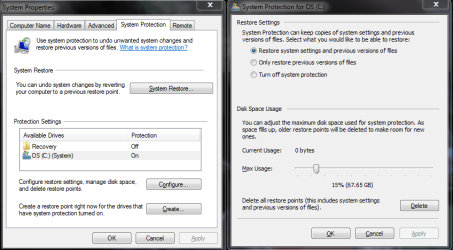
I have a problem with the System Restore. There are no system restore points. I have configured the drive to set them, but still nothing.

I have attached the image snips of the settings.

Please help...
 

Attachments
  • Eamane_sys rest-1.PNG
    Eamane_sys rest-1.PNG
    30.9 KB · Views: 19
  • Eamane_sys rest-2.PNG
    Eamane_sys rest-2.PNG
    19.5 KB · Views: 22

My Computer

Computer type
PC/Desktop
Computer Manufacturer/Model Number
Dell Inc. N5110
OS
Microsoft Windows 7 Home Premium 64-bit 7601 Multiprocessor Free Service Pack 1
CPU
Intel(R) Core(TM) i7 CPU 960 @ 3.20GHz
Motherboard
Dell Inc. 05DN3X
Memory
8.00 GB
Graphics Card(s)
NVIDIA GeForce 310
Sound Card
(1) NVIDIA High Definition Audio (2) NVIDIA High Definitio
Screen Resolution
1920 x 1080 x 32 bits (4294967296 colors) @ 60 Hz
Hard Drives
(1) ARRAY0 (2) SMI USB DISK USB Device
Keyboard
Dell
Mouse
Dell
Antivirus
AVG Antivirus Free 2014
Welcome to Seven Forums Eamane. Do you have sufficient free space on your drive? What happens if you try to manually create a restore point?

http://www.sevenforums.com/tutorials/697-system-restore-point-create.html

You might try turning SR off, then back on again and see if that helps. Normally that would delete any SR points, but you currently have none anyway. Let us know if none of this helps and we can look into services settings. A Guy
 

My Computer

Computer type
PC/Desktop
OS
Windows 10 Home x64
CPU
INTEL Core i5-750 Quad-Core 3.37GHz
Motherboard
ASUS P7P55D
Memory
HyperX Fury Black Series 8GB (2 x 4GB) 1866Mhz
Graphics Card(s)
EVGA GeForce GTX 750 Superclocked 1GB 128-Bit GDDR5
Monitor(s) Displays
LG 32MA68HY 32" IPS
Screen Resolution
1920 x 1080
Hard Drives
Samsung 840 Evo 120GB, SEAGATE 500GB Barracuda® 7200.12, SATA 3 Gb/s, 7200 RPM, 16MB cache
PSU
ANTEC TruePower New TP-550, 80 PLUS, 550W
Case
ANTEC Three Hundred Illusion
Cooling
COOLER MASTER Hyper 212 Plus, 4 x 120mm 1 x 140mm Noctua's
Internet Speed
85 + Mbps
Antivirus
Avast
Browser
Vivaldi
The automatic creation of SR Points is less frequent that in Windows XP.

What happens when you try to create one yourself? Click [Create] on that first screenshot.
 

My Computer

Computer type
PC/Desktop
Computer Manufacturer/Model Number
Scan 3XS P55 liteDAW
OS
Windows Home Premium (64)
CPU
Intel Core i7 860
Motherboard
Gigabyte GA-P55A-UD4
Memory
8GB (4x2GB) Corsair TwinX XMS3
Graphics Card(s)
1GB Gainward 9500 GT
Sound Card
M-Audio Delta 66
Monitor(s) Displays
Acer v223wBBd
Screen Resolution
1680 x 1050
Hard Drives
1 x 500 GB WD Barracuda (OS+Docs)
2 x 1TB Samsung Spinpoint F3 (Data)
PSU
Enermax EMD625AWT II - 625W Enermax Modu82+ II
Case
Fractal Design Define R2 Black
Cooling
Prolima Megahalems Super 6 Heatpipe Tower Cooler
Keyboard
Microsoft Digital Media Pro
Mouse
Belkin Optical Ergo
Internet Speed
8 Mbps nominal (14.9 achieved !)
Other Info
Digital Audio Workstation
I turned it off, then on again..

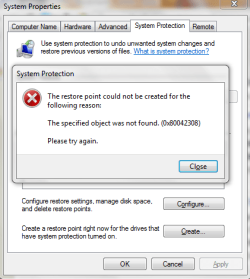
I tried to create manually SR point,

the first time it failed...see the screenshot attached..

Then the 2nd and 3rd time, it said..'SR point created successfully'..But when I check, there are no points...
 

Attachments

  • Eamane_sys rest-4.PNG
    Eamane_sys rest-4.PNG
    20.5 KB · Views: 17

My Computer

Computer type
PC/Desktop
Computer Manufacturer/Model Number
Dell Inc. N5110
OS
Microsoft Windows 7 Home Premium 64-bit 7601 Multiprocessor Free Service Pack 1
CPU
Intel(R) Core(TM) i7 CPU 960 @ 3.20GHz
Motherboard
Dell Inc. 05DN3X
Memory
8.00 GB
Graphics Card(s)
NVIDIA GeForce 310
Sound Card
(1) NVIDIA High Definition Audio (2) NVIDIA High Definitio
Screen Resolution
1920 x 1080 x 32 bits (4294967296 colors) @ 60 Hz
Hard Drives
(1) ARRAY0 (2) SMI USB DISK USB Device
Keyboard
Dell
Mouse
Dell
Antivirus
AVG Antivirus Free 2014
Does the Event Viewer Log give any more details (or previous errors / warnings)?
 

My Computer

Computer type
PC/Desktop
Computer Manufacturer/Model Number
Scan 3XS P55 liteDAW
OS
Windows Home Premium (64)
CPU
Intel Core i7 860
Motherboard
Gigabyte GA-P55A-UD4
Memory
8GB (4x2GB) Corsair TwinX XMS3
Graphics Card(s)
1GB Gainward 9500 GT
Sound Card
M-Audio Delta 66
Monitor(s) Displays
Acer v223wBBd
Screen Resolution
1680 x 1050
Hard Drives
1 x 500 GB WD Barracuda (OS+Docs)
2 x 1TB Samsung Spinpoint F3 (Data)
PSU
Enermax EMD625AWT II - 625W Enermax Modu82+ II
Case
Fractal Design Define R2 Black
Cooling
Prolima Megahalems Super 6 Heatpipe Tower Cooler
Keyboard
Microsoft Digital Media Pro
Mouse
Belkin Optical Ergo
Internet Speed
8 Mbps nominal (14.9 achieved !)
Other Info
Digital Audio Workstation
Lets check a few things. 1st:

Start> In search box type services.msc> Enter

In services, scroll down to Volume Shadow Copy and confirm it is set to automatic and started. If it isn't, change it to automatic and start the service. Try a SR again.

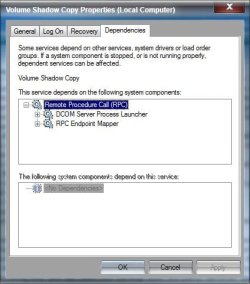
If it is already started and auto, check on it's dependencies.

VSC.jpg

All 3 should also be set to automatic, and started.

If all that checks out, try this:

Start> In search box type cmd> Right click on cmd.exe in results above and choose Run as administrator> When advanced command prompt opens type vssadmin list writers> Enter

Confirm that all the writers display without errors. If any errors, post a screenshot of the command prompt results.

http://www.sevenforums.com/tutorials/9733-screenshots-files-upload-post-seven-forums.html

A Guy
 

My Computer

Computer type
PC/Desktop
OS
Windows 10 Home x64
CPU
INTEL Core i5-750 Quad-Core 3.37GHz
Motherboard
ASUS P7P55D
Memory
HyperX Fury Black Series 8GB (2 x 4GB) 1866Mhz
Graphics Card(s)
EVGA GeForce GTX 750 Superclocked 1GB 128-Bit GDDR5
Monitor(s) Displays
LG 32MA68HY 32" IPS
Screen Resolution
1920 x 1080
Hard Drives
Samsung 840 Evo 120GB, SEAGATE 500GB Barracuda® 7200.12, SATA 3 Gb/s, 7200 RPM, 16MB cache
PSU
ANTEC TruePower New TP-550, 80 PLUS, 550W
Case
ANTEC Three Hundred Illusion
Cooling
COOLER MASTER Hyper 212 Plus, 4 x 120mm 1 x 140mm Noctua's
Internet Speed
85 + Mbps
Antivirus
Avast
Browser
Vivaldi
Does the Event Viewer Log give any more details (or previous errors / warnings)?

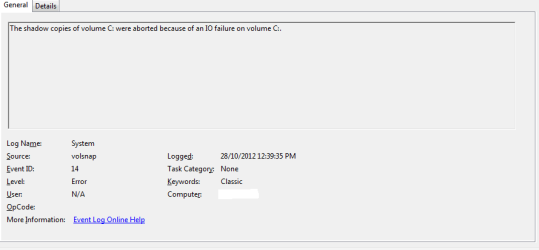
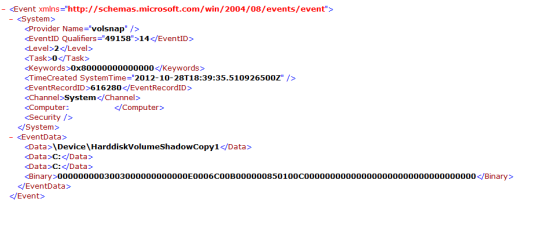
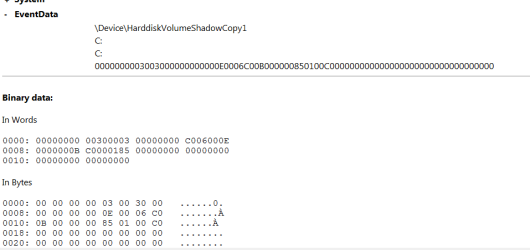
It says, that "the shadow copies were aborted because of an IO failure"
 

Attachments

  • Eamane_sys rest-5.PNG
    Eamane_sys rest-5.PNG
    5.8 KB · Views: 5
  • Eamane_sys rest-7.PNG
    Eamane_sys rest-7.PNG
    9.3 KB · Views: 5
  • Eamane_sys rest-6.PNG
    Eamane_sys rest-6.PNG
    5.8 KB · Views: 5

My Computer

Computer type
PC/Desktop
Computer Manufacturer/Model Number
Dell Inc. N5110
OS
Microsoft Windows 7 Home Premium 64-bit 7601 Multiprocessor Free Service Pack 1
CPU
Intel(R) Core(TM) i7 CPU 960 @ 3.20GHz
Motherboard
Dell Inc. 05DN3X
Memory
8.00 GB
Graphics Card(s)
NVIDIA GeForce 310
Sound Card
(1) NVIDIA High Definition Audio (2) NVIDIA High Definitio
Screen Resolution
1920 x 1080 x 32 bits (4294967296 colors) @ 60 Hz
Hard Drives
(1) ARRAY0 (2) SMI USB DISK USB Device
Keyboard
Dell
Mouse
Dell
Antivirus
AVG Antivirus Free 2014
Lets check a few things. 1st:

Start> In search box type services.msc> Enter

In services, scroll down to Volume Shadow Copy and confirm it is set to automatic and started. If it isn't, change it to automatic and start the service. Try a SR again.

If it is already started and auto, check on it's dependencies.

All 3 should also be set to automatic, and started.

If all that checks out, try this:

Start> In search box type cmd> Right click on cmd.exe in results above and choose Run as administrator> When advanced command prompt opens type vssadmin list writers> Enter

Confirm that all the writers display without errors. If any errors, post a screenshot of the command prompt results.

A Guy

The Volume shadow copy was not set to automatic. So I set it to 'Start' and 'Automatic'. Tried a SR, again it said, it created one successfully, but no SR points are there.

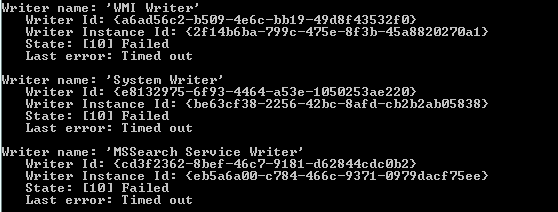
I did the vssadmin list, no errors. They all are in state: Stable or Waiting for completion.

I restarted my computer, and the Volume shadow copy service was stopped. So started again.

See my above post, it event log says that there was an 'IO failure on C:'


What to do now??
 

My Computer

Computer type
PC/Desktop
Computer Manufacturer/Model Number
Dell Inc. N5110
OS
Microsoft Windows 7 Home Premium 64-bit 7601 Multiprocessor Free Service Pack 1
CPU
Intel(R) Core(TM) i7 CPU 960 @ 3.20GHz
Motherboard
Dell Inc. 05DN3X
Memory
8.00 GB
Graphics Card(s)
NVIDIA GeForce 310
Sound Card
(1) NVIDIA High Definition Audio (2) NVIDIA High Definitio
Screen Resolution
1920 x 1080 x 32 bits (4294967296 colors) @ 60 Hz
Hard Drives
(1) ARRAY0 (2) SMI USB DISK USB Device
Keyboard
Dell
Mouse
Dell
Antivirus
AVG Antivirus Free 2014
This is looking like a hard drive issue. But try running the System File Checker first:

http://www.sevenforums.com/tutorials/1538-sfc-scannow-command-system-file-checker.html

If no help, suggest running chkdsk

http://www.sevenforums.com/tutorials/433-disk-check.html

If you use Option 1, try first with the choice on step 6

If you use Option 2, try the chkdsk C: /R

You can always try the other option if needed.

It looks like the HDD in your PC may be made by Toshiba, but see if you can find out and add it to your specs.

http://www.sevenforums.com/tutorials/180324-system-info-see-your-system-specs.html

We may want to use the manufacturers repair tool if they have one, but you can use Seagate's Seatools for Windows on any drive. With the Seagate tool, you'd want to run the Short DST and Long DST tests.

A Guy
 

My Computer

Computer type
PC/Desktop
OS
Windows 10 Home x64
CPU
INTEL Core i5-750 Quad-Core 3.37GHz
Motherboard
ASUS P7P55D
Memory
HyperX Fury Black Series 8GB (2 x 4GB) 1866Mhz
Graphics Card(s)
EVGA GeForce GTX 750 Superclocked 1GB 128-Bit GDDR5
Monitor(s) Displays
LG 32MA68HY 32" IPS
Screen Resolution
1920 x 1080
Hard Drives
Samsung 840 Evo 120GB, SEAGATE 500GB Barracuda® 7200.12, SATA 3 Gb/s, 7200 RPM, 16MB cache
PSU
ANTEC TruePower New TP-550, 80 PLUS, 550W
Case
ANTEC Three Hundred Illusion
Cooling
COOLER MASTER Hyper 212 Plus, 4 x 120mm 1 x 140mm Noctua's
Internet Speed
85 + Mbps
Antivirus
Avast
Browser
Vivaldi
Back
Top