Not Enough Space Left for C

ad1l8

New member
Local time
7:25 AM
Messages
19
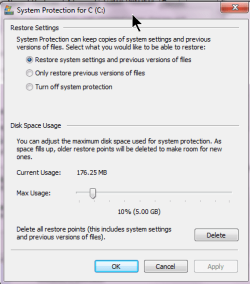
My System Partition C of 40 Gb was Showing me Less Than 4Gb Free Space so I decided to create more space, Therefor I Deleted "System Restore Point and %Temp% and Finally Used CCleaner to Help the cause!! It ridiculously increased Free Space Which is Now 29 Gb Free So I Freed 25 Gb!! Now I am Afraid If I Deleted Something Important as I wasn't expecting such Dramatic Increase in Free Space!! Hope You Can Help Even If It is not a smart Question!! Thanks
 

My Computer

Computer Manufacturer/Model Number
dell precision 670
OS
windows 7 ultimate
CPU
Intel xeon 2.8 ghz and 2.9 ghz 2 processors
Motherboard
Dell
Memory
2 GB
Graphics Card(s)
128 MB
Hard Drives
500 gb sata
You could have deleted temp files from windows (from IE, windows exp, and system) and/or applications. Most likely you have done no harm. I'd recommend getting an additional drive, as you don't want to go over 80% capacity on a drive.
 

My Computer

Computer Manufacturer/Model Number
Dell and Custom
OS
Systems 1 and 2: Windows 7 Enterprise x64, Win 8 Developer
CPU
System 1: i7 [email protected], System 2: AMD FX-4100 Zambezi 3.6G
Motherboard
System 1:Dell 06NWYK System 2: ASUS M5A97 AM3+
Memory
System 1: 8GB System 2: 8GB
Graphics Card(s)
System 1: ATI FirePro V4800 System 2: Radeon HD 6850
Sound Card
System 1: onboard System 2: onboard
Monitor(s) Displays
System1: Viewsonic HDMI 24"
Screen Resolution
System 1: 1920x1080 System 2: 1920x1080
Hard Drives
System 1: Mirrored .5B drives System 2: Seagate Barracuda ST1000DM003 1TB 7200 RPM 64MB Cache SATA 6.0Gb/s
Case
System 1: Dell System 2: Cooler Master
Internet Speed
10 MBPS
You want your System Restore points as they can save your WIn7 in many instances. If you turn it back on now, it will limit space taken to a small percent of HD. Then if you get a warning on HD space you can turn it off until you get a larger HD.
 
You want your System Restore points as they can save your WIn7 in many instances. If you turn it back on now, it will limit space taken to a small percent of HD. Then if you get a warning on HD space you can turn it off until you get a larger HD.

I would half agree ;)

With such a small HD it can quite quickly become full with restore points so I'd normally switch it off. Another course of action would be to run 'Disk cleanup' as administrator (right-click) and under the 'More options' tab you can clear all but the most recent restore point & shadow copies. This will also help in keeping HD usage to a minimum.

Hope it helps :)


OS
 

My Computer

Computer Manufacturer/Model Number
Compaq Desktop
OS
Windows 7 Ultimate x64
CPU
AMD Sempron Dual Core
Memory
3GB
Graphics Card(s)
NVIDIA GeForce 6150SE nForce 430
Screen Resolution
1024x768
Hard Drives
150GB Sata
Hi there
What I would do in this situation is IMAGE your OS, then format an HDD creating say a new 70 GB partition for your OS and then restore.

Job simply and easily done with software like Acronis since you can create bootable media and store the sytem image on DVD's or external USB drive etc etc for a "Bare Metal" restore.

It's rare these days to see only 40 GB for a complete HDD -- chances are this disk is MUCH larger with more partitions on it so it can easily be re-partitioned.

If you really ONLY have 40 GB it will be an OLD disk and it will be VERY SLOW so I'd replace it in any case.

You can get disks VERY cheaply -- even a 1.5 or 2 TB disk won't cost more than around 100 USD and smaller ones say 320 GB or 500 GB are cheaper still 45 - 70 USD.

Cheers
jimbo
 

My Computer

Computer type
PC/Desktop
Computer Manufacturer/Model Number
Custom built, several laptops HP/ASUS
OS
Linux CENTOS 7 / various Windows OS'es and servers
CPU
Intel i7 Intel i5
Memory
8GB, 16GB
Graphics Card(s)
On Motherboard
Sound Card
Realtek HD audio
Monitor(s) Displays
Apple Cinema display, Samsung LCD
Screen Resolution
1920 X 1080
Hard Drives
4 X 1TB SATA
Mouse
Toshiba wireless laser
Internet Speed
> 20MB up
If you need help to know for sure post back a screenshot of your full Disk Management drive map, using the Snipping Tool in Start Menu.
 

My Computer

Computer Manufacturer/Model Number
Too many to describe...
OS
Windows 7 x64 pro/ Windows 7 x86 Pro/ XP SP3 x86
ad118,

All is ok. To reduce unnecessary bloat, I suggest you run CCleaner frequently.

Notice how much free space is on my C: and I have such Microsoft "junk" as SDK, DDK, WAIK, full MS office pro installed.

Karl's disk map.png

You can control how much space is allocated for System Restore points:
Restore point space.png
 

My Computer

Computer Manufacturer/Model Number
Toshiba Satellite S875D-S7239 laptop
OS
MS Windows 7 Ultimate SP1 64-bit
CPU
AMD A10-4600M
Motherboard
AMD Pumori (Socket FT1)
Memory
6.00 GB Dual-Channel DDR3 @ 798MHz (11-11-12-28)
Graphics Card(s)
AMD Radeon HD 7660G
Sound Card
High Definition Audio Device
Monitor(s) Displays
Generic PnP Monitor (1600x900@60Hz)
Screen Resolution
1600x900@60Hz
Hard Drives
SSD 119GB Corsair CSSD-V128GB2 ATA Device
Keyboard
Standard PS/2 Keyboard
Mouse
HP Wireless Optical Mobile Mouse Model FHA-3410
Internet Speed
What the local pub, local coffee shop offers.
Other Info
Optical Drive:MATSHITA BD-CMB UJ160B ATA Device


Also have an Asus ha1002xp netbook with Win 7 Ultimate installed.
LOL I have a 500 GB HD but I was getting less than 4GB space out of my 40 GB C Partition and I Thought One Needs More Free Space on C for Windows 7 to Work Smoothly So I ran CCleaner Etc!! Just Wanted to Confirm If it was Okay to get so much free space after disk clean up measures!! Thanks All For Help!! Cheers!!
 

My Computer

Computer Manufacturer/Model Number
dell precision 670
OS
windows 7 ultimate
CPU
Intel xeon 2.8 ghz and 2.9 ghz 2 processors
Motherboard
Dell
Memory
2 GB
Graphics Card(s)
128 MB
Hard Drives
500 gb sata
Glad that we could help.
 

My Computer

Computer Manufacturer/Model Number
Toshiba Satellite S875D-S7239 laptop
OS
MS Windows 7 Ultimate SP1 64-bit
CPU
AMD A10-4600M
Motherboard
AMD Pumori (Socket FT1)
Memory
6.00 GB Dual-Channel DDR3 @ 798MHz (11-11-12-28)
Graphics Card(s)
AMD Radeon HD 7660G
Sound Card
High Definition Audio Device
Monitor(s) Displays
Generic PnP Monitor (1600x900@60Hz)
Screen Resolution
1600x900@60Hz
Hard Drives
SSD 119GB Corsair CSSD-V128GB2 ATA Device
Keyboard
Standard PS/2 Keyboard
Mouse
HP Wireless Optical Mobile Mouse Model FHA-3410
Internet Speed
What the local pub, local coffee shop offers.
Other Info
Optical Drive:MATSHITA BD-CMB UJ160B ATA Device


Also have an Asus ha1002xp netbook with Win 7 Ultimate installed.
Hello ad1l8, welcome to Seven Forums!


Why do you have only 40GB of a 500GB Hard Disk Drive (HDD) allocated to the C: partition, there are ways to safely enlarge that so you won't have space issues anymore; have a look at this tutorial at the link below to get some ideas.


Partition Wizard : Use the Bootable CD
 

My Computer

Computer Manufacturer/Model Number
* BFK Customs *
OS
W 7 64-bit Ultimate
CPU
Intel Q9550 Yorkfield
Motherboard
ASUS P5Q Pro
Memory
8GB Dominator 8500C5D
Graphics Card(s)
ATI : XFX 5870
Sound Card
Realtek HD Audio 7-1
Monitor(s) Displays
1x 47" LCD HDMI & 3x 26" LCD HDMI
Screen Resolution
1920x1080P & 1920x1200
Hard Drives
1x 80GB Intel X25-M G2 SSD : 1x 500GB & 1x 640GB WD Caviar Black(s)
PSU
Corsair 620HX
Case
Cooler Master RC-690
Cooling
Tuniq Tower 120, 2x 140mm and 3x 120mm case fans
Keyboard
Microsoft 500
Mouse
Razer Diamondback 3G
Internet Speed
14 Mb/s
Other Info
1x Koutech 3Gb/s SATA HDD Hot Swap Rack
If you post back a screenshot of your full Disk Management telling us what you would like to enlarge, or get rid of, etc. we will give you the steps to do it using Disk Mgmt and Partition Wizard.

Use Snipping Tool in Start Menu, attach file using Paper Clip in Reply Box.

You should have at least a 100gb Win7 partition unless you are placing your User folders on a separate data partition, which we can also help you do: http://www.sevenforums.com/tutorials/18629-user-folders-change-default-location.html
 
Back
Top