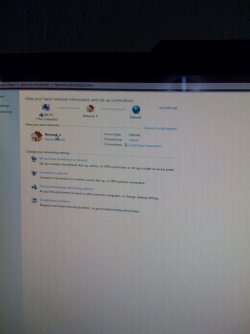
Not exactly sure> but is this right........

64met

New member
Member
Local time
5:14 PM
Messages
66
Can someone please take a look at the snap shot below? Is this correct? It seems I have a "Network 4" in the "middle" of my pc and the internet. Hopefully someone can tell me one way or the other. Not even sure what 'Network 4" is? Thank you!

download
 

My Computer My Computer

Computer Manufacturer/Model Number
Asus GC5275
OS
Windows 7 Ultimate x64
You forgot the attachment. ;)
 

My Computer My Computer

Computer Manufacturer/Model Number
Self
OS
Main - Windows 7 Pro SP1 64-Bit; 2nd - Windows Server 2008 R2
CPU
Main - Core i7 2600K; 2nd - Core i7 920
Motherboard
Main - Asus P8Z68-V Pro/Gen3; 2nd - Gigabyte GA-EX58-UDR3
Memory
Main - 16GB Corsair Vengeance; 2nd - 12GB Corsair Vengeance
Graphics Card(s)
Main - XFX Radeon 6870 1GB; 2nd - XFX Radeon 4870 1GB
Sound Card
Both: Onboard Realtek Azalia
Monitor(s) Displays
Main - Hann 25" + I-INC 25" + Acer 23"; 2nd - Upgrading Soon
Screen Resolution
Main - 1920x1080 (All Three Monitors); 2nd - Upgrading Soon
Hard Drives
Main - (1) Crucial M4 128GB (Boot)
Main - (1) Seagate 2TB 64MB Cache (Data)
Main - (1) Seagate 2TB 64MB Cache (Data Backup)
2nd - (1) Intel X25-M SSD 80GB (Boot)
2nd - (3) Seagate 1TB 32MB Cache (Data Backup)
2nd - (1) Seagate 320GB (Because)
PSU
Main - OCZ 600W Modular; 2nd - OCZ 600W
Case
Main - Thermaltake Element G; 2nd - NZXT something or other
Cooling
Main - Corsair H80; 2nd - Prolimatech Megahalems
Keyboard
Main - Razer Reclusa; 2nd - Old MS Keyboard
Mouse
Main - Logitech MX Revolution; 2nd - Old MS Mouse
Internet Speed
20Mbps Time-Warner Cable
Sorry, hopefully this works:

securedownload.jpg
 

My Computer My Computer

Computer Manufacturer/Model Number
Asus GC5275
OS
Windows 7 Ultimate x64
Yep, it worked. :)

Your setup looks normal. Windows seems to like to keep track of network settings even if you blow them out and set them up from scratch. I'm guessing that you probably reconfigured things a few times and Windows sees each iteration as a "new" network.

Your setup appears to be wireless. My onboard NIC is listed as "Adapter #3", for the same reason you are seeing a "4" - I removed the connection a couple of times and Windows decided to keep score for me. :geek:
 

My Computer My Computer

Computer Manufacturer/Model Number
Self
OS
Main - Windows 7 Pro SP1 64-Bit; 2nd - Windows Server 2008 R2
CPU
Main - Core i7 2600K; 2nd - Core i7 920
Motherboard
Main - Asus P8Z68-V Pro/Gen3; 2nd - Gigabyte GA-EX58-UDR3
Memory
Main - 16GB Corsair Vengeance; 2nd - 12GB Corsair Vengeance
Graphics Card(s)
Main - XFX Radeon 6870 1GB; 2nd - XFX Radeon 4870 1GB
Sound Card
Both: Onboard Realtek Azalia
Monitor(s) Displays
Main - Hann 25" + I-INC 25" + Acer 23"; 2nd - Upgrading Soon
Screen Resolution
Main - 1920x1080 (All Three Monitors); 2nd - Upgrading Soon
Hard Drives
Main - (1) Crucial M4 128GB (Boot)
Main - (1) Seagate 2TB 64MB Cache (Data)
Main - (1) Seagate 2TB 64MB Cache (Data Backup)
2nd - (1) Intel X25-M SSD 80GB (Boot)
2nd - (3) Seagate 1TB 32MB Cache (Data Backup)
2nd - (1) Seagate 320GB (Because)
PSU
Main - OCZ 600W Modular; 2nd - OCZ 600W
Case
Main - Thermaltake Element G; 2nd - NZXT something or other
Cooling
Main - Corsair H80; 2nd - Prolimatech Megahalems
Keyboard
Main - Razer Reclusa; 2nd - Old MS Keyboard
Mouse
Main - Logitech MX Revolution; 2nd - Old MS Mouse
Internet Speed
20Mbps Time-Warner Cable
Yep, it worked. :)

Your setup looks normal. Windows seems to like to keep track of network settings even if you blow them out and set them up from scratch. I'm guessing that you probably reconfigured things a few times and Windows sees each iteration as a "new" network.

Your setup appears to be wireless. My onboard NIC is listed as "Adapter #3", for the same reason you are seeing a "4" - I removed the connection a couple of times and Windows decided to keep score for me. :geek:

great, Thxs!!
 

My Computer My Computer

Computer Manufacturer/Model Number
Asus GC5275
OS
Windows 7 Ultimate x64
Back
Top