
July 21,2015, installed windows 7 professional full retail. Bought new from Ebay seller so at time I ran MGADiag and it was confirmed Genuine.
All was fine until July 2 ( 7:2:2016 17:51 to be exact) when my desktop background went black and MS started popping up the message that my Windows 7 build 7601 is not genuine 0xC004F200.
1) tried system restore to 6/28/16 - failed 0x80070005. Then system restore to 6/24/16 which succeeded only in removing a silverlight update. I have spent HOURS searching your help site and the internet to no avail.
2) Found archived tech support on MSN whose p0xC004F200 problem was solved so followed all the steps he was told (except entering the COA # which I seem to have misplaced my orig box)
I cannot find in my update history, the patch from Dec 2014 KB3004394 which apparently caused this, nor do I find the PatchRepair KB3024777 which came out two days later.
3) Tried downloading KB3024777 directly from MS site but it won't install... no error msg, it just won't do anything after I hit "install" I understand that somehow Windows hides some of their updates so they cannot be found -
4] Went to System properties & entered my Keycode again which directed me to telephone activation, which failed.
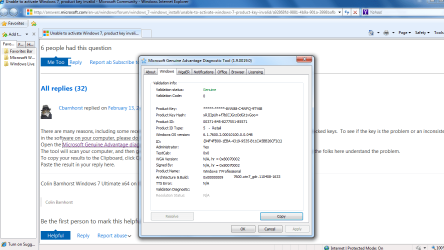
Ran two or three more MGAD which interestingly show different results for ID: in that the end # in () is 3 and it was (1) on july 21 2015 and "Build lab" is different than the first time i ran it when it was deemed "genuine" pasted are newest MGAD and just a png snip of the one that verified it as genuine last year(didn't know how nor that I would need to do the "copy" :
All was fine until July 2 ( 7:2:2016 17:51 to be exact) when my desktop background went black and MS started popping up the message that my Windows 7 build 7601 is not genuine 0xC004F200.
1) tried system restore to 6/28/16 - failed 0x80070005. Then system restore to 6/24/16 which succeeded only in removing a silverlight update. I have spent HOURS searching your help site and the internet to no avail.
2) Found archived tech support on MSN whose p0xC004F200 problem was solved so followed all the steps he was told (except entering the COA # which I seem to have misplaced my orig box)
I cannot find in my update history, the patch from Dec 2014 KB3004394 which apparently caused this, nor do I find the PatchRepair KB3024777 which came out two days later.
3) Tried downloading KB3024777 directly from MS site but it won't install... no error msg, it just won't do anything after I hit "install" I understand that somehow Windows hides some of their updates so they cannot be found -
4] Went to System properties & entered my Keycode again which directed me to telephone activation, which failed.
Ran two or three more MGAD which interestingly show different results for ID: in that the end # in () is 3 and it was (1) on july 21 2015 and "Build lab" is different than the first time i ran it when it was deemed "genuine" pasted are newest MGAD and just a png snip of the one that verified it as genuine last year(didn't know how nor that I would need to do the "copy" :
Code:
Diagnostic Report (1.9.0027.0):


-----------------------------------------


Windows Validation Data-->


Validation Code: 50


Cached Online Validation Code: 0xc004c4a2


Windows Product Key: *****-*****-8VW88-C4WFQ-9TY6B

Windows Product Key Hash: xRJIIpUh+f7bICJGrzOdGt1vGoo=


Windows Product ID: 00371-845-8277551-85571


Windows Product ID Type: 5


Windows License Type: Retail


Windows OS version: 6.1.7601.2.00010100.1.0.048

ID: {94F4FB00-1EBA-4319-9535-B11CA5BB26CF}(3)

Is Admin: Yes

TestCab: 0x0


LegitcheckControl ActiveX: N/A, hr = 0x80070002


Signed By: N/A, hr = 0x80070002


Product Name: Windows 7 Professional


Architecture: 0x00000009


Build lab: 7601.win7sp1_ldr.160408-2045


TTS Error:


Validation Diagnostic:

Resolution Status: N/A

Vista WgaER Data-->


ThreatID(s): N/A, hr = 0x80070002


Version: N/A, hr = 0x80070002

Windows XP Notifications Data-->

Cached Result: N/A, hr = 0x80070002


File Exists: No


Version: N/A, hr = 0x80070002


WgaTray.exe Signed By: N/A, hr = 0x80070002

WgaLogon.dll Signed By: N/A, hr = 0x80070002

OGA Notifications Data-->


Cached Result: N/A, hr = 0x80070002

Version: N/A, hr = 0x80070002


OGAExec.exe Signed By: N/A, hr = 0x80070002


OGAAddin.dll Signed By: N/A, hr = 0x80070002

OGA Data-->

Office Status: 109 N/A

OGA Version: N/A, 0x80070002


Signed By: N/A, hr = 0x80070002


Office Diagnostics:
025D1FF3-364-80041010_025D1FF3-229-80041010_025D1FF3-230-1_025D1FF3-517-80040154_025D1FF3-237-80040154_025D1FF3-238-2_025D1FF3-244-80070002_025D1FF3-258-3


Browser Data-->

Proxy settings: N/A

User Agent: Mozilla/4.0 (compatible; MSIE 8.0; Win32)


Default Browser: C:\Program Files (x86)\Mozilla Firefox\firefox.exe


Download signed ActiveX controls: Prompt


Download unsigned ActiveX controls: Disabled


Run ActiveX controls and plug-ins: Allowed


Initialize and script ActiveX controls not marked as safe: Disabled


Allow scripting of Internet Explorer Webbrowser control: Disabled


Active scripting: Allowed


Script ActiveX controls marked as safe for scripting: Allowed


File Scan Data-->


File Mismatch: C:\Windows\system32\wat\watadminsvc.exe[Hr = 0x80070003]


File Mismatch: C:\Windows\system32\wat\npwatweb.dll[Hr = 0x80070003]


File Mismatch: C:\Windows\system32\wat\watux.exe[Hr = 0x80070003]


File Mismatch: C:\Windows\system32\wat\watweb.dll[Hr = 0x80070003]


Other data-->


Office Details:
<GenuineResults><MachineData><UGUID>{94F4FB00-1EBA-4319-9535-B11CA5BB26CF}</UGUID><Version>1.9.0027.0</Version><OS>6.1.7601.2.00010100.1.0.048</OS><Architecture>x64</Architecture><PKey>*****-*****-*****-*****-9TY6B</PKey><PID>00371-845-8277551-85571</PID><PIDType>5</PIDType><SID>S-1-5-21-3662381819-2302391705-1256642760</SID><SYSTEM><Manufacturer>Dell
Inc.</Manufacturer><Model>Inspiron 1720
</Model></SYSTEM><BIOS><Manufacturer>Dell
Inc.</Manufacturer><Version>A09</Version><SMBIOSVersion
major="2"
minor="4"/><Date>20080711000000.000000+000</Date></BIOS><HWID>B3BA3607018400FA</HWID><UserLCID>0409</UserLCID><SystemLCID>0409</SystemLCID><TimeZone>Mountain
Standard
Time(GMT-07:00)</TimeZone><iJoin>0</iJoin><SBID><stat>3</stat><msppid></msppid><name></name><model></model></SBID><OEM><OEMID>DELL
 </OEMID><OEMTableID>M08
</OEMTableID></OEM><GANotification/></MachineData><Software><Office><Result>109</Result><Products/><Applications/></Office></Software></GenuineResults>


Spsys.log Content: 0x80070002


Licensing Data-->


Software licensing service version: 6.1.7601.17514


Name: Windows(R) 7, Professional edition


Description: Windows Operating System - Windows(R) 7, RETAIL channel


Activation ID: e838d943-63ed-4a0b-9fb1-47152908acc9


Application ID: 55c92734-d682-4d71-983e-d6ec3f16059f


Extended PID: 00371-00170-845-827755-00-1033-7601.0000-1852016


Installation ID: 018281074810069711940660457653874855050725653246812651


Processor Certificate URL: [URL="http://go.microsoft.com/fwlink/?LinkID=88338"]SpcService Web Service[/URL]


Machine Certificate URL: [URL="http://go.microsoft.com/fwlink/?LinkID=88339"]RacService Web Service[/URL]


Use License URL: [URL="http://go.microsoft.com/fwlink/?LinkID=88341"]UseLicenseService Web Service[/URL]


Product Key Certificate URL: [URL="http://go.microsoft.com/fwlink/?LinkID=88340"]PkcService Web Service[/URL]


Partial Product Key: 9TY6B


License Status: Notification


Notification Reason: 0xC004F200 (non-genuine).


Remaining Windows rearm count: 4


Trusted time: 7/3/2016 1:55:25 PM


Windows Activation Technologies-->


HrOffline: 0x00000000


HrOnline: 0xC004C4A2


HealthStatus: 0x0000000000000000


Event Time Stamp: 7:2:2016 17:51


ActiveX: Not Registered - 0x80040154


Admin Service: Not Registered - 0x80040154


HealthStatus Bitmask Output:


HWID Data-->


HWID Hash Current:
QAAAAAIABgABAAIAAAADAAAAAwABAAEA6GGs4rVyehAGDOrGRoN2/6JwSEVCo4hZjB+jXY2ImNs/gPK5FvEqhQ==


OEM Activation 1.0 Data-->


N/A


OEM Activation 2.0 Data-->


BIOS valid for OA 2.0: yes


Windows marker version: 0x0


OEMID and OEMTableID Consistent: yes


BIOS Information:


  ACPI Table Name    OEMID Value    OEMTableID Value


  APIC            DELL          M08


  FACP            DELL          M08


  HPET            DELL          M08


  BOOT            DELL          M08


  MCFG            DELL          M08


  SLIC            DELL          M08


  SSDT            PmRef        CpuPm
Attachments
Last edited:
My Computer
- Computer type
- Laptop
- Computer Manufacturer/Model Number
- Dell Inspiron 1720
- OS
- Windows 7 Professional 64 bit
- Antivirus
- Avast

