Not Genuine Message Appeared!??

ukgovsucks

New member
Power User
VIP
Local time
12:29 AM
Messages
170
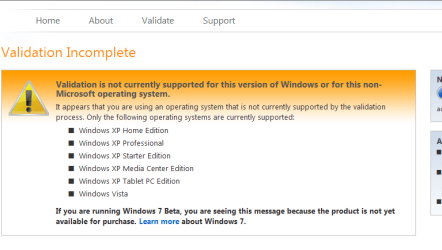
Has anyone had the message appear yet that tells them that their Windows 7 ( build 7068 x64 ) is not genuine? I've just had it appear on mine! I've checked my Validation badge thing, and it has disappeared, and instead I see the message "get genuine". On the left it still says "Windows is validated".

What's happening here then?

Is this now going to restrict me in some way?
 

My Computer

Computer Manufacturer/Model Number
Self Built
OS
Windows 7 Ultimate x64
CPU
AMD Phenom II x4 965
Motherboard
Gigabyte
Memory
8Gb Corsair XMS3 DDR3
Graphics Card(s)
Asus EN9600GT 512Mb DDR3 Fanless
Sound Card
Integrated
Monitor(s) Displays
Belinea 22" LCD (Primary) and HP 19" LCD (secondary)
Screen Resolution
1680 x 1050 / 1440 x 900
Hard Drives
4 x 1Tb
1 x 250Gb
+ Backup Drives
PSU
800w Silent
Case
Nifty looking Midi Case
Cooling
3 x Super Cooling Quiet Case Fans. Water Cooled CPU.
Keyboard
Saitek USB Illuminated
Mouse
Optical Wireless/Batteryless Mouse
Internet Speed
5Mb BT Total Broadband (True Unlimited Downloads)
i had that happen a few times when my clock, time and date was not correct
 

My Computer

Computer Manufacturer/Model Number
TripOG - Kwamathon
OS
windows 7 X64
CPU
amd phenom II x4 940
Motherboard
GIGABYTE GA-MA790GP-UD4H
Memory
8GB
Graphics Card(s)
integrated radeon hd3300
Sound Card
Realtek ALC889A
Monitor(s) Displays
ASUS VH222H
Screen Resolution
1920 x 1080
Hard Drives
PQI DK9320GD3R000A03
Internet Speed
30Mbps down / 2Mbps up
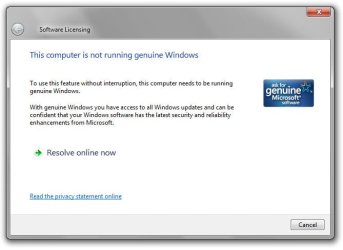
I've just had it happen again, when I opened a text file.
This time I grabbed the message. Here it is....
 

Attachments

  • notgenuinenotice.jpg
    notgenuinenotice.jpg
    56.4 KB · Views: 1,297

My Computer

Computer Manufacturer/Model Number
Self Built
OS
Windows 7 Ultimate x64
CPU
AMD Phenom II x4 965
Motherboard
Gigabyte
Memory
8Gb Corsair XMS3 DDR3
Graphics Card(s)
Asus EN9600GT 512Mb DDR3 Fanless
Sound Card
Integrated
Monitor(s) Displays
Belinea 22" LCD (Primary) and HP 19" LCD (secondary)
Screen Resolution
1680 x 1050 / 1440 x 900
Hard Drives
4 x 1Tb
1 x 250Gb
+ Backup Drives
PSU
800w Silent
Case
Nifty looking Midi Case
Cooling
3 x Super Cooling Quiet Case Fans. Water Cooled CPU.
Keyboard
Saitek USB Illuminated
Mouse
Optical Wireless/Batteryless Mouse
Internet Speed
5Mb BT Total Broadband (True Unlimited Downloads)
When I click on 'Change Product Key' I get the following message shown below. Do I need to re-install Windows 7 to enter a new key?
 

Attachments

  • changeproductkey.jpg
    changeproductkey.jpg
    58.9 KB · Views: 1,025

My Computer

Computer Manufacturer/Model Number
Self Built
OS
Windows 7 Ultimate x64
CPU
AMD Phenom II x4 965
Motherboard
Gigabyte
Memory
8Gb Corsair XMS3 DDR3
Graphics Card(s)
Asus EN9600GT 512Mb DDR3 Fanless
Sound Card
Integrated
Monitor(s) Displays
Belinea 22" LCD (Primary) and HP 19" LCD (secondary)
Screen Resolution
1680 x 1050 / 1440 x 900
Hard Drives
4 x 1Tb
1 x 250Gb
+ Backup Drives
PSU
800w Silent
Case
Nifty looking Midi Case
Cooling
3 x Super Cooling Quiet Case Fans. Water Cooled CPU.
Keyboard
Saitek USB Illuminated
Mouse
Optical Wireless/Batteryless Mouse
Internet Speed
5Mb BT Total Broadband (True Unlimited Downloads)
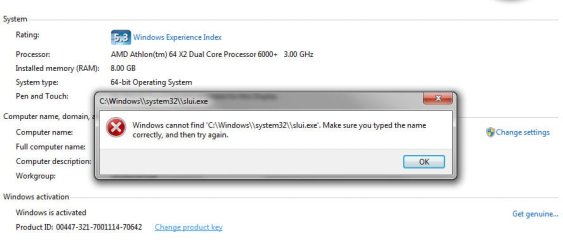
Okay. I've just used the PlusPatch program to change the key. I then rebooted. When I went back into the activation section it told me that I now had 30 days to activate, Activate Windows now. So I clicked on that, then I got the same message again telling me that Windows cannot find slui.exe!!
I never had any problems running Build 7057, I think I may go back to that for now and wait for the next build!?

Edit: I've just managed to activate it again using the Pluspatch program. But I shouldn't of needed to do this! A bit bizarre!
 

My Computer

Computer Manufacturer/Model Number
Self Built
OS
Windows 7 Ultimate x64
CPU
AMD Phenom II x4 965
Motherboard
Gigabyte
Memory
8Gb Corsair XMS3 DDR3
Graphics Card(s)
Asus EN9600GT 512Mb DDR3 Fanless
Sound Card
Integrated
Monitor(s) Displays
Belinea 22" LCD (Primary) and HP 19" LCD (secondary)
Screen Resolution
1680 x 1050 / 1440 x 900
Hard Drives
4 x 1Tb
1 x 250Gb
+ Backup Drives
PSU
800w Silent
Case
Nifty looking Midi Case
Cooling
3 x Super Cooling Quiet Case Fans. Water Cooled CPU.
Keyboard
Saitek USB Illuminated
Mouse
Optical Wireless/Batteryless Mouse
Internet Speed
5Mb BT Total Broadband (True Unlimited Downloads)
Okay. I've just used the PlusPatch program to change the key. I then rebooted. When I went back into the activation section it told me that I now had 30 days to activate, Activate Windows now. So I clicked on that, then I got the same message again telling me that Windows cannot find slui.exe!!
I never had any problems running Build 7057, I think I may go back to that for now and wait for the next build!?

Edit: I've just managed to activate it again using the Pluspatch program. But I shouldn't of needed to do this! A bit bizarre!

Sounds like you have already used hacks in the first place to cause the initial problem :rolleyes: and the slui.exe is in system32 and it's used for activation and without it you can't have genuine activation, here is another copy of it if you want to replace your hacked one.

View attachment slui.zip

Did you actually use one of the genuine Beta keys for your initial activation?
 

My Computer

Computer Manufacturer/Model Number
Home Brew
OS
Windows 7 Ultimate Vista Ultimate x64
CPU
Core 2 Duo E8500 3.16Ghz @ 3.8Ghz
Motherboard
eVGA 750i FTW
Memory
2x2Gigs Patriot PC2-6400 LL
Graphics Card(s)
Inno3D GeForce GTX260 216 SP
Monitor(s) Displays
ASUS VW222U 22" 2ms Response time
Screen Resolution
1680x1050
Hard Drives
SATA 150GB
SATA II 250GB
USB IDE 750GB Ext.
PSU
HYTEC 600W & Thermaltake 650W Toughpower Power Exp
Case
Thermaltake Armor LCS (Liquid Cooling System)
Cooling
Liquid Cooling System
Keyboard
Logitech G15 Gaming Keyboard
Mouse
Logitech G9 Gaming Mouse
Hi guys
Shouldn't worry too much about this yet (For WINDOWS) --Office etc still will need validation for some updates and downloads

The WGA hasn't been completed yet for Windows 7

Here's the screen shot.

Cheers

jimbo
 

Attachments

  • validation.png
    validation.png
    15.8 KB · Views: 823

My Computer

Computer type
PC/Desktop
Computer Manufacturer/Model Number
Custom built, several laptops HP/ASUS
OS
Linux CENTOS 7 / various Windows OS'es and servers
CPU
Intel i7 Intel i5
Memory
8GB, 16GB
Graphics Card(s)
On Motherboard
Sound Card
Realtek HD audio
Monitor(s) Displays
Apple Cinema display, Samsung LCD
Screen Resolution
1920 X 1080
Hard Drives
4 X 1TB SATA
Mouse
Toshiba wireless laser
Internet Speed
> 20MB up
Sounds like you have already used hacks in the first place to cause the initial problem :rolleyes: and the slui.exe is in system32 and it's used for activation and without it you can't have genuine activation, here is another copy of it if you want to replace your hacked one.

View attachment 6820

Did you actually use one of the genuine Beta keys for your initial activation?

THANKS for that Mr Grim! Nice one.
Yes, I didn't like seeing the numbers in the bottom right corner of the screen, so I used the PlusPatch program to remove it, and done a few other things too. My fault then, I just like 'tinkering'!! lol. :geek::o

Obviously then I have to tread carefully when using these unofficial programs!

Edit: I've just looked into the Windows\system32 folder and found the file was called slui.exe.bak, so I just renamed it to slui.exe and then the error message no longer appears and I get the proper 'change product key' message! So that PlusPatch program must of renamed it so that Windows avoids using it. In future, I won't use that software, I like my Windows intact!!
 

My Computer

Computer Manufacturer/Model Number
Self Built
OS
Windows 7 Ultimate x64
CPU
AMD Phenom II x4 965
Motherboard
Gigabyte
Memory
8Gb Corsair XMS3 DDR3
Graphics Card(s)
Asus EN9600GT 512Mb DDR3 Fanless
Sound Card
Integrated
Monitor(s) Displays
Belinea 22" LCD (Primary) and HP 19" LCD (secondary)
Screen Resolution
1680 x 1050 / 1440 x 900
Hard Drives
4 x 1Tb
1 x 250Gb
+ Backup Drives
PSU
800w Silent
Case
Nifty looking Midi Case
Cooling
3 x Super Cooling Quiet Case Fans. Water Cooled CPU.
Keyboard
Saitek USB Illuminated
Mouse
Optical Wireless/Batteryless Mouse
Internet Speed
5Mb BT Total Broadband (True Unlimited Downloads)
This same error happened to me as well. Running Build 7000.

The cause for it was when I had to unpl;ug this machine from the network fearing some virus that was infecting one of my diagnostic USB jump drives. When I connected it back to the network is when the "This copy of Windows is not genuine".

I followed another thread and renamed the Slui.exe. Which gave me the themes back but the error message stayed. I tried a copy of the Slui.exe Mr Grim posted but it did not work. I renamed my original back to Slui.exe and rebooted. This time I was prompted for the Serial Number.
 

My Computer

OS
Windows Seven
replace slui.exe but still has problem..cannot change activation key...:sarc:
 

My Computer

OS
Windows Seven
HI all, I´m the new one on this forum and I have the same problem (Windows seems activated, but when I open txt file, it will warn me I have not activated version), but the slui.exe from Mr. Grim seems doesn´t work properly. I have RC 7100 (x86). Is it possible that version slui.exe is for x64?
And do you have that someone for me in x86 version? Please, I am really puzzled right now.

//and I´m apologized, if I have some errors in my english post. I´m not a native speaker :)
 

My Computer

OS
win 7 RC 7100
Back
Top